Pine Script Trading Bots: Complete Guide to Automated Trading on TradingView in 2025
I'll be honest with you—Pine Script trading bots changed everything for me. After years of staring at charts until my eyes burned and missing trades because I had to sleep (imagine that!), I discovered how to automate my strategies on TradingView.
These aren't just fancy scripts that look cool on your chart. We're talking about real automation that can execute trades while you're having dinner, catch breakouts at 3 AM, and stick to your strategy even when your emotions are screaming to do something stupid.
What Exactly Are Pine Script Trading Bots?
Think of Pine Script trading bots as your tireless trading assistant that never gets tired, never gets emotional, and never forgets to check the charts. They're automated systems built with TradingView's Pine Script language that can execute your trading strategies 24/7.
Here's what makes them different from just sitting there clicking buy and sell buttons all day:
They Never Sleep: While you're catching up on Netflix, your bot is monitoring every price movement across multiple timeframes.
Zero Emotions: No more "just one more trade" or panic selling during a dip. The bot follows your rules, period.
Perfect Execution: Every signal gets acted on exactly as you programmed it—no more missing trades because you were in a meeting.
Built-in Risk Management: Stop losses and take profits happen automatically, which honestly saved my account more times than I care to admit.
The Building Blocks That Actually Matter
Every decent Pine Script bot needs these core pieces (and trust me, skip any of these and you'll regret it):
Strategy Logic: The "when to buy, when to sell" brain of your bot Entry Signals: What triggers your bot to actually make a move Exit Strategy: How your bot knows when to get out (this is huge) Risk Controls: Position sizing that won't blow up your account Backtesting: Because you want to know if your brilliant idea actually works before risking real money
Why These Bots Actually Work (And Why I Wish I'd Found Them Sooner)
Look, I'm not going to sugarcoat this—automated trading isn't magic. But after using Pine Script bots for the past few years, here's what actually changed for me:
Markets Don't Take Coffee Breaks (But You Do)
Crypto markets trade 24/7, and forex barely takes a breather. Before bots, I was either missing moves or staying up way too late watching charts. Now my bot catches:
- Those 2 AM crypto pumps while I'm actually sleeping
- Pre-market stock gaps that happen before my alarm goes off
- Weekend moves that used to drive me crazy
- News-driven spikes that happen faster than I can react
Your Emotions Are Not Your Friend
This was the big one for me. Every trader thinks they're disciplined until they're down 20% and panic-selling at the worst possible moment. Bots don't get scared, don't get greedy, and don't make "just this once" exceptions to your rules.
No more:
- Revenge trading after a loss (been there, done that, lost the t-shirt)
- FOMO buying at the top because "this time is different"
- Moving your stop loss "just a little bit" because you're sure it'll bounce back
- Overthinking every single trade until the opportunity passes
Consistency Is Everything
Manual trading is messy. You miss signals, second-guess entries, and execute trades differently based on your mood. With a bot, every signal gets the same treatment whether it's your first trade of the day or your tenth.
Getting Started with Pine Script (Don't Worry, It's Not as Scary as It Looks)
Pine Script is TradingView's programming language, and here's the thing—it's actually designed for traders, not computer science majors. Unlike trying to learn Python or other programming languages, Pine Script focuses specifically on what we actually need: analyzing charts and executing trades.
Why Pine Script vs Everything Else?
I've tried building bots in different languages, and here's the honest breakdown:
Pine Script: Built into TradingView, easy to learn, automatic backtesting. Perfect if you want to get something working quickly.
Python: More powerful but requires way more setup. Great if you're already a programmer.
MQL4/5: Works with MetaTrader, but has a steeper learning curve and less community support.
The bottom line? If you're trading on TradingView anyway, Pine Script is your fastest path to automation.
Your First Pine Script Bot (The Simple Version)
Here's a basic moving average crossover strategy that actually works. Don't worry about understanding every line—we'll break it down:
//@version=5
strategy("My First Trading Bot", overlay=true)
// Settings you can adjust
fastMA = input.int(10, "Fast Moving Average")
slowMA = input.int(20, "Slow Moving Average")
// Calculate the moving averages
fastMAValue = ta.sma(close, fastMA)
slowMAValue = ta.sma(close, slowMA)
// When to buy and sell
buySignal = ta.crossover(fastMAValue, slowMAValue)
sellSignal = ta.crossunder(fastMAValue, slowMAValue)
// Execute the trades
if buySignal
strategy.entry("Buy", strategy.long)
if sellSignal
strategy.entry("Sell", strategy.short)
// Show the lines on your chart
plot(fastMAValue, color=color.blue, title="Fast MA")
plot(slowMAValue, color=color.red, title="Slow MA")
This bot buys when the fast moving average crosses above the slow one, and sells when it crosses below. Simple, but it's caught plenty of good moves for me.
Building a Real RSI Trading Bot (Step by Step)
Let me walk you through creating an RSI-based bot that's actually been profitable for me. RSI is great because it helps you buy low and sell high—which sounds obvious but is surprisingly hard to do consistently.
Step 1: Set Up Your Strategy Foundation
//@version=5
strategy("RSI Trading Bot", overlay=false, initial_capital=10000)
// Settings you can tweak
rsiLength = input.int(14, "RSI Period", minval=1)
rsiOverbought = input.int(70, "Overbought Level", minval=50, maxval=100)
rsiOversold = input.int(30, "Oversold Level", minval=0, maxval=50)
stopLossPercent = input.float(2.0, "Stop Loss %", minval=0.1, maxval=10.0)
takeProfitPercent = input.float(4.0, "Take Profit %", minval=0.1, maxval=20.0)
Step 2: Calculate Your Indicators
// Calculate RSI
rsiValue = ta.rsi(close, rsiLength)
// Add a trend filter (this is important!)
trendMA = ta.sma(close, 50)
inUptrend = close > trendMA
inDowntrend = close < trendMA
Step 3: Define When to Buy and Sell
// Entry conditions (only trade with the trend)
buyCondition = rsiValue < rsiOversold and inUptrend
sellCondition = rsiValue > rsiOverbought and inDowntrend
// Calculate your exit levels
longStopLoss = close * (1 - stopLossPercent / 100)
longTakeProfit = close * (1 + takeProfitPercent / 100)
shortStopLoss = close * (1 + stopLossPercent / 100)
shortTakeProfit = close * (1 - takeProfitPercent / 100)
Step 4: Execute the Trades
// Buy when RSI is oversold in an uptrend
if buyCondition and strategy.position_size == 0
strategy.entry("Buy", strategy.long)
strategy.exit("Sell", "Buy", stop=longStopLoss, limit=longTakeProfit)
// Sell when RSI is overbought in a downtrend
if sellCondition and strategy.position_size == 0
strategy.entry("Sell", strategy.short)
strategy.exit("Cover", "Sell", stop=shortStopLoss, limit=shortTakeProfit)
// Display RSI on the chart
plot(rsiValue, color=color.purple, title="RSI")
hline(rsiOverbought, "Overbought", color=color.red)
hline(rsiOversold, "Oversold", color=color.green)
hline(50, "Midline", color=color.gray, linestyle=hline.style_dashed)
The key insight here is the trend filter. Without it, you'll be buying every dip in a downtrend and selling every bounce in an uptrend—which is a great way to lose money consistently.
Taking Your Bot to the Next Level
Once you've got the basics down, here are some upgrades that can seriously improve your bot's performance:
Multi-Timeframe Analysis (This One's Huge)
Here's something I learned the hard way: what looks like a great buy signal on the 15-minute chart might be a terrible idea if the daily chart is in a strong downtrend. Multi-timeframe analysis helps you avoid these traps:
//@version=5
strategy("Multi-Timeframe Bot", overlay=true)
// Check the bigger picture
htfTimeframe = input.timeframe("1D", "Higher Timeframe")
htfClose = request.security(syminfo.tickerid, htfTimeframe, close)
htfTrend = ta.sma(htfClose, 20)
// Your current timeframe signals
currentTrend = ta.sma(close, 20)
buySignal = ta.crossover(close, currentTrend)
sellSignal = ta.crossunder(close, currentTrend)
// Higher timeframe filter
bigPictureUp = htfClose > htfTrend
bigPictureDown = htfClose < htfTrend
// Only trade when both timeframes agree
longCondition = buySignal and bigPictureUp
shortCondition = sellSignal and bigPictureDown
if longCondition
strategy.entry("Buy", strategy.long)
if shortCondition
strategy.entry("Sell", strategy.short)
This approach has saved me from so many bad trades. When the daily trend disagrees with your short-term signal, it's usually better to wait.
Smart Position Sizing (Don't Risk It All)
Here's where most traders mess up—they risk the same dollar amount on every trade, whether the market is calm or going crazy. Smart position sizing adjusts your risk based on market volatility:
// Dynamic position sizing based on market volatility
atr = ta.atr(14) // Average True Range measures volatility
riskPerTrade = input.float(1.0, "Risk Per Trade %", minval=0.1, maxval=5.0)
accountBalance = strategy.initial_capital + strategy.netprofit
// Calculate position size
stopDistance = atr * 2 // Wider stops in volatile markets
riskAmount = accountBalance * (riskPerTrade / 100)
positionSize = riskAmount / stopDistance
// Use the calculated position size
if buyCondition
strategy.entry("Buy", strategy.long, qty=positionSize)
This way, you automatically take smaller positions when the market is volatile and larger positions when it's calm. It's like having built-in risk management.
Setting Up Alerts for Live Trading
If you want to connect your Pine Script bot to a real broker, you'll need alerts. Here's how to set them up:
// Send alerts when trades happen
if buyCondition
alert("BUY " + syminfo.ticker + " at " + str.tostring(close), alert.freq_once_per_bar)
if sellCondition
alert("SELL " + syminfo.ticker + " at " + str.tostring(close), alert.freq_once_per_bar)
// Alert when stop losses hit
if strategy.position_size > 0 and ta.crossunder(close, longStopLoss)
alert("STOP LOSS HIT for " + syminfo.ticker, alert.freq_once_per_bar)
You can connect these alerts to services like TradingView's automated trading features or third-party bridges to execute real trades.
No-Code Options (For When You Don't Want to Code)
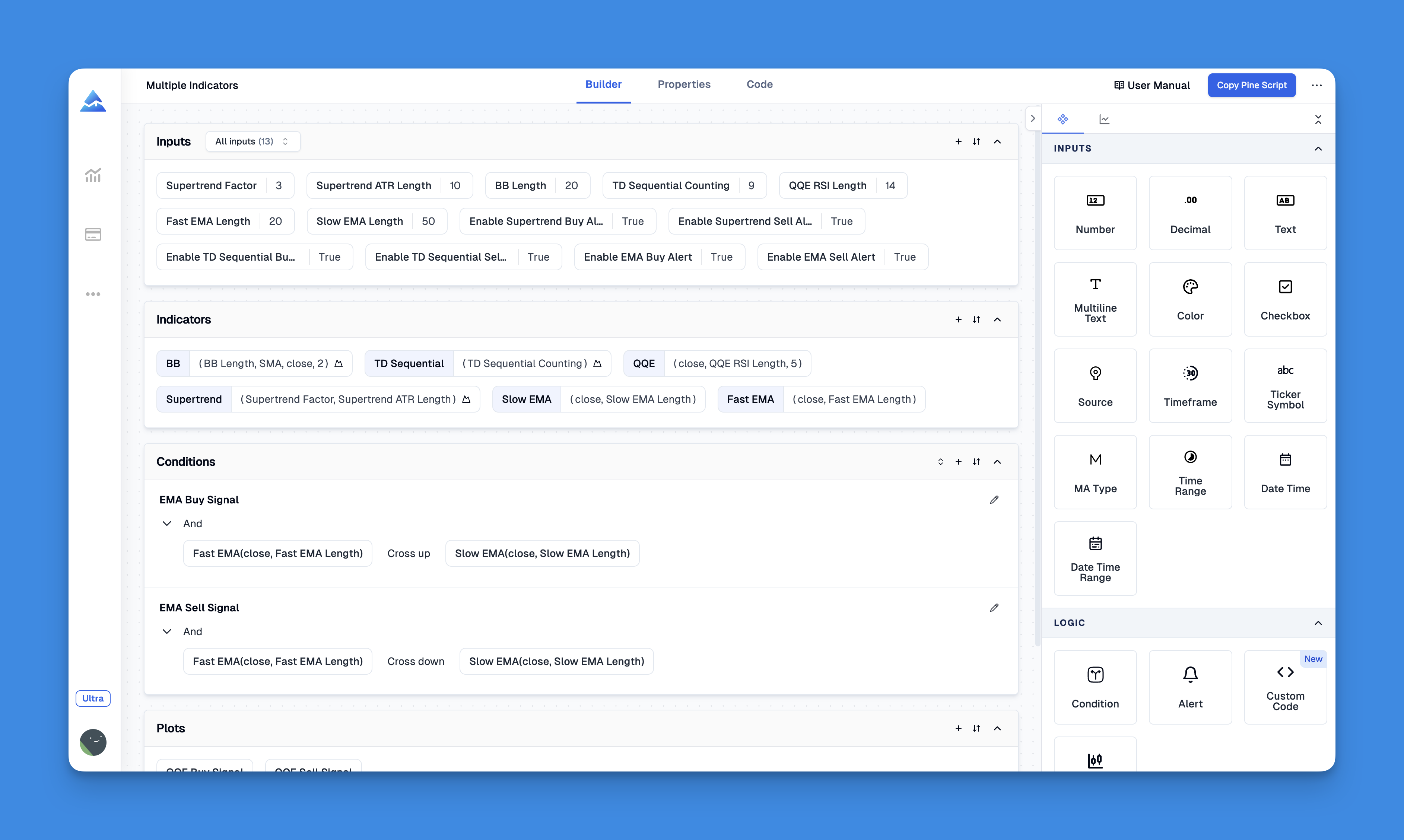
Look, not everyone wants to learn programming. I get it. If you'd rather drag and drop your way to a trading bot, tools like Pineify let you build strategies visually.
Check out Pineify's visual editorWhy Visual Editors Make Sense
Skip the Syntax Errors: No more typos breaking your code See What You're Building: Visual blocks make strategy logic clearer Faster Testing: Build and test ideas in minutes, not hours Pre-Built Components: Use proven strategy elements instead of starting from scratch Instant Feedback: Know immediately if something doesn't make sense
The downside? You're limited to what the visual editor can do. For most traders though, that's more than enough.
Testing Your Bot (The Part Everyone Skips)
Here's the brutal truth: most trading bots fail because people skip proper testing. Don't be that person.
The Numbers That Actually Matter
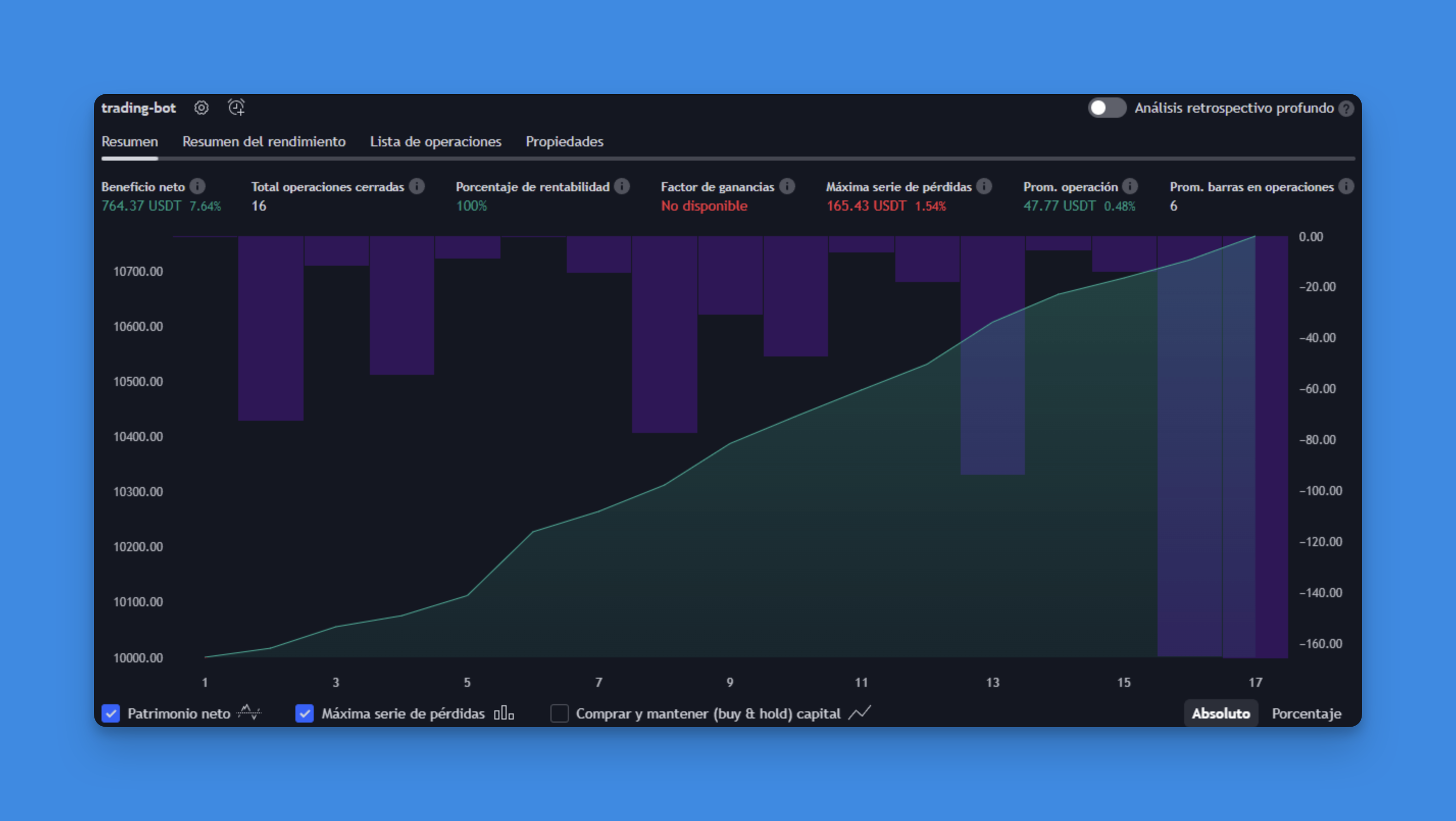
TradingView's Strategy Tester shows you tons of metrics, but here are the ones I actually pay attention to:
Net Profit: Obviously important, but not everything Win Rate: Higher isn't always better (seriously) Maximum Drawdown: How much you could lose in a bad streak Profit Factor: How much you make vs how much you lose
You can display these in your strategy:
// Track performance in real-time
strategy.initial_capital = 10000
strategy.default_qty_type = strategy.percent_of_equity
strategy.default_qty_value = 10
// Show key stats (this will appear in your log)
if barstate.islast
log.info("Net Profit: $" + str.tostring(strategy.netprofit))
log.info("Win Rate: " + str.tostring(strategy.wintrades / strategy.closedtrades * 100) + "%")
log.info("Max Drawdown: $" + str.tostring(strategy.max_drawdown))
log.info("Profit Factor: " + str.tostring(strategy.grossprofit / strategy.grossloss))
Testing the Right Way
Test on Different Time Periods: Your bot might work great in 2023 but terrible in 2022. Test both. Try Different Markets: What works on AAPL might not work on Bitcoin. Check Different Market Conditions: Bull markets, bear markets, sideways markets—test them all. Don't Overoptimize: If you tweak your parameters until they're perfect for historical data, they probably won't work going forward.
Risk Management (The Stuff That Keeps You in the Game)
Here's the thing about risk management—it's not sexy, but it's what separates traders who last from those who blow up their accounts in six months.
Position Sizing That Makes Sense
Don't risk the same amount on every trade. When you're on a winning streak, you can afford slightly bigger positions. When you're in a drawdown, scale back:
// Adjust position size based on recent performance
maxDD = input.float(10.0, "Max Drawdown %")
currentDD = (strategy.equity - strategy.max_equity) / strategy.max_equity * 100
// Reduce position size during rough patches
sizeMultiplier = currentDD < -maxDD/2 ? 0.5 : 1.0
adjustedQty = normalQty * sizeMultiplier
This simple adjustment has saved my account multiple times during rough market periods.
Popular Bot Strategies That Actually Work
The Trend Follower
// Simple but effective trend following
fastMA = ta.ema(close, 12)
slowMA = ta.ema(close, 26)
longTermTrend = ta.sma(close, 200)
buySignal = ta.crossover(fastMA, slowMA) and close > longTermTrend
sellSignal = ta.crossunder(fastMA, slowMA) and close < longTermTrend
The Mean Reversion Play
// Buy low, sell high using Bollinger Bands
length = 20
mult = 2.0
basis = ta.sma(close, length)
upper = basis + mult * ta.stdev(close, length)
lower = basis - mult * ta.stdev(close, length)
buySignal = close < lower and ta.rsi(close, 14) < 30
sellSignal = close > upper and ta.rsi(close, 14) > 70
Going Live (The Scary Part)
Before you risk real money, here's my checklist:
- Backtest on at least 2 years of data
- Paper trade for at least a month
- Start with small position sizes
- Have proper stop losses in place
- Monitor performance daily (at first)
Connecting to Real Brokers
You'll need to set up alerts and connect them to your broker. TradingView has partnerships with several brokers for direct integration, or you can use third-party services. Just make sure whatever you use is legitimate—there are a lot of sketchy services out there.
Common Problems (And How to Fix Them)
Bot Not Taking Trades: Usually a logic error or insufficient capital. Double-check your conditions.
Different Results Live vs Backtest: Welcome to reality. Slippage, spreads, and partial fills happen in live trading.
Strategy Stops Working: Markets change. What worked in 2023 might not work in 2024. Be ready to adapt.
The Bottom Line
Pine Script trading bots aren't magic money machines, but they're incredibly powerful tools when used correctly. The key is starting simple, testing everything thoroughly, and never risking more than you can afford to lose.
If you're just getting started, try the basic examples in this article. If coding isn't your thing, check out visual tools like Pineify. And if you want to dive deeper into specific strategies, there's tons more to explore with Pine Script v6 features.
Remember: the best trading bot is one that helps you stick to a profitable strategy consistently. Everything else is just noise.