Can Pine Script Execute Trades?

Pine Script is a domain-specific programming language developed by TradingView, primarily used for creating custom technical indicators and trading strategies. One of the common questions among traders is whether Pine Script can execute trades automatically. This article delves into the capabilities of Pine Script regarding trade execution, its limitations, and how traders can leverage it for automated trading strategies.
Understanding Pine Script

Pine Script is designed to facilitate the development of trading strategies and indicators on the TradingView platform. It allows users to write scripts that can generate buy/sell signals, plot custom indicators, and automate trading strategies directly on TradingView charts. The language is lightweight and user-friendly, making it accessible to traders with varying levels of coding experience.
- Custom Indicators: Traders can create tailored indicators based on specific parameters such as price action, volume, and mathematical calculations.
- Backtesting Capabilities: Pine Script allows users to backtest their trading strategies using historical data to evaluate performance under different market conditions.
- Real-time Execution: Scripts run directly on TradingView charts in real-time, providing immediate feedback on trading signals.
Can Pine Script Execute Trades?
While Pine Script can simulate trade execution through its strategy functions, it does not have the capability to execute trades automatically on brokerage accounts directly from the script. Here’s a breakdown of how it works:
1. Strategy vs. Indicator
In Pine Script, there are two primary types of scripts: strategies and indicators.
- Strategies: These are designed to simulate trading operations. They can generate buy/sell signals based on predefined conditions using commands like
strategy.entry()for entering trades andstrategy.exit()for exiting trades. However, these commands only simulate trades in the TradingView environment and do not place real orders with brokers. - Indicators: These provide visual representations of market data but do not execute trades or simulate orders.
2. Execution Model
When a Pine Script strategy is loaded onto a chart, it executes once for each historical bar using available OHLCV (open, high, low, close, volume) values. The script calculates trading signals based on these values but does not send orders to a broker automatically. Instead, it allows traders to view potential entry and exit points visually.
3. Manual Execution Requirement
To execute trades based on a Pine Script strategy:
- Traders must manually place orders through their brokerage account after analyzing the signals generated by the script.
- Alternatively, traders can use alerts set up in their scripts (via
alertcondition()) to notify them when specific conditions are met. They can then execute trades manually or through third-party automation tools that integrate with TradingView.
Limitations of Pine Script in Trade Execution
Despite its powerful features for analysis and strategy development, Pine Script has notable limitations when it comes to executing trades:
- No Direct Broker Integration: While some brokers allow manual trading through TradingView, automated trading via Pine Script is not supported directly within the platform.
- Third-party Solutions Required: For automated execution based on Pine Script signals, traders must rely on external services or platforms that can interpret alerts from TradingView and place trades accordingly.
- Simulation Only: The execution commands in Pine Script are intended for backtesting and simulation purposes only; they do not interact with live market data or broker APIs directly.
How to Use Pine Script for Trade Signals
Even though Pine Script cannot execute trades automatically, traders can still effectively use it to improve their trading strategies:
- Develop a Strategy: Write a strategy using
strategy()functions to define entry and exit conditions based on technical indicators or price movements. - Set Alerts: Use
alertcondition()within your script to create alerts that notify you when your strategy generates buy or sell signals. - Manual Execution: Monitor alerts and manually execute trades based on the signals provided by your Pine Script strategy.
- Integrate with Third-party Tools: Consider using third-party automation tools that can receive alerts from TradingView and execute trades automatically on your behalf.
Example of a Simple Trading Strategy in Pine Script
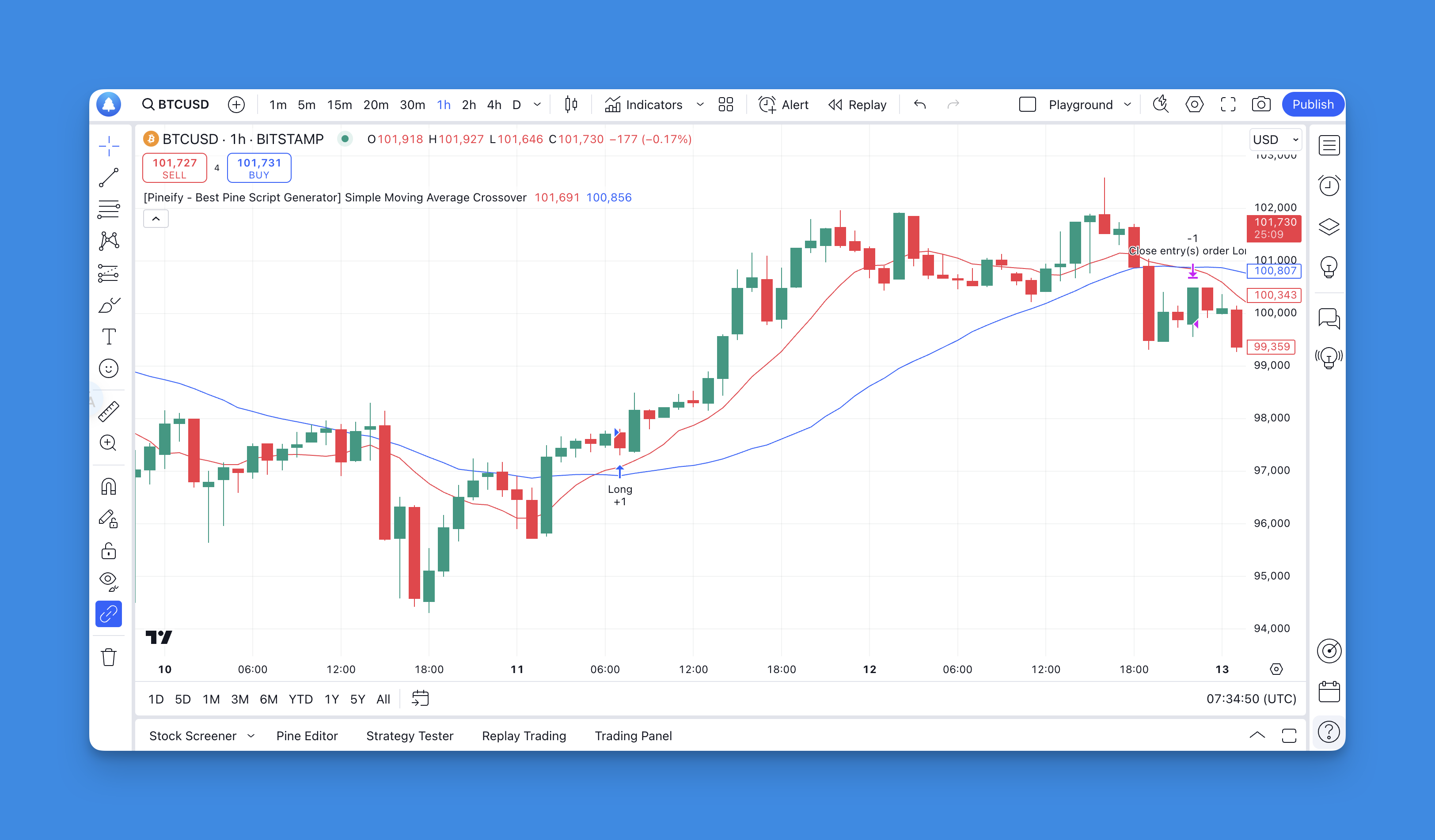
Here’s a basic example of a moving average crossover strategy written in Pine Script:
// This source code is subject to the terms of the Mozilla Public License 2.0 at https://mozilla.org/MPL/2.0/
// © Pineify

//======================================================================//
//                    ____  _            _  __                          //
//                   |  _ \(_)_ __   ___(_)/ _|_   _                    //
//                   | |_) | | '_ \ / _ \ | |_| | | |                   //
//                   |  __/| | | | |  __/ |  _| |_| |                   //
//                   |_|   |_|_| |_|\___|_|_|  \__, |                   //
//                                             |___/                    //
//======================================================================//

//@version=6
strategy("[Pineify - Best Pine Script Generator] Simple Moving Average Crossover", overlay=true)

// Define moving averages
shortMA = ta.sma(close, 10)
longMA = ta.sma(close, 30)

// Plot moving averages
plot(shortMA, color=color.red)
plot(longMA, color=color.blue)

// Define entry condition
longCondition = ta.crossover(shortMA, longMA)
if (longCondition)
    strategy.entry("Long", strategy.long)

// Define exit condition
shortCondition = ta.crossunder(shortMA, longMA)
if (shortCondition)
    strategy.close("Long")
In this example:
- A long position is entered when the short moving average crosses above the long moving average.
- The position is closed when the short moving average crosses below the long moving average.
While this script effectively simulates trade entries and exits within TradingView's environment, actual trade execution must be performed manually or through an integrated third-party service.
Adding Pineify to Your Article on Pine Script Trading Strategies

Website: Pineify
Click here to view all the features of Pineify.In the world of trading, effective strategy development is crucial, and tools like Pineify can significantly enhance your capabilities. Use Pineify to Generate Strategies and Add Alerts effortlessly, allowing traders of all skill levels to create and manage complex indicators without any coding expertise. Designed as a user-friendly platform, Pineify empowers users to bypass the limitations typically associated with TradingView's standard offerings, such as the restrictive two-indicator limit.
With Pineify, you can integrate unlimited technical indicators into your charts, tailor customizable inputs, and utilize a powerful condition editor to construct precise trading rules. The ability to generate strategy scripts for backtesting further optimizes your trading decisions, enabling immediate execution of market orders while efficiently managing risks with take-profit and stop-loss features. Whether you’re a novice or a seasoned trader, Pineify streamlines the process of developing indicators and strategies, ensuring a more efficient and enjoyable trading experience.
Click here to learn how to create your own Pine Script strategies with Pineify.
Conclusion
In conclusion, while Pine Script offers robust capabilities for creating custom trading strategies and indicators within TradingView, it does not support direct trade execution with brokers. Traders can utilize its simulation features to analyze potential trades but must rely on manual execution or third-party tools for automated trading solutions. By understanding these limitations and leveraging alerts effectively, traders can enhance their decision-making process in live markets.
References:
- https://www.tradingview.com/pine-script-docs/concepts/strategies/
- https://trendspider.com/learning-center/pine-script/
- https://stackoverflow.com/questions/65080714/open-a-market-order-with-pinescript
- https://www.forex.com/en/learn-trading/pine-script-user-guide-tradingview/
- https://algotrading101.com/learn/pine-script-tradingview-guide/
- https://www.tradingview.com/pine-script-docs/language/execution-model/
- https://pineify.app/resources/blog/pine-script-v6-everything-you-need-to-know
- https://stackoverflow.com/questions/74506950/using-tradingview-pinescript-only-is-it-possible-to-code-a-strategy-that-trades
- https://hackernoon.com/pinescript-for-beginners-writing-your-first-tradingview-indicator
- https://www.youtube.com/watch?v=APMUcBiKzn0