TradingView vs StockCharts: Which Platform Is Right for Your Trading Style?

· 9 min read

Choosing between TradingView and StockCharts can make or break your trading experience. After spending months testing both platforms with real money on the line, I've got some honest thoughts about what actually matters when you're picking a charting platform in 2025.

Look, I'm not here to sell you anything. I've lost money on both platforms (and made some too), so this is coming from someone who's been in the trenches with both tools. Whether you're day trading, swing trading, or just trying to understand what the heck is happening with your portfolio, the platform you choose really does matter.

TradingView vs StockCharts comparison

The Real Differences That Actually Matter

Both platforms will show you charts (shocking, I know), but they approach trading analysis from completely different angles. Here's what I've noticed after using both extensively.

Chart Customization: Power vs Simplicity

TradingView feels like walking into a candy store – there's almost too much to choose from. You can customize colors, layouts, timeframes, and layer on dozens of indicators until your chart looks like a Christmas tree. The best free indicators on TradingView can turn your basic chart into a technical analysis powerhouse.

If you're into creating custom indicators, TradingView's Pine Script capabilities are genuinely impressive. I've spent countless hours tweaking Pine Script strategies to match my trading style, and the flexibility is pretty amazing once you get the hang of it.

StockCharts takes the opposite approach. Think of it as the reliable Toyota Camry of charting platforms – not flashy, but everything works exactly as expected. You get point & figure charts, Kagi charts, and all the classic technical analysis tools that have been around since before smartphones existed. It's clean, focused, and doesn't try to be everything to everyone.

Market Coverage: Global vs US-Focused

This is probably the biggest practical difference between the two platforms.

TradingView covers pretty much every market you can think of. I've used it to track cryptocurrency prices during those wild 3 AM pumps, check European stock futures before the US market opens, and even peek at some obscure forex pairs when I was feeling adventurous. The global market coverage is honestly impressive.

StockCharts sticks to what it knows best: US markets. If you're trading American stocks and ETFs, you're golden. But if you want to explore international markets or cryptocurrency, you'll be looking elsewhere. This isn't necessarily bad – sometimes focus is better than trying to do everything.

Side-by-Side Reality Check

The Best Pine Script Generator

Let me break down the practical differences in a way that actually helps you decide:

FeatureTradingViewStockCharts
User InterfaceModern, sometimes overwhelmingClean, straightforward, dated design
Customization OptionsExtensive – almost too many choicesLimited but focused on essentials
Market CoverageGlobal markets, crypto, forex, everythingUS stocks and ETFs primarily
Social FeaturesActive community, idea sharing, chatMinimal social interaction
Built-in Indicators160+ indicators and oscillatorsClassic technical analysis tools
Free Plan Limitations2 indicators per chart, basic featuresVery restricted functionality
Best Suited ForActive traders, global marketsTraditional stock investors
Real-time Data QualityExcellent across all marketsGood for US markets
Educational ResourcesCommunity-driven, quality variesProfessional, well-structured content

User Experience: What It's Really Like Daily

TradingView's Learning Curve

When I first started using TradingView, I felt like I was trying to drink from a fire hose. There are so many features that it took me weeks to figure out what I actually needed versus what was just digital clutter.

The social aspect is interesting – you can follow other traders, see their ideas, and even copy their watchlists. Sometimes you find gold in the community posts, but you'll also wade through plenty of noise. It's like Reddit for traders, which can be both good and terrible depending on your tolerance for hot takes.

StockCharts' Focused Approach

StockCharts feels like stepping into a professional trader's office from 2010 – everything works, but it doesn't try to be fancy. The interface hasn't changed much over the years, which is either comforting or frustrating depending on your perspective.

What I appreciate about StockCharts is that when you click on something, it does exactly what you expect. No surprises, no hidden features, just straightforward chart analysis tools that get the job done.

The TradingView Limitation That Nobody Talks About

Here's something that drives me crazy about TradingView's free plan: you can only use two indicators per chart. When you're trying to analyze a stock properly, that's like trying to cook dinner with only a spoon and a fork.

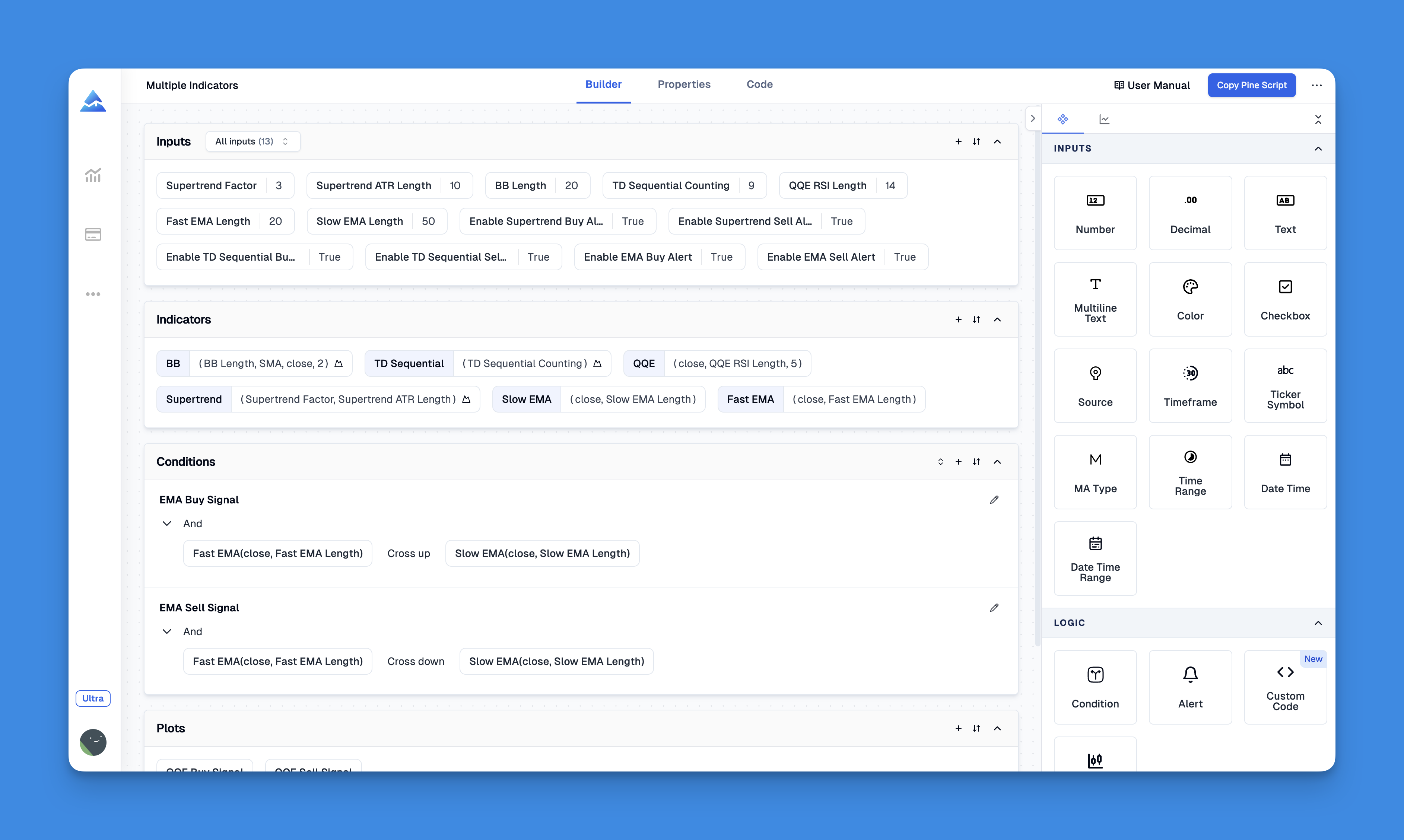
This is where I discovered something that actually solved this problem. There's a tool called Pineify that lets you combine multiple indicators into a single custom script without writing any code. I know, I know – it sounds too good to be true, but hear me out.

Pineify Pine Script Editor Interface

Instead of being limited to two separate indicators, I created one custom indicator that combines RSI, moving average crossovers, and volume analysis. The whole process took about 10 minutes using their drag-and-drop interface – no programming knowledge required.

Pineify Pine Script Generator

What impressed me most was how intuitive it is. You literally drag conditions like "RSI is above 70" or "price crosses above the 20-day moving average" and connect them however you want. It generates clean Pine Script code that you can copy directly into TradingView.

If you're serious about technical analysis but don't want to learn programming, Pineify might be worth checking out. They have a complete feature breakdown that shows everything you can build with it.

Advanced Features: Where Each Platform Shines

TradingView's Technical Analysis Powerhouse

The real strength of TradingView becomes apparent when you start digging into advanced features. The Pine Script ecosystem is genuinely impressive – you can build custom indicators, automated strategies, and even complex alert systems that can notify you via email or webhook when specific market conditions are met.

The replay feature is something I use constantly. Being able to replay historical market data and practice trading decisions without risking real money has probably saved me thousands of dollars in bad trades.

StockCharts' Professional Analysis Tools

StockCharts excels in areas that most retail platforms ignore. Their sector analysis tools, market breadth indicators, and institutional-quality screening capabilities are genuinely useful for understanding broader market trends.

The educational content is also top-notch. Their ChartSchool section reads like a technical analysis textbook written by people who actually know what they're talking about, not marketing copy written by interns.

Who Should Choose TradingView?

TradingView makes the most sense if you:

Trade Multiple Markets: If you're interested in stocks, crypto, forex, or commodities, TradingView's global coverage is unmatched. I can check Bitcoin, Tesla stock, and EUR/USD all in the same interface.

Want Customization: If you like tweaking your setup and trying new indicators, TradingView gives you endless options. The best indicators on TradingView can be combined in creative ways.

Value Community Input: The social features aren't just marketing fluff – I've genuinely learned from following experienced traders and seeing their chart setups.

Need Mobile Trading: TradingView's mobile app is solid, while StockCharts feels like it was built for desktop only.

Want to Learn Programming: If you're interested in automated trading strategies, TradingView's Pine Script is a great starting point.

Who Should Choose StockCharts?

StockCharts works better if you:

Focus on US Markets: If you primarily trade American stocks and ETFs, StockCharts' focused approach might be exactly what you need.

Prefer Traditional Analysis: Point & figure charts, market breadth studies, and classic technical analysis are StockCharts' bread and butter.

Want Quality Education: Their educational content is consistently high-quality, written by people with decades of market experience.

Like Stability: The interface hasn't changed much in years, which means less time relearning where everything is.

Don't Need Social Features: If you prefer to trade in isolation without community distractions, StockCharts keeps things simple.

Pricing Reality Check

Let's talk money because platform costs add up quickly:

TradingView Free: Actually usable with 2 indicators per chart, delayed data, and basic features. You can legitimately trade with the free version.

TradingView Paid: Plans start around $15/month and go up to $60+/month for professional features. The Pro plan ($30/month) hits the sweet spot for most serious traders.

StockCharts: The free version is quite limited. Paid plans start around $20/month, which gets you basic features. Professional plans can cost $50+/month.

If you're just starting out, TradingView's free version gives you more runway to figure out if you actually enjoy trading before committing money.

Platform Alternatives Worth Considering

Before you decide, know that these aren't your only options. TradingView alternatives include platforms like TrendSpider, which offers some unique automated pattern recognition features, or broker-specific platforms if you're trading with firms like TD Ameritrade.

My Final Recommendation

Start with TradingView's free version. Seriously.

It gives you enough functionality to figure out if you like active trading, and you can always upgrade later or switch to StockCharts if you find yourself wanting that traditional, focused approach.

The learning curve with TradingView is steeper initially, but the payoff is worth it if you stick with trading. StockCharts is easier to start with but might feel limiting as you develop more sophisticated strategies.

Most importantly, remember that no platform will make you profitable if you don't have a solid understanding of risk management and market psychology. The tools matter, but your decision-making matters more.

Whatever you choose, spend time learning the platform thoroughly before risking significant money. Both platforms offer paper trading or replay features – use them extensively before going live with real cash.