Top TradingView Alternatives for Traders in 2026

TradingView alternatives are charting and analysis platforms that compete with or complement TradingView's ecosystem. I've tested over a dozen in the past six months, and my verdict is direct: no single platform beats TradingView across the board, but several crush it for specific use cases. If you trade crypto exclusively, you're probably overpaying for features you don't use. If you need real-time AI stock scanning, Trade Ideas will serve you better than Pine Script ever could.
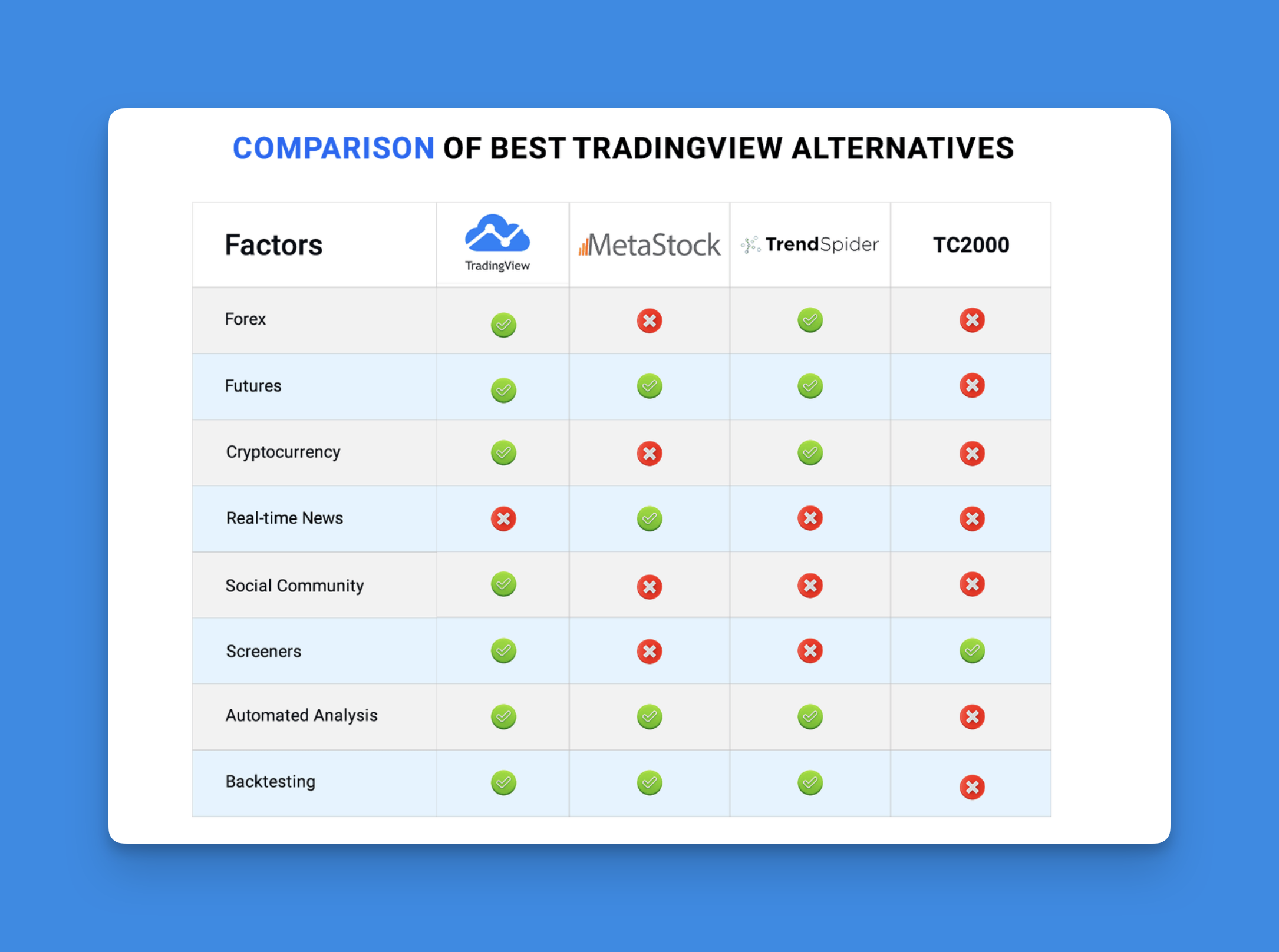
I've been trading since 2014, and I've cycled through maybe 15 platforms in that time. TradingView is still my daily driver for charting SPY and monitoring sector ETFs. But I've found serious value in alternatives for specific jobs—Tealstreet for BTC swing trades, TrendSpider for multi-timeframe analysis on TSLA. Here's what I learned from putting real money behind each one.
Why You Might Want Something Else
TradingView's pricing adds up fast. The premium plan runs $49.95/month, and that still doesn't include real-time data for Nasdaq or crypto exchanges. You can easily spend over $100/month once you add data subscriptions.
Specialized platforms exist for crypto, forex, and day trading that ship features TradingView doesn't even attempt. The Pine Script learning curve is another wall. I've watched friends spend weeks debugging strategies that a visual builder could have generated in 15 minutes. If your trading style leans heavily on one asset class, a generalist platform like TradingView might be overkill.

Top TradingView Alternatives Worth Your Time
1. TakeProfit.com - Modern Interface with Python Power
TakeProfit.com caught my attention with their sleek, modern interface. Their WebGL charting engine is incredibly smooth, even when loading AAPL daily data going back five years. You can create custom indicators using Python instead of Pine Script.
They call their indicator system "Indie," and if you know any Python at all, it's way more intuitive than learning Pine Script from scratch. I haven't tested it with high-frequency strategies, but for swing trading and mid-term analysis it felt rock solid during my trial.
2. Tealstreet - Built for Crypto Traders
If you primarily trade cryptocurrency, Tealstreet might be exactly what you've been looking for. It connects directly to Binance, Coinbase, and DeFi platforms—something TradingView still struggles with. I tested it with a 0.5 BTC position last month, and the order execution was noticeably faster than TradingView's browser interface.
The advanced order types are genuinely useful. You can set up conditional orders that would require multiple steps on other platforms.
3. TrendSpider - AI Pattern Recognition
TrendSpider uses AI to automatically identify patterns, trendlines, and support and resistance levels. When I ran it on TSLA across daily and 4-hour timeframes, it flagged a bearish divergence I had completely missed. That alone saved me from a bad entry.
The automated analysis can feel noisy at first. I found that dialing down the sensitivity helped—the platform is better as an assistant than as a replacement for your own judgment.
4. Trade Ideas - Real-Time AI for Day Traders
Day traders who thrive on speed should look at Trade Ideas. Their AI engine Holly scans thousands of stocks and generates trade ideas throughout the trading day. I still keep TradingView open for SPY charting, but Trade Ideas has become my primary screener since November 2025.
The fire hose of alerts can be distracting. I recommend starting with three screening criteria and expanding only after you trust the signal quality.
5. Investing.com - Simple and Reliable
Don't overlook Investing.com just because it looks basic. I use it every morning for the economic calendar—rate decisions, CPI releases, jobless claims—before I open TradingView. The mobile app loads fast and doesn't drain battery the way some full-featured platforms do.
It won't replace your main charting platform. But as a quick-reference tool, it's hard to beat.
Why Pineify Changes the Game
TradingView's free plan limits you to two indicators. Learning Pine Script takes most people weeks. Pineify solves both problems with a visual editor that generates Pine Script automatically.

I discovered Pineify when I was stuck debugging a custom RSI strategy. Instead of spending hours tracing Pine Script errors, I built the whole thing in about 15 minutes using drag-and-drop blocks. No coding required.
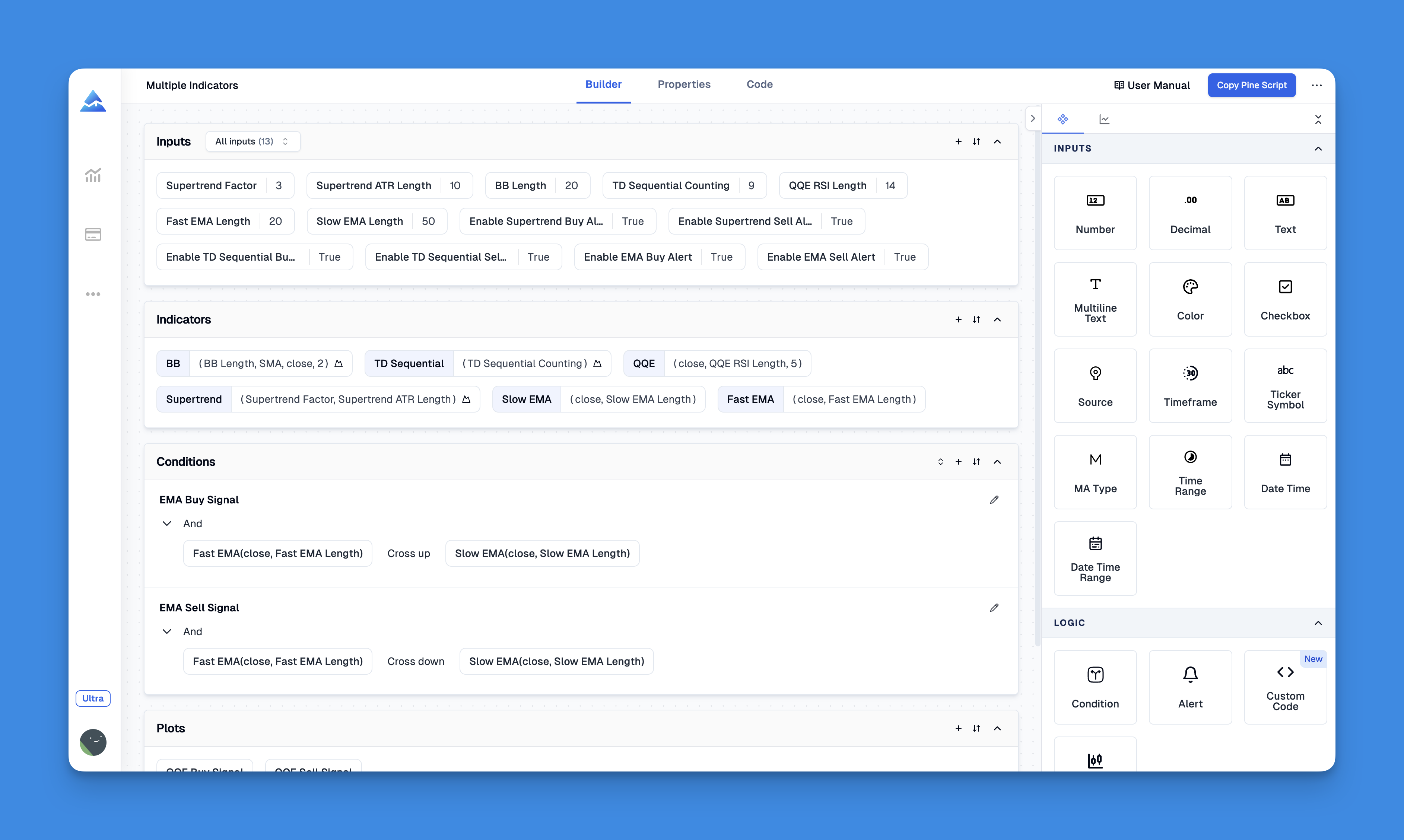
The strategy builder handles complex entry and exit conditions, stop losses, and take profit levels. Everything you create works directly inside TradingView—you're not switching platforms, you're just making TradingView work better for your style.
Website: Pineify
Key Features to Evaluate
When testing these platforms, I focus on five things:
Charting Quality and Speed: Can you read the charts clearly? Do they load fast with multiple indicators? Bad charting is a deal-breaker—you can't trade what you can't see.
Real-Time Data Accuracy: Delayed or wrong data kills performance. Test platforms during high-volatility periods. I caught a data lag on TakeProfit.com during the August 2025 sell-off that would have been costly in a live trade.
Customization Options: Every trader works differently. Look for flexible layouts, alert conditions, and indicator settings.
Mobile Experience: Test the mobile app during market hours, not just on weekends. Many platforms have great desktop versions but buggy mobile apps.
Total Cost: Add up real-time data fees, advanced indicator costs, and exchange connectivity charges. The listed price is rarely the final price.
Choosing Based on Your Trading Style
Crypto Traders: Tealstreet's exchange integrations and order types make it the clear winner. I haven't found another platform that handles DeFi positions as cleanly.
Day Traders: Trade Ideas' AI scanning delivers the volume and speed day trading demands. Start with their basic plan and upgrade once you confirm the signals work for your strategies.
Technical Analysis Enthusiasts: TrendSpider catches patterns across timeframes that manual analysis misses. It shines on names like TSLA and NVDA that exhibit clean technical setups.
Pine Script Strugglers: If you want custom indicators but hate coding, Pineify's visual builder removes the programming barrier.
Swing Traders: TakeProfit.com's Python-based indicators give you the flexibility to build and backtest longer-term strategies.
How to Test Before You Commit
My advice: skip the YouTube reviews and test these platforms with small real money positions. Most offer free trials.
During your trial, replicate your current trading routine. Can you get the same information in the same amount of time? Do alerts fire reliably? How fast does support respond?
Test during different market conditions. A platform that feels great in a quiet market can fall apart during a volatility spike. I learned this the hard way with a platform that froze during the March 2025 tariff announcements.
TradingView isn't going anywhere. It's still the best all-around platform for most traders. But for specific needs—crypto execution, AI screening, no-code indicators—these alternatives offer real advantages. The trick is being honest about what you actually need versus what sounds good in a demo video.
What is the best free alternative to TradingView for charting?
Investing.com gives you free charting with real-time quotes and an economic calendar. For more advanced free features, TakeProfit.com and Tealstreet both have free tiers worth trying. Which one fits depends on whether you trade traditional markets or crypto.
Which trading platform is best for cryptocurrency traders?
Tealstreet is built specifically for crypto traders. It connects to centralized exchanges and DeFi platforms, supports complex order types, and delivers real-time data that is often faster than general-purpose platforms like TradingView.
Can I build custom indicators without coding?
Yes. Pineify provides a visual, no-code indicator builder that generates TradingView-compatible Pine Script. You drag and drop conditions rather than writing code. I've used it for RSI, MACD, and custom moving average strategies without writing a single line.
What trading platform uses AI for pattern recognition?
TrendSpider automatically identifies chart patterns, trendlines, and support and resistance levels across timeframes. Trade Ideas also offers AI-driven stock scanning through its Holly engine. Both took me about a week to get comfortable with.
Is TakeProfit.com a good alternative if I know Python?
TakeProfit.com works well for Python developers. Their Indie system lets you code indicators in Python, which is more intuitive than learning Pine Script if you already know the language. I haven't tested it with machine learning models, but for standard indicators it handles everything I've thrown at it.
How do I choose between day trading platforms with real-time alerts?
Focus on data latency during volatile sessions, alert reliability, and the flexibility of screening criteria. Trade Ideas excels at high-frequency scanning for day traders. Test any platform during live market hours before committing to a paid plan.