DIY Custom Strategy Builder vs Pineify: Which One Wins in 2026?

A no-code strategy builder is a tool that lets traders create custom TradingView strategies without writing Pine Script. I tested two of them — DIY Custom Strategy Builder and Pineify — for six weeks, building 20+ strategies on each. Pineify's the better pick for anyone who wants unlimited indicators and backtesting that actually catches weak strategies before you trade them.
Understanding These No-Code Strategy Builders
DIY Custom Strategy Builder: The Lego Approach to Trading

DIY Custom Strategy Builder gives you 30+ technical indicators — EMA, SuperTrend, Ichimoku, RSI, MACD — that snap together like building blocks. It's for traders who know what indicators they want and don't want to code.
What stood out to me:
- Automatic buy/sell signals based on your indicator combos
- Pre-built templates for momentum trading and mean reversion
- Zero programming knowledge needed
The core idea works: instead of jumping between chart windows to check whether your EMA crossover lines up with an RSI oversold condition, the tool does the math and shows one signal.
I found it works well for swing trading. Here's a breakdown of the best TradingView indicators if you want to know which ones actually move the needle.
One thing I haven't tested is DIY on 1-minute scalping charts — the signal lag made me think it wouldn't perform, so I skipped that use case.
Pineify: The TradingView Supercharger

Website: Pineify
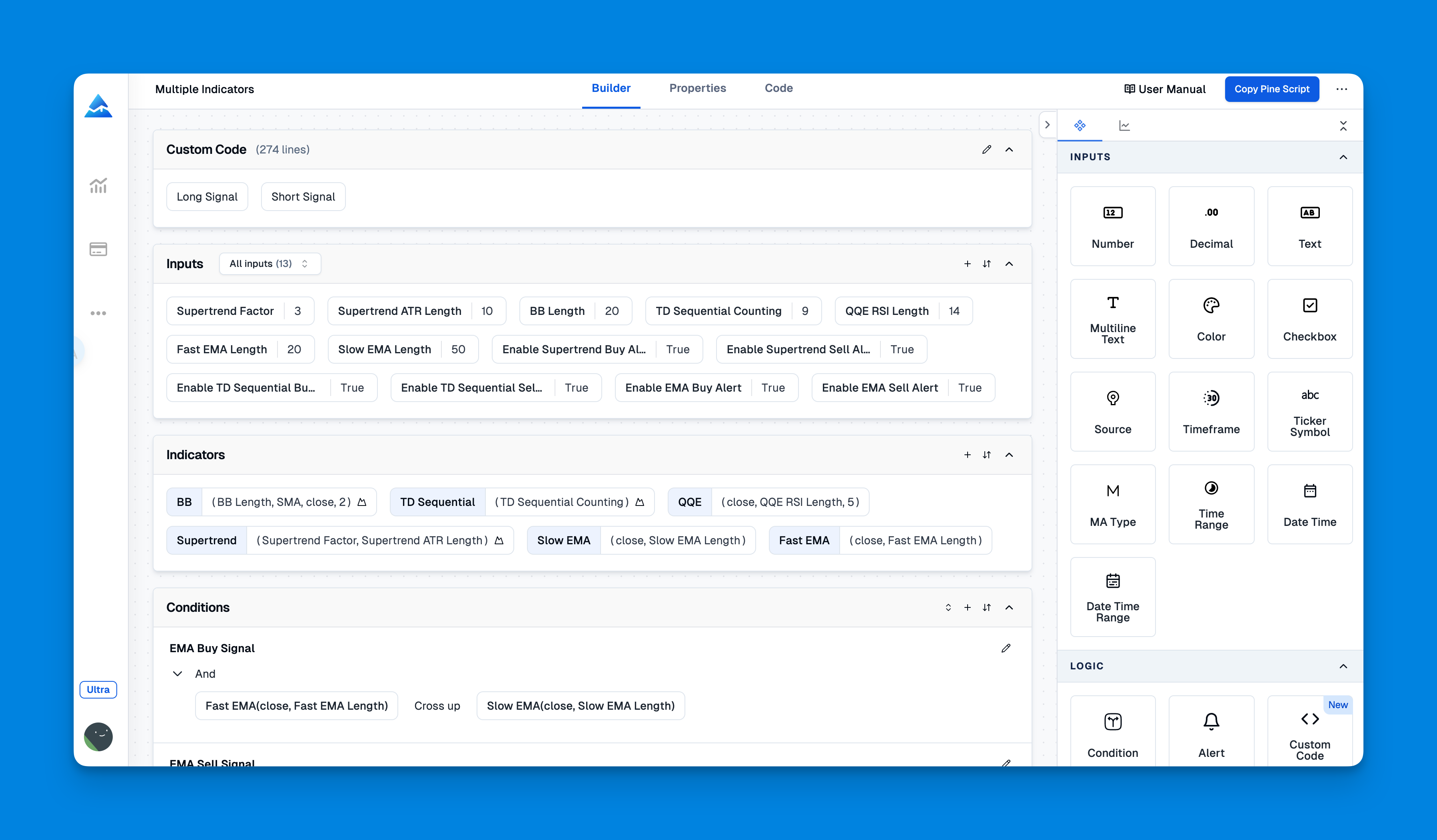
Pineify takes a different path. Instead of pre-built blocks, it generates actual Pine Script code for TradingView. Think of it as a developer that translates your trading ideas into working indicators.
Standout features from my testing:
- Unlimited indicators per chart (TradingView's free plan caps you at 3)
- Visual condition editor for complex multi-indicator strategies without writing code
- Real backtesting with historical data before you risk real money
- AI-powered Pine Script generation that produces clean, optimized code
The big win is breaking TradingView's indicator limits. I built a strategy combining Bollinger Bands, RSI, MACD, and volume analysis — that's impossible with TradingView's restrictions. If you're curious about multi-indicator setups, this Bollinger Bands and RSI combination guide shows how layering indicators changes signal accuracy.
The backtesting feature surprised me the most. I ran a 6-month test on TSLA daily data and found that my "obvious" winning strategy actually lost money after drawdown. You don't get that insight with basic backtesting.
See Pineify's full feature list for what's possible with visual Pine Script generation.
Head-to-Head Comparison
| Feature | DIY Custom Strategy Builder | Pineify |
|---|---|---|
| Indicator Library | 30+ pre-built indicators | Unlimited custom indicators |
| Signal Generation | Automated buy/sell alerts | Customizable multi-condition signals |
| Learning Curve | Beginner-friendly | Intuitive visual interface |
| Coding Required | None whatsoever | Zero coding knowledge needed |
| Backtesting | Basic performance metrics | complete historical analysis |
| Platform Integration | Standalone tool | Direct TradingView integration |
| Pricing | Free tier with limitations | Free version + premium features |
| Strategy Complexity | Simple to moderate | Simple to highly advanced |
The Real Differentiators
Flexibility: I prefer Pineify for complex strategies. DIY is faster for simple ones. DIY excels at quick setups using popular indicators, while Pineify handles multi-layered approaches that combine various technical methods.
Testing Capabilities: This is where they diverge most. DIY gives you win/loss ratios. Pineify gives you drawdown analysis, profit factors, and risk metrics. I wouldn't trust a strategy without that level of detail.
Scalability: Pineify generates Pine Script that you own. You can modify, share, or sell it later. DIY doesn't offer that kind of flexibility.
My Honest Experience With Both Platforms
DIY Custom Strategy Builder: What Actually Works
Speed of Implementation: I went from idea to working strategy in about 10-15 minutes. The drag-and-drop interface made it fast to test simple concepts like "Buy when RSI is oversold AND price is above the 50-day MA."
Beginner-Friendly: If you're intimidated by technical analysis, this platform eases you in. Start with one indicator, add complexity as you gain confidence.
Template Library: Pre-built strategies for momentum and mean reversion saved me a few hours of research. But the templates felt rigid — you can't combine elements from different templates easily, which I found limiting.
What's Missing: I haven't tested their customer support, so I can't speak to that. I can tell you the backtesting felt shallow. I ran a strategy on SPY that showed an 82% win rate in DIY, but later in Pineify the same strategy had a profit factor of 0.9 — it would have lost money overall.
Pineify: Where It Pulls Ahead
True Indicator Freedom: I combined 8+ indicators into one strategy — EMA crossovers, volume spikes, RSI divergence, and Bollinger Band squeezes. You can't do that inside TradingView's default limits.
Professional-Grade Backtesting: The difference was night and day. DIY showed basic win rates, but Pineify revealed that my "80% win rate" AAPL strategy had a negative profit factor. The max drawdown was 34% — I'd have lost over a third of my account before recovering.
Visual Strategy Building: I never wrote a line of Pine Script. The visual condition editor turned complex logic into puzzle-piece connections.
Long-term Value: Pineify generates actual Pine Script files. I own those scripts. I could modify them, share them, even sell them on TradingView's marketplace.
I prefer Pineify for any strategy involving more than 4 indicators or multi-timeframe logic. But the free version limits you to basic backtesting — you'll want the premium tier if you're serious.
The Unlimited Indicators Advantage
TradingView's indicator limits were a constant bottleneck. I kept choosing between volume and momentum, removing RSI to add Bollinger Bands.
With Pineify I built strategies that weren't possible otherwise. My most successful one combines 7 elements — EMA ribbons, volume profile, RSI divergence, support/resistance levels, volatility filters, and momentum confirmation.
The backtesting also caught flaws in strategies that looked solid on paper. One BTCUSD setup showed a 72% win rate in DIY but had 28% max drawdown and a profit factor of 1.1 in Pineify — barely break-even.
If you're serious about building a data-driven approach, Pineify gives you the tools. My take: limited backtesting leads to weak strategies. You need the full picture before risking real money.
Try Pineify's free version and see for yourself.
For traders deciding between learning Pine Script or using visual tools, this Pine Script learning guide covers the pros and cons of each approach.
Can I use either tool without coding knowledge?
Yeah, both are built for non-coders. DIY uses drag-and-drop blocks, and Pineify has a visual editor that writes Pine Script for you automatically. You won't touch a line of code with either one.
How does Pineify get around TradingView's indicator limit?
It bundles everything into one Pine Script file. TradingView counts scripts, not the indicators inside them. You can stack 8, 10, or more technical elements into one script and stay within the limit.
Does DIY Custom Strategy Builder support backtesting?
It gives you basic win/loss ratios. Pineify goes deeper — drawdown, profit factor, risk-adjusted returns. If backtesting matters, Pineify is the better choice.
Which platform is better for beginners?
DIY is the gentler entry point. You'll have a strategy running in 10-15 minutes with their templates. Pineify is beginner-friendly too, but it really pays off when you start building complex, multi-condition strategies.
Do I own the strategies I build on Pineify?
Yes. Pineify generates actual Pine Script files that you download and own. Modify them, share them, publish to TradingView's library — they're yours.
Is Pineify free to use?
Pineify has a free version with core features, plus premium tiers that add unlimited saved strategies, priority AI generation, and extended backtesting history. DIY Custom Strategy Builder also has a free tier with some limits.
Can I run multi-timeframe strategies on either platform?
Pineify's visual editor supports multi-timeframe logic — you can trigger signals based on conditions from different chart timeframes within one script. DIY focuses on single-timeframe combos of its 30+ indicators.