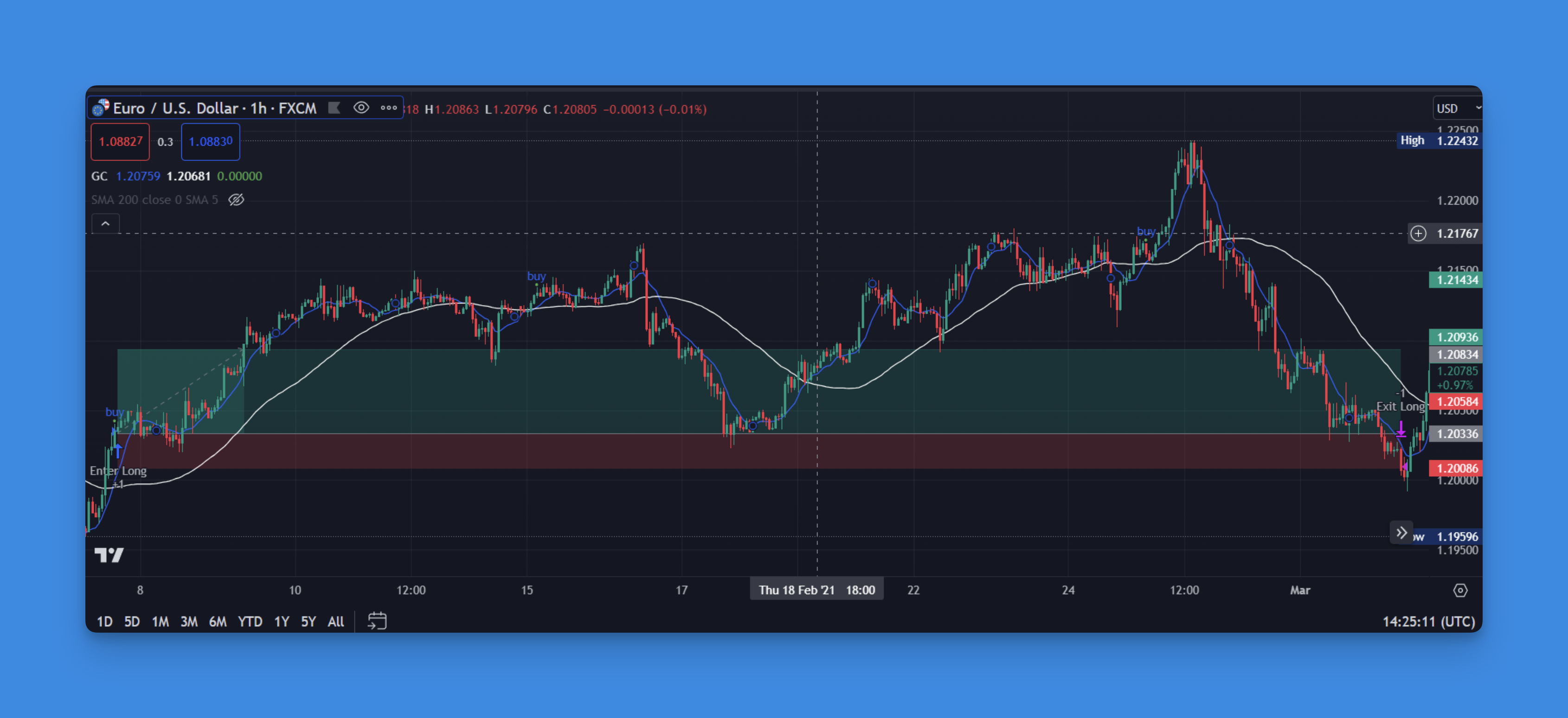
Mastering Pine Script Take Profit: A Guide to Optimizing Trading Strategies

· 8 min read

Getting into Pine Script and wondering how to properly set up take profit orders? You've hit on something crucial here - take profit strategies can literally make or break your trading results. I've spent countless hours testing different approaches, and I'm going to share what actually works.

Pine Script Take Profit Strategy Implementation

Understanding Take Profit in Trading Context

A take profit order is essentially your predetermined exit point when a trade moves in your favor. Instead of staring at charts all day wondering "should I sell now?" or watching profitable trades turn into losses, you set a specific price level where you automatically close the position.

In Pine Script, this translates to defining exact conditions where your strategy exits profitable positions. It's about removing emotion from the equation and letting your code make disciplined decisions.

The psychology behind this is simple: greed kills profits. I've seen traders (myself included) watch a 15% gain evaporate into a 5% loss because they thought "it might go higher." Take profit orders prevent this common mistake.

Implementing Basic Take Profit in Pine Script

Let's start with a straightforward implementation that you can actually use:

The Best Pine Script Generator
//@version=5
strategy("Take Profit Example", overlay=true)

// User inputs for flexibility
takeProfitPercent = input.float(10.0, title="Take Profit %", minval=1.0, maxval=50.0) / 100
stopLossPercent = input.float(5.0, title="Stop Loss %", minval=1.0, maxval=25.0) / 100

// Entry condition (simple moving average crossover)
fastMA = ta.sma(close, 10)
slowMA = ta.sma(close, 20)
enterLong = ta.crossover(fastMA, slowMA)

// Calculate take profit and stop loss levels
var float takeProfitPrice = na
var float stopLossPrice = na

if enterLong
strategy.entry("Long", strategy.long)
takeProfitPrice := close * (1 + takeProfitPercent)
stopLossPrice := close * (1 - stopLossPercent)

// Exit conditions
if strategy.position_size > 0
strategy.exit("Exit Long", "Long", limit=takeProfitPrice, stop=stopLossPrice)

This code does exactly what you'd expect - when the fast moving average crosses above the slow one, it enters a long position and automatically sets both take profit and stop loss levels based on percentages you define.

Advanced Take Profit Strategies

Multiple Take Profit Levels

Here's where things get interesting. Instead of closing your entire position at once, you can scale out at different profit levels:

// Scale out strategy
if enterLong
strategy.entry("Long1", strategy.long, qty=50)
strategy.entry("Long2", strategy.long, qty=30)
strategy.entry("Long3", strategy.long, qty=20)

// Different exit levels for each portion
strategy.exit("Exit1", "Long1", limit=close * 1.05) // 5% profit
strategy.exit("Exit2", "Long2", limit=close * 1.10) // 10% profit
strategy.exit("Exit3", "Long3", limit=close * 1.20) // 20% profit

This approach lets you lock in some profits early while still participating in larger moves.

Dynamic Take Profit Based on Volatility

Using Average True Range (ATR) to set dynamic take profit levels often works better than fixed percentages:

atrPeriod = input.int(14, title="ATR Period")
atrMultiplier = input.float(2.0, title="ATR Multiplier for Take Profit")

atrValue = ta.atr(atrPeriod)
dynamicTakeProfit = close + (atrValue * atrMultiplier)

When markets are more volatile, your take profit automatically adjusts wider. When they're calm, it tightens up. This adapts to market conditions rather than using the same target regardless of what's happening.

For more advanced ATR implementations, check out our comprehensive guide on ATR indicators in Pine Script.

Visual Tools and No-Code Solutions

Not everyone wants to write code from scratch, and honestly, you don't always need to. Visual strategy builders have come a long way.

Visual Pine Script Strategy Builder

Tools like Pineify let you build sophisticated take profit strategies through drag-and-drop interfaces. Want a take profit that adjusts based on RSI levels? Or one that uses Bollinger Bands to determine exit points? You can create these visually without writing a single line of code.
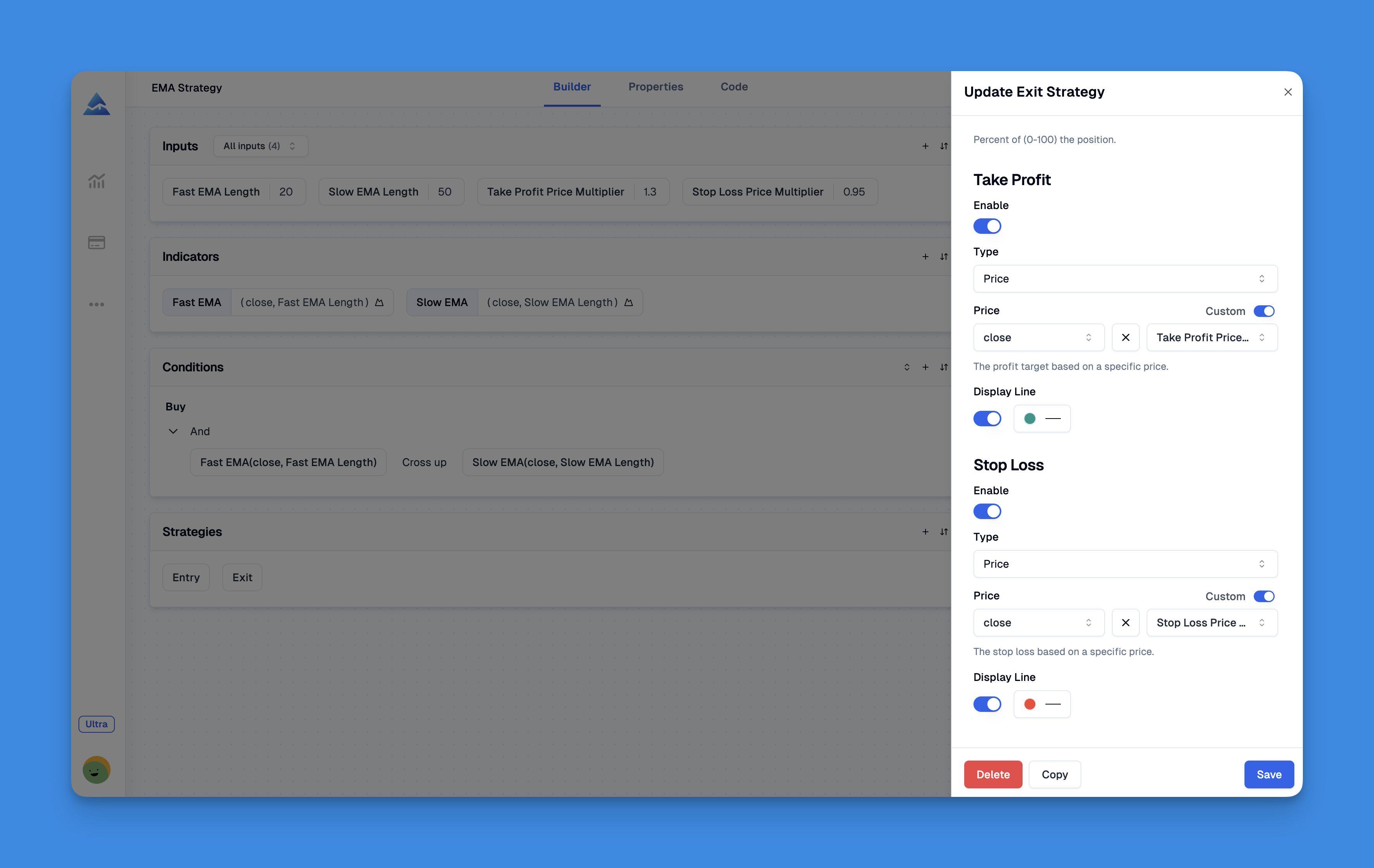
The beauty is you can prototype strategies quickly, test different approaches, and then export the Pine Script code to customize further if needed.

Pine Script Strategy Testing Interface

Website: Pineify

Explore Pineify's full feature set.

Proven Take Profit Optimization Techniques

Market-Adaptive Profit Taking

Different market conditions require different approaches. During trending markets, you might want wider profit targets. In ranging markets, tighter targets often work better.

// Trend strength indicator
trendStrength = ta.adx(14)
isStrongTrend = trendStrength > 25

// Adaptive take profit
adaptiveTakeProfit = isStrongTrend ? close * 1.15 : close * 1.08

Time-Based Profit Taking

Sometimes the best take profit isn't based on price at all, but on time. If a trade hasn't moved in your favor within a certain timeframe, it might be time to exit:

// Time-based exit after 10 bars
barsInTrade = strategy.position_size > 0 ? bar_index - strategy.opentrades.entry_bar_index(0) : 0
if barsInTrade >= 10
strategy.close("Long", comment="Time Exit")

Combining Technical Indicators

You can also use technical indicators to determine when to take profits. For example, exiting when RSI reaches overbought levels:

rsiValue = ta.rsi(close, 14)
if strategy.position_size > 0 and rsiValue > 70
strategy.close("Long", comment="RSI Overbought Exit")

If you're interested in RSI-based strategies, our RSI divergence guide covers advanced techniques.

Common Pitfalls and How to Avoid Them

The Single Exit Limitation

Pine Script strategies can only have one active strategy.exit() call per position. If you want multiple take profit levels, you need to work around this by using multiple entry IDs or strategy.close() functions.

Backtesting vs. Real Trading

Your backtest might show amazing results, but real trading includes slippage, spreads, and partial fills. Always account for these in your profit calculations:

// Add realistic slippage to your take profit
slippagePoints = input.int(2, title="Slippage (points)")
adjustedTakeProfit = takeProfitPrice - slippagePoints * syminfo.mintick

Over-Optimization

Don't fall into the trap of optimizing your take profit settings until they only work for historical data. Keep some parameters fixed and only optimize the most important ones.

Testing and Validation Strategies

Walk-Forward Analysis

Instead of optimizing on your entire dataset, try walk-forward testing:

  1. Optimize on the first 70% of your data
  2. Test on the next 15%
  3. Validate on the final 15%

This gives you a better idea of how your strategy might perform going forward.

Monte Carlo Simulation

Consider running Monte Carlo simulations on your take profit strategies to understand the range of possible outcomes. This helps you set realistic expectations and position sizes.

For comprehensive strategy testing approaches, check out our Pine Script backtesting guide.

Integration with Stop Loss Strategies

Take profit doesn't work in isolation - it needs to be part of a complete risk management system. Your stop loss and take profit should work together to create favorable risk-reward ratios.

// Risk-reward ratio calculation
riskRewardRatio = input.float(2.0, title="Risk:Reward Ratio")
stopLossDistance = close - stopLossPrice
takeProfitDistance = (close + (stopLossDistance * riskRewardRatio)) - close
adjustedTakeProfit = close + takeProfitDistance

This ensures you're always targeting profits that are at least twice your risk, which is essential for long-term profitability.

For more on stop loss implementation, see our detailed guide on Pine Script stop loss strategies.

Real-World Application Tips

Start Conservative

Begin with conservative take profit levels (5-10%) while you're learning. You can always adjust higher once you understand how your strategy behaves in different market conditions.

Monitor Performance Regularly

Set up regular reviews of your take profit performance. Are you leaving too much money on the table? Are you getting stopped out too often? Track these metrics:

  • Average profit per winning trade
  • Percentage of trades hitting take profit vs. stop loss
  • Maximum favorable excursion (how much profit you could have made)

Market-Specific Adjustments

Different markets require different approaches. Forex might need tighter take profits due to lower volatility, while crypto might allow for wider targets. Adjust your parameters based on the asset you're trading.

Conclusion

Effective take profit implementation in Pine Script isn't just about setting a percentage and calling it done. It's about creating a systematic approach that adapts to market conditions, manages risk appropriately, and aligns with your overall trading strategy.

The key is to start simple, test thoroughly, and gradually add complexity as you understand how different approaches perform in various market conditions. Remember, the best take profit strategy is the one you can stick to consistently, even when emotions are running high.

Whether you code everything from scratch or use visual tools to build your strategies, the principles remain the same: be systematic, test extensively, and always prioritize capital preservation over maximum profits. A strategy that consistently takes smaller profits is far better than one that occasionally hits home runs but frequently strikes out.

Take profit orders might not be the most exciting part of trading, but they're often what separates consistently profitable traders from those who give back their gains to the market. Master this skill, and you'll have a significant edge in your trading journey.