Pine Script Programmer: The Backbone of Automated Trading Strategies

Ever wondered how some traders get those perfectly timed buy and sell signals that others don't? Or how they automate their entire strategy while sleeping through the night? Behind most of these setups, there's a Pine Script programmer turning market logic into working code.
A Pine Script programmer is someone who writes automated scripts in TradingView's native language, converting raw trading concepts into executable analysis that runs 24/7 on live charts.
What Makes Pine Script So Special for Traders?
Pine Script is TradingView's programming language for creating custom trading tools. Think of it as your direct line to building exactly what fits your trading style, rather than settling for generic indicators everyone else uses.

What sets Pine Script apart from other languages:
- Trading-focused syntax: Built for financial markets, not general programming
- Real-time execution: Your code runs on every price update for instant analysis
- Historical data access: Backtest strategies across years of data in seconds
- Visual integration: Everything appears directly on your TradingView charts
- Community support: Thousands of traders sharing scripts and strategies
The beauty of Pine Script is its simplicity. Other languages might take hundreds of lines for basic market analysis. Pine Script does it in a few.
From Exclusive to Accessible
Not long ago, creating custom indicators was strictly for coders. If you couldn't write code, you were stuck with whatever basic tools your platform offered. That put retail traders with good ideas but no technical skills at a real disadvantage.

But that situation has changed fast. No-code tools like Pineify now let anyone build sophisticated indicators without writing a line of code. You can create custom indicators that actually work without years of programming experience.
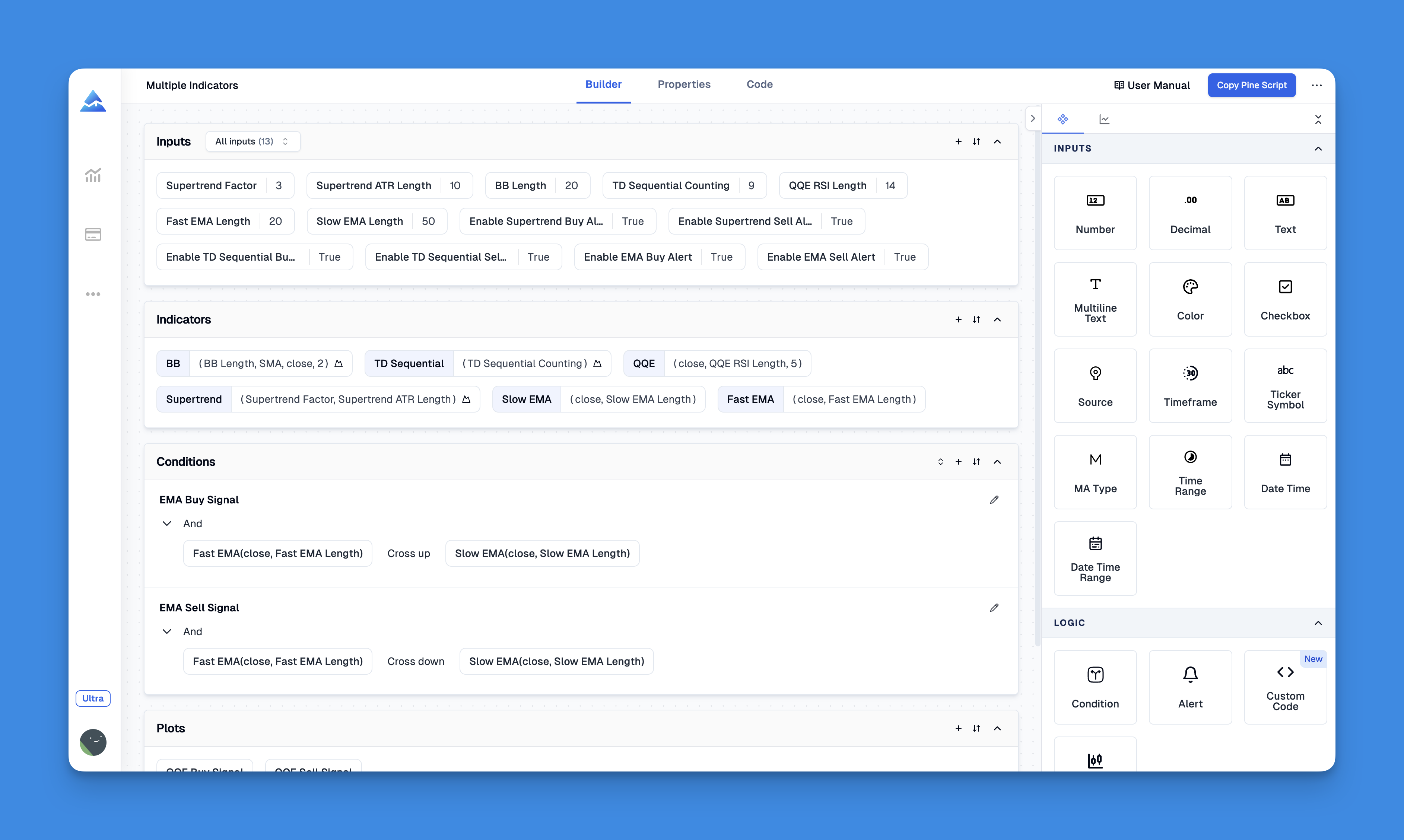
This shift has leveled things considerably. A retail trader with a solid strategy can now compete against institutional teams. It's like having a professional Pine Script programmer on call, minus the hourly rate and the back-and-forth.
Website: Pineify
Check out what Pineify can actually do.Why Pine Script Programmers Are in High Demand
Demand for skilled Pine Script programmers has exploded, and the reasons are pretty straightforward. These pros bridge the gap between trading expertise and technical execution, solving problems that can kill a strategy.
Here's what makes Pine Script programmers so valuable:
Strategy Translation: They take abstract trading concepts and convert them into precise, executable code. This demands understanding both programming and market behavior. I've hired three Pine Script freelancers this year alone, and the best ones charged $80 an hour — worth every dollar when the logic is complex.
Custom Solution Development: Every trader has unique needs. Generic indicators work for some, but successful traders often need specialized tools like moving average channels or advanced RSI variations tailored to their approach.
Performance Optimization: Bad Pine Script slows down charts or produces unreliable signals. Professionals optimize for speed and accuracy, so your strategies perform in live conditions. I prefer code that references confirmed bar data with [1] rather than relying on intrabar ticks — it's less prone to repainting.
Troubleshooting and Maintenance: Markets evolve, and so do strategies. Pine Script programmers provide ongoing support, fixing bugs and adapting as conditions change.
Essential Skills for Aspiring Pine Script Programmers
If you want to become a Pine Script programmer, here's what you'll need:
Technical Foundation: Pine Script is easier than traditional languages, but you still need variables, functions, and conditional logic. The good news is that its syntax is beginner-friendly. I've taught a few colleagues the basics, and most were writing working indicators within two weeks.
Market Knowledge: This is where programmers from other fields trip up. You need to genuinely understand how markets work, not just the textbook definitions. Know the difference between trend-following indicators like moving averages and oscillators like RSI.
Strategy Development: Understanding how strategies perform in live conditions versus backtests. This covers slippage, market impact, and risk management techniques. I haven't found a backtest yet that perfectly predicted live performance, so always expect a gap.
Problem-Solving Skills: Trading logic gets surprisingly complex. You'll debug repainting issues, handle edge cases in market data, and optimize across timeframes.
How Pine Script Execution Really Works
Understanding Pine Script's execution model is crucial. Unlike normal programs that run once and exit, Pine Script runs on an event-driven model.
Every time new data arrives, your script executes top-to-bottom on every historical bar up to the current moment. On a daily chart with two years of data, that's roughly 500 runs every time the market moves.
Here's a working example:
//@version=5
indicator("Smart Moving Average", overlay=true)

length = input.int(20, "Length")
source = input.source(close, "Source")

ma = ta.sma(source, length)
plot(ma, color=color.blue, title="Moving Average")

// Add buy/sell signals
bullish = ta.crossover(close, ma)
bearish = ta.crossunder(close, ma)

plotshape(bullish, style=shape.triangleup, location=location.belowbar, color=color.green)
plotshape(bearish, style=shape.triangledown, location=location.abovebar, color=color.red)
This creates a moving average with automatic buy and sell signals. Something this concise would take far more code in Python or JavaScript.
Business Opportunities in Pine Script Programming
The financial upside for skilled Pine Script programmers is real. Here are the main avenues:
Freelance Development: Upwork and Fiverr have constant requests for custom Pine Script work. Small indicator tweaks go for $50–$150. Full trading strategies with alerts and risk rules run $300 to $1,000+.
Corporate Employment: Trading firms, hedge funds, and fintech companies hire Pine Script specialists. The combination of technical skills and domain knowledge makes these positions well-compensated.
Educational Content: Pine Script courses and tutorials are a growing niche. Many traders monetize what they know by teaching it.
Strategy Licensing: Some programmers create and license their strategies, earning ongoing royalties.
Where Pine Script Falls Short
Pine Script has real limitations worth knowing. It runs exclusively on TradingView and can't connect directly to most brokers for live order execution — you need TradingView's broker integration or a third-party bridge. It also has no native support for machine learning models and can't import external data libraries the way Python can. I've hit the API limit more than once when running complex calculations across multiple symbols, and there's no clean workaround for that.
The Future of Pine Script Development
Several trends are driving continued demand:
Retail Trading Growth: More people are trading than ever, and they want tools that beat basic indicators.
AI Integration: AI can generate basic Pine Script, but human expertise is still needed for sophisticated, market-tested strategies.
Cross-Platform Integration: Pine Script is connecting with more platforms beyond TradingView.
Institutional Adoption: Large trading firms now use Pine Script for rapid prototyping.
The programmers who understand both the technical and trading sides will stay in demand. Now is a solid time to get involved if you're serious about either becoming one or hiring one.
What does a Pine Script programmer actually do?
They write custom scripts for TradingView that automate strategies, build indicators, and generate buy/sell signals. In short: they turn a trader's logic into working code that runs on live and historical price data.
Do I need prior programming experience to learn Pine Script?
Not strictly. Pine Script uses a syntax built around trading concepts, so it's beginner-friendly. Basic familiarity with variables and conditions helps, but plenty of traders pick it up through tutorials within a few weeks.
How much does it cost to hire a Pine Script freelance developer?
Depends on complexity. Simple indicator tweaks run $50–$150. Full automated strategies with alerts and risk management go from $300 to $1,000+. Experienced devs on Upwork charge $30–$80 per hour.
What is the difference between a Pine Script indicator and a strategy?
An indicator shows visual signals on a chart without executing trades — it displays information. A strategy includes entry and exit logic that TradingView can backtest against historical data to measure win rate, profit factor, and other metrics.
Can non-programmers build automated trading tools without writing Pine Script?
Yes. No-code platforms like Pineify let traders build custom indicators and strategies visually. The platform generates valid Pine Script based on your configuration, no coding required.
What are the main limitations of Pine Script for algorithmic trading?
Pine Script runs only on TradingView and can't connect directly to most brokers for live execution without TradingView's integrations. It also lacks native ML support and can't import external libraries the way Python systems can.
How do Pine Script programmers prevent repainting indicators?
Repainting happens when a script uses future data to paint past signals. Programmers prevent it by using confirmed bar data (referencing the previous closed bar with [1]), avoiding lookahead in security calls, and testing on bar close rather than intrabar ticks.