Can AI Generate Pine Script? What Changed

Don't let AI write your Pine Script. You might miss the pleasure of copying a compiler error from TradingView into a chat window, pasting the answer back into the Pine Editor, and finding a fresh error one line down.
In August 2024, that warning was sincere. A general chatbot could explain a moving average clearly, then output a script that mixed two versions of Pine Script. Today, the answer is more specific: AI can generate working Pine Script v6, provided it pairs current language documentation with an automated syntax-check loop. Without that check, generic chat tools still run into the same compiler errors and silent logic bugs. For a new TradingView indicator or strategy, we now start with Pineify Coding Agent.
Why was AI not recommended for Pine Script?
When traders ask why people warned against using AI to generate Pine Script, four recurring failure modes explain the reputation. They still show up whenever you paste prompts into a general-purpose chatbot that has no connection to TradingView's compiler.
1. Mixing Pine Script versions
General models were trained on years of public scripts written in Pine Script v3, v4, v5, and v6. Ask for a v6 indicator and a chatbot may still emit deprecated study() headers, old security() calls, or v5 boolean and type conventions that fail under stricter v6 rules. TradingView documents these breaking changes in the official Pine Script v6 migration guide, and our breakdown of the Pine Script v6 compiler covers why older idioms stop compiling.
2. Invented functions and wrong arguments
Pine Script has narrow namespace rules (ta.*, request.*, strategy.*, math.*). A chatbot without an active v6 reference often invents helper names or passes arguments in the wrong order. That produces immediate Undeclared identifier or parameter mismatch errors in the Pine Editor. If you have hit those messages before, see our guide on what causes the undeclared identifier error in Pine Script.
3. Copy-paste debugging loops
Fixing one compiler error in a plain chat window often introduces another error ten lines away. After three or four rounds of pasting code back and forth, it is easy to lose track of which version holds your alert rule, which one fixed the plot color, and which one broke the entry condition.
4. Scripts that compile cleanly but fail on the chart
Syntax is only half the problem. A script can pass TradingView's compiler with zero errors and still misbehave in live markets. Common examples include alerts firing mid-candle instead of at bar close, wick touches triggering a close-only rule, or higher-timeframe request.security() calls leaking future bar data. TradingView outlines these pitfalls in its official repainting documentation, and we walk through practical fixes in our guide on how to avoid repainting in Pine Script.
What changed since 2024?
The shift is less about a chatbot getting lucky on the first try and more about workflow design. A dedicated Pine Script coding agent keeps the v6 API reference in context and runs syntax validation before handing you the script.
| Task | With a general chatbot in 2024 | With Pineify Coding Agent today |
|---|---|---|
| Use the right Pine version | You looked up unfamiliar functions to see whether they existed in your version. | Choose Pine v6. The built-in knowledge base gives the agent the API reference for that version. |
| Fix a compiler error | You copied the error into chat, pasted the revised script into TradingView, and tried again. | With Auto-fix on, the agent checks the script, edits the flagged code, and runs the check again. |
| Change an alert rule | You had to keep track of which code block held the latest fix. | Ask for the change in the same conversation. The agent edits the current script, which you can review beside the chat. |
| Audit chart behavior | You debugged syntax first and rarely had energy left to test edge cases on historical bars. | Syntax checks finish faster, so your review time goes directly into checking markers and alerts on the chart. |
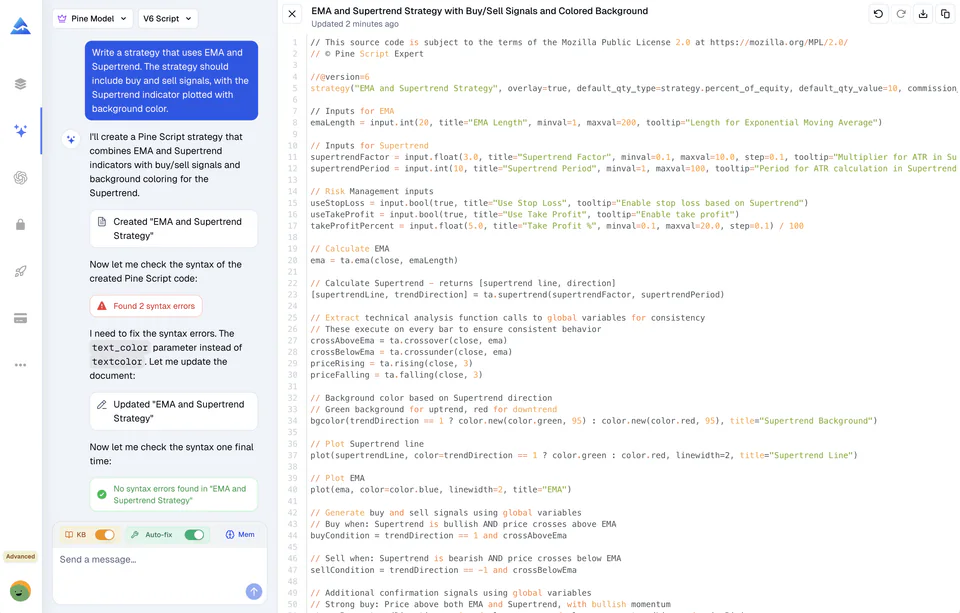
A clean syntax check answers one question: does the code follow Pine Script grammar? It does not guarantee that an alert fires on the exact candle you pictured, or that a strategy backtest reflects realistic fills. For a side-by-side look at how a dedicated workflow compares with pasting into a general chat window, read Pineify vs ChatGPT for Pine Script.
When AI works well for Pine Script (and when to slow down)
Using AI to generate Pine Script makes sense when your trading rule can be stated clearly and checked visually on a chart:
- Combining standard indicators, oscillators, volatility bands, and session markers into one custom overlay
- Turning a multi-condition setup into
alertcondition()oralert()calls with clear bar-close rules - Migrating older v4 or v5 scripts to Pine Script v6 and replacing deprecated functions
- Iterating on input parameters, plot styles, or exit rules without rewriting boilerplate by hand
Slow down and review every line manually when your script involves:
- Multi-timeframe
request.security()calls, where wrong offset orlookaheadsettings can let historical bars peek ahead - Strategy backtest assumptions, including commission, slippage, order fill timing, and
process_orders_on_close - Unstated edge cases, because any model will guess if your prompt skips how to handle ties, gaps, or consecutive signals
If you are weighing an AI coding agent against other TradingView builders, our overview of Pine Script coding tools compared breaks down where visual builders, native Copilot, and prompt-based tools fit.
Give the agent a rule you can verify on a chart
Good AI output starts with a testable rule. Here is a first request you can copy into Pineify Coding Agent:
Build a Pine Script v6 indicator that plots a 20-bar exponential moving average. Mark the first candle that closes above the average after the previous close was at or below it. Use the same condition for an alert. Let me change the length in the indicator settings.
That word first matters. Three consecutive closes above the average should produce one marker. A candle whose wick crosses the average but closes below it should produce none.
4-step verification checklist before you trade with AI-generated Pine Script
- Confirm the script starts with
//@version=6and passes validation with zero compiler errors. - If your rule says "at the close," ask the agent to show where it uses
barstate.isconfirmedso alerts wait for the live candle to finish. - Add the script to a TradingView chart and look specifically for two cases: consecutive candles above the average (should plot once) and wick-only touches (should plot zero).
- When you want to add a cross-below marker, a trend filter, or a stop loss, request the edit in the same conversation so the agent updates the current source rather than starting from scratch.
This is where we put the time we used to spend chasing compiler errors. Decide which candle counts, let the agent write and validate the code, then compare its markers against your own reading of the chart.
Frequently Asked Questions
Is it safe to use AI to generate Pine Script?
Yes, as long as you treat AI output as code to verify rather than a finished trading system. Use a tool with Pine Script v6 reference context and syntax validation, then inspect the plotted signals, alert timing, and strategy settings on a TradingView chart before risking real capital.
Why does ChatGPT often produce errors in Pine Script?
General chatbots mix syntax from older Pine Script versions (v4 and v5) with v6, guess function names or argument orders, and cannot run TradingView's compiler checks automatically. Without a validation loop, you end up copying errors back and forth manually.
Can AI write Pine Script v6 without syntax errors?
Yes. When an AI coding agent has access to a Pine Script v6 knowledge base and an automated syntax-check and Auto-fix loop, it can catch and repair compiler issues before you paste the code into TradingView's Pine Editor.
Can AI-generated Pine Script still repaint even if it compiles?
Yes. Passing a syntax check only confirms valid Pine grammar. A script can still repaint if it triggers signals on unconfirmed live bars instead of checking barstate.isconfirmed, or if it misconfigures higher-timeframe request.security() calls.
Should I use an AI coding agent or a visual Pine Script editor?
Use a visual editor when you want to assemble standard indicators, conditions, and exits from selectable controls without touching source code. Use an AI coding agent when your setup needs custom logic, specific plotting behavior, or direct edits to Pine Script v6 source.