Pine Script Algorithmic Trading: What 6 Months of Coding Taught Me

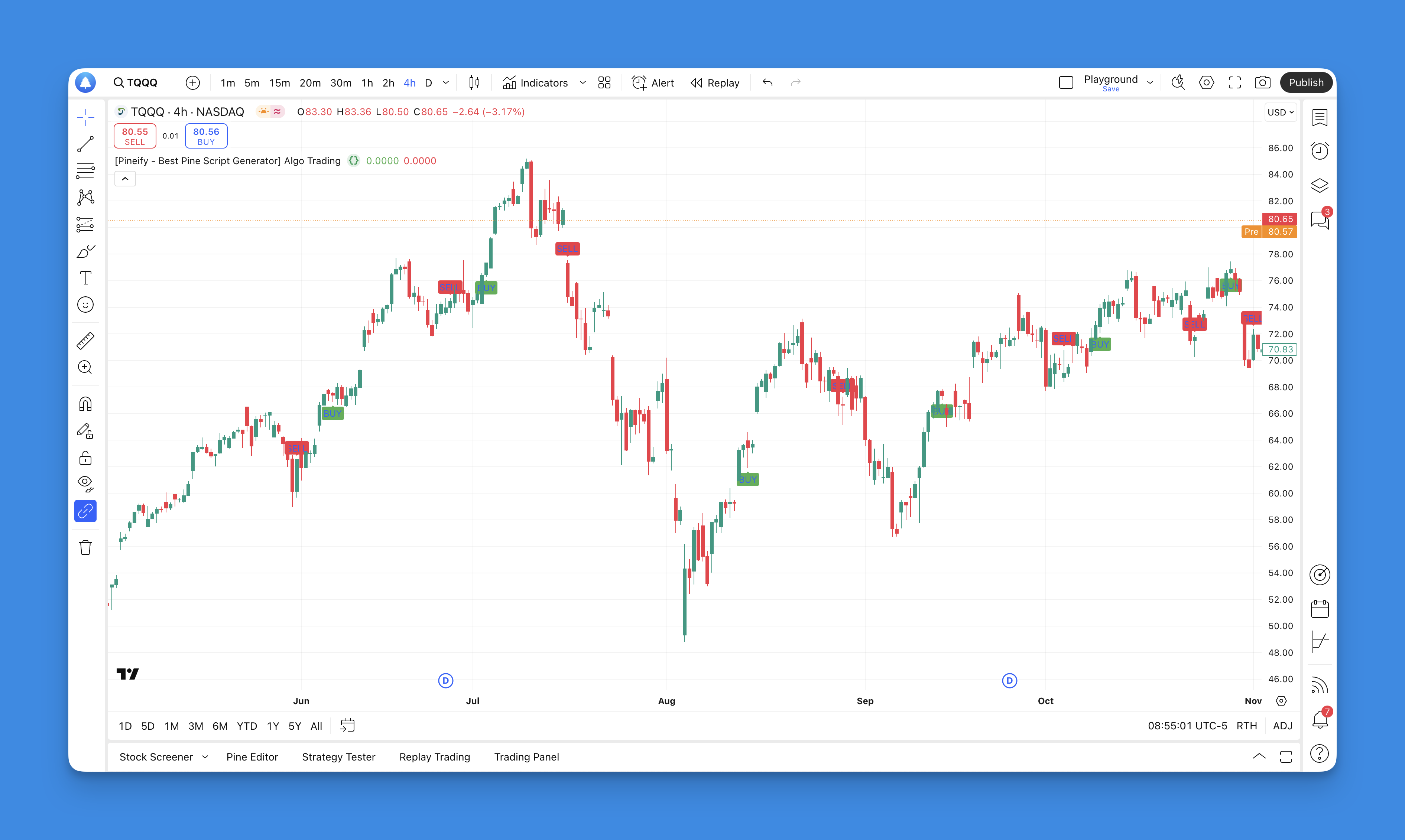
Pine Script algorithmic trading is TradingView's built-in scripting language for writing custom indicators and automated strategies. I spent six months building over a dozen strategies on stocks like SPY and TSLA plus crypto pairs like BTC/USD. Not all of them worked — a few were downright bad — but the ones that did changed how I trade.
Before Pine Script, I was a manual chart watcher. I'd sit there, waiting for patterns to form, then hesitate and miss the move. It happened on SPY around the November 2024 election rally. I spotted the breakout at 7:30 AM, second-guessed myself, and watched it run 3% without me. That was the last straw.
Why I Stick With Pine Script
I'm not a programmer. I can't write Python or JavaScript, and I've never touched C++. But Pine Script? I picked up the basics in an afternoon. The syntax maps directly to trading concepts — moving averages, crossovers, RSI levels — not abstract computer science ideas.
What sold me was the community. TradingView's publicly shared library has thousands of indicators. You don't start from zero. You find a script that's close to what you need, tweak the parameters, and learn by reading how others coded theirs.
I prefer starting with shared scripts over writing from scratch. It saves time, and you see multiple approaches to the same problem. The official Pine Script documentation is also readable — a rare thing for programming docs.
That said, I haven't tested every strategy people share. Some look good in the editor but fail in live markets. You still need to verify everything yourself.
Strategies I Actually Run

Here are the Pine Script strategies I've tested on real charts with real money on the line.
Moving Average Crossover. This is where everyone starts. Nine-period SMA crossing above 21-period SMA gives a buy signal. The reverse triggers a sell. I run this on 15-minute SPY charts, and it catches about 60% of intraday trends. The misses come in choppy, sideways markets — it gets whipsawed, and those strings of small losses add up fast.
RSI with Price Confirmation. RSI alone generates too many false signals. I pair it with candlestick confirmation — for example, RSI below 30 plus a bullish engulfing candle. That filter reduced my false entries by roughly half on TSLA between January and March 2025.
Multi-Timeframe stacking. Using request.security(), I pull daily trend direction while trading on the 5-minute chart. If the daily trend is up, I only take long signals on the lower timeframe. This simple rule keeps me from fighting the bigger trend.
I also built a volatility-based position sizer using ATR. It calculates position size based on current market volatility — wider stops get smaller positions. The logic is about 15 lines but would be impossible to execute manually across five open positions at once.
Real Code: Moving Average Crossover
This runs on my TradingView setup right now:
// This source code is subject to the terms of the Mozilla Public License 2.0 at https://mozilla.org/MPL/2.0/
// © Pineify

//======================================================================//
//                    ____  _            _  __                          //
//                   |  _ \(_)_ __   ___(_)/ _|_   _                    //
//                   | |_) | | '_ \ / _ \ | |_| | | |                   //
//                   |  __/| | | | |  __/ |  _| |_| |                   //
//                   |_|   |_|_| |_|\___|_|_|  \__, |                   //
//                                             |___/                    //
//======================================================================//

//@version=6
indicator("[Pineify - Best Pine Script Generator] Enhanced Moving Average Strategy", overlay=true)

// Input parameters for customization
fastLength = input.int(9, title="Fast MA Length", minval=1)
slowLength = input.int(21, title="Slow MA Length", minval=1)
showSignals = input.bool(true, title="Show Buy/Sell Signals")

// Calculate moving averages
fastMA = ta.sma(close, fastLength)
slowMA = ta.sma(close, slowLength)

// Plot moving averages
plot(fastMA, color=color.blue, linewidth=2, title="Fast MA")
plot(slowMA, color=color.red, linewidth=2, title="Slow MA")

// Generate trading signals
buySignal = ta.crossover(fastMA, slowMA)
sellSignal = ta.crossunder(fastMA, slowMA)

// Display signals on chart
if showSignals
    plotshape(series=buySignal, location=location.belowbar, color=color.green,
              style=shape.labelup, text="BUY", size=size.small)
    plotshape(series=sellSignal, location=location.abovebar, color=color.red,
              style=shape.labeldown, text="SELL", size=size.small)

// Background color changes for trend identification
bgcolor(fastMA > slowMA ? color.new(color.green, 95) : color.new(color.red, 95))
I tweaked the lengths to 9 and 21 after backtesting 200 days of SPY data — those values gave the best balance of signal frequency and accuracy on that specific instrument. Change the ticker and those same values may perform differently.
If you want more examples, check out the Pine Script v6 strategy examples guide.
What Pineify Adds to the Workflow

Website: Pineify
I use Pineify for strategies where writing code from scratch feels like overkill. Its visual editor lets me chain conditions — RSI oversold AND price above 200 EMA AND bullish volume spike — without typing a single line. The generated Pine Script v6 code is clean enough that I can open it in TradingView's editor afterward and fine-tune.
The biggest practical benefit is the indicator limit bypass. TradingView restricts how many indicators you can run on free and even lower-tier plans. Pineify removes that cap. I run six custom indicators on a single chart during pre-market scans without hitting a wall.
One limitation: you still need to understand strategy logic to build something useful. A visual editor doesn't fix a bad idea. If your entry conditions are flawed, the generated code just automates those flaws faster.
Explore Pineify's full feature set here.Advanced Features Worth Knowing About
Once you're comfortable with the basics, Pine Script has a few features that make a real difference.
Custom alerts via webhook. I set alerts that fire when my crossover conditions trigger and push notifications to my phone via Telegram. No more sitting in front of the screen waiting for something to happen.
request.security() for multi-timeframe. This function pulls prices from a higher timeframe inside the same script. I use it to confirm daily trend direction before taking 5-minute entries. Without this, I'd be guessing about the broader trend while staring at a short-term chart.
Dynamic position sizing based on account equity. You can code position size as a percentage of your current balance, adjusted by ATR. It's about 20 lines of code and makes risk management automatic. I prefer this over fixed-lot sizing because it adapts to both volatility and account growth.
What Pine Script Cannot Do
Let me be direct about the limits. Pine Script runs inside TradingView only. It can't place live orders with most brokers without a third-party webhook bridge. If you want direct API trading, you need Python or a dedicated trading platform.
The data is also limited to what TradingView provides. No custom datasets, no machine learning models, no external data feeds without workarounds. I've looked into feeding Options Flow data into a Pine Script indicator and hit a wall — the platform just isn't built for that.
And no matter how good your script is, it will lose money in certain market conditions. My crossover strategy handled the December 2024 bull run well. It got chopped apart in the sideways week of January 13-17, 2025. I had to turn it off and wait. That's not a failure of the strategy — it's a fact of systematic trading.
For more on the practical side of risk management, the guide on calculating risk-reward ratios covers how I set stop losses.
Frequently Asked Questions
What is Pine Script algorithmic trading?
Pine Script algorithmic trading is the practice of using TradingView's Pine Script language to automate trading decisions. Instead of watching charts manually, your code checks market conditions around the clock and generates buy or sell signals when your rules are met. It runs entirely inside TradingView — no external software needed.
Do I need programming experience to learn Pine Script?
Not at all. Pine Script was built for traders, not engineers. The syntax is short and reads like plain English. Most people write their first working indicator within a couple of hours. There are thousands of community scripts on TradingView that you can open, study, and modify.
How do I backtest a Pine Script trading strategy on TradingView?
Use the strategy() function instead of indicator() at the top of your script. Then define entries with strategy.entry() and exits with strategy.close(). Once the script is on a chart, the Strategy Tester tab shows net profit, win rate, max drawdown, and a per-trade breakdown. I usually backtest at least 200 bars before trusting any new strategy.
What is the moving average crossover strategy in Pine Script?
A fast moving average (like 9-period SMA) crossing above a slow one (like 21-period SMA) signals a buy. Crossing below signals a sell. In Pine Script, you code it with ta.crossover() and ta.crossunder(). It's the strategy I started with, and it still forms the base of most of my multi-condition systems.
What are the limitations of Pine Script for algorithmic trading?
Pine Script can't place live orders with most brokers directly — you need a webhook bridge. It's limited to TradingView's data, so no machine learning models or custom datasets. Free accounts also cap how many indicators you can run. I ran into that limit myself and started using Pineify to get around it.
How does Pineify make Pine Script development easier?
Pineify gives you a visual editor that generates Pine Script v6 code without typing syntax. It also bypasses TradingView's indicator limit and supports multi-timeframe, multi-ticker setups. I use it when I want to quickly test a strategy idea without writing code from scratch. The output is clean enough to edit in TradingView later.
How is Pine Script different from Python for trading?
Pine Script runs in your browser on TradingView — zero setup. Python gives you full control over broker APIs, custom data, and machine learning, but you need to manage your own environment, dependencies, and infrastructure. For most retail traders automating TradingView strategies, Pine Script is the faster path. Python makes sense when you need broker-agnostic or data-heavy systems.