Build a Simple Breakout Trading Strategy in Pine Script

A breakout strategy needs a precise boundary, an entry event, and an exit rule. The Pine Script example below supplies the first two: it checks whether a bar's high or low exceeds the previous lookback channel. It is a small entry baseline, with no protective stop or profit target.
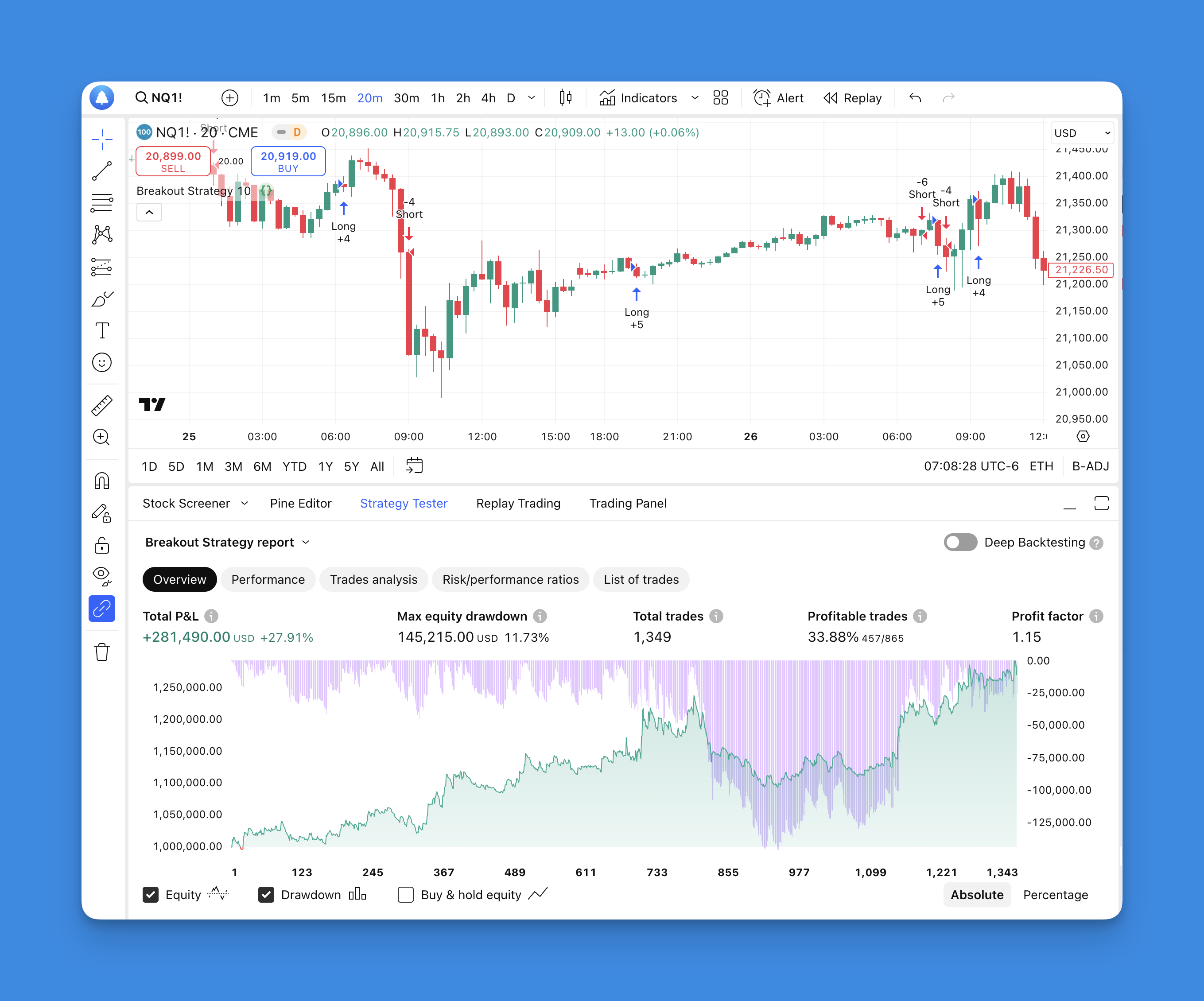
Define what counts as a breakout
For a 20-bar lookback, the upper boundary is the highest high of the preceding 20 bars and the lower boundary is their lowest low. The signal bar is excluded from those boundaries.
There are two different entry questions:
- Did price trade beyond the boundary? Compare the current high or low with the previous channel. A wick can qualify even if the bar closes inside it.
- Did price close beyond the boundary? Compare the confirmed close with the previous channel. This waits for a different event and can produce fewer or later signals.
The example uses the first definition. It does not place a resting order at the channel boundary. That distinction matters when you compare the chart's breakout price with a simulated fill.
The Pine Script entry baseline
Open TradingView's Pine Editor, create a strategy, paste the following source, save it, and select Add to chart. Use standard candlesticks and record the symbol's exchange, chart interval, and session settings before examining the results.
// This source code is subject to the terms of the Mozilla Public License 2.0 at https://mozilla.org/MPL/2.0/
// © Pineify

//======================================================================//
//                    ____  _            _  __                          //
//                   |  _ \(_)_ __   ___(_)/ _|_   _                    //
//                   | |_) | | '_ \ / _ \ | |_| | | |                   //
//                   |  __/| | | | |  __/ |  _| |_| |                   //
//                   |_|   |_|_| |_|\___|_|_|  \__, |                   //
//                                             |___/                    //
//======================================================================//

//@version=6
strategy("Simple Breakout Strategy", overlay=true)

// How many bars back do we look for our highs and lows?
length = input.int(title="Lookback Period", minval=1, maxval=1000, defval=20)

// Find the highest high and lowest low over our lookback period
upBound = ta.highest(high, length)
downBound = ta.lowest(low, length)

// Enter long when we break above the previous bar's upper bound
if (high > upBound[1])
    strategy.entry("Long", strategy.long)

// Enter short when we break below the previous bar's lower bound
if (low < downBound[1])
    strategy.entry("Short", strategy.short)
upBound[1] and downBound[1] refer to the channel calculated on the previous bar. This excludes the current high and low from the threshold being tested. It does not establish that every possible modification of this strategy is free from repainting.
Under the default calculation settings, the strategy evaluates after a bar closes and a market order normally fills on the next available tick, typically the next bar's open in historical testing. An opposite strategy.entry() can reverse an existing position. These are broker-emulator rules, not evidence of executable live fills. See TradingView's strategy execution documentation.
What this example does not decide
There is no stop-loss, take-profit, or time-based exit. A trade can remain open until an opposite entry reverses it. Calling that a complete risk-managed breakout system would misdescribe the code.
A wide bar can breach both boundaries. Both independent conditions can be true on the same bar. Before building a trading system around this baseline, choose how to handle that case: skip the bar, prioritize one side, or use a separately specified intrabar model. Do not infer the order of the high and low from an OHLC candle alone.
A touch and a close are different signals. If you later change the condition or enable calculation on every tick, save a new version and rerun the test. TradingView explains why historical and realtime behavior can differ in its repainting documentation.
Turn the idea into a reproducible experiment
Write down the test specification before adding filters. A useful record contains:
| Decision | What to record |
|---|---|
| Data | Exchange-qualified symbol, interval, session, date range, and chart type |
| Entry | Wick breach or confirmed close; when the order is submitted |
| Conflicts | What happens when both boundaries are breached |
| Exits | Exact stop, target, opposite-signal, or time-exit rule |
| Sizing | Fixed units or a defined risk budget, plus contract value where relevant |
| Costs | Commission schedule, spread assumption, and slippage assumption |
| Evaluation | Development period and a separate period reserved for validation |
A fixed-distance stop, an ATR-based stop, and an opposite-channel exit are three different hypotheses. Select one to test first. For an ATR stop, also specify whether ATR is frozen at entry or recalculated; those choices can change exposure after entry. The source above implements none of these additions.
Inspect individual trades before interpreting an aggregate return. Check a normal breakout, a gap, a losing trade, an opposite signal, and a bar that crosses both boundaries. Confirm that order timing and size match the written rules. A report with a large open position also needs separate inspection from closed-trade results.
Test one filter at a time
A trend filter can exclude entries against a longer moving average. A volume filter can require activity above a defined baseline. A session filter can restrict entries to specified hours. Each changes the set of trades; none establishes a performance improvement by itself.
Compare the original rules with one modification while keeping the dates, exits, sizing, and cost assumptions fixed. Report the number of trades, net result after modeled costs, drawdown, average win and loss, and exposure. Then evaluate the chosen rules on the reserved period without selecting new parameters from its results.
There is no verified win rate or average payoff for this example supplied here. A low win rate can coexist with a profitable sample, but only the full distribution of wins, losses, costs, and trade sizes can establish that result. Repeatedly selecting the best lookback on the same history does not provide an independent test.
Questions before using the results
Which lookback is best? There is no universal setting. The default of 20 bars defines the example; it is not an optimization result. Check whether nearby settings produce similar behavior rather than relying on a single peak.
Can this trade a live brokerage account? The example produces simulated strategy orders. Live execution requires a separate supported connection and order-handling process; a Strategy Tester result does not establish that such a connection exists.
What should be added first? Resolve conflicting signals and write the exit and sizing rules. More indicators cannot substitute for those decisions.
