Introduction to Pine Script Buy/Sell Signals

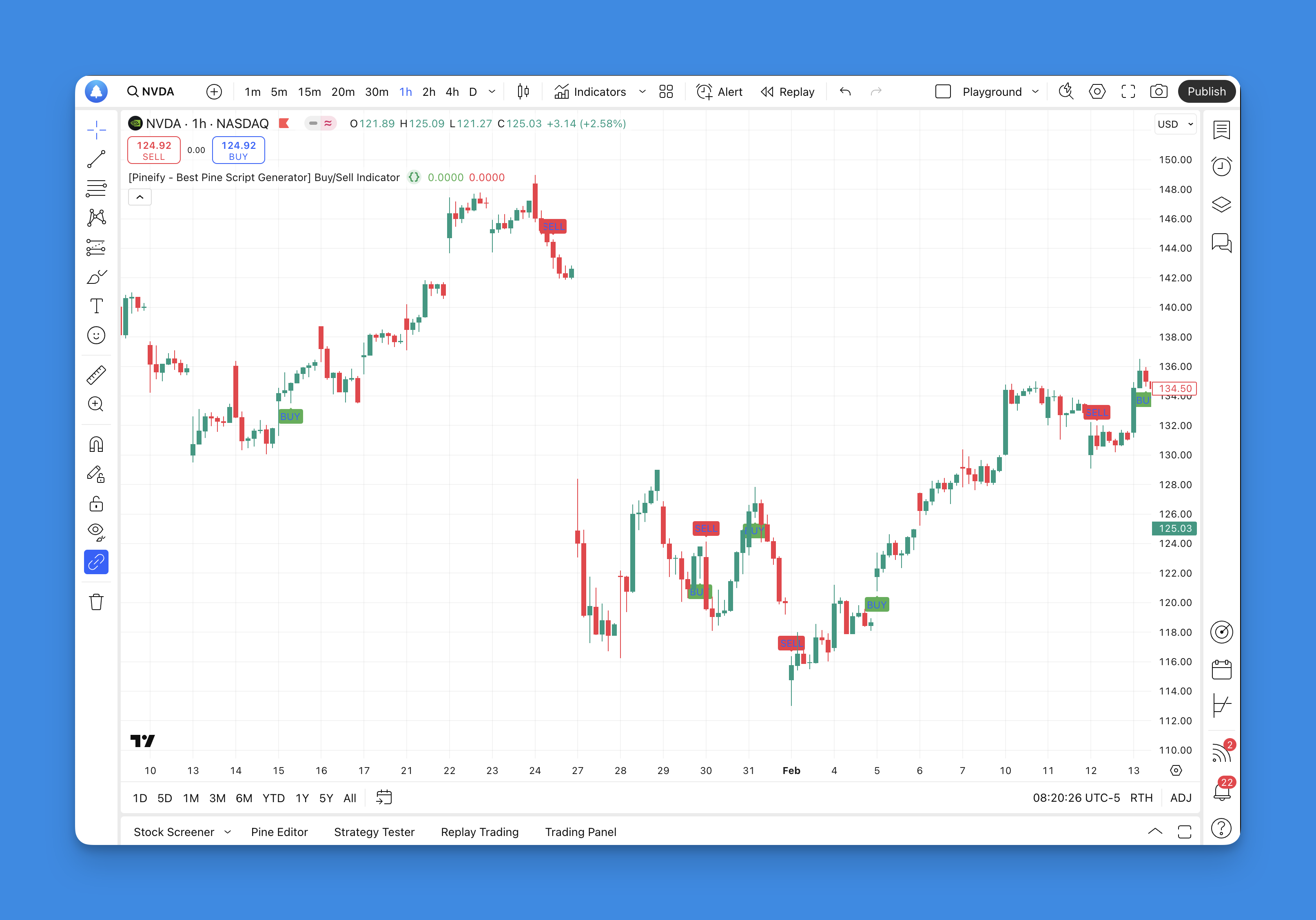
In the world of trading, having reliable buy and sell signals is crucial for making informed decisions. Pine Script, developed by TradingView, is a powerful tool that allows users to create custom indicators and strategies for generating these signals. This article will delve into how to use Pine Script to create effective buy/sell indicators, focusing on moving averages and multi-indicator strategies.
What is Pine Script?
Pine Script is a programming language designed for backtesting trading strategies and creating custom indicators on the TradingView platform. It offers a flexible way to analyze markets using various technical indicators, making it a favorite among traders and analysts.
Creating a Basic Buy/Sell Indicator with Moving Averages
One of the simplest yet effective ways to generate buy/sell signals is by using moving averages. Here’s how you can create a basic indicator:
How It Works

- Fast and Slow Moving Averages: Use a fast moving average (e.g., 5-day SMA) and a slow moving average (e.g., 20-day SMA).
- Buy Signal: When the fast MA crosses above the slow MA, it generates a buy signal.
- Sell Signal: Conversely, when the fast MA crosses below the slow MA, it generates a sell signal.
Streamlining Buy/Sell Signals Through Visual Strategy Building
Pineify revolutionizes Pine Script signal creation by enabling traders to develop sophisticated buy/sell triggers without coding expertise. The platform's visual condition editor allows combination of 14+ technical indicators, price action patterns, and custom variables through intuitive logic gates - enabling complex strategies like "RSI < 30 AND MACD crossover" in minutes.

Key features for signal generation include:
- Multi-timeframe analysis: Test strategies across different chart periods simultaneously
- Custom alert triggers: Set audible/visual alerts when conditions meet entry/exit criteria
- Automatic stop-loss/take-profit: Attach risk management parameters directly to signals
- Backtesting integration: Validate signal effectiveness across historical data
The platform overcomes TradingView's two-indicator limit by letting users bundle multiple technical analysis tools into single scripts - combining Bollinger Bands, moving averages, and volume oscillators into unified buy/sell signals. For advanced users, Pineify's custom code import feature allows integration of existing Pine Script logic while adding visual editing capabilities to refine entries/exits.
Website: Pineify
Click here to view all the features of Pineify.Example Pine Script Code:
// This source code is subject to the terms of the Mozilla Public License 2.0 at https://mozilla.org/MPL/2.0/
// © Pineify

//======================================================================//
//                    ____  _            _  __                          //
//                   |  _ \(_)_ __   ___(_)/ _|_   _                    //
//                   | |_) | | '_ \ / _ \ | |_| | | |                   //
//                   |  __/| | | | |  __/ |  _| |_| |                   //
//                   |_|   |_|_| |_|\___|_|_|  \__, |                   //
//                                             |___/                    //
//======================================================================//

//@version=6
indicator('[Pineify - Best Pine Script Generator]  Buy/Sell Indicator', overlay = true)

// Define moving averages
fastMA = ta.sma(close, 5)
slowMA = ta.sma(close, 20)

// Create buy and sell signals
buySignal = ta.crossover(fastMA, slowMA)
sellSignal = ta.crossunder(fastMA, slowMA)

// Plot signals
plotshape(series = buySignal, title = 'Buy Signal', location = location.belowbar, color = color.new(color.green, 0), style = shape.labelup, text = 'BUY')
plotshape(series = sellSignal, title = 'Sell Signal', location = location.abovebar, color = color.new(color.red, 0), style = shape.labeldown, text = 'SELL')
Advanced Multi-Indicator Strategies
For more sophisticated traders, combining multiple indicators can enhance the reliability of buy/sell signals. Here are some popular combinations:
Multi-Indicator Combinations:
- RSI & CCI: Combines Relative Strength Index (RSI) and Commodity Channel Index (CCI) signals.
- RSI & Stochastic: Uses RSI and Stochastic Oscillator signals.
- All Signals: Displays individual signals from RSI, CCI, and Stochastic Oscillator.
Benefits of Multi-Indicator Strategies:
- Customization: Allows traders to select the combination that best fits their strategy.
- Clarity: Uses arrows, labels, and vertical lines to clearly mark entry points.
- Flexibility: Can be adjusted for overbought/oversold levels and indicator lengths.
How to Use These Strategies Effectively
To maximize the potential of these indicators, follow these tips:
- Backtest Thoroughly: Test your strategy on historical data before live trading.
- Combine with Other Tools: Use support/resistance levels or volume analysis for additional confirmation.
- Avoid Overloading: Limit the number of signals to prevent clutter on your chart.
Conclusion
Creating effective buy/sell signals with Pine Script can significantly enhance your trading strategy. Whether you prefer simple moving average crossovers or more complex multi-indicator strategies, Pine Script offers the flexibility to tailor your approach to the markets.
Use Pineify to create custom and reliable buy/sell signals without needing extensive coding knowledge. By leveraging its visual strategy builder, you can develop sophisticated trading strategies that combine multiple indicators and customize them to your specific trading style. Start experimenting with these tools today to enhance your trading decisions and potentially improve your market performance.