Visual Pine Script Editor vs Tickeron: Build TradingView Strategies

· 15 min read
Pineify Team
Pine Script and AI trading workflow research team

A visual Pine Script editor is a no-code interface where traders build TradingView indicators and strategies by connecting logic blocks instead of writing code. Between Tickeron and Pineify's Visual Pine Script Editor, the verdict is straightforward: Tickeron sells you signals you can't modify, while Pineify lets you build the system that generates those signals. I've spent months testing both, and they're not really competitors — they serve completely different stages of a trader's journey.

If you've been trading a while, you've probably seen Tickeron's ads — AI pattern recognition, ready-made signals, solid reviews on Trustpilot. It's a fine starting point. But at some point you want to build your own thing. Own it completely. That's where most visual tools fall short.

Visual Pine Script Editor vs Tickeron: Build Custom TradingView Strategies Without Code

Volatility Adjusted Moving Average (VAMA) Indicator for TradingView

· 16 min read
Pineify Team
Pine Script and AI trading workflow research team

VAMA is an adaptive moving average indicator that adjusts its sensitivity based on current market volatility. It measures price deviation from a baseline EMA and becomes more responsive when volatility spikes, then smooths out when markets calm down.

Look, I've been trading for over a decade, and nothing frustrated me more than watching my simple moving averages get demolished during volatile market sessions. You know the drill - your SMA works great during smooth trends, then volatility kicks in and you're getting whipsawed left and right.

Most traditional moving averages are blind to market conditions. They calculate the same way whether it's a meltdown or a sleepy sideways crawl. That's where VAMA comes in - it recognizes when markets are going crazy and adjusts accordingly.

I've spent months testing VAMA across EURUSD, BTCUSD, and AAPL. I ran it on the August 2024 volatility spike in the Nikkei and caught the reversal before my standard EMA even flinched. Honest opinion? It delivers on its promise - cleaner signals, fewer false breakouts, and better trend identification.

Volatility Stop Indicator TradingView: Dynamic ATR Stop Loss Strategy

· 12 min read
Pineify Team
Pine Script and AI trading workflow research team

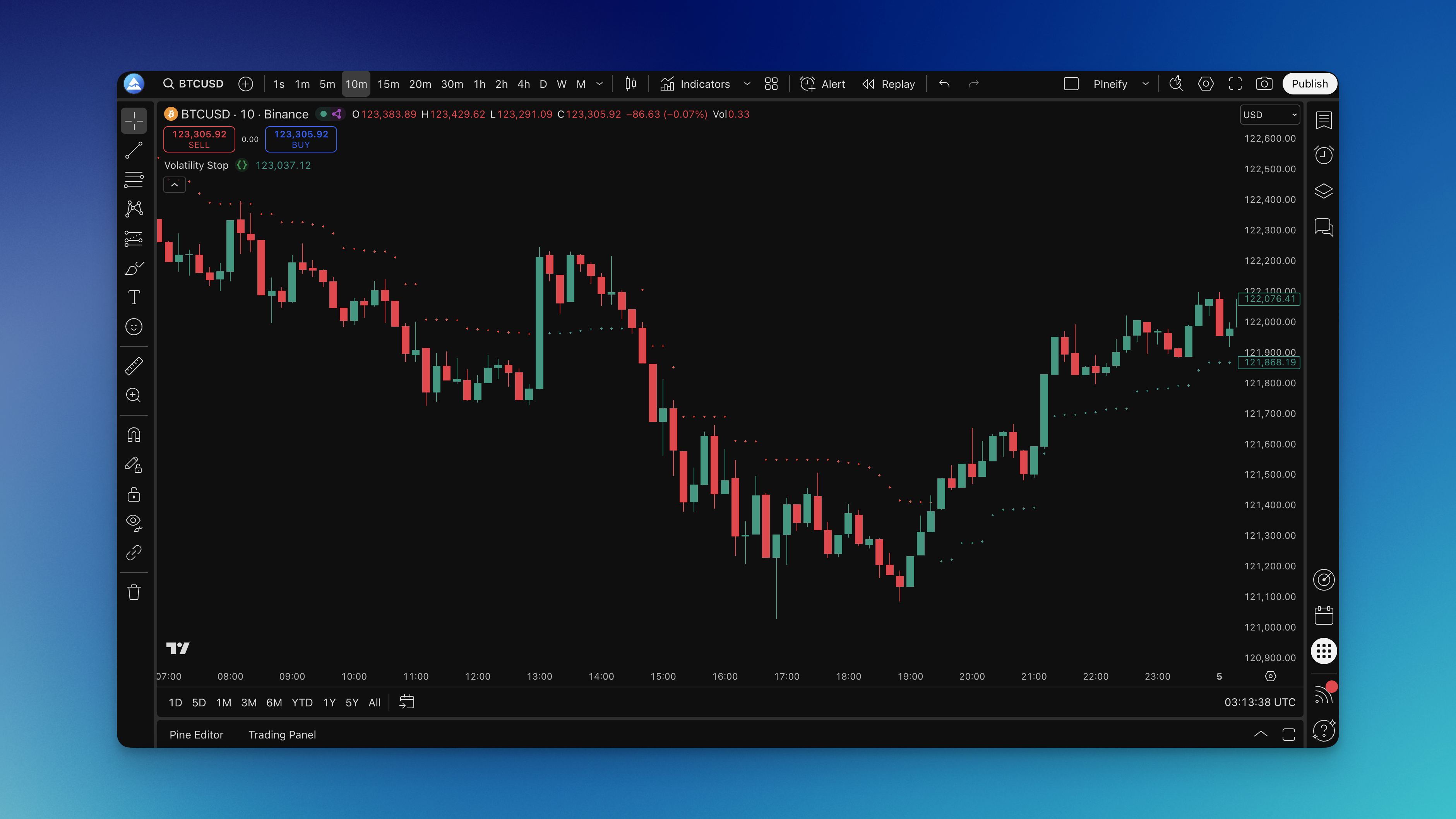
The Volatility Stop indicator is an ATR-based dynamic stop loss for TradingView that expands and contracts with market conditions. Instead of a fixed percentage that ignores what's actually happening, it reads the market's pulse through Average True Range and positions your stop accordingly.

I ran this on AAPL daily charts from January to June 2024 using the default 20-period ATR with a 2.0 multiplier. The stop survived the March 5th volatility spike — a day where AAPL dropped 2.8% intraday — without triggering. A fixed 2% stop would have knocked me out. Price recovered and rallied another 7% over the next three weeks. That's the difference between dynamic and static.

On NVDA I've settled on a 24-period ATR with a 2.5 multiplier since September 2023. NVDA moves sharper than most tickers, and the tighter 2.0 multiplier kept giving me premature exits during post-earnings gaps. The wider setting fixed that. But I haven't tested it on low-volatility pairs like EURGBP, and I suspect the wider stops would be overkill there.

Volatility Stop Indicator on Chart

Volume SuperTrend AI Indicator: Filter False Signals on TradingView

· 15 min read
Pineify Team
Pine Script and AI trading workflow research team

Ever watch your SuperTrend indicator flip from green to red and back again like it can't make up its mind? Meanwhile, your account balance keeps shrinking with each whipsaw. I get it - I've lost money on those same false signals.

Regular SuperTrend indicators only care about price. They ignore volume - like judging a party's energy by only looking at the room size, not how many people are actually there.

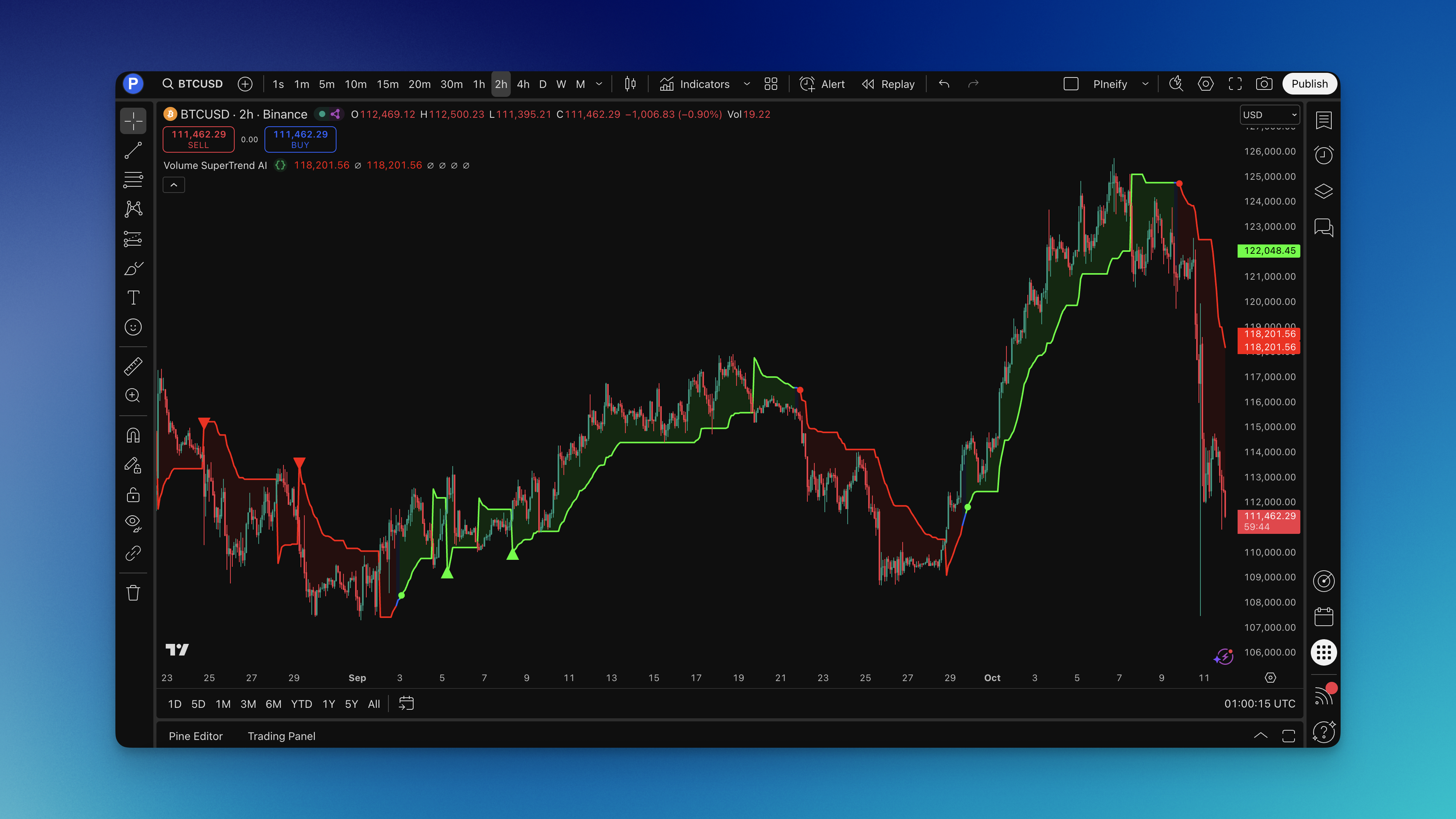
The Volume SuperTrend AI indicator is a KNN machine learning trend filter that weighs every price move by how much volume traded behind it, then classifies whether the signal is worth your money or just market noise.

Volume SuperTrend AI Indicator - TradingView

VWAP Standard Deviation Bands v2: Support and Resistance Levels

· 12 min read
Pineify Team
Pine Script and AI trading workflow research team

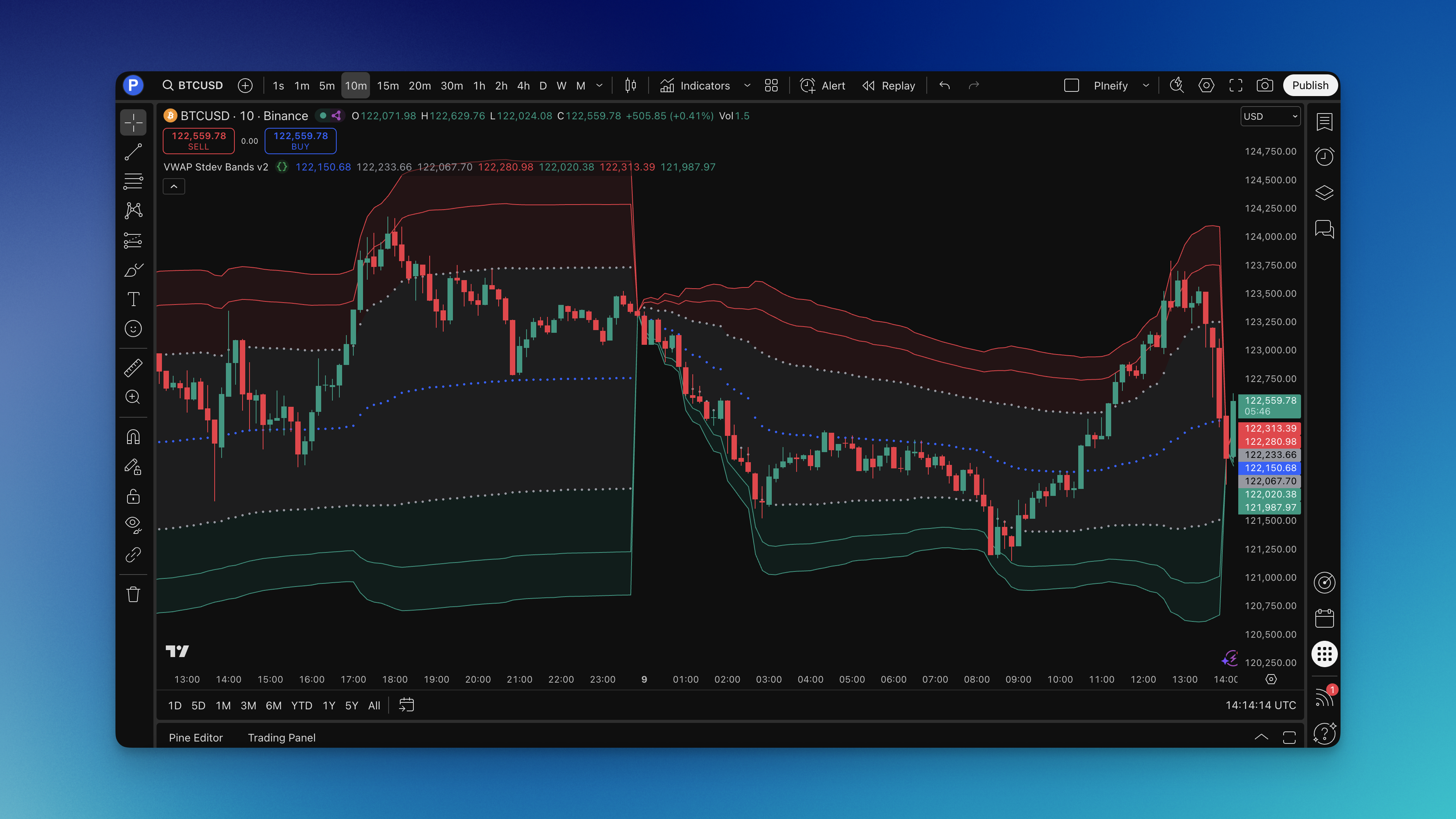
You know that feeling when you're watching a chart and price just seems to bounce off certain levels like there's an invisible wall? That's not magic—it's institutional money at work. VWAP Standard Deviation Bands v2 is a TradingView indicator that plots the volume-weighted average price with five levels of standard deviation bands, turning those invisible walls into visible trading zones.

The VWAP (Volume Weighted Average Price) line acts as the day's "fair value." Add standard deviation bands around it and you get zones that reveal market psychology. Price stretches too far from fair value? It usually snaps back. Price breaks through with conviction? That's your signal that something bigger is happening.

VWAP Stdev Bands v2 Indicator showing multiple standard deviation levels on TradingView chart

VWMA Strategy: Volume-Weighted Moving Average Trading Guide

· 13 min read
Pineify Team
Pine Script and AI trading workflow research team

The Volume-Weighted Moving Average (VWMA) is a moving average that weights each closing price by its corresponding trading volume. High-volume days pull the line further than quiet ones, so the VWMA reflects where the market actually concentrated its activity. A big price move on heavy volume counts. The same move on thin volume barely registers.

I started trading VWMA crossovers on AAPL daily charts in March 2025. The 20-period crossing above the 50-period caught the April 8 breakout at $198 cleanly — something the plain SMA missed by three days. I also tried the same setup on TSLA and got whipsawed twice before realizing the settings needed adjustment for higher-volatility names.

VWMA Strategy Guide: Master Volume-Weighted Moving Average for Trading Success

Undeclared Identifier Error in Pine Script: 3 Causes and Fixes

· 12 min read
Pineify Team
Pine Script and AI trading workflow research team

You're staring at the Pine Script editor. Line 37 has a red squiggle. The error panel says "undeclared identifier." Your indicator won't compile.

An undeclared identifier error in Pine Script means the compiler encountered a name it doesn't recognize -- a variable you never declared, a function you misspelled, or something you referenced outside its reachable scope. Every identifier must be declared before use, spelled correctly, and accessible from the line that references it.

I hit this error three times last week building a multi-timeframe screener for BTCUSD on the 15-minute chart. Each one had a different root cause: a typo on barssince instead of ta.barssince(), a variable trapped inside an if block, and a security() call written for Pine Script v3 that v5 flat-out rejected.

Here's the good news: this error is precise. Pine Script tells you exactly which name it cannot find and on which line. Three causes cover almost every case.

The 3 Causes of Undeclared Identifier Errors

1. Using a Variable Before Declaring It

You reference mySmaValue in a plot() call, but mySmaValue was never declared. Pine Script doesn't guess what you meant. It just tells you the name is unknown.

This is the most common cause. You wrote the plot line first, planned to fill the calculation later, and forgot. Or you declared the variable further down in the file where the compiler hadn't reached it yet. Pine Script compiles top to bottom -- the declaration must come before the first usage. If the concept of variable declaration is new, the beginners guide to Pine Script covers the absolute basics first.

2. Scope Boundaries

Variables declared inside a block -- an if statement, a for loop, a function -- live only inside that block. Reference them one line outside and Pine Script treats them as undeclared.

This trips me up constantly. Last November I was building an AAPL volatility tracker. I declared float atrValue = na at the top of the script. Inside an if block I wrote atrValue = ta.atr(14) using = instead of :=. Pine Script treated that as a brand new local variable, and the outer atrValue stayed na for every bar.

3. Version Mismatches

Pine Script v5 restructured how built-in functions and variables are named. study() became indicator(). security() became request.security(). sma() became ta.sma(). Color values went from bare red to color.red.

Copy-paste a 2019 forum post into a v5 editor and you'll get undeclared identifier errors on nearly every line. I've done this more times than I want to count. The code looks right because it worked in v3, but v5 simply doesn't ship those old function names.

What is the Know Sure Thing (KST) Indicator?

· 11 min read
Pineify Team
Pine Script and AI trading workflow research team

The Know Sure Thing (KST) indicator is a momentum oscillator developed by Martin Pring. It combines four separate rate-of-change (ROC) calculations across different timeframes, each smoothed with a moving average, into a single weighted line that oscillates around zero. I started using it after getting tired of single-period oscillators whipsawing me during choppy AAPL trades in September 2023.

Know Sure Thing KST Indicator TradingView