Pineify Coding Agent vs Pine Script Wizard: Workflow Comparison

Pineify and Pine Script Wizard both offer AI-assisted Pine Script generation. The useful comparison is how each handles a complete revision: define a rule, generate code, diagnose a failure, preserve the intended behavior, and test it in TradingView. This article is published by Pineify; it does not present an independent benchmark or a measured accuracy ranking.
What the available evidence establishes
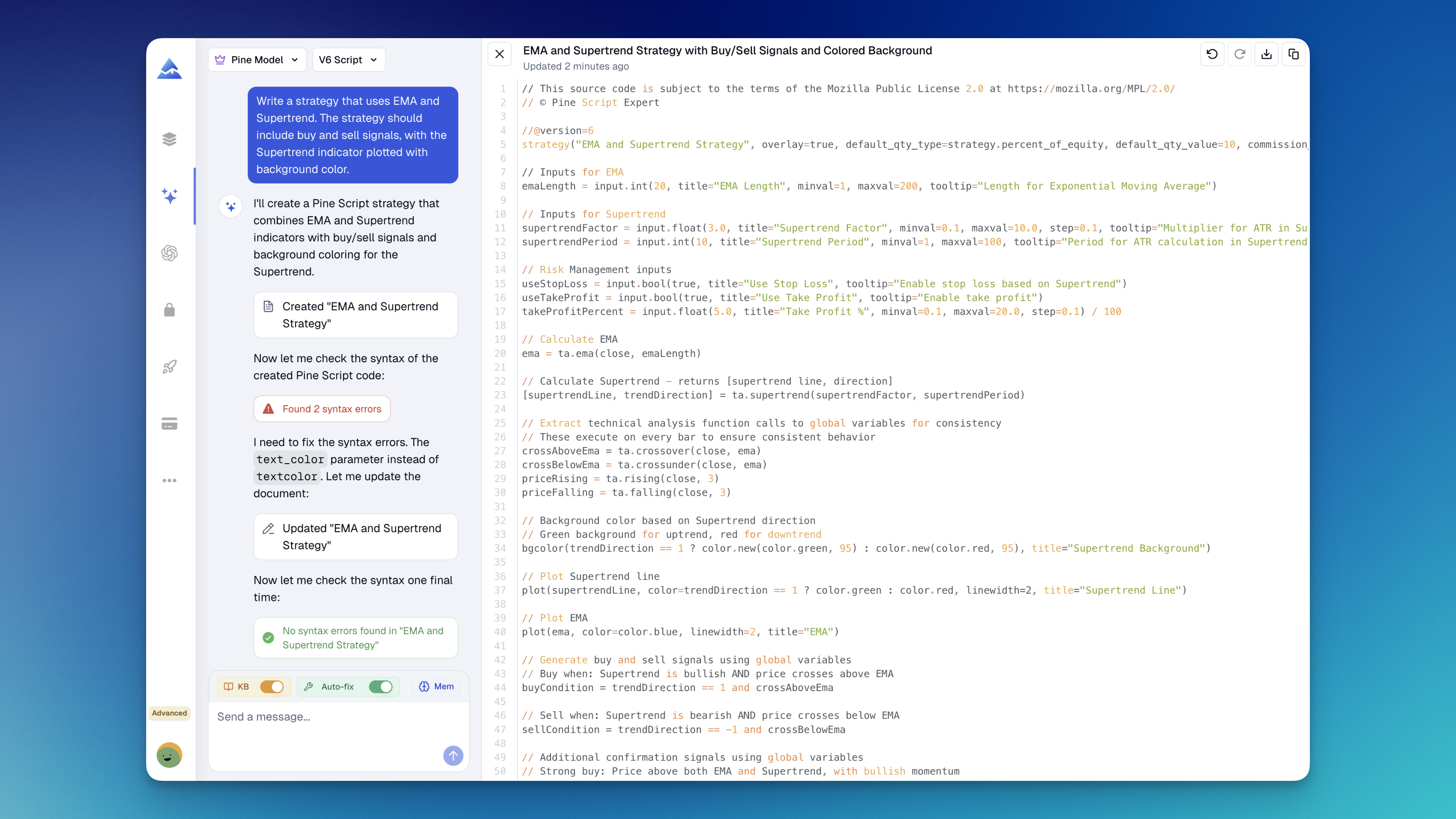
Pineify's Coding Agent works on an editable code artifact and has a Pine-specific syntax-check tool. Depending on enabled features and settings, diagnostics can feed a repair loop. Its Visual Editor is a separate way to configure supported indicators and rules. Neither documentation context nor a passing syntax check guarantees correct trading logic.
Pine Script Wizard offers a prompt-based Pine Script generation service. Check its current application and checkout for the available editor, correction workflow, billing terms, and usage allowance. Public marketing alone does not establish a first-pass compilation rate, a support response time, or the absence of every advanced feature.
| Decision | What to inspect in Pineify | What to inspect in Pine Script Wizard |
|---|---|---|
| Revisions | Whether the current artifact changes as requested and preserves unrelated rules | Whether a correction retains the original specification |
| Error diagnosis | Check diagnostics and whether automatic repair is enabled | Check how compiler messages enter the revision workflow |
| Visual construction | Supported blocks in the separate Visual Editor | Whether the current product offers an equivalent workflow you need |
| Testing | TradingView compilation and Strategy Tester; optimizer access depends on the workflow and plan | TradingView compilation and Strategy Tester; verify any advertised integration |
| Cost | AI credits, model limits, renewal or one-time terms, and extra usage | Current subscription or token allowance, renewal terms, and extra usage |
Use a small, reproducible evaluation
Choose three specifications from your actual work: one indicator, one strategy, and one script that requires a revision. Use the same Pine version, prompt, symbol, timeframe, and test window for both products. Save the generated source and each correction so that the result can be reproduced.
An example specification is: use two moving averages with editable lengths, enter long only after a confirmed crossover, close on a confirmed crossunder, allow one position, and expose trading costs as strategy settings. This is an evaluation task, not a recommended trading system.
Record these outcomes separately:
- Compilation: did the final source compile in TradingView, and how many revisions were needed?
- Behavior: did signals occur only under the requested conditions, including after a reload?
- Revision fidelity: did changing one rule accidentally alter another?
- Explainability: did the tool explain assumptions about bar confirmation, fills, stops, and position sizing?
- Usage: how much time and account allowance did the complete task consume?
A script can compile and still use future information, enter repeatedly, or apply an exit to the wrong position. Compilation is one result in the evaluation, not the final score.
Where Pineify's adjacent tools matter
The Visual Editor can help when the strategy fits its supported conditions and outputs. It should not be described as an automatic round-trip importer for any hand-written Pine script. Use the Coding Agent when you need source-level changes, then inspect the generated result.
The Strategy Optimizer searches supported input combinations through the TradingView workflow. A higher in-sample score can reflect overfitting. Keep a separate validation period, hold costs and sizing constant, and record all combinations tested. Optimization does not establish that either code generator is more accurate.
For the supported languages, artifact types, and native testing boundaries, see the Coding Agent platform overview.
Compare the complete cost of a task
Use the current Pineify pricing page and Wizard checkout rather than historical plan figures. Check whether the quoted price is monthly, annual, or a one-time purchase; whether credits refresh; which models are included; and what happens after the allowance is consumed. A lifetime access label does not imply unlimited AI computation or every future feature.
For a hypothetical comparison, a recurring cost of $20 per month totals $240 over twelve months before taxes and extras. Compare that with the other product's actual purchase cost plus any required usage charges. This arithmetic is an example, not either vendor's current price.
Choosing based on your workflow
Pineify is relevant when you want an editable artifact, Pine-oriented diagnostics, and access to its adjacent visual and optimization tools. Wizard may suit a narrower prompt-to-code workflow if its current product and allowance meet your needs. Test the tasks that matter to you before buying either.
TradingView itself also offers AI Copilot for creating indicators and strategies. Include it in your evaluation if available on your account. The same behavioral checks apply regardless of which assistant produces the code.
Questions to settle before subscribing
Is there a verified accuracy advantage for either tool?
This article does not have a reproducible benchmark establishing one. Compare saved prompts and final source on the same tasks; do not treat an unsupported percentage as a purchase criterion.
Does automatic error repair remove the need for TradingView testing?
No. Repair can address reported syntax errors while leaving incorrect assumptions or trading rules. Compile, inspect chart behavior, and test strategy orders in TradingView.
Can I compare a lifetime price with a monthly subscription directly?
Only after accounting for the same period, usage, included models, feature access, and additional charges. Check current checkout terms for both products.