Pineify MCP: Connect AI Agents to Financial Trading Tools

AI agents are only as useful as the tools they can call. An agent that can only read what you paste into a chat window has to rely on you to fetch every price, every options-flow alert, and every research snapshot by hand.
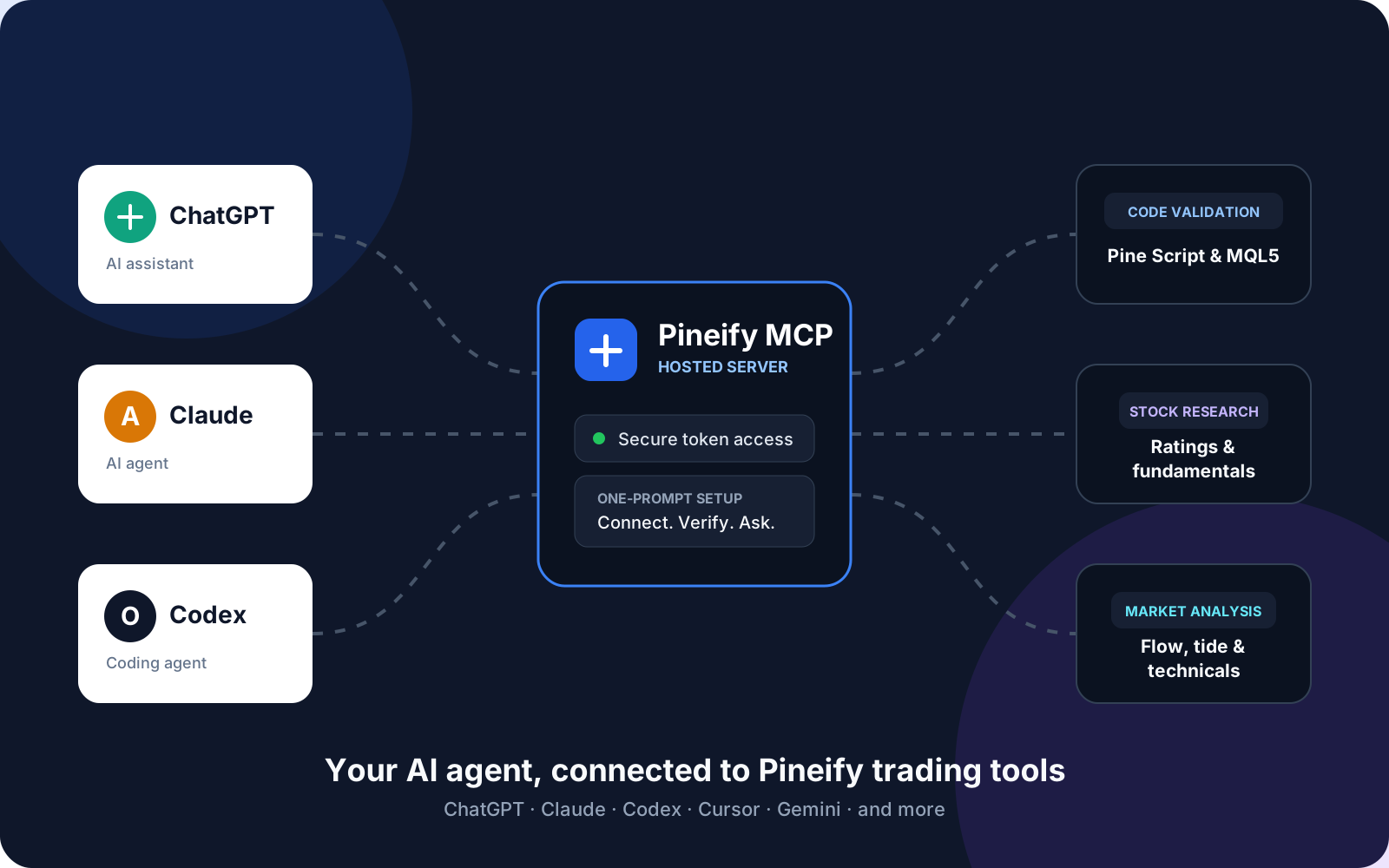
Pineify MCP removes that bottleneck. It exposes Pineify's financial data and code-validation tools through the Model Context Protocol (MCP), so a compatible client can request structured results during a conversation. The client must support the remote transport, authentication method, and tool configuration used by the server.
The server currently ships 40 tools across five categories: code validation, market research, financial analysis, bounded agent workflows, and Trading Journal.
Key Takeaways
- Pineify MCP is a hosted, remote MCP server. There is no local service to install or maintain.
- It exposes 40 tools across five groups: code validation, market research, financial analysis, bounded agent workflows, and Trading Journal.
- The app supplies an endpoint and token setup prompt. Client-specific installation and permission settings still apply.
- Check support for remote Streamable HTTP, Bearer-token authentication, and the server protocol version in the specific client and plan you use.
- Pineify MCP has 35 read-only tools and five Trading Journal write tools. The same Expert MCP token permits both categories. Journal writes update records of trades, closes, reviews, and cash movements; they do not send broker orders or transfer money. Select and review the intended journal before a write.
- Pineify MCP requires an Expert Plan subscription.
What Is Pineify MCP?
Pineify MCP is a Model Context Protocol server that exposes Pineify's core financial and coding tools to compatible AI clients. A tool result supplies diagnostics or data for the requested task; it can also report unavailable or partial information. The agent still needs to interpret the result correctly.
The server runs remotely at a Streamable HTTP endpoint (https://agents.pineify.app/mcp). Every request is authenticated with a private Bearer token tied to your account. There is nothing to run locally, no Python environment to configure, and no local stdio process to keep alive.
Why Financial AI Agents Need an MCP Server
An AI assistant's access to current information depends on the tools and connectors enabled in that session. Pineify MCP adds a defined set of market-research and code-checking operations; it does not establish that other assistants lack live data access.
The Model Context Protocol defines structured communication between clients and servers. Pineify implements that standard specifically for trading and investing:
- Instead of copying a Pine Script snippet into a chat and asking "does this look right?", your agent calls the Pineify syntax-checking service and reviews the diagnostics for the supplied source. A timeout or service error is not a successful check.
- Instead of asking "what's happening with NVDA options flow?" and getting a hedge, your agent requests available options-flow records and preserves timestamps, coverage limits, and missing fields.
- Instead of manually checking Congress trade disclosures across multiple sites, your agent queries one tool and gets a filtered, sorted result.
Pineify MCP Tools
The catalog below groups the 40 registered tools into five categories, including Trading Journal. The connected server's tool list is the reference for availability in your session.
Write and Validate Code (5 tools)
| Tool | What It Does |
|---|---|
| pine-script-syntax-checker | Checks TradingView Pine Script v6 code and returns normalized diagnostics without modifying the source. |
| mql5-syntax-checker | Checks a standalone MQL5 script or a multi-file MetaEditor project for compile errors. |
| mql4-syntax-checker | Checks a standalone MQL4 script or a bounded multi-file MetaTrader 4 project with MetaEditor. |
| ctrader-csharp-syntax-checker | Checks a cTrader C# cBot or indicator for compiler and cTrader API errors. |
| ninjascript-syntax-checker | Runs an external static/API compile check for one NinjaTrader 8 Indicator or Strategy source file. |
These five tools let an agent iterate on trading code in a tight loop: write, check, read the diagnostics, revise, and check again. The MQL4 checker performs a static MetaEditor check rather than execution or backtesting, and the NinjaScript checker does not replace native NinjaScript Editor compilation, execution, or backtesting.
Research Markets and Companies (4 tools)
| Tool | What It Does |
|---|---|
| find-ai-stock-picks | Returns a bounded, ranked list of USA stock candidates for a supported strategy (overall, low-risk, growth, value, dividend, large-cap, and more). |
| get-ai-stock-rating | Retrieves the latest available rank, score breakdown, and supporting metrics for one exact ticker. |
| get-stock-research-snapshot | Compares fundamentals, quality, growth, valuation, and expectations across up to five companies at once. |
| research-stock | Combines bounded business, financial, valuation, technical, options-risk, activity, catalyst, and bull/bear evidence for one exact US company or ADR without returning a rating or recommendation. |
Analyze Financial Data (9 tools)
| Tool | What It Does |
|---|---|
| get-technical-analysis-snapshot | Reads the latest technical-analysis fields for one ticker across up to four timeframes: prices, indicator values, states, scores, and signals. |
| find-options-flow-alerts | Finds recent unusual US options-flow alerts, filterable by symbol, premium, DTE, sweep status, and more. |
| screen-option-opportunities | Finds up to 20 US option-contract candidates with activity, unusual-volume, or earnings-window criteria and nullable last-trade IV and reference NBBO. |
| get-option-contract-flow | Drills into recent prints and the latest available Greeks for one exact option contract ID. |
| find-dark-pool-trades | Finds recent large dark-pool prints, market-wide or for a specific US ticker, with inferred side and size class. |
| find-congress-trades | Finds recent, late, or politician-specific US congressional trade disclosures, filterable by chamber, party, and transaction type. |
| get-market-tide | Reads broad US options-flow direction and the top-impact symbols driving the latest market session. |
| get-sector-flow-snapshot | Compares bullish and bearish options flow across the fixed eleven-sector universe, with an optional intraday series. |
| find-technical-setups | Scans a supported US stock universe with one of six fixed technical-setup presets and returns up to 25 evidence-backed matches; it does not accept arbitrary scanner code or DSL expressions. |
Build Repeatable Agent Workflows (13 tools)
| Tool | What It Does |
|---|---|
| get-stock-event-context | Builds a bounded briefing from issuer releases, SEC filings, earnings, recent analyst actions, and scheduled earnings through the next 14 days. |
| generate-market-briefing | Builds a latest-available US market briefing from major indexes, covered breadth, sectors, movers, events, news, activity summaries, and benchmark technical context with section-level coverage. |
| analyze-portfolio-risk | Calculates concentration, correlation, volatility, earnings, and bounded options-risk facts for 1 to 15 positive long USD US stock or ADR positions; the final portfolio result is not cached or persisted. |
| analyze-earnings | Reviews bounded earnings history, surprise statistics, close-to-close reactions, analyst expectations, and optional one-standard-deviation IV event risk without transcript guidance inference. |
| suggest-options-strategy | Builds one to three defined-risk options scenarios and calculates payoff fields only when every leg has coherent bid/ask evidence. |
| track-smart-money | Separates bounded options, dark-pool, Congress, insider, and quarterly 13F evidence without cross-source dollar netting. |
| analyze-sector-rotation | Ranks the fixed eleven GICS sector ETF proxies against SPY with adjusted 5, 21, and 63 trading-day evidence. |
| validate-trading-idea | Runs one of six fixed long-only daily presets across three variants with development-only selection and an untouched holdout. |
| screen-stocks | Applies typed AND filters from a fixed fundamental, sector, and 1d technical registry to a canonical US index universe. |
| detect-market-regime | Combines bounded trend, VIX, breadth, sector, and market-tide dimensions and returns insufficient when required evidence is missing. |
| optimize-portfolio | Compares a deterministic long-only historical model scenario with current weights under explicit constraints, without caching the final portfolio result. |
| analyze-stock-analyst-consensus | Aggregates point-in-time TipRanks calls, comparable price targets, activity, and bounded evidence for one supported US stock while preserving no-coverage and partial states. |
| analyze-analyst-track-record | Resolves one TipRanks analyst and returns provider-reported lookback performance separately from bounded point-in-time active stock coverage. |
The analyst workflows turn the relevant seven TipRanks datasets available through FMP into two user tasks; they do not mirror each provider endpoint as a separate MCP tool. Results can be null or partial, historical access is limited to the supported recent three-year retention window, and price targets are not compared across incompatible currencies. The tools do not predict returns or provide investment advice.
Trading Journal: Four Queries and Five Writes
Pineify MCP has 35 read-only tools and five Trading Journal write tools. The same Expert MCP token permits both categories. Journal writes update records of trades, closes, reviews, and cash movements; they do not send broker orders or transfer money. Select and review the intended journal before a write.
| Tool | Behavior |
|---|---|
| get-journal-context | Read only. Find existing journals, currency, timezone, revision, and paginated tags and setups. |
| read-journal-trades | Read only. Find recorded trades or read one trade with its close records and current journal revision. |
| create-journal-trade | Writes Journal. Record an occurred trade with explicit price, quantity, time, and optional notes or existing tags and setup. |
| update-journal-trade | Writes Journal. Edit explicit fields or notes on one recorded trade while preserving omitted fields and existing close records. |
| record-journal-trade-close | Writes Journal. Append one occurred partial or full close, preserving earlier closes and recalculating remaining quantity and PnL. |
| read-journal-diary | Read only. Read dated diary summaries or retrieve the full text of one entry before editing. |
| write-journal-diary | Writes Journal. Create a dated daily review or update a specific entry ID; same-day creation reports a conflict. |
| read-journal-transactions | Read only. Page through recorded deposits and withdrawals to check amounts, dates, notes, and journal currency. |
| record-journal-transaction | Writes Journal. Record one deposit or withdrawal in journal currency with a positive amount and explicit time. |
Read context and current records before writing. Every write requires the journal revision and a UUID idempotency key. If the response is lost, retry the original request and key. A revision conflict requires rereading before deciding on a new write. Deletion, sharing, images, dashboards, reports, and resource administration remain in the app.
How Pineify MCP Setup Works
The app supplies a setup prompt with the remote endpoint and your private token. A prompt can help a capable client configure the connection, but it cannot grant unsupported transport features or installation permissions.
- Open the MCP area in your signed-in Pineify account and check current Expert access.
- Configure
https://agents.pineify.app/mcpusing your client's supported remote MCP settings and Bearer-token field. Use its credential storage when available. - If using the app's setup prompt, share it only with a trusted client that is allowed to configure MCP connections. The prompt contains a credential and may become part of the client's stored conversation.
- List the discovered tools, then run a small read-only request. Inspect the actual result rather than treating a connected status as proof that every downstream service is available.

Client compatibility
Compatibility depends on remote Streamable HTTP support, authentication, protocol versions, and account or administrator settings. A product name alone does not establish compatibility for every version or plan. Follow the current configuration instructions for the client you actually use.
The server is hosted, so you do not need to run a local Pineify server. Your client may still require configuration, an approved connector, or a supported adapter. This article does not promise automatic setup in every client or completion within a minute.
Example Research and Validation Prompts
A useful way to think about Pineify MCP is as a set of commands your agent already knows how to call once connected. These examples cover selected research and validation tasks:
- "Use Pineify to check this Pine Script v6 code and explain every diagnostic."
- "Use Pineify to compile-check this MQL5 Expert Advisor project."
- "Use Pineify to compile-check this MQL4 Expert Advisor project."
- "Use Pineify to check this cTrader C# cBot and explain every diagnostic."
- "Use Pineify to check this complete NinjaTrader 8 Indicator source and explain every diagnostic."
- "Use Pineify to find five low-risk USA stock candidates from the latest snapshot."
- "Use Pineify to get the latest AI stock rating for AAPL."
- "Use Pineify to compare the latest research snapshots for AAPL and MSFT."
- "Use Pineify to research AAPL at compact detail on the 1d timeframe and keep bull/bear evidence separate without issuing a recommendation."
- "Use Pineify to analyze NVDA on the 1h and 1d timeframes."
- "Use Pineify to find recent high-premium options flow alerts for TSLA."
- "Use Pineify to inspect recent prints for this option contract ID."
- "Use Pineify to find the largest recent dark-pool trades for SPY."
- "Use Pineify to summarize the latest reported congressional trades in NVDA."
- "Use Pineify to explain today's market tide and its top-impact symbols."
- "Use Pineify to rank sectors by net options flow for the latest session."
- "Use Pineify to scan the S&P 500 for up to five 1d bullish-trend setups and show the required evidence."
- "Use Pineify to build a sourced 72-hour event briefing for AMD."
- "Use Pineify to generate a compact US market briefing and list every partial or stale section."
- "Use Pineify to analyze this AAPL and MSFT long portfolio for concentration, correlation, volatility, and event risk without suggesting allocations."
- "Use Pineify to analyze AAPL earnings at compact detail and label any expected move as a one-standard-deviation IV estimate."
- "Use Pineify to suggest a balanced bullish 1m options structure for AAPL and keep unavailable pricing null."
- "Use Pineify to track 30d smart-money evidence for AAPL without netting incompatible source units."
- "Use Pineify to analyze 3m sector rotation and preserve all eleven sector coverage states."
- "Use Pineify to validate the AAPL RSI mean-reversion preset over 5y and compare development with holdout."
- "Use Pineify to screen the S&P 500 for market cap at least $1B and P/E below 30."
- "Use Pineify to detect the medium-term market regime and show every evidence dimension."
- "Use Pineify to model a minimum-volatility SPY and QQQ portfolio with a 30% turnover cap."
- "Use Pineify to analyze AAPL analyst consensus over 1y and report buy, hold, sell, unclassified, currency, and coverage states without giving a recommendation."
- "Use Pineify to inspect the 1y provider-reported track record and active stock coverage for this exact analyst expertUID."
Data handling and tool limits
Requests send the selected inputs, such as source code or portfolio positions, to the remote service. Results are returned to the connected client. The client's storage and model-provider policies also apply. A read-only tool does not mean its input remains on your computer, and a workflow's uncached final result does not establish zero retention throughout every service involved.
Keep the token out of public chats, repositories, and screenshots. It can authorize Journal writes as well as research. If exposed, use the account's token management controls and replace the credential in connected clients.
Structured data can be incomplete, delayed, or unavailable. Compilation does not prove trading logic, runtime behavior, or profitability. Portfolio scenarios and fixed-preset tests are historical analyses; they are not broker instructions or a guarantee of future results.
Who Should Use Pineify MCP?
Traders Who Live in an AI Agent
If you already use Claude, ChatGPT, or Cursor as a daily driver, Pineify MCP removes the manual step of finding and pasting market data into the conversation.
Pine Script, MQL5, cTrader C#, and NinjaScript Developers
The syntax-checker tools let an agent validate and revise trading code in a tight loop. Each checker has platform-specific boundaries, and the NinjaScript checker is an external static/API compile check rather than a native NinjaScript Editor compile.
Systematic and Discretionary Researchers
The research and analysis tools cover the same ground a manual pre-trade routine usually does: ratings, fundamentals, technicals, options flow, dark-pool activity, and Congress trade disclosures, all callable from one connection.
First connection check
Open Pineify MCP, review current access terms, and configure the endpoint in a supported client. Ask for the available tools, choose one narrow read-only request, and inspect its data timestamp and coverage. For Journal changes, first read the target journal and explicitly specify the record and fields to write.
Frequently Asked Questions
What is Pineify MCP?
Pineify MCP is a hosted Model Context Protocol server that gives AI agents like Claude, ChatGPT, and Cursor direct access to research and Journal tools, covering Pine Script, MQL5, cTrader C#, and NinjaScript validation, stock research, technical analysis, options flow, dark-pool trades, Congress trade disclosures, and company event briefings.
How many tools does Pineify MCP include?
Pineify MCP currently includes 40 tools: five code-validation tools, 26 market-research, financial-analysis, and bounded workflow tools, plus nine Journal tools across five groups.
Which AI agents work with Pineify MCP?
Use a client that supports the server's remote transport, Bearer authentication, and protocol version. Available settings and permissions vary by client, version, and plan.
Do I need to install anything locally to use Pineify MCP?
Pineify hosts the server. You still need to configure a supported client; some clients may require an adapter or administrator approval.
Can Pineify MCP place trades or manage my portfolio?
Pineify MCP has 35 read-only tools and five Trading Journal write tools. The same Expert MCP token permits both categories. Journal writes update records of trades, closes, reviews, and cash movements; they do not send broker orders or transfer money. Select and review the intended journal before a write.
Is Pineify MCP free?
Pineify MCP requires an Expert Plan subscription. The Expert Plan includes access to all MCP tools and your private authentication token.
How do I set up Pineify MCP with Claude or ChatGPT?
Use the client's current remote MCP configuration instructions. The Pineify app supplies the endpoint and private token, but automatic installation depends on the client's capabilities and permissions.
Is my Pineify MCP token safe to share?
Keep your token private. It authenticates every request to the MCP server. Only send your setup prompt to AI agents you trust, and never post it in a public repository or chat.