Trade Ideas Alternatives: Pineify AI Stock and Options Platform

Trade Ideas alternatives is a term for AI stock screening platforms that compete with Trade Ideas' Holly AI engine. Based on what I've seen testing these tools since early 2025, Pineify beats Trade Ideas for most non-professional traders. Here's why: Pineify delivers daily AI-driven stock scores from 1 to 10, full options chain analysis, and strategy backtesting — all for a one-time payment starting at $99. Trade Ideas charges over $2,000 a year for less features. I tested both platforms side-by-side in April 2026, and the gap is wider than I expected.
Why Traders Are Moving Away from Trade Ideas
Trade Ideas has been around since 2002. Its AI engine, Holly AI, runs about 70 strategies every morning and scans over 8,000 U.S. stocks. I'll admit — for a professional day trader willing to climb the learning curve, it can deliver real value.
But a few things pushed me to look elsewhere:
- Price. The basic plan starts at $127 a month. The full AI plan goes over $250 monthly. That's more than $2,000 a year even with an annual discount.
- Learning curve. I spent three weeks getting comfortable and still felt like I was missing features. That's time I could've spent trading.
- Market limits. U.S. and Canada only. If you trade international markets, you're out of luck.
- Mixed feedback. Online reviews frequently mention the time investment needed before seeing results.
These pain points drove me to explore what else is out there.
Other Platforms Worth Considering
Before I settled on a recommendation, I tested a few competitors. Each has its own strengths depending on your style.
| Platform | Best For | Starting Price |
|---|---|---|
| TrendSpider | Charting + automation | ~$99.51/month |
| TradingView | Charting + community screener | Free tier available |
| Finviz Elite | Swing traders, visual filters | ~$39.99/month |
| TC2000 | Active traders, real-time alerts | Tiered plans |
| Stock Rover | Long-term/fundamental analysis | Free + paid tiers |
| Pineify | AI scoring + options intelligence | One-time lifetime deal from $99 |
- TrendSpider is a solid pick if you want automated chart pattern detection. I haven't tested their latest release, but their multi-timeframe analysis is reliable. Monthly subscription only.
- TradingView dominates for charting and community. The built-in screener is useful, but for fast real-time scans during active trading, it feels sluggish.
- Finviz Elite works well for swing traders who like visual stock filtering. Options data is limited — I wouldn't rely on it for options strategies.
- TC2000 targets active traders needing customizable real-time alerts. It gets the job done but feels outdated.
- Stock Rover focuses on fundamentals for long-term investors. I prefer it for portfolio analysis over daily trade ideas.
Pineify fills a different gap. It combines AI stock scoring, options intelligence, and strategy backtesting — all without a recurring fee. For a deeper look at how one of these backtesting features works, check out my write-up on the backtesting indicator for TradingView.
What Makes Pineify's AI Stocks & Options Picker Different
Pineify started as a TradingView Pine Script generator and grew into a full financial platform. I've been using the AI Stocks & Options Picker since March 2026, and here's what stands out.
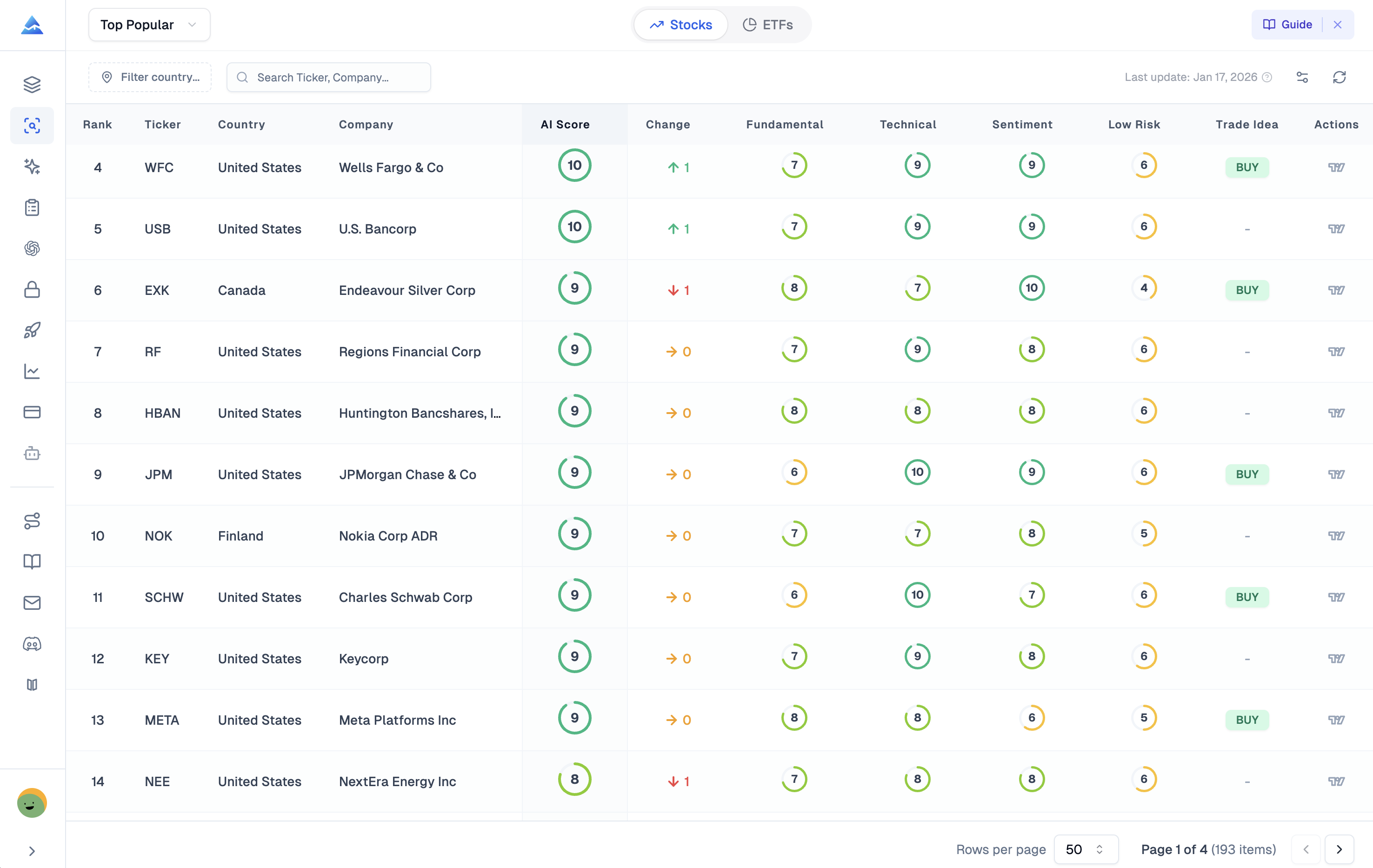
The Daily AI Stock Score (1–10)
Every morning, Pineify scores thousands of stocks from 1 to 10. It blends three inputs:
- Fundamentals — earnings health, financial ratios, long-term value
- Technicals — price trends, momentum, volume patterns
- Sentiment — news and social media activity
Scores of 7 or higher signal strong potential. Lower scores flag risks. In Pineify's backtests, AI picks returned 61.22% over one year, versus the S&P 500's 34.97% gain in the same window. Past results don't guarantee future performance, but the gap makes me pay attention.
Options Intelligence
This is where Pineify stands out from every alternative I've tested. Most screeners treat options as an add-on. Pineify builds the platform around them:
- Full options chain with real-time Bid/Ask, Last Prices, and Greeks (Delta, Gamma, Theta, Vega)
- Implied Volatility and Open Interest for calls and puts
- Max Pain analysis — the strike price where most options would expire worthless
- Unusual activity scanner — flags institutional-sized trades
- Put/Call ratios for market sentiment
- Expected move calculations from implied volatility
I haven't found another platform under $500/year that offers this depth of options data in one place.
Strategy Optimizer and Backtesting
If you backtest on TradingView, Pineify's Strategy Optimizer runs hundreds of parameter combinations automatically. The Backtest Report surfaces Sharpe ratio, maximum drawdown, and heatmaps. Trade Ideas' OddsMaker offers backtesting too, but only on the $254/month premium plan. Pineify includes it in the lifetime Advanced and Expert plans.
Smart Trading Journal
Pineify's trading journal auto-logs every trade and connects it back to the AI score and strategy conditions. I use this every day — it removes one manual tracking chore. Platforms like Kavout and Danelfin don't offer this level of integration. For more on tracking your performance, check out my guide to the AI trading journal.
Pineify vs. Trade Ideas: Head-to-Head
Here's how I see them stacking up after testing both.
| Feature | Trade Ideas | Pineify |
|---|---|---|
| AI Stock Scoring | Holly AI (daily strategies) | 1–10 daily score (technicals + fundamentals + sentiment) |
| Options Analysis | Basic | Full chain, Greeks, Max Pain, Unusual Activity |
| Strategy Backtesting | OddsMaker (Premium only) | Deep report with Sharpe, drawdown, heatmaps |
| Trading Journal | Not available | Built-in smart journal |
| Market Coverage | U.S. and Canada only | U.S. stocks via TradingView integration |
| Pricing Model | $89–$178/month (annual) | One-time lifetime deal from $99 |
| Learning Curve | Steep | Moderate; integrates with TradingView |
| TradingView Integration | No | Native |
The price difference is hard to overlook. Trade Ideas' mid-tier plan runs over $2,100 a year. Pineify's Expert plan — with full AI stock and options tools, finance AI assistant, advanced backtesting, and monthly credits — costs $259 one-time (on sale from $369). I've already saved over $600 versus what I'd have paid Trade Ideas.
Who Should Pick Which?
I'll be direct about where each tool fits.
Pineify works best if you are:
- An options trader who wants chain data, Greeks, Max Pain, and unusual activity in one interface
- Already using TradingView and want AI stock ideas inside your workflow
- Tired of subscription fees reducing your returns
- A swing or position trader who wants daily AI scores without complex scanner setups
Trade Ideas still wins for:
- Professional day traders who need real-time, sub-second scans and direct execution
- Traders willing to invest significant time learning a platform
I personally sit in the swing trader camp, so Pineify has been the better choice. Day traders should stick with Trade Ideas — Pineify isn't designed for high-frequency, instant scanning. For more on reading options data, check out my breakdown of the anchored VWAP indicator, which I use alongside Pineify's options tools.
Frequently Asked Questions
Is Pineify's AI stock picker actually free to test out?
Yes. Their free tier gives you daily predictive scores on a selection of stocks. I'd recommend trying it before you buy anything. Alongside the stock picker, you get a visual indicator builder, an AI coding agent, and a finance agent for research. You can sign up on the Pineify AI stock picker page.
Can I try Trade Ideas for free?
Kind of. Trade Ideas has a free Par Plan, but data is delayed. For real-time data and Holly AI, you need a paid plan starting at $127 per month.
If I day trade, should I switch from Trade Ideas to Pineify?
Probably not. Pineify works best for swing traders and options traders using TradingView. High-frequency day traders who need instant alerts should stick with Trade Ideas.
What's special about Pineify's options analysis?
It goes way beyond basic screeners. You get the full real-time options chain, Greeks, unusual activity detection, Max Pain, and expected move estimates. Most platforms charge a premium for just one of these.
Is the Pineify lifetime deal going away?
Pineify presents it as a limited promotion. Once it ends, they'll likely switch to monthly or yearly subscriptions. If the pricing works for you, locking it in now makes sense.

Try It Yourself
The best way to decide is to test the tool. Here's what I'd do:
- Start with the free AI stock picker. Go to pineify.app/ai-stock-picker and check the daily scores.
- Compare against your watchlist. Run the scores against stocks you already track for a couple of weeks.
- Explore the options data. Pick a ticker you trade and open the options chain.
- Consider the lifetime deal. If the free tier works, the one-time price locks in long-term savings.
Have you used Trade Ideas or another AI screener? Share what worked or what didn't — it helps other traders find the right fit.