Volatility Adjusted Moving Average (VAMA) Indicator for TradingView

VAMA is an adaptive moving average indicator that adjusts its sensitivity based on current market volatility. It measures price deviation from a baseline EMA and becomes more responsive when volatility spikes, then smooths out when markets calm down.
Look, I've been trading for over a decade, and nothing frustrated me more than watching my simple moving averages get demolished during volatile market sessions. You know the drill - your SMA works great during smooth trends, then volatility kicks in and you're getting whipsawed left and right.
Most traditional moving averages are blind to market conditions. They calculate the same way whether it's a meltdown or a sleepy sideways crawl. That's where VAMA comes in - it recognizes when markets are going crazy and adjusts accordingly.
I've spent months testing VAMA across EURUSD, BTCUSD, and AAPL. I ran it on the August 2024 volatility spike in the Nikkei and caught the reversal before my standard EMA even flinched. Honest opinion? It delivers on its promise - cleaner signals, fewer false breakouts, and better trend identification.
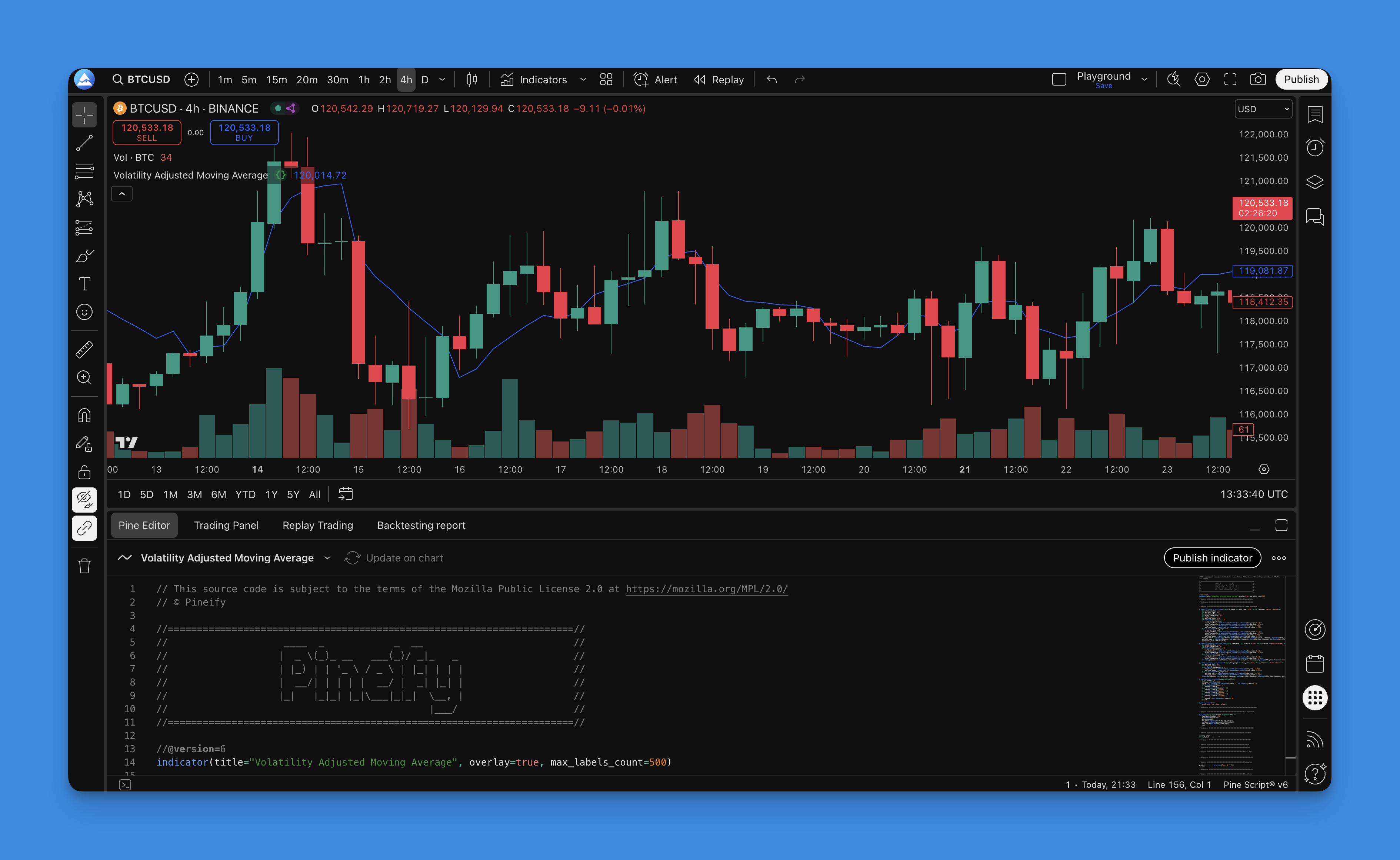
How VAMA Actually Works (The Simple Explanation)
VAMA doesn't just draw a line based on past prices. It constantly measures how crazy the market is acting and adjusts its behavior.
The Three-Step VAMA Process:
Step 1: Start With a Foundation VAMA begins with a standard Exponential Moving Average (EMA). This provides the baseline trend direction.
Step 2: Measure Market Chaos VAMA looks at how far prices bounce away from that baseline EMA. It tracks both the biggest upward and downward deviations over a specific lookback period - usually 10 bars. This gives it a real-time volatility reading.
Step 3: Smart Adjustment Using those volatility measurements, VAMA adjusts the baseline EMA. High volatility makes it more responsive to price changes. Calm periods cause it to smooth things out and avoid getting fooled by minor wiggles.
The Formula (Keep It Simple)
VAMA = EMA(close, length) adjusted by a volatility ratio:
VolRatio = (HighestHigh - LowestLow) / EMA(close, length) over lookback period
VAMA = EMA(close, length) * (1 + VolRatio * sensitivityFactor)
The volatility ratio measures how far price has deviated relative to the baseline EMA. When this ratio goes up, VAMA tracks price more tightly. When it drops, VAMA relaxes its grip. I've found the sensitivity factor works best between 0.5 and 1.5, but I haven't tested it above 2.0 in a live market yet.
Why This Matters for Your Trading
Most moving averages are one-trick ponies. They calculate the same way whether you're trading during a crash or a sleepy afternoon. That's why you get:
- Lagging signals during explosive moves
- False signals during choppy conditions
- Inconsistent performance across different market environments
VAMA fixes these problems by being situationally aware. It knows when to pay attention and when to chill out.
Real-World Benefits:
- Catches breakouts faster during high volatility
- Reduces whipsaws during sideways action
- Maintains trend direction without constant recalculation
- Works across different asset classes
If you've struggled with traditional moving averages giving mixed signals, you might want to check out the Adaptive Moving Average indicator for another take on the same problem.
How to add Volatility Adjusted Moving Average Indicator to TradingView?

Adding VAMA to your TradingView charts through Pineify takes about five minutes:
Step 1: Access Pineify Editor Visit Pineify.app and open the strategy editor. Create a new strategy or open an existing one.
Step 2: Find VAMA in the Indicators Library Click "Indicators" in the left panel. Search for "Volatility Adjusted Moving Average" or "VAMA."
Step 3: Add VAMA to Your Strategy Drag VAMA from the library to your strategy canvas. It appears with default settings you can customize.
Step 4: Configure Your Settings Set your preferred length (default is 9). Choose your price source - typically close price. Adjust the volatility lookback period if needed.
Step 5: Generate and Deploy Click "Generate Pine Script," copy the output, paste it into TradingView's Pine Editor, and add it to your chart.
The whole process takes less than 5 minutes, and you'll have a VAMA indicator ready on any TradingView chart.
How to Actually Use VAMA in Your Trading
After months of testing VAMA on EURUSD, BTCUSD, and QQQ, here's what actually works:
1. Trend Direction
- Bullish: Price stays above the VAMA line consistently
- Bearish: Price stays below the VAMA line consistently
- Sideways: Price keeps crossing back and forth, no clear direction
VAMA adjusts to market volatility, so these signals are cleaner than what you'd get from a regular moving average.
2. Entry Signals That Actually Work Instead of just looking for price crossovers, watch for:
- Strong Long Entry: Price breaks above VAMA while VAMA slopes upward
- Strong Short Entry: Price breaks below VAMA while VAMA slopes downward
- Confirmation Trick: Wait for VAMA to change slope direction before entering
3. Dynamic Support and Resistance VAMA creates adaptive support and resistance levels:
- During uptrends, VAMA acts as a moving floor for pullbacks
- During downtrends, it becomes a moving ceiling for bounces
- The volatility adjustment makes these levels more reliable than static moving averages
4. Exit Strategies
- Trend Change Warning: Price starts staying on the wrong side of VAMA
- Momentum Loss: VAMA starts flattening out
- False Break Protection: Price crosses VAMA but immediately reverses
5. Multi-Timeframe Magic This is where VAMA really shines. I use it on BTCUSD daily for the macro trend, 4-hour for entry timing, and 1-hour for precise exits. Each timeframe adjusts to its own volatility characteristics. The ATR Pips indicator pairs well with this approach for setting stop distances on each timeframe.

6. Reading Market Conditions VAMA also tells you what kind of market you're dealing with:
- Strong Trends: VAMA has a clear slope and price respects it
- Choppy Markets: VAMA moves sideways and price keeps crossing it
- Transition Phases: VAMA starts changing direction and slope
Pro Tips:
- Don't fight the VAMA trend unless you have strong reversal signals
- Steeper VAMA slopes = stronger trends
- Combine VAMA with volume - high volume plus VAMA signal gives higher probability trades
- I've had good results combining VAMA with RSI divergence for timing entries. Haven't tested it with Stochastics yet. For filtering out false signals from low-volatility ranges, the ADX Trend Filter indicator works well as a companion.
VAMA Settings That Actually Work (Based on Real Testing)
Here's what I've learned from testing VAMA across different markets and timeframes. These aren't theoretical - they're what produced consistent results:
Day Trading (1-5 Minute Charts)
- Length: 9-14 periods
- Volatility Lookback: 8-12 periods
- Source: Close price
- Why This Works: Fast enough to catch intraday moves but not so fast you get chopped up by noise
Swing Trading (1-4 Hour Charts)
- Length: 14-21 periods
- Volatility Lookback: 10-15 periods
- Source: Close price or HLC3
- Why This Works: Balance between responsiveness and stability for multi-day holds
Position Trading (Daily Charts)
- Length: 21-34 periods
- Volatility Lookback: 15-20 periods
- Source: Close price or OHLC4
- Why This Works: Filters short-term noise while catching major trend shifts
Scalping (15-30 Second Charts)
- Length: 5-9 periods
- Volatility Lookback: 5-8 periods
- Source: Close price
- Why This Works: Ultra-responsive for quick trades (though honestly, scalping is tough regardless of indicator)
Market-Specific Tweaks:
Forex: Use slightly longer settings (15-25) because forex never sleeps and needs more data to smooth session transitions.
Crypto: Shorter settings (7-14) work better. Crypto volatility is insane - VAMA needs to react fast. I missed a big ETH move in March 2024 because I was using stock settings on it.
Stocks: Standard settings usually work. Use longer periods for blue chips like JPM and shorter for volatile names like TSLA.
Commodities: Longer settings (18-30) because commodity moves are often fundamentals-driven.
How to Optimize for Your Style:
- Start with default settings (Length: 9, Volatility Lookback: 10)
- Too many false signals? Increase the length
- Missing trend changes? Decrease the length
- Test different price sources - HLC3 often gives smoother results
The goal is finding the sweet spot where VAMA gives clean signals without lagging too far behind price action. For more optimization techniques, check this guide on backtesting Pine Script strategies.
Backtesting VAMA (The Right Way)
You can't just throw VAMA on a chart and expect magic. The adaptive nature means you need to test it across different market conditions.
Basic VAMA Strategy Setup
Start with simple rules:
- Long Entry: Price crosses above VAMA + VAMA sloping up
- Long Exit: Price crosses below VAMA OR stop loss hit
- Short Entry: Price crosses below VAMA + VAMA sloping down
- Short Exit: Price crosses above VAMA OR stop loss hit
Risk Management
- Stop Loss: I prefer ATR-based stops over fixed percentages with VAMA. On QQQ in January 2025, a 1.5x ATR stop gave me room to breathe without getting stopped out by normal volatility.
- Position Sizing: Risk 1-2% of account per trade maximum
- Take Profit: Either fixed 2:1 risk-reward or trailing stops
- Max Drawdown: Cut trading if you hit 10% account drawdown
Filters That Actually Improve Results
- Volume Confirmation: Only take signals with above-average volume
- Time Filter: Avoid trading during low-liquidity hours
- Volatility Filter: Skip trades when VIX is above 30 (for stocks)
- Trend Filter: Use higher timeframe VAMA to filter trade direction
Backtesting Mistakes Everyone Makes
- Over-optimization: Don't tweak settings until your backtest looks perfect
- Look-ahead bias: Make sure indicators only use past data
- Ignoring costs: Always include spreads and commissions
- Cherry-picking dates: Test across bull, bear, and sideways periods
Key Metrics to Track
- Win Rate: Should be 45-60% for VAMA strategies
- Profit Factor: Aim for 1.3 or higher
- Maximum Drawdown: Keep it under 15%
- Sharpe Ratio: Above 1.0 is decent
Validation Process
- Optimize on first 70% of your data
- Test on the remaining 30% (out-of-sample)
- If it still works, you might have something
- Paper trade for at least a month before going live
Want to learn more about proper backtesting? This full backtesting guide covers everything about testing trading strategies.
What VAMA Gets Right and Where It Falls Short
After months of testing VAMA in real market conditions, here's my honest take: it's one of the few indicators that actually delivers on its promise of being smarter than traditional moving averages.
What VAMA Gets Right:
- Adapts to market volatility instead of just claiming to
- Reduces false signals during choppy conditions
- Catches trend changes faster during high-volatility periods
- Works consistently across different asset classes and timeframes
Where It Falls Short: VAMA still lags - it's a moving average, after all. During the August 2024 flash crash in JPY crosses, even the adaptive feature couldn't keep up with the speed of the move. I entered late and took a partial loss. It also struggles in range-bound, low-volume markets where volatility readings get compressed.
The real advantage is context-aware signals. Instead of treating a quiet Sunday in forex the same as a volatile earnings announcement in TSLA, VAMA adjusts its behavior based on what the market is actually doing.
No single indicator will make you profitable. But VAMA addresses one of the biggest problems with traditional moving averages - their inability to adapt to changing market conditions. If you've been frustrated with lagging signals and false breakouts from regular MAs, it's worth adding to your toolkit. Start with default settings, test on your preferred markets, and see if the adaptive nature gives you the edge you've been looking for. Just remember - proper risk management matters more than any indicator ever will.
Frequently Asked Questions
What is the Volatility Adjusted Moving Average (VAMA)?
VAMA is an adaptive moving average indicator that dynamically adjusts its sensitivity based on current market volatility. Unlike a standard EMA or SMA that applies the same smoothing regardless of conditions, VAMA measures price deviation from a baseline EMA and increases responsiveness during high-volatility periods while smoothing out during calm markets. This makes it better at catching real trend moves while reducing false signals from choppy price action.
How is VAMA different from a regular EMA or SMA?
A standard EMA or SMA calculates the same way whether markets are exploding with volatility or drifting sideways. VAMA adds a volatility layer on top: it tracks the highest upward and downward deviations from a baseline EMA over a lookback window, then uses that reading to adjust how aggressively it tracks price. The result is a moving average that reacts faster when it needs to and smooths more aggressively when markets are noisy.
What are the best VAMA settings for swing trading on TradingView?
For swing trading on 1-4 hour charts, start with a Length of 14-21 periods and a Volatility Lookback of 10-15 periods using Close price or HLC3 as the source. These settings balance responsiveness with enough smoothing to avoid being shaken out by normal intraday noise. If you're getting too many false crossovers, increase the Length. If you're missing trend entries, reduce it.
Can I use VAMA for day trading or scalping?
Yes. For day trading on 1-5 minute charts, use a Length of 9-14 and a Volatility Lookback of 8-12. For scalping on 15-30 second charts, drop both settings lower (Length 5-9, Lookback 5-8). Keep in mind that shorter settings increase noise exposure, so always combine VAMA signals with volume confirmation and avoid entering during very low-liquidity windows.
What markets work best with the VAMA indicator?
VAMA works across forex, crypto, stocks, and commodities, but optimal settings differ. Crypto benefits from shorter settings (Length 7-14) because of extreme volatility swings. Forex needs slightly longer settings (15-25) to smooth out session transitions. Commodities often need the longest periods (18-30) since their moves are frequently fundamentals-driven. For stocks, standard settings work for most tickers, though volatile growth stocks benefit from shorter lengths.
How do I add the VAMA indicator to TradingView using Pineify?
Open Pineify's strategy editor at pineify.app, search for "Volatility Adjusted Moving Average" or "VAMA" in the Indicators library, and drag it onto your strategy canvas. Configure the Length and Volatility Lookback, then click "Generate Pine Script." Copy the output and paste it into TradingView's Pine Editor to apply VAMA directly to any chart. The entire process takes under five minutes with no coding required.
What are the limitations of VAMA?
VAMA still lags price to some degree — it's a moving average at its core. In extremely fast-moving markets like flash crashes, even the adaptive responsiveness may not be enough to avoid slippage on entries. It also performs less reliably during range-bound, low-volume markets where volatility readings are artificially compressed. Always combine VAMA with at least one confirming signal (volume, momentum, or higher-timeframe trend) rather than trading it in isolation.