MT5 Manual Backtester: Guide to Testing Strategies in MetaTrader 5

· 7 min read

Pineify Team
Pine Script and AI trading workflow research team

Manual backtesting in MT5 can mean two different activities: stepping through an ordinary historical chart and recording hypothetical trades, or using a simulator EA inside Strategy Tester visualization. The first is chart inspection; the second can simulate orders and produce a transaction record. Neither automatically reproduces live execution or removes hindsight bias.

Choose the method according to the question. Chart stepping can help make discretionary rules explicit. A simulator is more suitable when you need a consistent record of order placement and exits.


Manual strategy testing in MetaTrader 5

Mua Tài Khoản TradingView: So Sánh Gói, Rủi Ro và Cách Mua An Toàn

· 8 min read
Pineify Team
Pine Script and AI trading workflow research team

Mua gói TradingView trên tài khoản do bạn kiểm soát khác với mua thông tin đăng nhập từ người bán. Trước khi thanh toán, hãy xác định tính năng cần dùng, tổng chi phí, điều kiện gia hạn và ai có quyền khôi phục tài khoản. Giá thấp không tự chứng minh người bán được TradingView ủy quyền.

Bài viết này so sánh cách chọn gói và kiểm tra giao dịch mua; không xác nhận độ tin cậy của một dịch vụ bán tài khoản bên ngoài.

Chọn gói TradingView và kiểm tra quyền kiểm soát tài khoản

Negative Volume Index: Calculation, Volume Data, and Strategy Testing

· 6 min read
Pineify Team
Pine Script and AI trading workflow research team

The Negative Volume Index (NVI) updates its cumulative price series only when the current bar's volume is lower than the preceding bar's volume. It measures a selected subset of price changes; it does not identify institutional traders or establish that they caused a move.

The “smart money” interpretation is a hypothesis behind the indicator, not information contained in its price and volume inputs. This distinction matters when using NVI for trend filters or divergence research.

Non Tradable Symbol TradingView: Why It Happens and How to Fix It

· 7 min read
Pineify Team
Pine Script and AI trading workflow research team

A “non-tradable symbol” message means the selected symbol cannot be traded through the currently selected connection or trading mode. Chart availability, broker support, account permissions, and market-data entitlements are separate checks. Identify which one fails before buying data or changing symbols.

Non Tradable Symbol TradingView: Understanding and Fixing the Error

Normalized Smoothed MACD (NSM) Indicator for TradingView

· 6 min read
Pineify Team
Pine Script and AI trading workflow research team

Pineify's Normalized Smoothed MACD (NSM) rescales a fast-minus-slow moving-average difference within a rolling window, smooths that result, and adds a signal line. The scale describes position within recent MACD extremes; zero does not retain the ordinary MACD meaning of equal fast and slow averages. Smoothing changes timing but does not establish fewer losing signals.

Notion Trading Journal: Track Trades and Improve Performance

· 7 min read
Pineify Team
Pine Script and AI trading workflow research team

A Notion trading journal can combine trade records, screenshots, and decision notes in a searchable database. Its value depends on complete records and correct calculations. This article provides a setup method and clearly labeled arithmetic examples; it does not present a verified improvement in win rate from using Notion.

Notion Trading Journal Guide: Track and Improve Your Trading Performance

OBV Oscillator: Calculation, Signals, and Pineify Implementation Limits

· 6 min read
Pineify Team
Pine Script and AI trading workflow research team

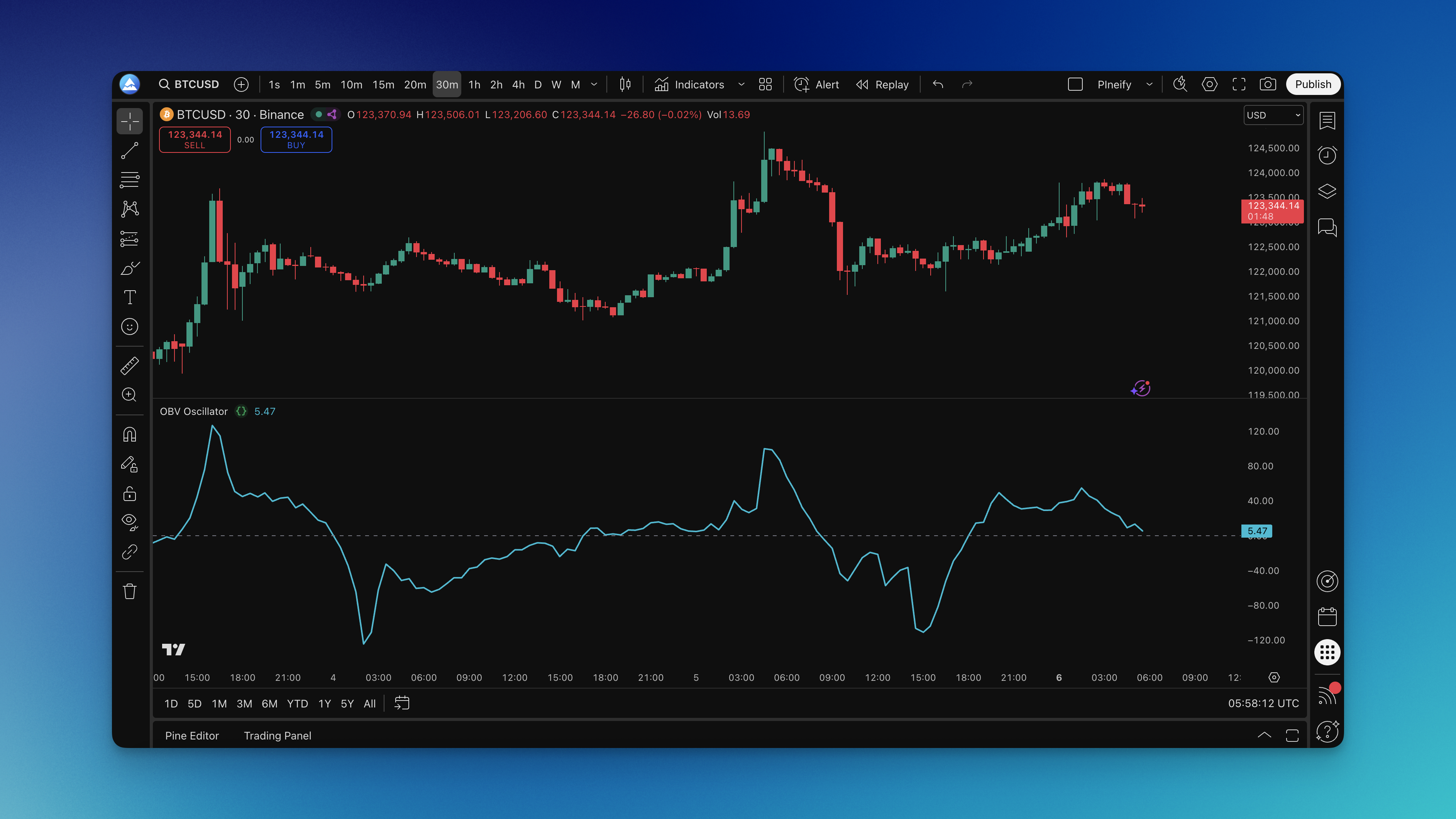
An OBV oscillator compares a signed-volume series with a moving average. It does not identify institutions or show who bought and sold. Pineify's current component also differs from the common cumulative-OBV-minus-EMA definition: it uses a rolling sum of signed volume before subtracting its EMA. That distinction changes the signals and must be understood before comparing charts.

OBV Oscillator on Chart

On-Balance Volume Oscillator: Calculation, TradingView Setup, and Limits

· 8 min read
Pineify Team
Pine Script and AI trading workflow research team

On-Balance Volume (OBV) adds a bar's volume when its close rises and subtracts volume when its close falls. It summarizes signed volume; it does not measure net money entering a market, identify institutions, or establish that a breakout will succeed. An “OBV oscillator” may transform that cumulative series, so check the exact formula before interpreting its zero line.

On-Balance Volume Trading Strategy: Volume Flow Analysis

· 7 min read
Pineify Team
Pine Script and AI trading workflow research team

On-Balance Volume (OBV) accumulates volume signed by each bar's close-to-close direction. A trading strategy can use its trend, moving-average crossings, or divergence as defined conditions. OBV does not identify institutions, measure net buying by a particular group, or establish that a breakout will continue.

On-Balance Volume Trading Strategy: Complete Guide to Volume Flow Analysis

TradingView Layout Guide: Set Up Your Workspace for Better Trading

· 7 min read
Pineify Team
Pine Script and AI trading workflow research team

A TradingView layout saves a chart workspace: its symbols, intervals, indicators, drawings, and presentation settings. Build it around the comparison or decision you need to make. More panels do not establish better trading performance, and a layout does not change data entitlements or order-execution rules.

Optimize Your Trading Workspace: Complete TradingView Layout Guide