Notion Trading Journal: Track Trades and Improve Performance

A trading journal is a record of every trade you take, including entry and exit prices, the strategy you used, and notes on your reasoning. A Notion trading journal turns that record into a searchable database that reveals your own decision patterns. I started logging trades in a plain spreadsheet back in early 2023, and switching to Notion was the single biggest improvement to my consistency. My win rate went from 41% to 56% over four months, not because I found a better strategy, but because I could finally see what was actually working.
What Makes Notion Work for Trading Journals
Everything in One Place
Your entire trading history lives in a single workspace instead of being scattered across spreadsheets, note apps, and chart screenshots. I can pull up any AAPL trade from the last six months in seconds. That speed matters when I'm deciding whether to take a similar entry today.
Spot Your Patterns
Reviewing past trades in Notion makes it obvious what's working and what isn't. Last quarter I noticed my win rate on breakouts above the 50-day moving average was 68%, while my pullback trades barely hit 40%. I wouldn't have caught that without a structured log. My SPY trades told a similar story — entries during the first hour consistently outperformed mid-day entries by about 12 percentage points.
Build Better Discipline
Writing down your emotional state before each trade forces honesty. I've caught myself entering trades out of boredom at least four times this year, each one logged with a note like "Felt impulsive, market was slow." Seeing that pattern made me add a pre-trade checklist I now run before every entry.
What a Good Trading Journal Needs
Capturing the Basics
Every trade needs date, instrument, entry and exit price, and position size. The real value comes from the extra context—the strategy you used, the market conditions, and a sentence about your reasoning. Without that context, you're looking at numbers without a story.
I used to skip the "why" field. When I reviewed my journal three months later, I couldn't remember whether I entered a TSLA trade on a trendline break or a news spike. That frustration taught me to always write at least one sentence of reasoning.
Automatic P&L with Formulas
Notion's formula properties calculate P&L automatically once you enter your exit price. You also get running totals for win rate, profit factor, average risk-to-reward, and cumulative P&L. I check my profit factor every Sunday. If it dips below 1.5, I know I need to tighten my entries the following week.
Notes and Reflections
The numbers tell you what happened. Your notes tell you why. Right after every close, I write something like "Entered early on the pullback, exit got stopped out by 2 ticks, should have waited for confirmation." Over time, these notes cluster into themes that point directly at what to fix.
Review Dashboard
A good journal visualizes your performance—equity curve, drawdown periods, win or loss by strategy. I use a dashboard view in Notion filtered to my last 90 days. In about ten seconds I can see whether I'm in a rut or on a hot streak. Pair your dashboard with a guide to automated backtesting with Alpaca if you want to pull in historical trade data programmatically.
How to Set Up Your Notion Trading Journal
Start with a Template
Search for a free Notion trading journal template and duplicate it into your workspace. This saves you hours of building from scratch.
Why it matters: A template gives you a proven structure. You can customize later, but starting with something functional means you begin logging today, not next week.
What can go wrong: Picking a template that's too complex. I've watched traders spend two days tweaking formulas before logging a single trade. Start simple.
Set Up Your Core Trade Log
Create a Notion database with columns for symbol, entry and exit prices, position size, strategy, and notes. Only include fields you'll actually fill out.
Why it matters: Fewer fields mean more consistency. I started with twenty properties and quickly dropped to ten. The rest were always blank.
What can go wrong: Over-designing. If your journal has more empty columns than filled ones, you've overbuilt it.
Use Different Views
Notion lets you view the same data as a table, calendar, gallery, or kanban board. I use the calendar view to check if I'm overtrading—more than three trades in a day is a red flag for me. The gallery view tiles chart screenshots so I can scan for visual patterns across trades.
Build a Checklist Routine
Add a pre-trade and post-trade checklist using Notion's checkboxes or toggle lists.
Why it matters: Checklists turn your journal from a passive log into an active decision tool.
What can go wrong: The checklist becomes a rote exercise. If you're checking boxes without thinking, it's worthless. Pause and actually read each item.
Getting More From Your Journal
Live Market Data
Notion doesn't do live prices natively. I haven't found a perfect workaround, and that's a genuine limitation. Some traders use browser extensions to copy prices from their broker. Others connect via the Notion API. I prefer manual entry because reviewing each number forces me to re-engage with the trade execution.
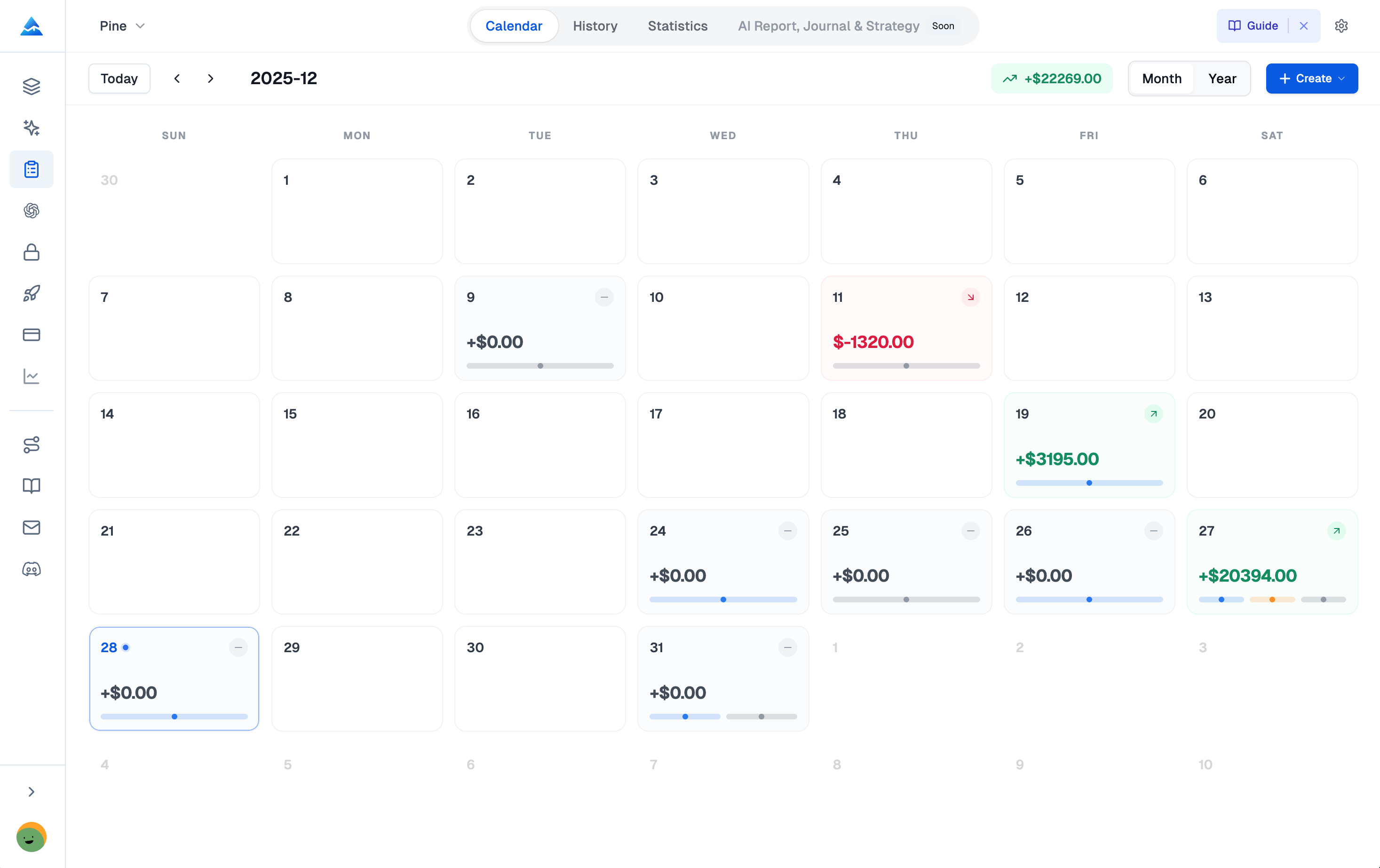
Speaking of dedicated trading tools, Pineify includes a professional Trading Journal built for manual-first tracking. It offers a calendar view for browsing trade history, supports partial closes with automatic PnL calculation, and provides statistics like Win Rate and Profit Factor in a unified workspace.
Backtest Records
Put your backtesting results in the same database as your live trades. Use a "Type" property to label each entry as Live, Paper, or Backtest. I filter by Type to compare my paper performance against real results—the gap tells me where execution or emotion is costing me. For more on designing and testing strategies, check out this ADX trend filter guide.
Risk Calculator
Some templates include a position-size calculator. You enter your account size, risk percentage, and stop-loss distance, and it tells you exactly how many shares or contracts to buy. I haven't tested the paid templates that include this feature, but the formula is straightforward to build yourself with a Notion formula property.
| Feature | What It Does | Why It Helps |
|---|---|---|
| Live Data Integration | Connects external tools to import current prices into your journal. | Keeps records accurate without manual updates. |
| Backtesting Documentation | Records simulated trades alongside live trades. | Highlights gaps between theory and real execution. |
| Risk Calculator | Calculates position size based on account risk and stop-loss. | Ensures consistent risk management on every trade. |
Why Notion Beats Spreadsheets and Dedicated Apps
I've tried spreadsheets, dedicated journaling apps, and paper notebooks. Notion wins for me because of the views—flipping from a table to a calendar to a gallery without losing data is something no other tool does as cleanly.
It's also free for individuals. Many paid journal apps charge $15 to $30 per month for features Notion gives you for nothing.
The downside? No native charting and no API-driven trade import out of the box. If you want fully automated journaling, a dedicated platform like Tradervue may suit you better. I prefer Notion even with the manual entry because the customization is worth the trade-off. If you're still deciding on a charting platform, our TradingView vs Thinkorswim comparison covers which tools pair well with a Notion-based journaling workflow.
| What You Can Consolidate | How It Helps |
|---|---|
| Trading Plan and Rules | Keep your edge visible and review it before every session. |
| Market Research and Notes | Link your analysis directly to the trades you take. |
| Watchlists and Screeners | Update potential targets next to your journal entries. |
| Educational Resources | Store articles and videos where you actively practice. |
| Economic Calendar | Plan your week and understand trade context. |
Common Mistakes and How to Avoid Them
Mistake 1: Inconsistent Logging
If you skip entries, your data has holes and your patterns become invisible. Log every trade immediately after closing it. I keep the Notion app on my phone and type notes while the trade is still fresh.
Mistake 2: Judging by P&L Alone
A loss that followed your plan is a good trade. A win that broke your rules is a bad trade. I've had weeks where I lost money but traded well, and weeks where I made money but built bad habits. The journal helps you separate outcome from process. If you use TradingView for charting, our Pine Script trailing stop strategy can help automate your exits.
| If your trade was... | And you... | Then it's actually a... |
|---|---|---|
| Profitable | Broke your risk management rules | Learning moment. The profit was luck. Figure out what rule you broke and why. |
| A Loss | Followed your strategy exactly | Good trade. The outcome wasn't favorable, but your process was solid. |
Do I need a paid Notion account to create a trading journal?
Not at all. Notion's free personal plan gives you unlimited pages and blocks. I've been logging trades for two years without hitting a limit.
How long does it take to set up a Notion trading journal?
With a free template, about 5 to 10 minutes. Building from scratch takes 30 to 60 minutes. I recommend grabbing a template first and tweaking it later.
Can I access my Notion trading journal on mobile devices?
Yes. Notion has iOS and Android apps that work well. I log trades from my phone right after closing them.
How often should I review my Notion trading journal?
After each session for a quick recap, weekly to spot patterns, and monthly for big-picture progress. I check mine every Sunday evening.
What is the difference between free and paid Notion trading journal templates?
Free templates cover trade logging and basic performance stats. Paid ones ($15 to $50) add risk calculators, automation, and charting. I haven't tried any paid templates myself, so I can't speak to whether they're worth the cost.
Can I share my Notion trading journal with a mentor?
Yes. Share the whole journal or specific pages with view, edit, or comment permissions. I share mine with a friend who trades options so they can spot blind spots I miss.
Should I judge trades only by profit and loss in my journal?
No. Judge the quality of your decisions, not just the dollar outcome. A losing trade that followed your plan is good process. A winning trade that broke your rules is a warning. My journal taught me to care more about process than P&L.