522 posts tagged with "TradingView"

Blog posts related to the TradingView

View All Tags

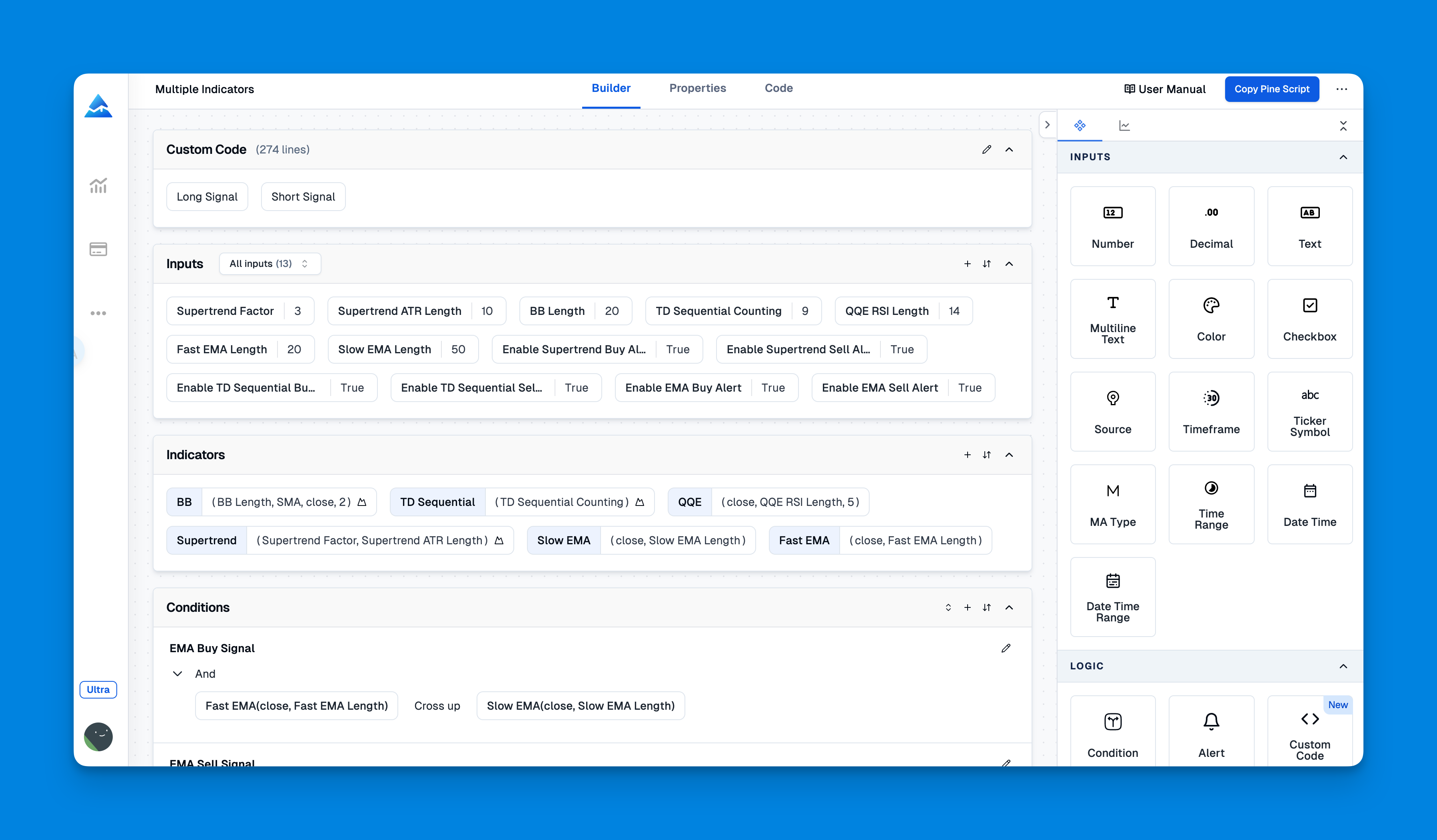
Visual Pine Script Editor: Build TradingView Indicators Without Coding

· 17 min read
Pineify Team
Pine Script and AI trading workflow research team

Ever had a flash of trading insight? A clear idea for a custom chart tool that could help spot opportunities or confirm your market read? For most traders, the next step is the frustrating part. Turning that idea into a working TradingView indicator usually means wrestling with complex code—a roadblock that forces many to abandon great concepts.

Pineify's Visual Pine Script Editor is built to fix that. It transforms how you create custom indicators, turning a process that used to take hours (or feel impossible) into something you can do in minutes. You don't need to be a programmer; you just need your trading knowledge.


Visual Pine Script Editor: Build TradingView Indicators Without Coding

Master Pine Script with AI Coding Agent: Generate Error-Free TradingView Code

· 15 min read
Pineify Team
Pine Script and AI trading workflow research team

Writing Pine Script for TradingView can be a lot of fun when it works, but let's be honest—it can also be incredibly frustrating. You have a great trading idea, but then you get stuck for hours fixing syntax hiccups, outdated functions, or weird bugs that pop up when you least expect them. The good news? This is getting much easier. Tools like the Pine Script AI Coding Agent, especially the one built into Pineify's platform, are changing how traders and coders create indicators, strategies, and screeners on TradingView.

This guide will walk you through how to use an AI coding assistant to write clean, reliable Pine Script code that works the way you want it to.


Master Pine Script with AI Coding Agent: Generate Error-Free TradingView Code

Free Options Backtesting Guide: Test Trading Strategies Without Cost

· 17 min read
Pineify Team
Pine Script and AI trading workflow research team

Most people who trade options end up losing money, often because they’re going on a hunch instead of checking the facts. That’s where free options backtesting comes in—it lets you test your trading idea against years of actual market history, so you can see how it might play out before you risk any real money. No matter if you’re into covered calls, iron condors, or those last-minute 0DTE spreads, backtesting is the best way to know if your strategy actually holds up.


Free Options Backtesting Guide: Test Trading Strategies Without Cost

Get Live Market Data and Company Financials with Pineify's AI Finance Agent

· 16 min read
Pineify Team
Pine Script and AI trading workflow research team

Pineify's AI Finance Agent is like having a financial research assistant right in your pocket. It gives you instant answers about the markets, pulling from live data sources instead of relying on old, memorized information. Whether you're checking a stock price before a trade or digging into a company's latest earnings report, this guide will show you how to get what you need, quickly and reliably.


Get Live Market Data and Company Financials with Pineify's AI Finance Agent

Cursor AI vs GitHub Copilot for Pine Script: Why Generic AI Tools Fail and Pineify's Solution Works

· 14 min read
Pineify Team
Pine Script and AI trading workflow research team

If you've ever asked a general AI coding assistant for help with Pine Script, you know the drill. It gives you code that seems right. It might even pass a basic syntax check. But the moment you paste it into TradingView, it falls apart. That’s because tools built for Python or JavaScript weren’t made for Pine Script’s unique world. The difference between code that looks correct and code that actually works in a live chart can mean hours of tweaking and debugging. Let's talk about why that happens and how a tool built specifically for Pine Script fixes it.


Cursor AI vs GitHub Copilot for Pine Script: Why Generic AI Tools Fail and Pineify's Solution Works

Best Congress Insider Trading Viewer: Pineify Market Insights - Complete Guide to Political Trading Signals

· 16 min read
Pineify Team
Pine Script and AI trading workflow research team

It’s a simple fact: members of the U.S. Congress are actively buying and selling stocks, often while serving on committees that directly influence those same industries. The 2012 STOCK Act requires them to disclose those trades within 45 days. But for the average person, finding and making sense of that data has been nearly impossible—buried in complicated filings and hidden behind expensive platforms.

That’s the whole reason Pineify Market Insights exists. If you're looking for a clear, usable view of congressional trading activity, Pineify brings it all together. It combines these political disclosures with real-time options flow, dark pool data, and market sentiment—giving you a complete picture in one straightforward dashboard. For traders who want to build their own automated systems based on this data, our guide on TradingView algorithms is a valuable resource.


Best Congress Insider Trading Viewer: Pineify Market Insights - Complete Guide to Political Trading Signals

HalfTrend Indicator: TradingView Pine Script for Trend and Buy/Sell Signals

· 11 min read
Pineify Team
Pine Script and AI trading workflow research team

Knowing when the trend has actually flipped—instead of chasing noise—is one of the hardest parts of trend trading. I've found the HalfTrend (HT) indicator useful for that. It draws a single trend line that switches between support and resistance, plus an ATR-based channel around it, and it marks Buy and Sell only when the internal trend state changes. That keeps signals clear and avoids the clutter of many overlapping lines.

HalfTrend uses the Average True Range (ATR) and a short lookback (amplitude) to decide when price has broken the current structure. When the trend flips from down to up, you get a Buy signal and the line turns into support (often shown in blue); when it flips from up to down, you get a Sell signal and the line acts as resistance (often shown in red). The ATR High and ATR Low bands form a ribbon that shows the channel around the trend line. After testing it on multiple timeframes, I use it mainly as a trend filter and for reversal entries when the arrow and label appear. In this guide you'll see how HalfTrend is built, how to add and tune it in TradingView (including via Pineify), and how to use it in real strategies with clear entry, stop-loss, and take-profit rules.

TradeStation vs Pineify: Complete Backtesting Analytics Comparison Guide

· 17 min read
Pineify Team
Pine Script and AI trading workflow research team

Trying to validate a trading idea? Whether you build automated systems or prefer to trade by feel, the quality of your backtesting can be the difference between confidence and a costly mistake. Two powerful options often come up: the established TradeStation platform and the modern analytics of Pineify's Backtest Deep Report for TradingView users. Let's break down what TradeStation brings to the table first, so you can see which tool fits your workflow.


TradeStation vs Pineify: Complete Backtesting Analytics Comparison Guide