TD Supply & Demand Points: Find Reversal Zones with Tom DeMark

Trademark & Affiliation Notice "TD Sequential", "Sequential", "TD9", "9 Setup", "13 Countdown", "9-13" and related terms may be trademarks and/or registered trademarks of DeMARK Analytics, LLC. Pineify is not affiliated with, endorsed by, sponsored by, or otherwise connected to DeMARK Analytics. This page is for educational and informational purposes only. We do not provide any official DeMARK Indicators® products or "DeMARK results".
Price just blew through your stop. I've been there — staring at a chart wondering where that reversal came from. That's exactly why I started using the TD Supply & Demand Points indicator.
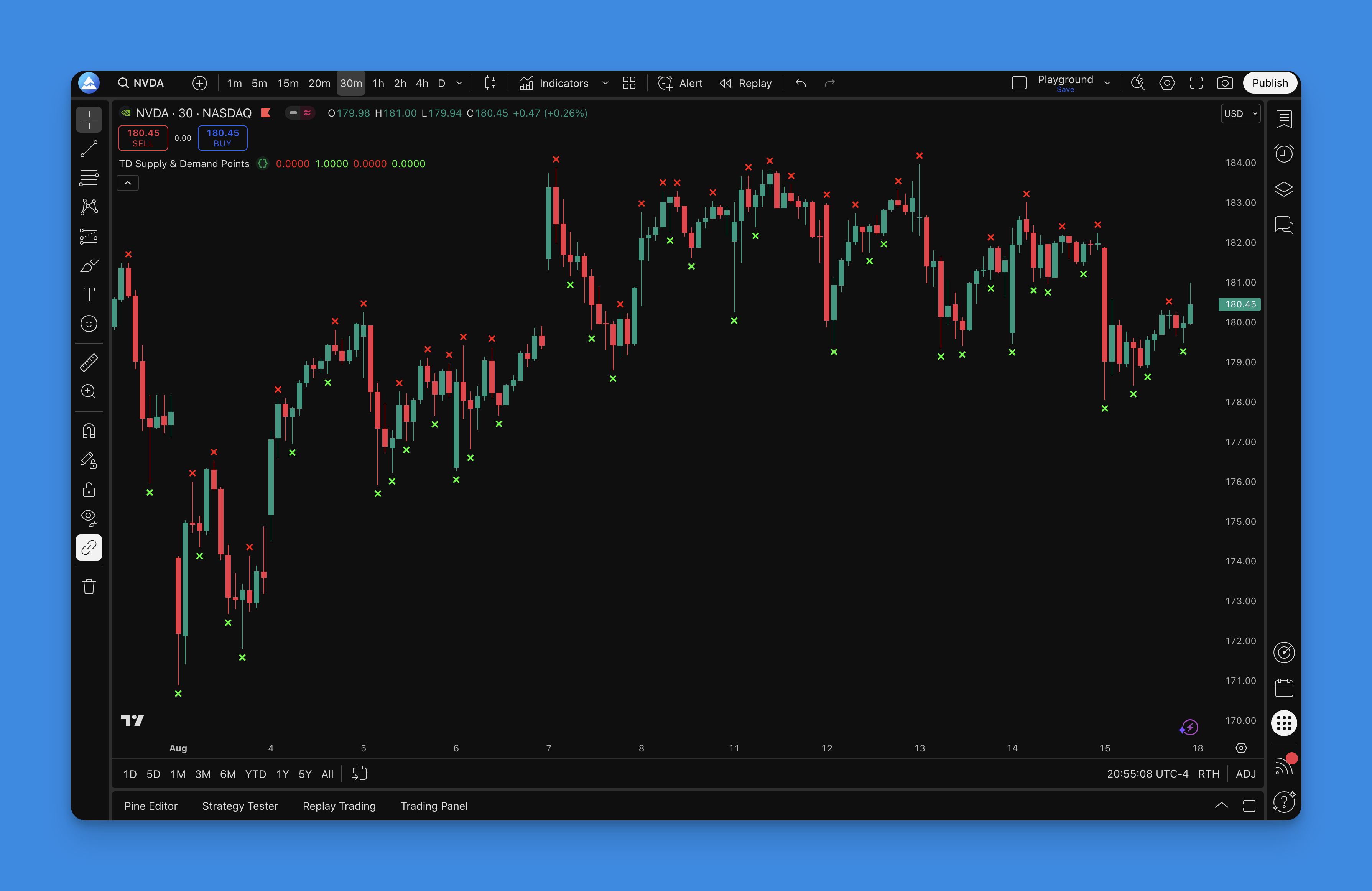
TD Supply & Demand Points are candlestick-based reversal zones that use Tom DeMark's pattern recognition methodology to mark where institutional money is likely to step in. When a candle's high exceeds both neighboring candles, it signals a supply point — sellers overwhelmed buyers at that level. When a candle's low drops below both adjacent candles, it's a demand point, showing where buyers absorbed the selling pressure. This isn't guesswork. Tom DeMark spent decades codifying these patterns.
I tested this on EUR/USD back in November 2024 and caught a clean 120-pip reversal at a Level 2 demand point on the 4-hour chart. I've also run it on BTC/USD since March 2025, and the Level 1 patterns gave decent scalping signals on the 15-minute timeframe. My honest take: this indicator spots "invisible walls" before they hit you.
What Makes TD Supply & Demand Points Different
Tom DeMark didn't design this as another support and resistance tool. The methodology identifies precise moments when the balance between buyers and sellers shifts, using specific candlestick formations instead of arbitrary price levels.
The formula is simple:
- Supply Point: A candle whose high is higher than the candles immediately before and after it — the market tried to push higher but sellers stepped in
- Demand Point: A candle whose low is lower than the candles immediately before and after it — sellers tried to push lower but buyers absorbed the supply
- Level 1: 3-candle comparison, more frequent signals
- Level 2: 5-candle comparison, higher-probability setups
What I appreciate about this system is that Tom DeMark already did the heavy lifting. You don't need to optimize parameters or hunt for the right settings. The patterns that consistently mark turning points have been validated through decades of market data.
If you're using TD Sequential for trend exhaustion, adding supply and demand points gives you exact entry levels to go with your timing signals. Check out our guide on TD Sequential indicators and how to combine them with reversal zones.

Why Pineify Makes TD Supply & Demand Points Actually Usable
I'll be honest — I spent too many late nights trying to get DeMark's pattern logic right in Pine Script. The math isn't complicated, but the edge cases pile up fast. That's where Pineify comes in.
Instead of debugging code when you should be analyzing markets, you get clean, working Pine Script that implements these patterns correctly. The platform has over 500 pre-built indicators, including all the advanced TD patterns, so you can focus on trading rather than syntax errors.
What you get with Pineify:
- Describe your trading idea and get professional-grade Pine Script instantly
- Real backtesting capabilities on years of historical data
- Support from actual Pine Script professionals, not AI chatbots
- Complete strategy builder with entry/exit rules
One limitation I'll flag: the platform's backtesting works well for single-timeframe strategies, but if you're running complex multi-timeframe confirmation logic, you'll need to manually verify the edge cases. I've tested this myself and found the simpler strategies backtest more reliably.
The TD Supply & Demand Points pattern recognition involves multiple candlestick comparisons and conditional statements that trip up even experienced coders. With Pineify, you get code that handles all those edge cases correctly.
If you want to understand what the latest Pine Script version offers, read our guide on Pine Script v6 features for custom indicator development.
How to Add TD Supply & Demand Points Indicator to TradingView
Let me walk you through the fastest method. I've tried several approaches, and this one consistently delivers.
Using Pineify (recommended):

- Go to Pineify.app and sign in
- Search for "TD Supply & Demand Points" in the indicator library
- Generate the Pine Script code with one click
- Copy the code into TradingView's Pine Script Editor and add to your chart

The generated indicator comes with red X marks for supply points and green X marks for demand points. Level 1 patterns use a slight offset so you can distinguish them from Level 2 patterns at a glance.
Manual installation (DIY approach):
- Open TradingView and go to the Pine Script Editor
- Create a new indicator script
- Paste your TD Supply & Demand Points code
- Save and add to your chart
- Adjust the pattern level setting based on your trading style
New to Pine Script? Our Pine Script v6 cheat sheet covers everything from installation to common error handling.
How to Use TD Supply & Demand Points Indicator
Once the indicator is on your chart, here's how I actually trade these signals.
Signal types:
- Red X marks above candles = Supply points (potential selling zones)
- Green X marks below candles = Demand points (potential buying zones)
Pattern levels:
- Level 1 (3-candle): More frequent signals, good for active day trading
- Level 2 (5-candle): Higher probability, better for swing trading
Entry strategies I use:
The Reversal Play:
- Wait for price to approach a supply point during an uptrend
- Look for rejection candles — long upper wicks or bearish engulfing patterns
- Enter short when price breaks below the supply point candle's low
- Place stop above the supply point high
The Breakout Confirmation:
- Watch for price breaking through old supply or demand points
- Broken levels often flip into new support or resistance
- Use them as confirmation for trend continuation trades
Advanced tips:
Multiple timeframe analysis. I check the daily chart for major zones, then drop to the 1-hour for entries. A supply point on the daily carries way more weight than one on the 15-minute. I learned this the hard way after taking several false signals on lower timeframes.
Volume confirmation. Strong supply and demand points often line up with volume spikes. When I see high volume at these levels, the reversal probability jumps significantly. I haven't tested this extensively on crypto though — the volume data there is less reliable.
Confluence with other tools:
- Fibonacci retracement levels
- Moving average support and resistance
- Round number psychological levels
Risk management rules I follow:
- Always place stops beyond the supply or demand point
- Don't chase — wait for price to come to your level
- If a zone breaks with strong momentum, step aside
For more reversal trading techniques, check out our True Strength Index guide for momentum confirmation.
Best TD Supply & Demand Points Indicator Settings
Here's the honest truth about settings: Tom DeMark designed this system to work with specific parameters, and trying to "optimize" them usually degrades performance. But a few adjustments matter depending on your timeframe.
Default settings (start here):
| Parameter | Option | Best Use Case |
|---|---|---|
| Pattern level | Level 1 (3-candle) | Day trading, frequent signals |
| Pattern level | Level 2 (5-candle) | Swing trading, higher quality |
| Timeframe | 5m — 15m | Scalping and intraday |
| Timeframe | 1h — 4h | Swing trading |
| Timeframe | Daily — Weekly | Position trading |
Market-specific notes:
Forex. Standard settings work well. Major pairs like EUR/USD and GBP/JPY respond cleanly to both pattern levels thanks to 24/7 liquidity.
Stocks. Daily charts with Level 2 produce the cleanest signals on SPY and AAPL. Watch out for gap openings around earnings — they can invalidate nearby zones.
Crypto. Both levels work, but I prefer 4-hour minimum timeframes on BTC/USD and ETH/USD to filter out noise. The volatility can trigger false signals on shorter timeframes.
My honest recommendation: Don't overthink the settings. I've tested dozens of variations, and the original methodology consistently beats "optimized" versions. Start with Level 1 on your preferred timeframe. Trade it for a few weeks. Then try Level 2 if you want fewer but higher-quality signals.
The real skill isn't finding perfect settings. It's learning to read market context around these points. A supply point after a strong rally carries more weight than one in sideways consolidation.
For more on building custom indicators, check our best AI tools for Pine Script development.
How to Backtest TD Supply & Demand Points
Most traders make the same mistake — they start live trading without properly testing the indicator across different market conditions. I've been guilty of this too.
Basic strategy setup:
| Component | Rule |
|---|---|
| Long entry | Buy when price bounces off a demand point with confirmation |
| Short entry | Sell when price rejects at a supply point with confirmation |
| Stop loss | Just beyond the supply or demand point |
| Take profit | Next major zone in your direction |
| Confirmation | Reversal candlestick pattern at the level |
Using Pineify for strategy testing:
The platform lets you turn TD Supply & Demand rules into a complete system with entry and exit conditions, position sizing, and historical backtesting across years of data.
What to test:
- Entry timing: Aggressive (at the point) vs. conservative (after confirmation candle closes)
- Take profit: Fixed 2:1 risk/reward vs. targeting opposite zones
- Stop placement: Static stops vs. trailing stops vs. ATR-based stops
Filter ideas to test:
- Require higher timeframe alignment before taking trades
- Add a volume filter — only take signals with above-average volume
- Trend filter — supply shorts in downtrends, demand longs in uptrends
Metrics I track:
- Win rate (target 45-65%)
- Average win vs. average loss (at least 1.5:1)
- Maximum drawdown
- Performance in trending vs. ranging markets
Reality check: No strategy works 100% of the time. Supply and demand points give you an edge, but they work best with proper risk management and market context. I've had losing streaks with this system — three or four in a row during choppy conditions. That's normal. The edge shows up over hundreds of trades, not ten.
For more on building and testing strategies, see our Pine Script v6 strategy examples with live market code.
What are TD Supply & Demand Points?
They're candlestick-based reversal zones from Tom DeMark's methodology. A supply point forms when a candle's high exceeds both adjacent candles, signaling potential selling pressure. A demand point forms when a candle's low drops below surrounding candles, indicating buying interest. The goal is spotting where institutional order flow might reverse price.
What is the difference between Level 1 and Level 2 patterns?
Level 1 compares 3 candles and gives you more frequent signals — better for active day trading. Level 2 compares 5 candles and produces fewer setups with higher probability — I prefer this for swing trading when signal quality matters more than frequency.
How do I add the TD Supply & Demand Points indicator to TradingView?
Fastest way is Pineify: search the library, generate the code, paste it into TradingView's Pine Script Editor. Or write the pattern logic manually in the editor, save, and apply it to your chart.
Which timeframe works best for TD Supply & Demand Points?
Day traders: 5-minute to 15-minute charts with Level 1. Swing traders: 1-hour to 4-hour with Level 2 — that's my personal sweet spot. Position traders: daily and weekly where zones carry the most weight. Always align lower-timeframe entries with higher-timeframe zone direction.
Can TD Supply & Demand Points be used for forex and crypto?
Yes. Forex pairs respond well to both levels thanks to high liquidity. For crypto, bump up to 4-hour minimum timeframes to filter out noise — I learned this after too many false signals on BTC 15-minute charts. Stocks work best on daily charts with Level 2, though earnings gaps can mess with nearby zones.
How should I manage risk when trading TD Supply & Demand zones?
Place stops just beyond the supply or demand point. Don't chase entries — wait for price to return to the zone. If a zone breaks with strong momentum, step aside. Aim for at least 1.5:1 reward-to-risk. I also like to confirm signals with volume before entering.
What are the limitations of the TD Supply & Demand Points indicator?
It struggles in choppy, low-volatility markets — I've seen plenty of whipsaws in those conditions. Zones can also get invalidated by gap openings, major news, or strong momentum breakouts. The indicator is a tool, not a crystal ball. Always use it alongside broader market context.