BBWP Indicator: Rank Volatility with Bollinger Band Width Percentile

Bollinger Band Width Percentile, or BBWP, ranks the current band-width calculation against its recent history. It supplies relative volatility context, not a direction forecast or a probability that a breakout will succeed. A percentile must be interpreted alongside the raw width, comparison window and treatment of equal values.
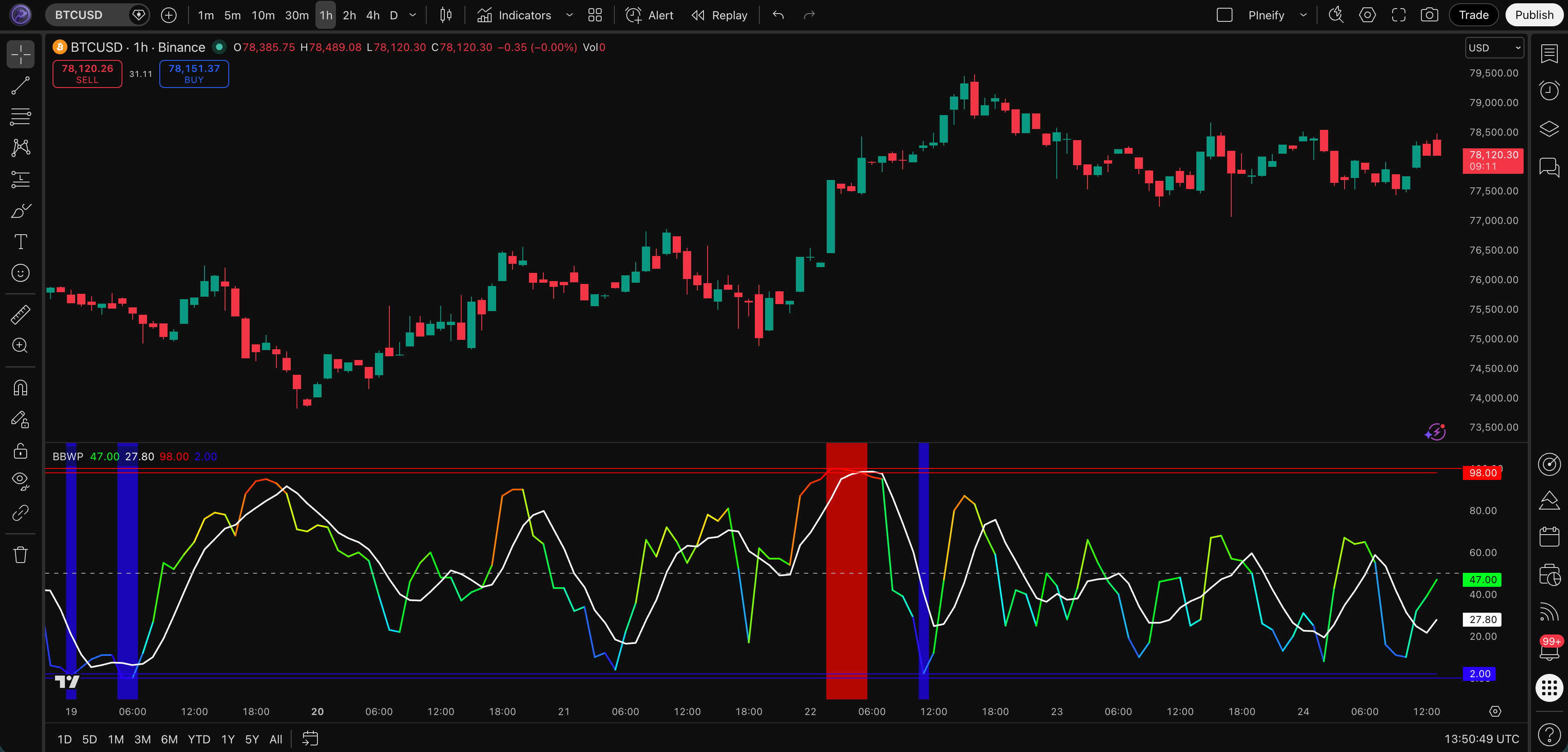
What the Pineify preset calculates
The reviewed Pineify implementation uses these steps:
- Calculate a moving-average basis from the selected source. Defaults are close, SMA and length 7.
- Calculate a normalized width as twice the source standard deviation divided by the basis, when the basis is nonzero.
- Examine prior widths at offsets 1 through the selected lookback, default 100. The current observation is excluded from that comparison sample.
- Count valid prior widths less than or equal to the current width, and divide by the number of valid prior widths.
- Multiply by 100 and calculate a moving-average signal line, default SMA length 5.
The width expression has a different constant scale from a conventional two-standard-deviation Bollinger Band width. Multiplying every valid width by the same positive constant leaves its ordering unchanged, so it does not by itself change the percentile. Changing the basis type, lookback or missing-data treatment can change it.
A hypothetical example: prior widths of 1%, 2%, 3% and 4%, with a current width of 3%, give three prior values less than or equal to the current one. BBWP is 3 / 4 × 100 = 75. That is a rank in this small sample, not a 75% chance of a price increase.
Three edge cases to inspect
Equal values count. If every valid width equals the current width, the rank is 100. For a constant positive price series, standard deviation and all widths can be zero, yet BBWP can still be 100 because of the less-than-or-equal comparison. Check raw width before interpreting a high rank as extreme volatility.
Warm-up can use a partial sample. The implementation divides by available valid prior values, not always 100. With only one valid comparison, a rank can jump to either endpoint. Decide how much history your strategy requires and exclude earlier observations consistently.
An invalid current width needs a separate check. The reviewed code guards a zero basis when calculating width, but its later ranking loop can still return zero when current width is unavailable and prior values exist. Do not interpret that zero as confirmed compression. Verify current source, basis and width validity before using the rank. Negative or near-zero bases also need careful treatment in this normalization.
Add BBWP and verify its settings

In Pineify, select the BBWP preset and inspect the inputs rather than reconstructing it from unrelated blocks. The current preset exposes source, basis MA type/length, lookback and signal MA type/length. Generate the script, inspect it and compare the plotted values in TradingView before building strategy rules.
TradingView community scripts with the same name may use different ranking formulas. Check the author, current-bar inclusion, tie handling and warm-up before expecting identical values. No complete Pine source is supplied on this page, and no five-minute setup benchmark is claimed.
| Setting or display | Reviewed default | Interpretation |
|---|---|---|
| Source / basis | Close / SMA length 7 | Input and normalization basis |
| Lookback | 100 prior bars | Maximum comparison window |
| Signal | SMA length 5 | Smoothing of the percentile series |
| Midline | 50 | Reference rank, not proof of normal absolute volatility |
| Low / high levels | 2 / 98 | Display thresholds, not validated trade triggers |
The preset's “background alerts” option colors the background at the thresholds. It does not by itself create a TradingView server alert. Configure an actual alert condition and the alert in TradingView if notifications are required; see Pine alert concepts.
Research three different questions
Compression followed by a price breakout
A candidate rule could require a low BBWP rank before a break of a defined price range. Specify the threshold, how long the condition remains active, and whether the range excludes the current bar. Low relative width does not establish that pressure is building or that a large move is imminent.
Use price to define direction. A rise in BBWP can accompany either an upward or downward move. Record failed breakouts as well as successful ones and include spreads and slippage.
A pause inside an existing trend
A separate hypothesis could combine a price trend filter with lower relative width during a pause. Define the trend and pause mechanically rather than labeling them after observing the outcome. Test whether the BBWP filter adds useful information compared with the price rule alone.
High relative width and a possible reversal
A high rank says the current width compares highly with the selected history, subject to the edge cases above. It does not establish exhaustion. A trend can continue while BBWP remains high, and the rank can change as old observations leave the window even without a large change in current width.
A signal-line crossing adds information about the recent percentile path, not the direction of the underlying price. Treat a reversal rule as a separate hypothesis with its own price confirmation and invalidation.
Choose settings by testing the question
There is no established best crypto, scalping or swing-trading preset here. A shorter basis changes the volatility estimate; a shorter ranking window changes what counts as unusual. A longer window can span several regimes and may make current observations look unusual relative to conditions that no longer apply.
Compare a small, predefined set of configurations on the same instrument, interval and cost assumptions. Retain the raw width alongside BBWP so two markets at the same percentile are not mistaken for having the same absolute volatility. Equal ranks do not imply equal dollar risk or equivalent stop distances.
For a higher-timeframe filter, use values available at the decision time. A developing daily value can change during the session. Review TradingView's other-timeframe data rules when implementing that workflow.
Build a causal backtest
A concrete research specification might require price above a chosen moving average, a previously observed low BBWP reading and a later close above the highest high of the previous 20 completed bars. Specify when the low-rank state expires and whether the BBWP signal-line cross must occur on the same bar. These are example design choices, not tested recommendations.
Define the stop from information available at entry, position size from the instrument's units, and exits before measuring performance. An intended stop price is not a guaranteed fill during gaps. State how fees, partial exits and trailing levels are modeled. See TradingView strategy assumptions.
Reserve later data before selecting settings, then compare the complete strategy with and without the filter. Report sample size, turnover, drawdown and net results under consistent costs. This guide contains no SPY, BTC, NVDA, ETH or futures trading experiment and no recommended universal account-risk percentage.
FAQs
Does BBWP show buy and sell signals?
It ranks a width calculation. Direction and order decisions require separate rules; a high or low reading is not an automatic trade.
Is BBWP better than Bollinger Band Width?
They answer different questions. Raw width describes the current normalized spread of the bands, while BBWP describes its rank relative to selected history. Inspect both when comparing markets.
Can BBWP be combined with RSI or ADX?
Yes, but agreement is not proof of independent confirmation or improved returns. Define each filter and evaluate its incremental effect after costs. The ADX guide explains that indicator's separate role.
Why can BBWP be high when price barely moves?
The rank is relative and includes ties. If many prior widths equal the current one, even a small or zero width can receive a high rank. Inspect the input series, basis, raw width and valid sample count before treating it as expansion.
