Tom Demark 9 (TD9) Indicator: Complete TradingView Guide

· 12 min read
Pineify Team
Pine Script and AI trading workflow research team

The Tom Demark 9 (TD9) indicator is one of the most fascinating tools in the DeMark arsenal. While many traders focus on the TD Sequential setup phase, the TD9 Countdown is where the real magic happens - it tells you when a trend might be running out of steam and a reversal could be imminent.

I've been using Tom Demark's methodology for years, and the TD9 Countdown has become one of my favorite indicators for timing entries and exits. Unlike traditional indicators that rely on fixed parameters, TD9 adapts to each candle's relationship with previous bars, making it incredibly responsive to market dynamics.

What makes the TD9 Countdown particularly powerful is its ability to identify exhaustion points in trending markets. When you see the countdown reaching 9, it means price has closed in the direction of the trend for nine consecutive bars (after a setup completes), suggesting the momentum might be fading.

In this guide, I'll walk you through everything you need to know about implementing and using the Tom Demark 9 indicator on TradingView. Whether you're new to DeMark indicators or looking to add this powerful tool to your trading arsenal, this article will give you a complete understanding of how TD9 works and how to use it effectively.

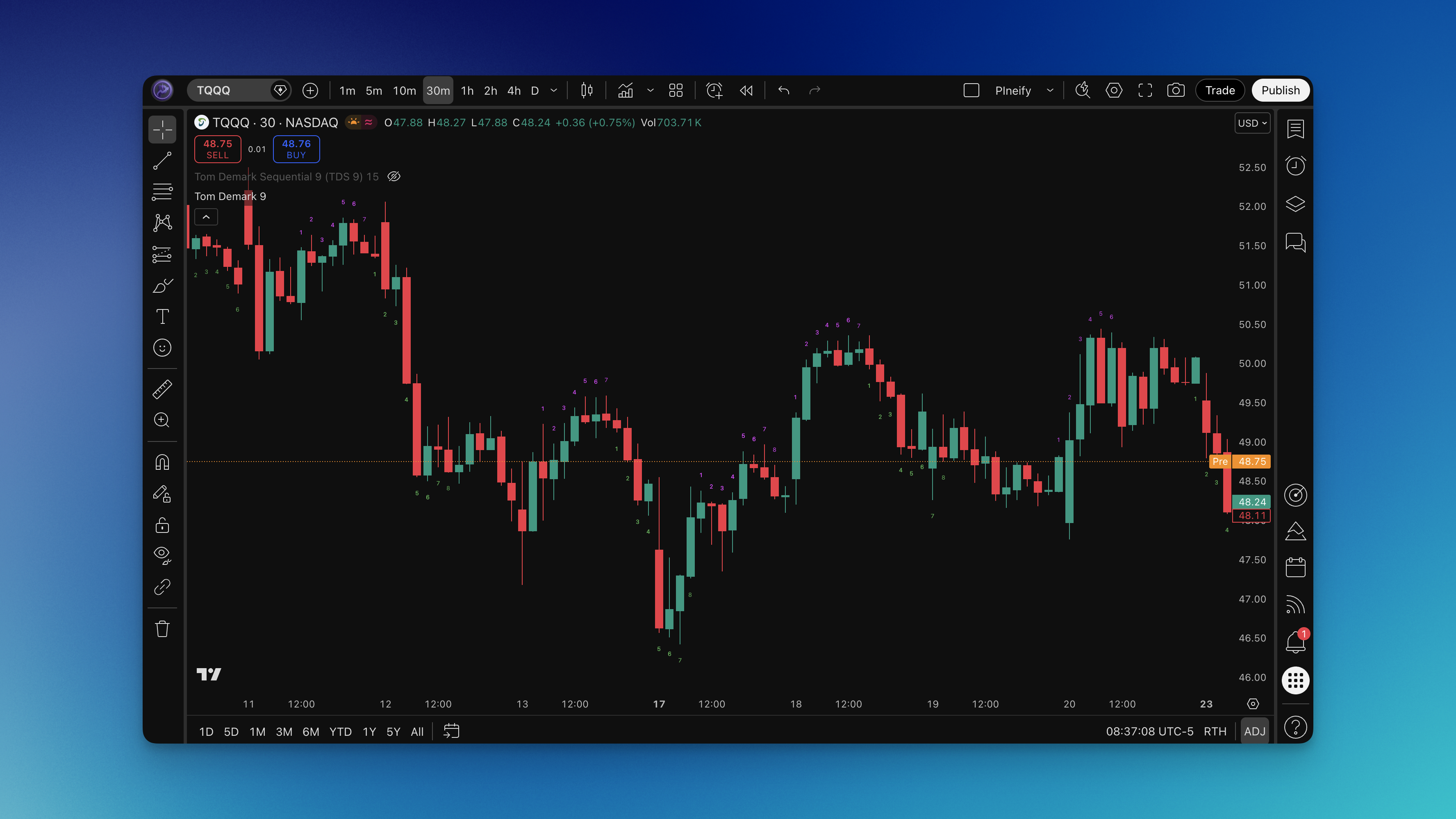
TD9 Chart

Understanding the Tom Demark 9 Countdown

Let me break down what makes the TD9 Countdown so effective. Tom Demark developed this indicator as a follow-up to the TD Sequential, designed to confirm trend exhaustion after a setup completes.

The core concept behind TD9 is beautifully elegant: after a TD Sequential setup completes (which is either 9 consecutive closes higher or lower than the close 4 bars earlier), you start counting. Each bar that closes in the direction of the trend adds to the countdown. When the countdown reaches 9, it signals a potential exhaustion point where the trend might reverse.

Why TD9 Countdown Works:

  • Trend momentum confirmation - Counts consecutive closes in the direction of the trend after setup completion
  • Exhaustion identification - Nine consecutive closes suggest the trend is losing steam
  • Entry timing tool - Helps time entries at the end of a trend rather than at the beginning
  • Universal application - Works on any market and timeframe

The mathematical logic is straightforward but powerful. An uptrend count increments when the current close is higher than the close four bars back. A downtrend count does the same in reverse. When either count reaches 9, you've got a potential signal.

What I appreciate about this methodology is that it's not a lagging indicator dressed up to look predictive. The TD9 Countdown genuinely identifies moments when market structure suggests exhaustion, giving you a systematic approach to finding reversal points.

The Best Pine Script Generator

How the TD9 Indicator Works

Now let me explain the mechanics of how the TD9 Countdown actually calculates its signals. Understanding this will help you interpret the indicator more effectively and avoid common misinterpretations.

The Counting Logic:

The indicator tracks two separate counts:

  • Uptrend Count: Increments when close > close[4]
  • Downtrend Count: Increments when close < close[4]

Each count resets to zero when the condition isn't met. This means the count doesn't just count bars - it counts bars that meet specific criteria relative to recent price action.

The Setup Phase:

Before the countdown begins, you need a TD Sequential setup to complete. This is 9 consecutive closes either higher (for buy setups) or lower (for sell setups) than the close four bars earlier. The setup phase is crucial because it establishes the trend direction the countdown will track.

The Countdown Phase:

Once the setup completes, the countdown begins. For each bar that closes in the same direction as the original setup, the count increments. When this reaches 9, you've got a potential exhaustion signal.

Visual Representation:

The TD9 indicator typically displays numbers 1 through 9 on the chart:

  • Numbers appear above candles in uptrends
  • Numbers appear below candles in downtrends
  • The number 9 is often highlighted differently to emphasize the exhaustion point

This visual approach makes it incredibly easy to see where you are in the countdown at a glance. I've found this particularly useful when scanning multiple charts - I can quickly identify which markets are approaching potential exhaustion points.

How to Add Tom Demark 9 to TradingView

Let me walk you through the fastest way to get this powerful indicator running on your charts. I've tested multiple approaches, and this method gives the best results.

The Smart Way (Using Pineify):

Pineify Website
  1. Access Pineify - Go to Pineify.app and set up your account
  2. Search the library - Look for "Tom Demark 9" or "TD9" in the indicator collection
  3. Generate clean code - The platform creates optimized Pine Script code automatically
  4. Deploy to TradingView - Copy the code to TradingView's Pine Script Editor and add to your chart

What you'll get:

The generated TD9 indicator comes with smart visual coding - numbers displayed above or below candles showing the current countdown position. The number 9 is typically highlighted to clearly mark potential exhaustion points.

Manual Installation Steps:

If you prefer the DIY approach:

  1. Open TradingView and go to the Pine Script Editor
  2. Create a new indicator script
  3. Paste the Tom Demark 9 code
  4. Save and add to your chart
  5. Adjust any settings if needed

The Pine Script implementation handles all the edge cases correctly, including proper initialization and count resets. Getting this right manually can be tricky, which is why using Pineify's generated code ensures accuracy.

How to Use the TD9 Indicator Effectively

Once you have the TD9 Countdown on your chart, here's how to actually use it to make better trading decisions. I'll focus on the signals that matter most in real trading situations.

Reading the Basic Signals:

The indicator provides several key pieces of information:

  • Uptrend countdown - Numbers 1-9 appearing above candles during bullish conditions
  • Downtrend countdown - Numbers 1-9 appearing below candles during bearish conditions
  • Exhaustion point - When either countdown reaches 9, watch for potential reversals

The Complete TD Sequential Flow:

The TD9 is part of a larger system. Here's how everything fits together:

Phase 1: Setup

  • TD Buy Setup: 9 consecutive closes higher than the close 4 bars earlier
  • TD Sell Setup: 9 consecutive closes lower than the close 4 bars earlier

Phase 2: Countdown

  • After setup completion, begin counting bars that close in the trend direction
  • Count to 9, with each close in the trend direction incrementing the count

Phase 3: Signal

  • Count of 9 indicates potential exhaustion
  • Wait for price action confirmation before entering trades

Entry Strategies That Work:

The Reversal Play:

  • Wait for countdown to reach 9
  • Look for reversal candlestick patterns at the exhaustion point
  • Enter in the opposite direction of the exhausted trend
  • Place stop beyond the recent high/low

The Breakout Confirmation:

  • Use TD9 to time entries after false breakouts
  • When price breaks a key level after countdown completion, enter in the breakout direction

Trend Continuation:

  • Not all 9-counts lead to reversals
  • Some lead to powerful trend continuations
  • Use the countdown as a timing tool, not a prediction

Timeframe Analysis:

Higher Timeframes:

  • Daily and weekly charts show the most reliable signals
  • Use for swing trading and position trading
  • Less noise, more significant signals

Lower Timeframes:

  • Good for day trading and scalping
  • More frequent signals but also more noise
  • Combine with other confirmation tools

Confluence Trading:

The most powerful setups occur when TD9 signals align with other technical factors:

  • Support and resistance levels
  • Moving average crossovers
  • Fibonacci retracement levels
  • Trend line breaks

Risk Management:

  • Always use stops - TD9 signals aren't guarantees
  • Don't risk more than 1-2% on any single trade
  • Wait for confirmation before entering
  • The countdown is a timing tool, not a prediction

Best TD9 Indicator Settings

Here's what you need to know about TD9 settings - the original Tom DeMark methodology is surprisingly robust, and most "optimizations" tend to make things worse.

The Standard Setup:

The beauty of TD9 is its simplicity - it uses fixed numbers (9 for setup, 9 for countdown) that Tom DeMark determined through decades of research. These aren't arbitrary values but reflect specific market psychology patterns.

What the Settings Control:

Trend Length Parameter:

  • The default compares current close to close[4] (5 bars ago)
  • This captures medium-term momentum
  • Some traders experiment with different lookbacks

Display Options:

  • Show/hide countdown numbers
  • Color customization for up and down counts
  • Label positioning

Timeframe Selection:

For Day Trading:

  • 15-minute to 1-hour charts work well
  • Focus on the countdown for entry timing
  • Combine with intraday support/resistance

For Swing Trading:

  • Daily charts are ideal
  • The 9-count often marks significant turning points
  • Use for entry and exit timing

For Position Trading:

  • Weekly charts show major exhaustion points
  • Both setup and countdown matter more on higher timeframes
  • Less frequent but higher conviction signals

Market-Specific Considerations:

** Forex Markets:**

  • The standard 9-count works well across major pairs
  • 24-hour nature means continuous counting
  • Best results on the 4-hour and daily charts

Stock Markets:

  • Daily charts work best for position trading
  • Earnings seasons can create false signals
  • Focus on liquid, actively traded stocks

Cryptocurrency:

  • Higher volatility may require filtering
  • Consider longer timeframes to reduce noise
  • Works well on 4-hour and daily charts

My Honest Recommendation:

Start with the standard settings. I've tested countless variations, and the original methodology consistently outperforms "optimized" versions. The key isn't finding perfect parameters - it's learning to read the market context around these countdown signals.

How to Backtest the TD9 Indicator

Now let me show you how to properly backtest this indicator to understand its effectiveness in different market conditions. This is where most traders go wrong - they trade without testing first.

Setting Up Your TD9 Strategy:

Basic Entry Rules:

  • Long entries: Enter when countdown reaches 9 in a downtrend with bullish confirmation
  • Short entries: Enter when countdown reaches 9 in an uptrend with bearish confirmation
  • Confirmation: Wait for price action signals at the exhaustion point

Exit Rules:

  • Stop loss: Place stops beyond recent structure
  • Take profit: Target the next significant level in the new direction
  • Time-based: Exit if no movement occurs within expected timeframe

Using Pineify for Strategy Development:

The platform makes it easy to create complete trading systems from your TD9 rules. You can specify entry conditions, exit rules, position sizing, and test across extensive historical data.

Strategy Components to Test:

Entry Timing:

  • Aggressive entry at the exhaustion point
  • Conservative entry after price confirms the reversal
  • Partial entry at countdown 7-8, remainder at confirmation

Take Profit Approaches:

  • Fixed risk/reward ratios (start with 2:1)
  • Structure-based exits at support/resistance
  • Trailing stops following favorable movement

Stop Loss Methods:

  • Static stops beyond the exhaustion candle
  • ATR-based stops adjusting to volatility
  • Swing-based stops at recent structure

Advanced Testing Ideas:

Multi-Timeframe Confirmation: Require alignment between timeframes. A TD9 exhaustion on the daily carries more weight than on the 15-minute chart.

Trend Filtering: Only take bullish countdowns in uptrends and bearish countdowns in downtrends. Counter-trend trades from TD9 are higher risk.

Volume Confirmation: Add volume conditions - strong exhaustion signals often coincide with high volume.

What to Track:

  • Win Rate: Target 40-60%
  • Average Win vs Loss: At least 1.5:1 risk/reward
  • Maximum Drawdown: Know your worst-case scenario
  • Market Condition Performance: How does it perform in trends vs. ranges?

The Reality Check:

No indicator works perfectly. The TD9 is a powerful tool but should be combined with proper risk management and market context analysis. Backtesting helps you understand when the indicator works best in different conditions.

Final Thoughts

The Tom Demark 9 Countdown is a remarkable tool that has stood the test of time. Developed through decades of market research, it offers a systematic approach to identifying potential trend exhaustion points that works across markets and timeframes.

What makes TD9 special:

  • Uses price action rather than arbitrary calculations
  • Part of a complete methodology (setup + countdown)
  • Works across all markets and timeframes
  • Provides clear, actionable signals

Key takeaways:

Start with the standard settings and focus on learning to read market context. A countdown that reaches 9 after a strong trending move carries more weight than one that appears in choppy, sideways markets.

The real power comes from combining TD9 signals with other technical analysis tools. Support and resistance, trend lines, and momentum indicators all work well alongside the countdown to confirm potential reversal points.

Practical advice:

Don't rush into live trading. Spend time observing how TD9 behaves on different charts and timeframes. The best traders I know spent months just watching and learning before they risked real capital.

Once you're comfortable with the signals, backtest thoroughly. What looks promising on a single chart might not hold up when you factor in real trading costs and varying market conditions.

Ready to start building your own TD9 strategies? Pineify makes it simple to customize, backtest, and deploy your trading ideas. The countdown is always running - make sure you're ready to act when it reaches 9.