AI or an MQL4 Programmer? A Practical EA Development Workflow

An AI coding assistant can help draft and revise an Expert Advisor, but it does not make MQL4 programmers unnecessary. The useful comparison is whether a tool or developer can deliver a specified behavior, verified source, and maintainable tests for the intended MetaTrader platform. Generation time alone does not measure that work.
Decide between MT4 and MT5 before writing a prompt
MQL4 targets MetaTrader 4 and MQL5 targets MetaTrader 5. Their common ancestry does not make their source or compiled files interchangeable. Moving to MT5 is a migration decision, not a reason to dismiss the developer of an existing MT4 system.
MetaQuotes documents differences when moving from MQL4 to MQL5, including event handlers and access to indicator and price data. Migration also needs a review of the destination account's position model, order handling, broker restrictions, and custom dependencies. Renaming a file or changing a few function names cannot establish equivalent behavior.
For example, an MQL5 indicator handle is not the indicator's current numeric value. Code must obtain the appropriate buffer data and check whether it is available. Confusing a handle with a value can produce logic that is wrong even when individual identifiers look familiar.
What Pineify's coding workflow supports
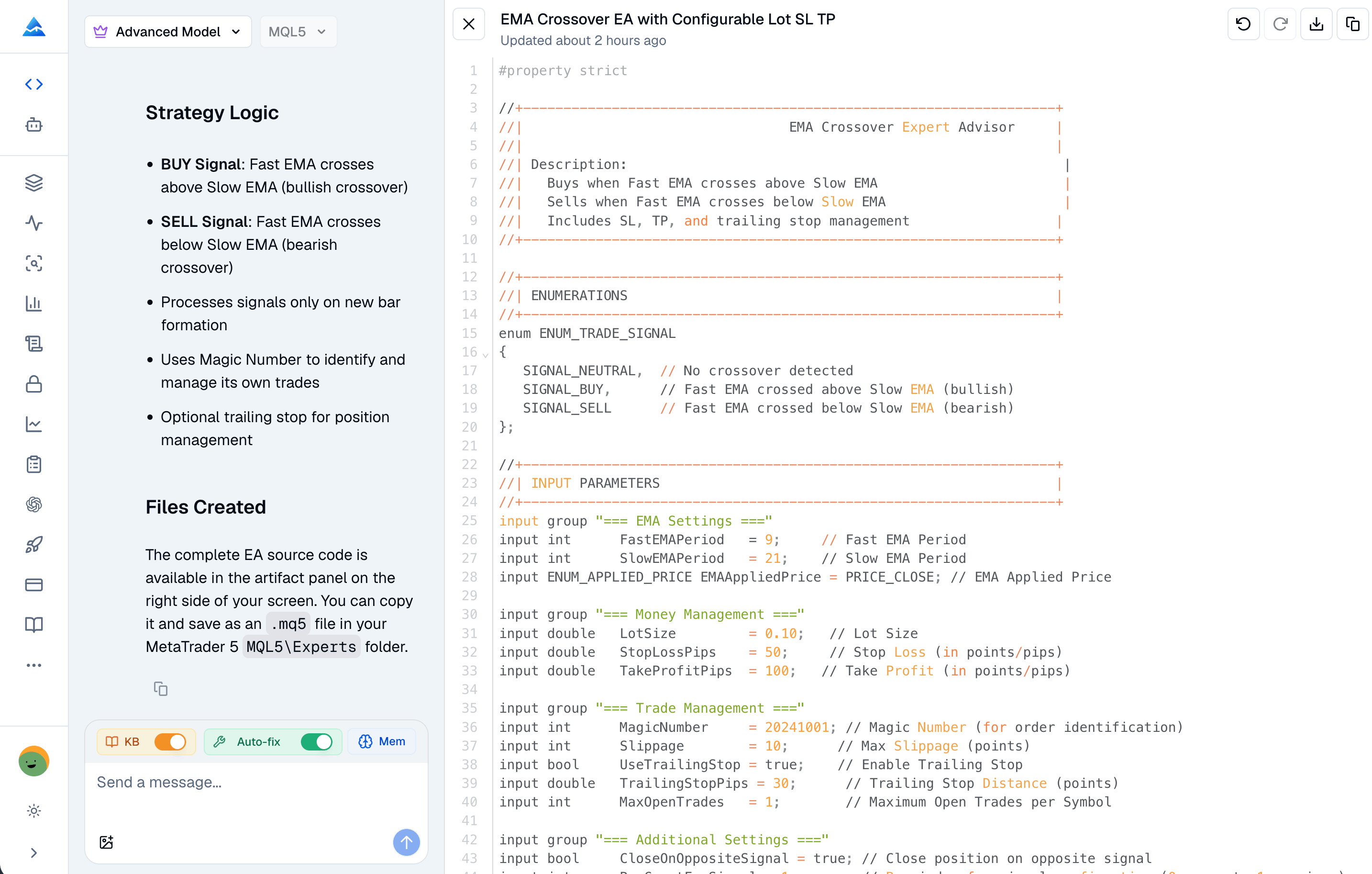
The Pineify MQL5 Coding Agent provides a workspace for requesting MQL5 Expert Advisors, indicators, conversions, and fixes. The current application includes MQL5 task prompts and a syntax-check request path with compiler-error responses. These are concrete capabilities; they do not establish a special model-training corpus, superior accuracy over every other assistant, or guaranteed successful repair.
A validation result applies to the submitted source and the checker environment. It does not prove correct entries, suitable risk limits, broker compatibility, or profitability. A failed or unavailable check must remain visible rather than being treated as success. Preserve the final source and validation result together, and compile again in the MetaEditor installation where the program will run.
Conversation history can help an assistant revise code, but a saved specification and current source are safer handoff artifacts than assuming that it remembers every parameter across sessions. Restate consequential rules when opening a new task or changing a strategy.
AI assistance is one development option
MetaEditor itself offers an AI Assistant. Manual development, templates, platform tools, and hired specialists are also options. Evaluate them with the same specification and acceptance checks instead of assuming that a platform-specific product always outperforms a general assistant.
| Decision | AI-assisted drafting | Developer engagement |
|---|---|---|
| Precise, small rule change | Can produce a draft for review | Can implement and explain the change |
| Ambiguous strategy idea | Needs clarification and test cases | Needs clarification and test cases |
| Existing code with dependencies | Needs complete, authorized source and environment details | Needs the same, with agreed maintenance scope |
| Complex position or recovery logic | Requires careful independent review | Relevant platform expertise may be useful |
| Cost comparison | Include plan/credit use and review time | Include quoted scope, revisions, testing, and support |
| Completion evidence | Final source, compiler result, behavior tests | The same evidence plus agreed deliverables |
There is no measured “seconds versus weeks” benchmark or universal cost saving here. Check current Pineify plans for access and usage limits. A historical lifetime offer does not imply unlimited model usage, every feature, or a fixed future credit allowance.
Write an EA specification that can be checked
“Buy when the fast average crosses the slow average” leaves several decisions open. A useful research specification states:
- The platform, symbol, interval, average types, lengths, and price inputs.
- Whether the crossover uses completed bars and when the order may be submitted.
- Whether only one position is allowed and how manual trades or other EAs are distinguished.
- Fixed volume or a sizing formula, broker volume limits, stop distance, and cost assumptions.
- Exit, reversal, session-close, and restart behavior.
- What happens after missing data, order rejection, a connection failure, or an already-open position.
These rules are requirements, not evidence of an edge. Ask for a written explanation of how the implementation meets each one, including any unsupported requirement. For a conversion, compare the old and new programs on matched inputs before comparing profits.
A staged acceptance process
- Review the draft. Confirm the requested platform, program type, dependencies, and event handlers. An indicator that draws arrows is not an EA that places trades.
- Compile the final source. Save errors and warnings; fix their causes and rerun the compiler after the final edit. Do not accept an earlier passing result for a later version.
- Check calculations without live orders. Compare indicator values, closed-bar selection, and expected signal timestamps with manually selected cases.
- Test execution behavior in simulation. Inspect orders, deals, and positions, including rejection and restart cases. Verify that one signal does not accidentally create repeated entries.
- Run historical tests with recorded settings. Save data dates, model choice, costs, parameters, and account assumptions. Review the trade list and reserve a later period from parameter selection.
- Observe the final version on a demo account. Compare logs and intended behavior as data arrives. A successful demo run does not guarantee live fills or returns.
When hiring a developer, make these acceptance steps part of the scope. When using AI, retain responsibility for completing them or arrange qualified review. Automation can reduce drafting work while leaving substantial verification work intact.
Can an AI assistant replace an MQL4 programmer?
It can assist with some drafting and revision tasks. Whether it replaces a particular engagement depends on the requirements and your ability to verify the result. Complex integration, recovery behavior, and ongoing maintenance may still need a developer.
Can MQL4 code be converted automatically to MQL5?
An assistant can draft a conversion, but equivalent behavior must be checked. Indicator access, trade handling, dependencies, and account rules can require changes beyond syntax.
Does compilation mean the EA is ready for live trading?
No. Compilation checks language and supported API usage in an environment. It does not validate strategy logic, execution behavior, or expected returns.
What should I save when a development task is finished?
Save the final source, specification, dependencies, compiler output, test settings, observed results, and unresolved limitations. Those artifacts support later changes regardless of who wrote the code.