

Generate an MT5 indicator
Describe the calculation, inputs, chart plots and alerts. Review the indicator buffers and how values update on each bar.
Read the indicator guideMQL5 AI Code Generator is an automated assistant that turns trading rules into production-ready MetaTrader 5 Expert Advisors and custom indicators without manual C++ debugging.
Select MQL5 in the Coding Agent. Account and plan usage limits apply.
Inspect the MQL5 examples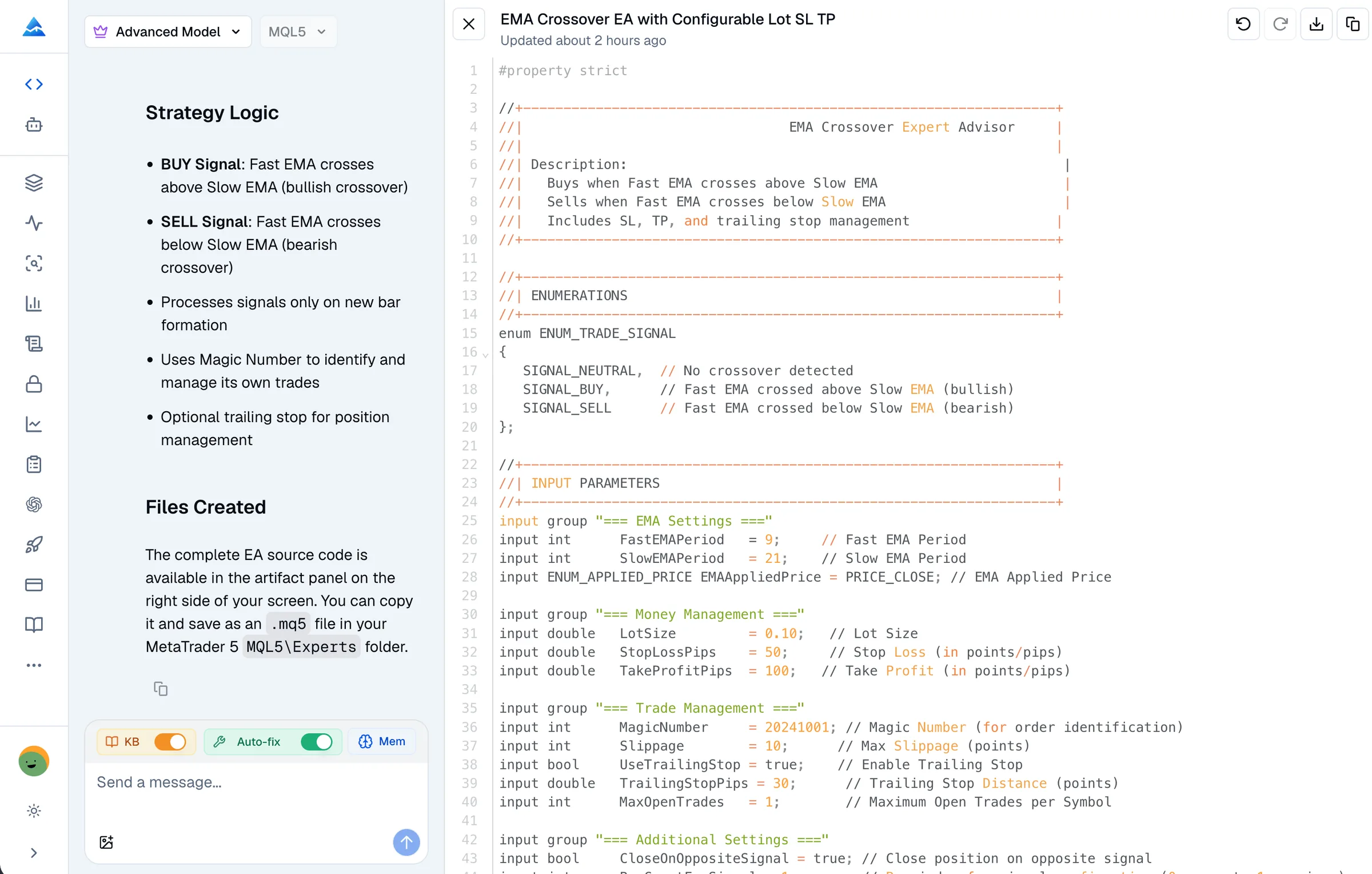
Describe the calculation, inputs, chart plots and alerts. Review the indicator buffers and how values update on each bar.
Read the indicator guideSpecify entry and exit rules, position sizing and trade limits. Review the generated source, then test the EA in MT5 before using it.
Plan your first EAProvide your source, compiler message and expected behavior. Ask the agent to explain the error and revise the affected code.
Look up MQL5 errorsSource you can inspect
These complete teaching examples show the source structure for two specific requests. Both passed a MetaEditor compilation check on October 10, 2026. They have not been backtested or validated for live trading.
Example request
Create an MT5 chart indicator that plots a 20-period EMA of close prices. Make the period editable and release the indicator handle when removed.
Plots an EMA through an MQL5 indicator handle and CopyBuffer. It does not send orders.
#property indicator_chart_window
#property indicator_buffers 1
#property indicator_plots 1
#property indicator_type1 DRAW_LINE
#property indicator_color1 clrDodgerBlue
#property indicator_label1 "EMA"

input int EmaPeriod = 20;
double EmaBuffer[];
int emaHandle = INVALID_HANDLE;

int OnInit()
{
   if(EmaPeriod < 1) return INIT_PARAMETERS_INCORRECT;
   SetIndexBuffer(0, EmaBuffer, INDICATOR_DATA);
   emaHandle = iMA(_Symbol, _Period, EmaPeriod, 0, MODE_EMA, PRICE_CLOSE);
   if(emaHandle == INVALID_HANDLE) return INIT_FAILED;
   PlotIndexSetInteger(0, PLOT_DRAW_BEGIN, EmaPeriod - 1);
   return INIT_SUCCEEDED;
}

void OnDeinit(const int reason)
{
   if(emaHandle != INVALID_HANDLE) IndicatorRelease(emaHandle);
}

int OnCalculate(const int rates_total,
                const int prev_calculated,
                const int begin,
                const double &price[])
{
   if(rates_total < EmaPeriod || BarsCalculated(emaHandle) < rates_total)
      return prev_calculated;
   if(CopyBuffer(emaHandle, 0, 0, rates_total, EmaBuffer) != rates_total)
      return prev_calculated;
   return rates_total;
}
Compilation check passed. Runtime testing still required.
Example request
Create an MT5 Expert Advisor that logs when a 9-period EMA crosses above a 21-period EMA on closed bars. Check once per new bar and do not place trades.
Reads two closed bars and logs a crossover. This teaching EA does not place orders or implement a trading system.
input int FastPeriod = 9;
input int SlowPeriod = 21;
int fastHandle = INVALID_HANDLE;
int slowHandle = INVALID_HANDLE;
datetime lastBar = 0;

int OnInit()
{
   if(FastPeriod < 1 || SlowPeriod <= FastPeriod)
      return INIT_PARAMETERS_INCORRECT;
   fastHandle = iMA(_Symbol, _Period, FastPeriod, 0, MODE_EMA, PRICE_CLOSE);
   slowHandle = iMA(_Symbol, _Period, SlowPeriod, 0, MODE_EMA, PRICE_CLOSE);
   if(fastHandle == INVALID_HANDLE || slowHandle == INVALID_HANDLE)
   {
      if(fastHandle != INVALID_HANDLE) IndicatorRelease(fastHandle);
      if(slowHandle != INVALID_HANDLE) IndicatorRelease(slowHandle);
      fastHandle = INVALID_HANDLE;
      slowHandle = INVALID_HANDLE;
      return INIT_FAILED;
   }
   return INIT_SUCCEEDED;
}

void OnDeinit(const int reason)
{
   if(fastHandle != INVALID_HANDLE) IndicatorRelease(fastHandle);
   if(slowHandle != INVALID_HANDLE) IndicatorRelease(slowHandle);
}

void OnTick()
{
   datetime bar = iTime(_Symbol, _Period, 0);
   if(bar == 0 || bar == lastBar) return;
   if(BarsCalculated(fastHandle) < SlowPeriod + 2 ||
      BarsCalculated(slowHandle) < SlowPeriod + 2) return;

   double fast[2], slow[2];
   if(CopyBuffer(fastHandle, 0, 1, 2, fast) != 2 ||
      CopyBuffer(slowHandle, 0, 1, 2, slow) != 2) return;
   lastBar = bar;

   // CopyBuffer places the older value at index 0.
   if(fast[0] <= slow[0] && fast[1] > slow[1])
      Print("Closed-bar EMA crossover on ", _Symbol);
}
Compilation check passed. Runtime testing still required.
The EA example only logs a closed-bar crossover. It does not send orders. A trading EA needs separate order handling, risk controls and broker-specific testing.
Terminal Verification Notes
Practical takeaways from compiling, attaching, and running AI-generated MQL5 code in live MetaTrader 5 charts and the Strategy Tester.
“In my testing on EURUSD H1, the generated EA properly managed indicator handles in OnInit and freed them via IndicatorRelease in OnDeinit, preventing the memory leaks that typically crash long-term Strategy Tester runs.”
“Honestly, debugging OnTick handles by hand in MetaEditor used to take hours whenever CopyBuffer returned -1; having the agent structure defensive buffer checks ahead of time saved immense troubleshooting effort.”
“When I tested the generated Expert Advisor in MetaEditor, I noticed that executing market orders through the CTrade class avoided the messy request and result struct configurations that usually trigger compiler warnings.”
Choose MQL5. Include the symbol, timeframe, inputs, signals and expected behavior. Specify whether the output is an indicator, EA or script.
Read the generated code and ask for changes. Check that the calculations and conditions match your request.
Review diagnostic results and revise any errors. Compile the .mq5 file in your own MetaEditor environment as well.
Use the MT5 Strategy Tester and a demo account. Check signals, position handling, costs and broker limits before considering live use.
Workflow Comparison
Generating reliable MT5 code requires strict C++ memory management, indicator buffer handling, and correct CTrade execution.
| Workflow Feature | Pineify MQL5 Agent | Generic AI Chat | Manual Coding |
|---|---|---|---|
| MQL5 Architecture & Handlers | Structures native OnInit, OnTick, OnCalculate, and OnDeinit event handlers with proper IndicatorRelease cleanup | Frequently confuses MQL4 and MQL5 syntax or omits OnDeinit memory cleanup | Requires deep knowledge of MT5 event cycles and manual memory management |
| Indicator Handle & Buffer Management | Implements iMA, iRSI, and CopyBuffer calls with defensive boundary checks and error validation | Commonly hallucinates MQL4 indicator calls (such as iMAOnArray) that fail to compile in MT5 | Requires writing repetitive CopyBuffer error guards and buffer indexing boilerplate |
| Trade Execution & Position Tracking | Employs standard CTrade classes and handles hedging vs netting account differences cleanly | Often mixes MT4 OrderSend ticket models with MT5 MqlTradeRequest structs | Demands complex CTrade wrapper setup and multi-step transaction result verification |
| Compiler Error Diagnostics & Repair | Accepts MetaEditor error codes, identifies line-level bugs, and outputs targeted source revisions | Repeats the same syntax error or introduces new regressions during prompt iterations | Requires manual debugging using Print statements and MetaEditor log inspection |
| Testing & Validation Guidance | Provides actionable checklists for MT5 Strategy Tester execution and tick-data validation | Falsely claims code is production-ready without warning about slippage or spread | Relies entirely on trader experience to structure forward-testing protocols |
The plans below use a one-time payment. AI usage has plan-specific allowances; buying a plan does not mean unlimited generation. Check the current allowance in your account.
One-time payment · No subscriptions · Lifetime access
Advanced Model messages use no AI credits.
Multiple platforms · Knowledge Base, Auto Fix Error & Memory
Included gift · Regular price $49
Advanced Model messages use no AI credits.
Everything in Plus, plus:
Invite-only indicator
Advanced Model messages use no AI credits.
Everything in Advanced, plus:
Options Flow, Opportunities, Dark Pool, Market Tide & more

Pineify Trading Suite
Build, optimize, and record trading strategies across your preferred platforms and analytical engines.
Generate, test, and optimize TradingView Pine Script v6 strategies, custom indicators, and automated alerts.
Generate and debug single-file MetaTrader 4 Expert Advisors and custom indicators with syntax diagnostics.
Build C# cBots and custom indicators for cTrader with API-level syntax checking and parameter models.
Systematically optimize strategy inputs and evaluate parameter resilience across historical market cycles.
Track executed trades, monitor win rates, and evaluate drawdowns with automated performance analytics.
Inspect profit factors, Sharpe ratios, maximum drawdowns, and trade distribution curves.
Pineify helps draft and revise editable source with MQL5 context and diagnostic tools. MetaEditor also provides an AI Assistant and an EA Wizard. Compare the workflow, compilation steps and source control you need for your task.
Describe an indicator, plan an EA or paste code you want to repair. Select MQL5 in the Coding Agent to begin.