Best Options Flow Tool: Pineify Market Insights

An options flow tool is useful when it helps you turn a reported event into a checkable research question. Pineify Market Insights puts options alerts, premium summaries, off-exchange records and congressional disclosures in one workspace. Those views provide context; they do not identify every trader or tell you which trade to copy.
The practical test is whether you can trace a displayed label back to its contract, timestamp and calculation. This walkthrough focuses on doing that in Pineify, including the difference between its Market Insights dashboard and its public options snapshot analyzer.
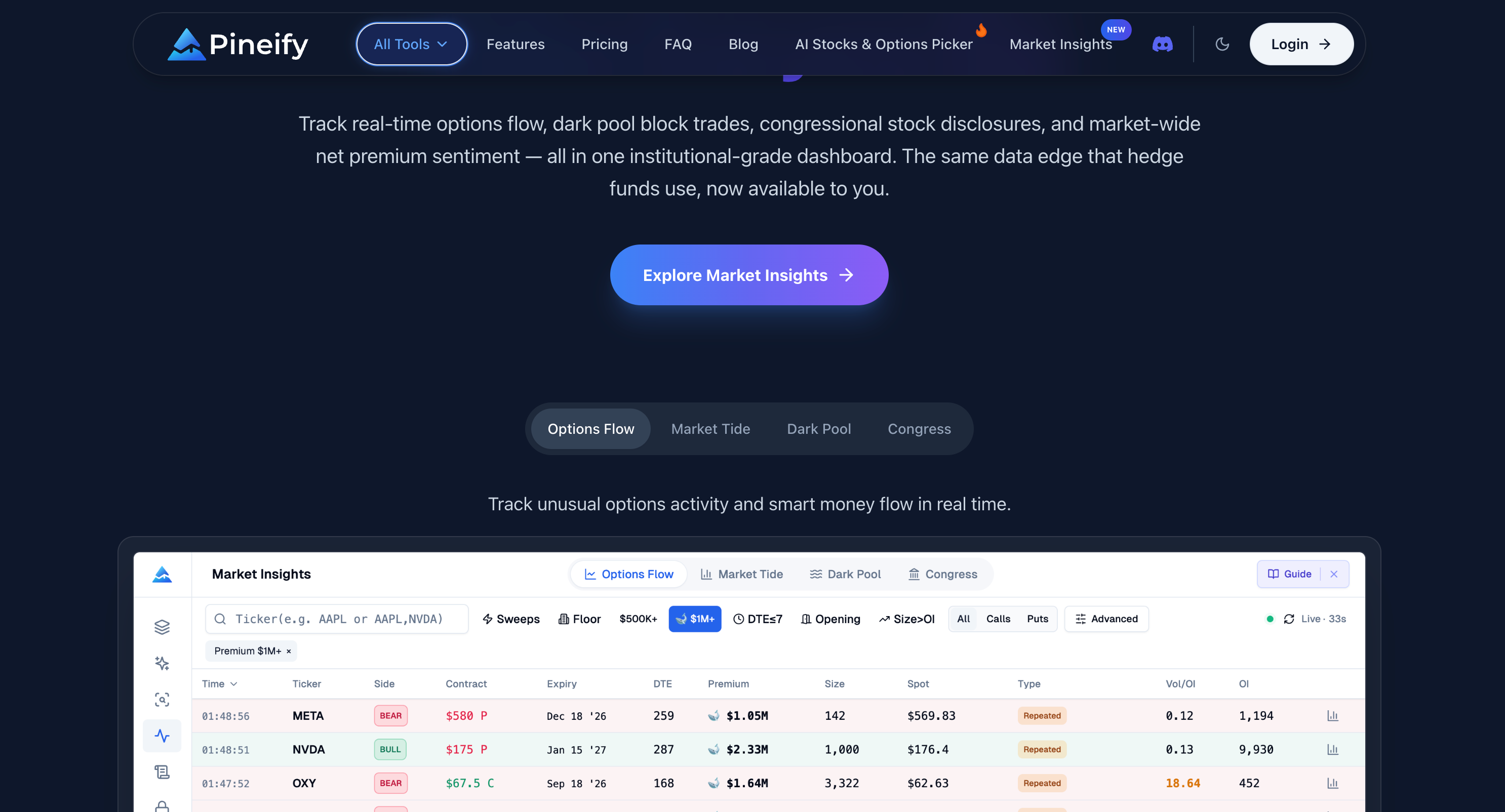
Start with a question the data can answer
“Which contracts have unusually large reported activity for a stock I follow?” is a research question. “Where are informed institutions buying before a guaranteed rally?” assumes identities, information and future outcomes that a public trade record cannot establish.
Choose an underlying and holding period before filtering. Record the observation time, relevant event calendar and the type of position you are considering. A contract expiring today and one expiring in three months can have the same premium total but very different exposures.
Pineify's four modules support different checks:
| Research question | View to inspect | Keep this distinction |
|---|---|---|
| Which option alerts meet my criteria? | Options Flow | Returned alerts are a filtered dataset, not every market print |
| How does net premium context compare? | Market Tide | Aggregate premium labels do not establish investor beliefs |
| What off-exchange records appear near a price? | Dark Pool | A transaction is not proof of accumulation or an unfilled order |
| What transactions have lawmakers disclosed? | Congress Trading | Public filing dates differ from transaction dates |
The current integration uses Unusual Whales data services. Its published dataset descriptions explain the underlying categories. Coverage and timeliness still depend on each request and the provider's available records.
Step 1: inspect an options alert before interpreting it
Use the ticker, premium, expiration and other available filters to define a manageable list. A $500,000 filter is a convenient interface choice, not a statistical boundary separating informed investors from everyone else. Compare activity with the underlying's normal liquidity and the specific contract's history where available.
Expand a result and read its option identifier, call/put type, strike, expiry and recent prints. Inspect ask-side and bid-side premium rather than relying only on the bullish/bearish badge. Greeks and IV appear when the returned contract data provide them; an absent value should remain unknown.
A bullish label in the current interface can come from ask-dominant call premium or bid-dominant put premium. A bearish label reverses those relationships. This is a directional interpretation of reported execution-side data, not a verified customer position. A long put may hedge a large stock holding; a sold call may be one leg of a spread.
A sweep is an execution-related classification. It does not establish that the trader has private information, and a large call print does not guarantee a large upward move. Midpoint trades likewise do not prove institutional negotiation.
A hypothetical premium calculation
Suppose a single options print is 200 contracts at a premium of $3.00 with a 100 multiplier. Its gross premium is $60,000: 200 × $3.00 × 100. That is the transaction value before fees, not the buyer's expected profit or evidence of the buyer's identity.
Now suppose a contract's daily volume is 200 but only its latest trade price is known to be $3.00. Multiplying those numbers also gives $60,000, but this second number is only an estimate: earlier contracts may have traded at different prices. The same arithmetic does not make the two datasets equivalent.
Step 2: compare Market Tide over the same window
Market Tide supplies net call and net put premium series. Pineify's directional net measure subtracts net put premium from net call premium. The inputs are already net measures; they should not be described as all call purchases minus all put purchases.
Use the sector view and impact rankings to understand which displayed groups or names contribute to the result. Check the selected date and whether the latest observations are available for every panel. A sector ETF series may differ from constituent-stock activity.
A divergence between price and premium is something to investigate, not a proven early-warning signal. It might reflect hedging, changing strike selection, different expiries or the composition of the returned data. Record an alternative explanation instead of treating every mismatch as an impending reversal.
Options Flow and Market Tide can summarize overlapping underlying transactions. Combining their labels does not automatically produce independent confirmation or a higher measured probability of success.
Step 3: read Dark Pool records without assigning intent
The current Dark Pool module contains summary cards, filters, a trade table and transaction details. Its large/block/mega labels use dollar-value thresholds, including $1 million for block and $5 million for mega. They are not universal categories defined by share count.
Buy/sell labels are inferred from the price relative to supplied bid/ask midpoint: above is classified as buy, below as sell and an exact midpoint is neutral. The label does not establish the original investor's identity, opening versus closing status or complete position.
Off-exchange volume includes more than dark pools. FINRA distinguishes ATS and non-ATS activity in its OTC transparency documentation. It is inaccurate to treat a fixed percentage of all stock trading as hidden institutional accumulation.
Pineify's current module does not contain the volume-profile, point-of-control and 70% value-area display formerly described here. Repeated prints at a price can be logged for further study, but they do not prove that an institution will support that price in the future.
Step 4: treat Congress as disclosure research
Check the reporter, asset, transaction date, filing date, disclosed owner and amount range. The dashboard's ticker and name search, party/chamber filters, buy/sell filters and member views organize returned records. Counts and rankings describe that result set, not every holding of every member.
The House Ethics Committee describes reporting deadlines as 30 days after awareness, with an outside limit of 45 days after a reportable transaction. This is not a fixed 45-day data delay or a promise of complete reporting. Some records appear sooner; amendments and provider processing can add other timing differences.
Pineify retrieves these records through its provider. Party classification can be incomplete, and a late-report indicator is a review aid rather than a legal determination. Inspect the original disclosure before drawing conclusions about ownership or compliance.
A purchase near a legislative event does not prove inside information. Nor does bipartisan buying establish a profitable strategy. Any historical test must use the date the filing became public, rather than giving a model knowledge of the earlier private transaction.
Step 5: document the result before trading
Use a research note with the following fields:
- The precise question and the rule that selected the record.
- Event time, time first observed and the dashboard's last-refresh time.
- Contract identifier, expiry, premium, quote context and missing fields.
- Related market context, with overlapping sources identified.
- Alternative explanations such as a hedge, spread, roll or stale quote.
- A future observation that would contradict the hypothesis.
Record rejected cases as well as interesting ones. Looking back only at alerts that preceded a large move creates selection bias. The dashboard is not a backtest archive, and a TradingView strategy does not automatically obtain its historical flow records.
Pineify's separate Pine tools can help express supported chart rules; the Trading Journal can support recordkeeping. Neither turns an unverified flow interpretation into an automatically validated or executed strategy.
Freshness and the public analyzer are separate checks
In the current Market Insights implementation, active Options Flow requests refresh every 60 seconds and Dark Pool every 30 seconds. Market Tide's main series uses 60 seconds, with sector and impact views on longer intervals. Inactive pages pause polling. Provider timestamps, caching and network failures still affect freshness; there is no demonstrated subsecond delivery guarantee.
The public Live Options Flow Analyzer is a different tool. Its current page reads option-chain snapshots, including daily contract volume, open interest and recent quote/trade fields. A row represents a contract snapshot rather than a verified individual trade event.
Its premium estimate multiplies a recent price by daily volume and the contract multiplier. Its sweep, block and opening labels are heuristics based on snapshot fields; they do not reconstruct execution across exchanges or establish which trades opened positions. Data load on the initial visit and when a scan is applied, rather than through the Market Insights polling loop.
Use the public page to inspect snapshot fields and filters. Do not treat it as a performance trial of an identical full-market tick feed, and check data timestamps and availability before interpreting any result.
Compare access and cost without unsupported rankings
The full Market Insights feature set currently requires Expert or a higher eligible plan. Check Pineify pricing and checkout for the current payment terms, AI quotas and feature entitlements. The old $259 promotion and fixed 2,500-credit claim are not a current offer.
Other platforms also combine datasets. Unusual Whales documents options flow, dark pool, Congress and Market Tide; FlowAlgo advertises options activity and dark-pool prints. The comparison should focus on the actual package, history, filters, exports, latency terms and workflow you need, rather than marking documented competitor capabilities absent.
Pineify's integration with its other research and Pine tools may suit someone already using that workspace. No controlled comparison here establishes that it is the fastest, cheapest or most predictive tool, and no unsupported user count is needed to describe its functionality.
Common questions
Can a beginner use these labels as trade instructions?
No. First understand call/put exposure, expiry, spread, liquidity and execution-side uncertainty. A readable badge is a summary of a classification, not a suitability assessment or profit forecast.
Does combining all four modules remove uncertainty?
No. They can have different timestamps, overlapping sources and missing context. Agreement is a reason to investigate, not proof of independent confirmation.
Is Congress data collected directly from every official filing?
The dashboard retrieves provider-supplied records. Verify the original filing, dates, owner and amount range when those details matter.
Is the public analyzer the same as the paid alert feed?
No. The public analyzer currently processes option-chain snapshots with estimated classifications. Market Insights requests provider flow alerts and related contract prints. Their rows, timing and calculations differ.
What is a useful first session?
Choose one familiar ticker, inspect several records and write down what each field does and does not establish. Check timestamps and compare the source records before evaluating a trading hypothesis.