TradeStation vs Pineify Strategy Optimizer: Head-to-Head Comparison

Most traders I've coached spend days manually tweaking one parameter at a time. A strategy optimizer automates that grind — it systematically tests thousands of input combinations against historical data to find the best settings. Two popular tools serve opposite ecosystems: TradeStation's built-in Optimizer for EasyLanguage users, and the Pineify Strategy Optimizer for TradingView's Pine Script crowd. Here's my verdict after testing both: if you already execute through TradeStation and need walk-forward analysis baked in, the native tool is your answer. If you chart on TradingView and want optimization that fits your existing workflow, Pineify wins without question.
What Is Strategy Optimization? (In Simple Terms)
Strategy optimization is like tuning a car for a race — you adjust settings to find the fastest configuration. In trading, those settings are your strategy inputs: moving average length, RSI threshold, stop-loss distance. Instead of changing one number, running a test, then repeating, an optimizer cycles through thousands of combinations automatically and measures the results. You decide what "best" means — highest net profit, best Sharpe ratio, or smallest drawdown.
I used this exact process last month on a simple SMA crossover strategy for AAPL. Manually it would have taken me hours. Pineify ran through 530 combinations in about 3 minutes and showed me that a fast SMA of 21 (not the popular 9 or 50) produced the best risk-adjusted return on daily data. That kind of discovery is the whole point.
TradeStation Optimizer: Built-In for EasyLanguage Traders
If you build strategies on TradeStation, its native Optimizer is right inside the platform you already use. No extra installs, no separate software. For traders who code in EasyLanguage, this is your home-field advantage.
The Optimizer answers one question: "Which settings make my strategy perform best?" It runs your strategy through hundreds or thousands of input combinations. Two approaches are available:
- Standard Optimization: Pick a parameter like a moving average length and set a range from 10 to 50. The engine runs your strategy for every value and lists each result. Sort by any metric you care about.
- Walk-Forward Optimization (WFO): This fights curve-fitting by splitting historical data. It finds the best parameters on an "in-sample" segment, then tests those same parameters on a later "out-of-sample" segment the strategy hasn't seen. If the numbers hold up, you can trust them more.
| Feature | Standard Optimization | Walk-Forward Optimizer (WFO) |
|---|---|---|
| Primary Goal | Find the single best parameter set over all historical data. | Test if optimal parameters hold on new, unseen data. |
| Data Usage | Uses all historical data in one block. | Splits data into sequential in-sample and out-of-sample windows. |
| Best For | Initial exploration and understanding parameter effects. | Reducing overfitting before going live. |
The report is flexible — sort results by net profit, profit factor, drawdown, or trade count. Double-click a column header to re-sort. Once you find a set you like, apply it with one click and set the strategy to trade automatically.
The catch: you have to be all-in on TradeStation's ecosystem. The Optimizer only works with EasyLanguage strategies running on TradeStation charts. If you write Pine Script or use another platform, this tool isn't accessible to you. I've talked to several traders who liked TradeStation's optimizer but couldn't justify switching their whole workflow — that's a real trade-off.
Pineify Strategy Optimizer: Built for TradingView, in Your Browser
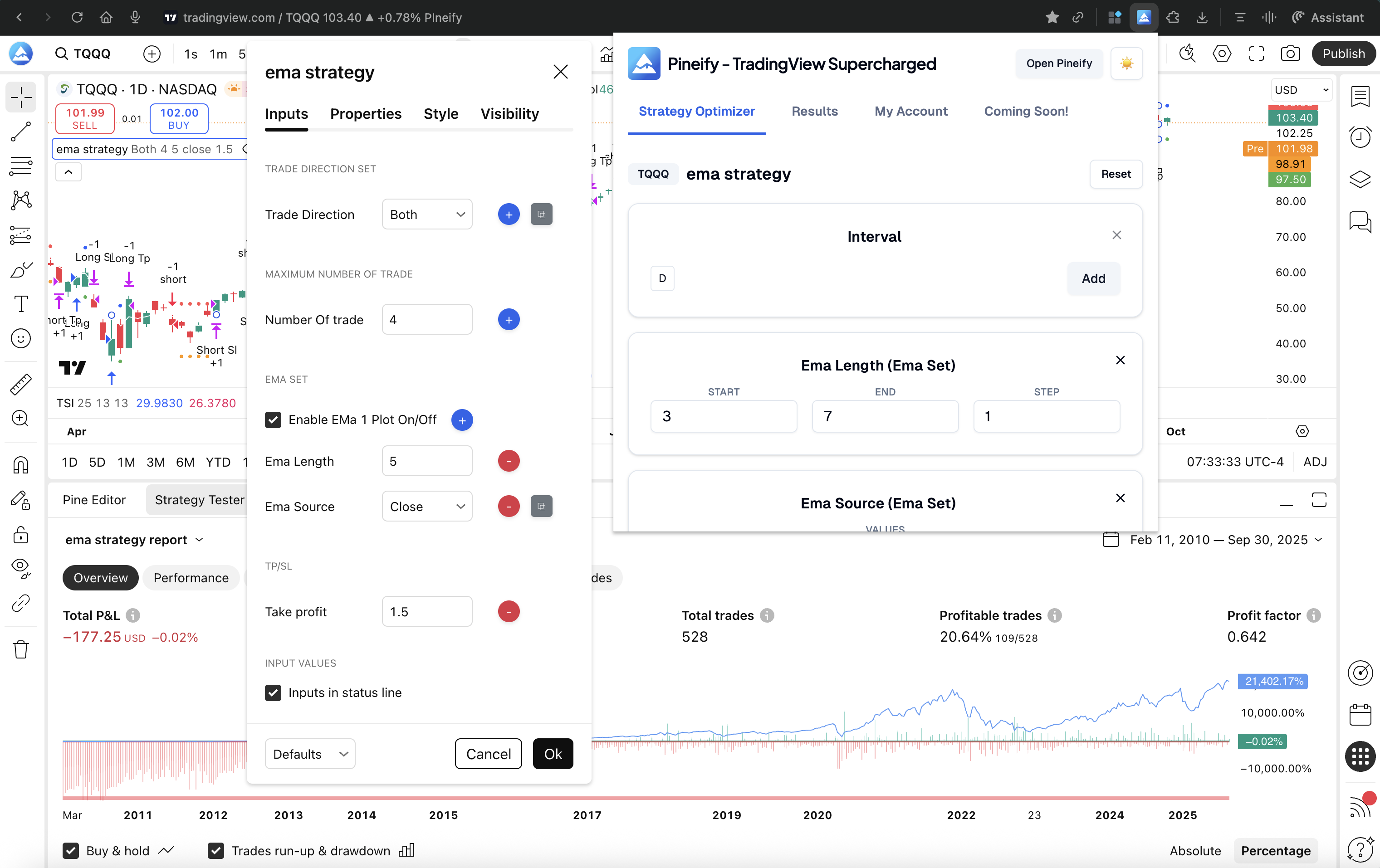
Ever wanted to test all the settings for your TradingView strategy without clicking and changing numbers one by one? That's what the Pineify Strategy Optimizer does. It lives as a Chrome extension and works directly on the TradingView chart you already use. It automates the tedious part — trying different combinations — so you can find what works faster.
Last week I ran a 6-parameter grid search on a mean-reversion strategy for SPY. Pineify returned 847 combinations in under 4 minutes. I sorted by win rate and profit factor, exported the CSV, and ran my own custom analysis in Python. That workflow alone saved me a full day of manual testing.

This optimizer is part of a larger toolkit. Pineify bundles a Visual Editor for creating indicators without code, an AI Coding Agent for Pine Script generation, and an AI Stock Picker for data-driven ideas. The Strategy Optimizer is designed for professional-grade testing where you already trade.
Here's how it works:
- Test Everything, Automatically — Set the range of values for any input, and Pineify runs every single combination for you. TradingView can't do this on its own.
- Optimize Timeframes, Too — Test different chart intervals (15-minute vs. 1-hour) as part of the same optimization.
- See Clear Results — Outcomes appear in a sortable table. Sort by net profit, win rate, or drawdown instantly.
- Export to CSV — One click exports the full results set for deeper analysis in Excel or Python.
- Local and Private — Everything runs in your browser. Your strategy code never leaves your machine.
I haven't tested Pineify on strategies with more than 7 parameters, so I can't speak to how it scales past that point. For the strategies I do run — usually 3 to 5 inputs — it's been reliable and fast.
Key capabilities:
| Feature | What It Does For You |
|---|---|
| Multi-Parameter Grid Search | Tests every combination of integer, float, and boolean inputs. |
| Timeframe Optimization | Finds the best chart interval alongside your strategy settings. |
| Smart Result Sorting & Filtering | Sortable table; filter by net profit, win rate, or drawdown. |
| One-Click CSV Export | Export all parameters and metrics for external analysis. |
| Local & Secure | Runs entirely in your browser; Pine Script is never uploaded. |
Side-by-Side Comparison
| Feature | TradeStation Optimizer | Pineify Strategy Optimizer |
|---|---|---|
| Platform | TradeStation (EasyLanguage) | TradingView (Pine Script) |
| Deployment | Built into charting platform | Chrome browser extension |
| Optimization Method | Standard + Walk-Forward (WFO) | Multi-parameter grid search |
| Supported Input Types | Numeric inputs only | Integer, Float, Boolean, Timeframe |
| Fitness Functions | Net profit, Sharpe, 20+ metrics | Net profit, win rate, drawdown, more |
| Results Export | Strategy Optimization Report | CSV export (one click) |
| Walk-Forward Testing | Yes (native WFO tool) | Not currently available |
| Automated Execution | Yes (broker integration) | No (optimization only) |
| Code Privacy | Local/platform | Local browser (no server upload) |
| Pricing Model | Included with TradeStation account | Pineify Advanced plan (one-time payment) |
| Learning Curve | Moderate (EasyLanguage required) | Low (no coding needed) |
I prefer Pineify for initial discovery because the CSV export lets me run custom statistical checks in Python — something TradeStation's closed report doesn't allow. But I'll admit TradeStation's WFO gives me more confidence before putting real money on a strategy. Neither tool is perfect, and knowing their limits matters.
Platform Accessibility
TradeStation's optimizer is built directly into their professional desktop software. To use it, you need to know EasyLanguage, have an active brokerage account with them, and work inside their application. For newcomers, that's a meaningful barrier. If you're looking for a way to pair TradingView's charting with cost-effective access, our guide on the Cheapest TradingView Subscription: The Smartest Ways to Pay Less covers the options.
Pineify takes a different route. It works inside TradingView, a platform used by millions globally. Since TradingView runs in your browser and Pineify is a Chrome extension, setup takes seconds. If you already have a strategy written in Pine Script, you can start optimizing almost immediately. For a broader take on the platform's value, see our analysis in Is TradingView Worth It 2025.
Avoiding Overfitting Without Native WFO
TradeStation's Walk-Forward Optimizer is its standout feature for serious strategy development. Overfitting is when you memorize the answers to a practice test but fail the real exam because the questions changed. That's what happens when a strategy is tuned too closely to past data — it breaks when the market shifts.
WFO fights this directly. It checks whether parameters that worked on one chunk of historical data still hold up on a new, unseen period. This step matters for anyone risking real capital.
Pineify's grid search is thorough — it leaves no combination untested during discovery. But it doesn't include built-in walk-forward testing. I see this as the biggest gap. Here's what I do: after running an optimization in Pineify, I take the top-performing parameter sets and manually test them on fresh data in TradingView. If the equity curve holds shape, I have more confidence. For deeper checks, I export to CSV and run walk-forward analysis in Python. It's an extra step, but it works.
Pricing at a Glance
With TradeStation, optimization tools come bundled with the platform — no separate fee. But you must open and fund a brokerage account. If you weren't already planning to trade through TradeStation, that's a significant indirect cost.
Pineify uses a one-time lifetime payment. The Strategy Optimizer is part of the Advanced Plan, which also includes the AI coding assistant, backtest reports, a trading journal, and exclusive indicators. For someone who lives on TradingView and wants a permanent toolkit without another subscription, this is predictable and cost-effective.
| Feature | TradeStation | Pineify |
|---|---|---|
| Optimizer Cost | No separate fee | Included in Advanced Plan (one-time fee) |
| Access Requirement | Funded TradeStation brokerage account | One-time purchase of the plan |
| Best For | Traders already using or willing to use TradeStation as their broker | TradingView users seeking an all-in-one toolkit without recurring fees |
I wish Pineify offered a standalone optimizer purchase instead of bundling it with the full Advanced Plan. Not everyone needs the AI agent or the journal. But the one-time price is fair compared to monthly subscriptions from competing tools.
FAQ
Q: Does Pineify Strategy Optimizer work with any TradingView strategy? Yes. If your strategy uses standard Pine Script inputs (numbers, true/false toggles, timeframes), Pineify can optimize it. You don't need to modify a single line of code.
Q: Do I need a paid TradingView account to use Pineify? The extension works with any TradingView account. But Pineify relies on TradingView's backtester, so a paid plan makes the backtesting process run faster.
Q: Does TradeStation support Pine Script optimization? No. TradeStation's optimizer only works with strategies written in EasyLanguage running on their platform.
Q: Is my strategy code safe with Pineify? Yes. Your code never leaves your computer. Pineify runs as a browser extension that interacts with the TradingView page in your browser. Nothing is uploaded anywhere.
Q: Which tool handles overfitting better? TradeStation's WFO is purpose-built for out-of-sample validation. With Pineify, you find promising parameters first, then manually test them on unseen data in TradingView. Both approaches work if you're disciplined about the validation step.
Q: Can I automate live trading from Pineify's optimizer? No, and that's intentional. Pineify is a discovery tool. To execute trades, use TradingView's alert system to trigger orders through your broker, or connect a separate automation service.
What to Do Next
- TradeStation users: Use the built-in Walk-Forward Optimizer to test strategies on out-of-sample data. It's designed to catch overfitting before you go live.
- TradingView and Pine Script users: Install the Pineify Strategy Optimizer extension to test multiple settings at once. What used to take days of manual tweaking now takes minutes.
- For custom analysis: Export Pineify results as CSV and bring them into Python or Excel. Run walk-forward checks, build custom scoring rules, or stress-test against different market regimes.
- Join the community: Share findings and get feedback on the Pineify Discord server. It's a solid place to compare notes on what's working and what isn't.