Pineify Trading and Research Tools: What Each Workflow Does

Pineify provides separate tools for financial research, stock discovery, code development, backtest reporting, parameter optimization, and trade journaling. They can support stages of one process, but they do not turn a research question into a verified live strategy automatically.
This product overview is published by Pineify. It describes workflow boundaries rather than personal portfolio results or a performance comparison with other vendors.
Choose the tool by the question
| Question | Relevant workflow | Output to verify |
|---|---|---|
| What do this company's reported results show? | Finance Agent | Sources, periods, units, timestamps, and interpretation |
| Which symbols should I investigate? | AI Stock Picker | List category, ranking source, update date, and supporting company data |
| How do I express a defined chart rule? | Coding Agent or Visual Editor | Generated source, assumptions, compilation, and chart behavior |
| What does my exported backtest reveal? | Backtest Deep Report | Parsed trade list, settings, metric definitions, and reconciliation |
| How do supported inputs affect historical results? | Strategy Optimizer | Parameter ranges, test conditions, costs, and out-of-sample results |
| What happened in my actual trading? | Trading Journal | Recorded trades, quantities, prices, dates, and completeness |
Finance Agent: research with source checks
The Finance Agent can retrieve supported quotes, financial statements, estimates, news, calendars, and other research inputs. Ask for the observation time and fiscal period as well as the number. A query made today can return an earlier observation, and the model can misinterpret an otherwise correct source.
A useful research note separates reported facts, forecasts, calculations, and assumptions. It should identify missing evidence and explain what could change the conclusion. A buy/sell label is not a substitute for that work.
Stock Picker: discovery and symbol views
The Stock Picker displays ranked lists through Pineify's Danelfin integration, with fields such as AI Score and supporting scores where available. Check the latest available update date. The presence of a score does not establish a calibrated probability of profit or a separate Pineify model that improves trading odds.
Symbol views include charts, financials, analyst information, events, and available options data. Options Insights uses a bounded contract snapshot; aggregate ratios or max-pain displays may span returned expirations and should not be assumed to represent a complete chain. Unusual volume does not prove institutional intent, and an expected-move estimate is not a guaranteed range.
See the Stock Picker's data and calculation boundaries before using its summaries.
Coding and visual construction: define the rule first
The Coding Agent works with editable source in supported language modes. The Visual Editor configures supported Pine Script blocks. Neither should be described as instantly producing error-free code for any possible strategy.
A testable specification needs entry and exit conditions, timing, inputs, sizing, and data assumptions. Compile the result in the native platform and inspect its behavior. TradingView's Strategy Tester then evaluates the Pine strategy under its historical data and broker-emulator assumptions.
A chart embed or an integration does not mean the entire Pineify platform lives inside TradingView. Source editing, chart verification, and results analysis remain distinct steps.
Backtest Report and Optimizer: analyze without overclaiming
Backtest Deep Report analyzes a supported trade-list CSV. It does not execute the source strategy again. Reconcile trade counts, dates, currency, and net P&L before interpreting distributions or rolling metrics. Calendar heatmaps show when outcomes occurred; they do not establish why a market regime caused them.
The report's trade-based ratios and bootstrap simulations have specific assumptions. Read the Backtest Report methodology notes before comparing them with another service. Basic calculations run locally, while optional AI Analysis sends selected report summaries to the server.
The Strategy Optimizer explores supported TradingView input combinations. The best result among many trials may be overfit. Retain the tested parameter range, use consistent costs, and evaluate later or otherwise reserved data before interpreting an improvement as durable.
Trading Journal: record what actually happened
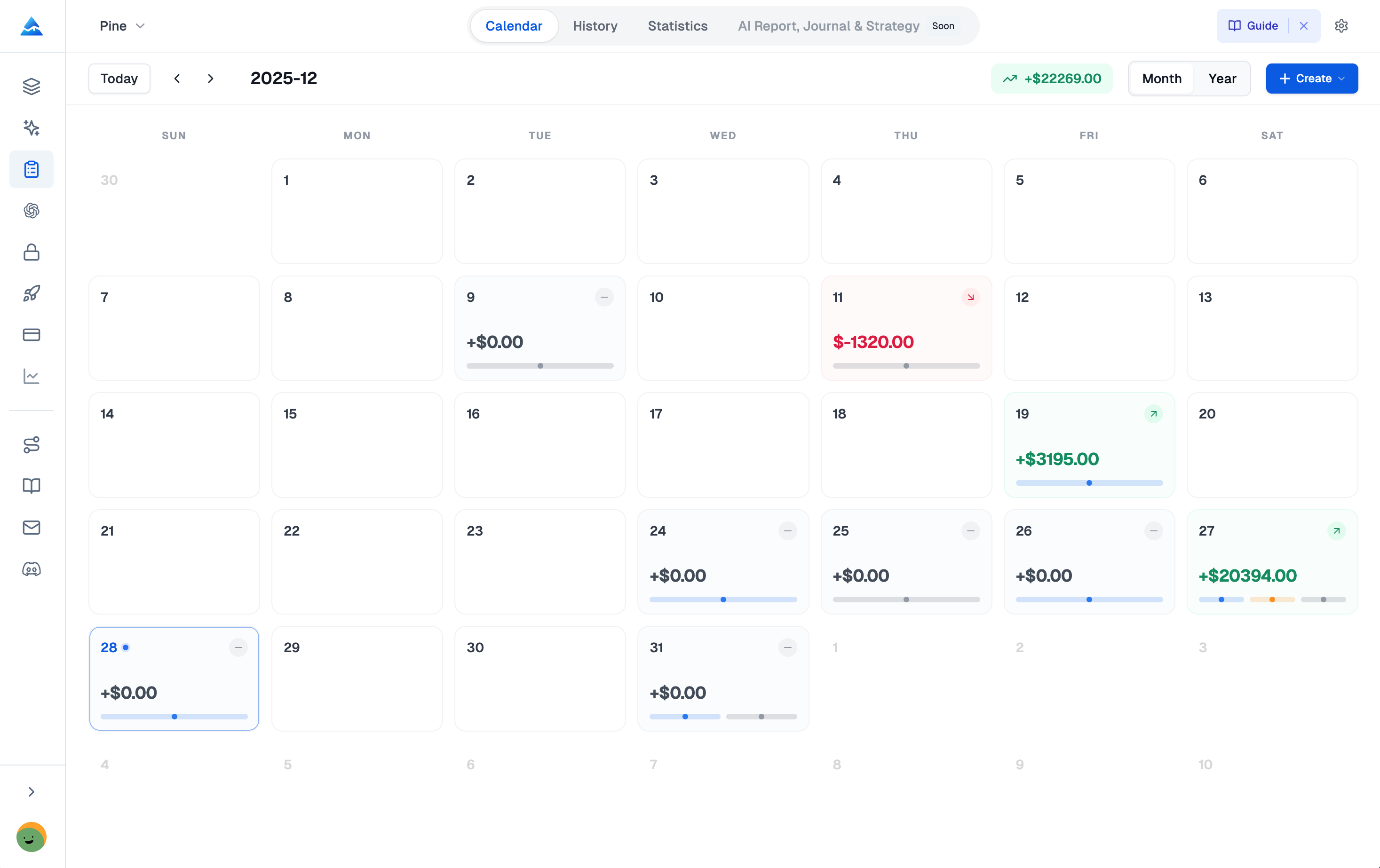
The Trading Journal has trade records, calendar and report views, and notes. The Finance Agent's journal tool can record an already executed trade when explicitly requested in a supported journal context; recording a trade does not place an order.
Do not assume every brokerage trade appears automatically. Reconcile the journal with the account records and check price, quantity, fees, timestamps, and missing entries. A journal can help organize observations about process, but a calendar alone cannot infer boredom, identify causation, or prove that a behavioral change improves returns.
An example sequence with clear handoffs
A hypothetical user could research a company, add it to a shortlist, define a chart-based rule, generate and test a script, analyze its trade export, and later record simulated or executed trades. Each step produces a different artifact and requires its own check.
The research thesis and the chart rule may also be unrelated hypotheses. A successful moving-average backtest does not prove that the company analysis was correct. Keep that distinction in the review notes rather than presenting the sequence as one automatic validation process.
Access and purchasing
Review current pricing for each required feature, AI allowance, model limit, and additional usage charge. Historical lifetime prices or credit tables do not establish the present offer. Compare tools using the outputs and data you need, not an unverified claim that a bundle replaces every specialist platform.
Open the Finance Agent for a research question or the Stock Picker for lists and symbol views.
Is the Finance Agent the same as the Stock Picker?
No. The Finance Agent is a conversational research workflow; the Stock Picker displays ranked lists and symbol detail views. Their data and access requirements can differ.
Does Backtest Report prove a strategy will work live?
No. It analyzes supplied historical trades and inherits the source test's assumptions. It does not validate future returns, signal correctness, or actual execution.
Does the journal automatically place or capture every trade?
Recording a trade is separate from order execution. Check the supported entry workflow and reconcile records with your brokerage; do not assume complete automatic synchronization.