

NinjaTrader AI Coding Agent
Generate, statically check, and revise one NinjaTrader 8 NinjaScript Indicator or Strategy source file with Pineify's AI Coding Agent.
The NinjaTrader AI Coding Agent turns a plain-language trading specification into an editable NinjaTrader 8 C# source file for one Indicator or one Strategy. Pineify can run a single-file static syntax and supported API check, return diagnostics with source locations, and revise the current artifact. NinjaScript Editor compilation and NinjaTrader testing remain required.
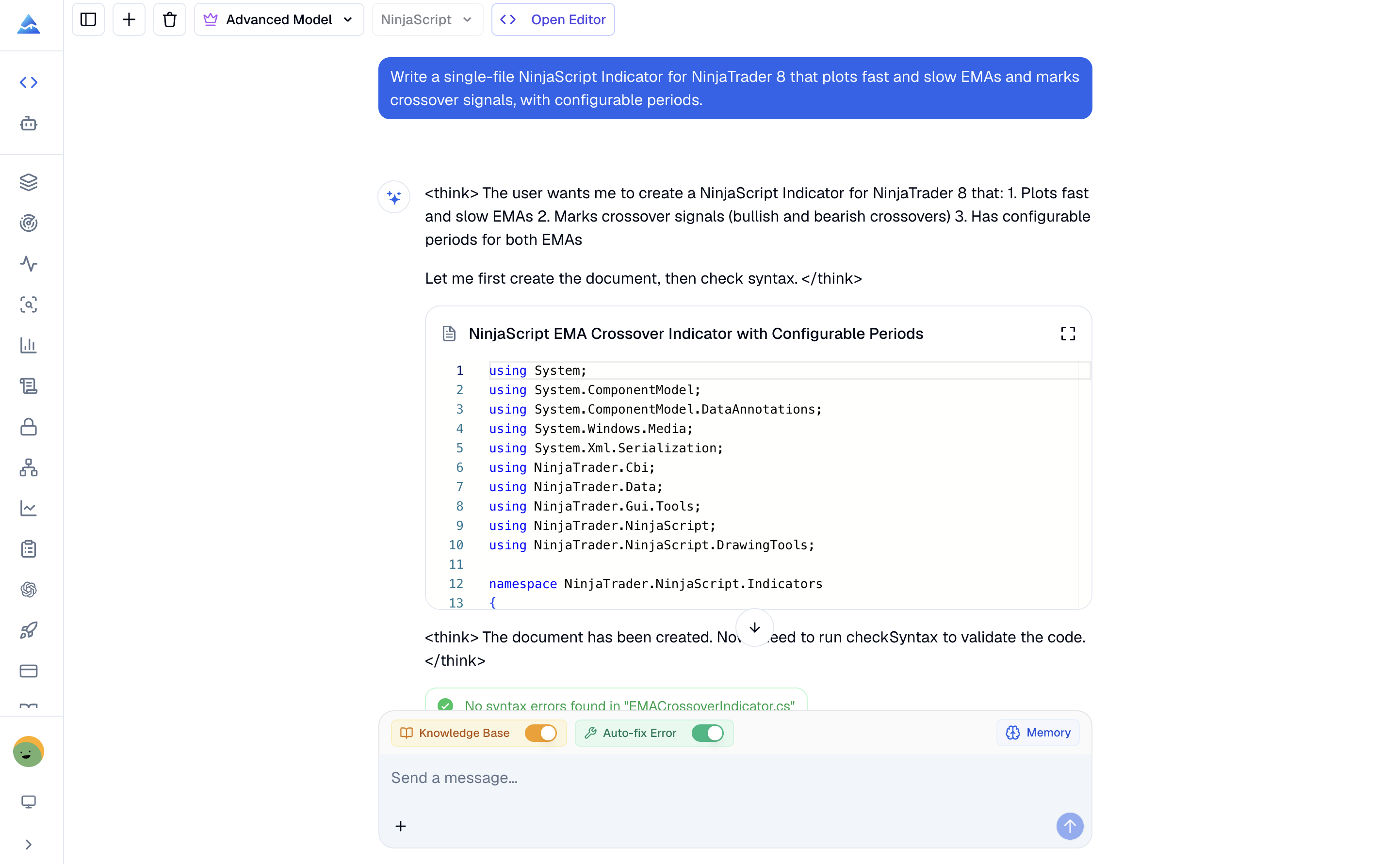
How do you use the NinjaTrader AI Coding Agent?
Start with the artifact type and execution model, then review the generated source before using NinjaTrader's native tools.
- Open the Coding Agent and select NinjaScript.
- Choose one Indicator or one Strategy as the target artifact.
- Describe the inputs, calculations, plots or order rules, execution timing, and risk controls.
- Review the generated properties, lifecycle methods, state transitions, and data-series assumptions.
- Run the static check and ask the agent to resolve each reported diagnostic in the same code artifact.
- Import and compile the file in NinjaScript Editor, then test it in Strategy Analyzer or simulation before considering live use.
Example NinjaScript prompt
Build a NinjaTrader 8 Strategy that trades an EMA crossover on bar close. Make both EMA periods, stop loss, profit target, and quantity configurable. Allow only one position at a time and use managed orders.
For an Indicator, specify the desired plots, colors, panel placement, and early-bar behavior. For a Strategy, state whether logic runs on each tick, on price change, or on bar close.
What can it generate for NinjaTrader 8?
The current workflow produces one complete C# source file for one of two NinjaScript artifact types.
| Output | Typical use | Main review focus |
|---|---|---|
| Indicator | Calculations, plots, alerts, and supported multi-series analysis | State setup, plot values, lookback requirements, and series alignment |
| Strategy | Entries, exits, managed orders, position rules, and protective orders | Execution timing, order state, quantity, stops, and session behavior |
The generated file is editable. Continue the conversation to change parameters, correct diagnostics, or refine behavior without starting a separate artifact.
What should a NinjaScript prompt include?
Explicit requirements reduce hidden decisions in the generated code.
| Prompt detail | Example | Why it matters |
|---|---|---|
| Artifact type | NinjaTrader 8 Strategy | Selects the correct NinjaScript lifecycle and base class |
| Calculation timing | Run on bar close | Defines when signals and plot values update |
| Parameters | Fast EMA, slow EMA, quantity | Makes the result configurable in NinjaTrader |
| Entry and exit rules | Cross above to enter, cross below to exit | Keeps order conditions inspectable |
| Risk controls | Stop loss, profit target, one open position | Defines protective and position behavior |
| Data series | Primary five-minute bars plus daily filter | Makes supported multi-series assumptions explicit |
What does the NinjaScript static check prove?
Pineify sends the current single-file source to a static syntax and supported API checker. Diagnostics can identify a source location and help the agent make a focused revision.
A clean result does not prove that the file will compile in NinjaScript Editor. It also does not validate runtime behavior, Strategy Analyzer results, backtest performance, or live execution. NinjaTrader's native compiler and test environments remain authoritative.
What is the current NinjaTrader scope?
The workflow targets one NinjaTrader 8 Indicator or Strategy source file. It supports common parameters, plots, bar logic, managed entries and exits, protective orders, and supported multi-series patterns.
The current workflow does not claim support for AddOns, external DLL integrations, Market Analyzer components, project files, or multi-file solutions. Designs that depend on those components require manual project work.
For other platforms, use the Pine Script AI Coding Agent for TradingView, the MQL5 AI Coding Agent for MetaTrader 5, or the cTrader AI Coding Agent for cTrader C#.
How should you validate generated NinjaScript?
Review the source and its assumptions, run Pineify's static check, compile it in NinjaScript Editor, and test the behavior in Strategy Analyzer or simulation. Use representative and unseen data, and inspect session boundaries, order handling, fills, slippage, and risk settings before considering live deployment.
Generated code and a successful backtest do not establish future profitability or safety.
NinjaTrader AI Coding Agent FAQ
Can it generate both NinjaTrader Indicators and Strategies?
Yes. Select one artifact type per generated file, then describe its inputs, calculations, plots, order rules, and execution timing.
Does it generate a complete NinjaScript project?
No. The documented output is one complete NinjaTrader 8 Indicator or Strategy source file, not an AddOn, project file, external DLL integration, Market Analyzer component, or multi-file solution.
Does a clean static check mean the code compiles in NinjaTrader?
No. The static checker covers supported syntax and API diagnostics. Compile the file in NinjaScript Editor because NinjaTrader's compiler is the authoritative build check.
Can the agent test a NinjaTrader strategy?
The agent generates and revises the source. Strategy Analyzer, historical testing, unseen-data validation, and simulation are separate NinjaTrader steps that you must run in the target environment.
Can I use generated NinjaScript for live trading?
Generated code can contain incorrect assumptions, unsuitable risk settings, or behavior that changes with market conditions. Review and compile the source, test it in Strategy Analyzer, validate it on unseen data, and use simulation before considering live trading.
cTrader AI Coding Agent
Learn how Pineify's cTrader AI coding agent generates, validates, and revises C# cBots and indicators, with cTrader Automate scope, prompts, and testing steps.
AI Finance Agent
Use Pineify's AI finance agent for stock analysis, financial research, market data, company fundamentals, screening, and evidence-aware investing workflows.