

cTrader AI Coding Agent
Learn how Pineify's cTrader AI coding agent generates, validates, and revises C# cBots and indicators, with cTrader Automate scope, prompts, and testing steps.
cTrader AI coding agent is a Pineify workflow that turns a plain-language trading specification into editable C# source for cTrader Automate cBots and custom indicators, then keeps the code artifact while compiler diagnostics guide revisions. It supports cTrader C# only; cTrader Python, plugins, custom NuGet or DLL dependencies, and multi-file projects are outside the current scope.
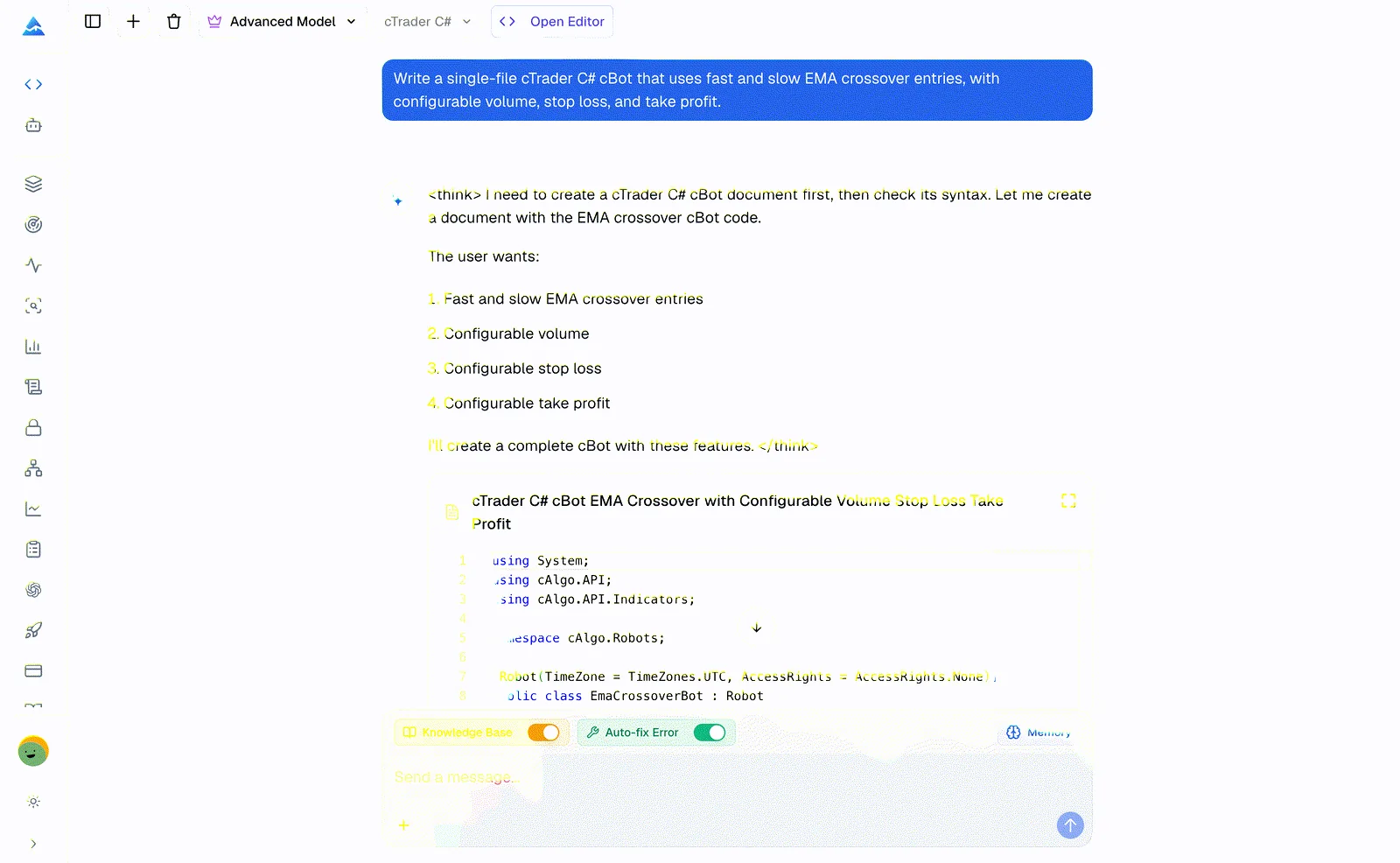
How do you use the cTrader AI coding agent?
The shortest reliable path is specification, review, compiler feedback, then cTrader testing. Keep the target symbol, execution model, and risk assumptions explicit in the prompt.
- Open the cTrader AI Coding Agent and select cTrader C#.
- Describe the entry and exit rules, timeframe, volume rule, stop logic, spread filter, and maximum position count.
- Review the generated parameters, lifecycle methods, trading calls, and position filters.
- Run syntax checking and inspect every compiler diagnostic, including its source location and affected API call.
- Ask the agent to revise the same code artifact until the reported issues are addressed.
- Build and backtest the source in cTrader, then repeat the test in a demo environment before risking capital.
Use a prompt that states the execution boundary. For example:
Build a cBot that trades an EMA crossover on bar close, rejects entries above a configurable spread, and uses configurable stop loss and take profit. Keep at most one position open for the symbol.
What can it generate for cTrader?
The workflow supports two main output types: cTrader cBots for automated rules and cTrader C# indicators for chart calculations and visual output. Both are editable C# source and require review in the target cTrader environment.
| Output | Typical use | Review before compile |
|---|---|---|
| cBot | Entry, exit, position handling, and risk controls | Order semantics, volume units, spread assumptions, and lifecycle events |
| Custom indicator | Plots, output series, chart objects, and multi-timeframe calculations | Series alignment, lookback behavior, null values, and display assumptions |
cTrader cBot generator workflow
As a cTrader cBot generator, the agent can express explicit entry and exit conditions, configurable parameters, position filters, and risk controls. State whether decisions occur on bar close or on every tick, because that choice changes signal timing and event logic.
cTrader C# indicator workflow
For a cTrader C# indicator, describe the input parameters, output series, chart objects, and timeframe relationships. Ask for edge-case behavior, such as the first bars where a moving average has insufficient history, before compiling.
Compiler diagnostics and code artifacts
The validation loop returns C# and cTrader API diagnostics with source locations and can revise the current artifact. A successful syntax check means the checked source was accepted by the validation flow; it does not prove that order behavior, data assumptions, or performance are correct.
What should a cTrader prompt include?
A precise specification gives the agent fewer hidden decisions to make. Include the details below when they affect the strategy or indicator:
| Prompt detail | Example | Why it matters |
|---|---|---|
| Signal timing | EMA crossover on bar close | Separates confirmed-bar logic from tick-level logic |
| Position rules | One position per symbol | Prevents accidental stacking or duplicate entries |
| Risk parameters | Stop loss, take profit, risk per trade | Makes sizing and exits inspectable |
| Market filters | Maximum spread, session hours | Defines when signals may be acted on |
| Data and display | Timeframe, output series, chart objects | Clarifies the cTrader API surface and visual result |
For platform comparisons, the MQL5 AI Coding Agent targets MetaTrader 5, the NinjaTrader AI Coding Agent targets NinjaTrader 8 NinjaScript, and the Pine Script AI Coding Agent targets TradingView. Choose the page that matches the runtime where you will compile and test the result.
What is the current cTrader scope?
The current workflow targets C# cBots and custom indicators that use the cTrader Automate API. It does not claim support for cTrader Python, plugins, custom NuGet or DLL dependencies, or multi-file project generation. If your design depends on one of those components, treat the generated file as a reference and expect manual project work.
The reference context covers cTrader Automate concepts such as lifecycle methods, orders, positions, symbols, volume, market data, and indicators. Dedicated memory keeps cTrader naming and risk conventions separate from Pine Script and MQL5 work, but saved preferences do not replace a compile or backtest.
How should you validate generated C#?
Validation is a sequence, not a single pass. Inspect the generated logic, run the validation flow, compile in cTrader, backtest with representative data, and use a demo account to check execution behavior. Review slippage, commissions, spread, volume normalization, session boundaries, and position state before live deployment.
For an additional TradingView workflow, see the Strategy Optimizer, which tests supported TradingView inputs separately from cTrader code generation.
Frequently asked questions
Does the cTrader AI coding agent generate cBots?
Yes. It generates editable C# cBot source for explicit entry, exit, position-handling, and risk-control rules. Compile and backtest the result in cTrader before using a demo or live account.
Can it create a cTrader C# indicator?
Yes. Describe parameters, output series, chart objects, and any multi-timeframe calculation. Review series alignment and early-bar behavior before relying on the plotted output.
Is this a cAlgo AI generator?
The phrase cAlgo AI is often used for AI-assisted cTrader coding. This workflow's documented output is cTrader C# for cBots and custom indicators, not Python, plugins, custom NuGet or DLL dependencies, or multi-file projects.
Does a successful syntax check prove that a cBot is safe or profitable?
No. Syntax checking addresses compiler and API diagnostics only. It does not validate trading assumptions, execution behavior, slippage, risk, or profitability, so cTrader backtesting and demo validation remain required.
MQL5 AI Coding Agent
Use Pineify's MQL5 AI Coding Agent to generate, validate, and revise MetaTrader 5 Expert Advisors, MT5 indicators, scripts, and libraries with a clear workflow.
NinjaTrader AI Coding Agent
Generate, statically check, and revise one NinjaTrader 8 NinjaScript Indicator or Strategy source file with Pineify's AI Coding Agent.