Built for NinjaTrader 8

NinjaTrader AI Coding AgentGenerate NinjaScript Indicators and Strategies

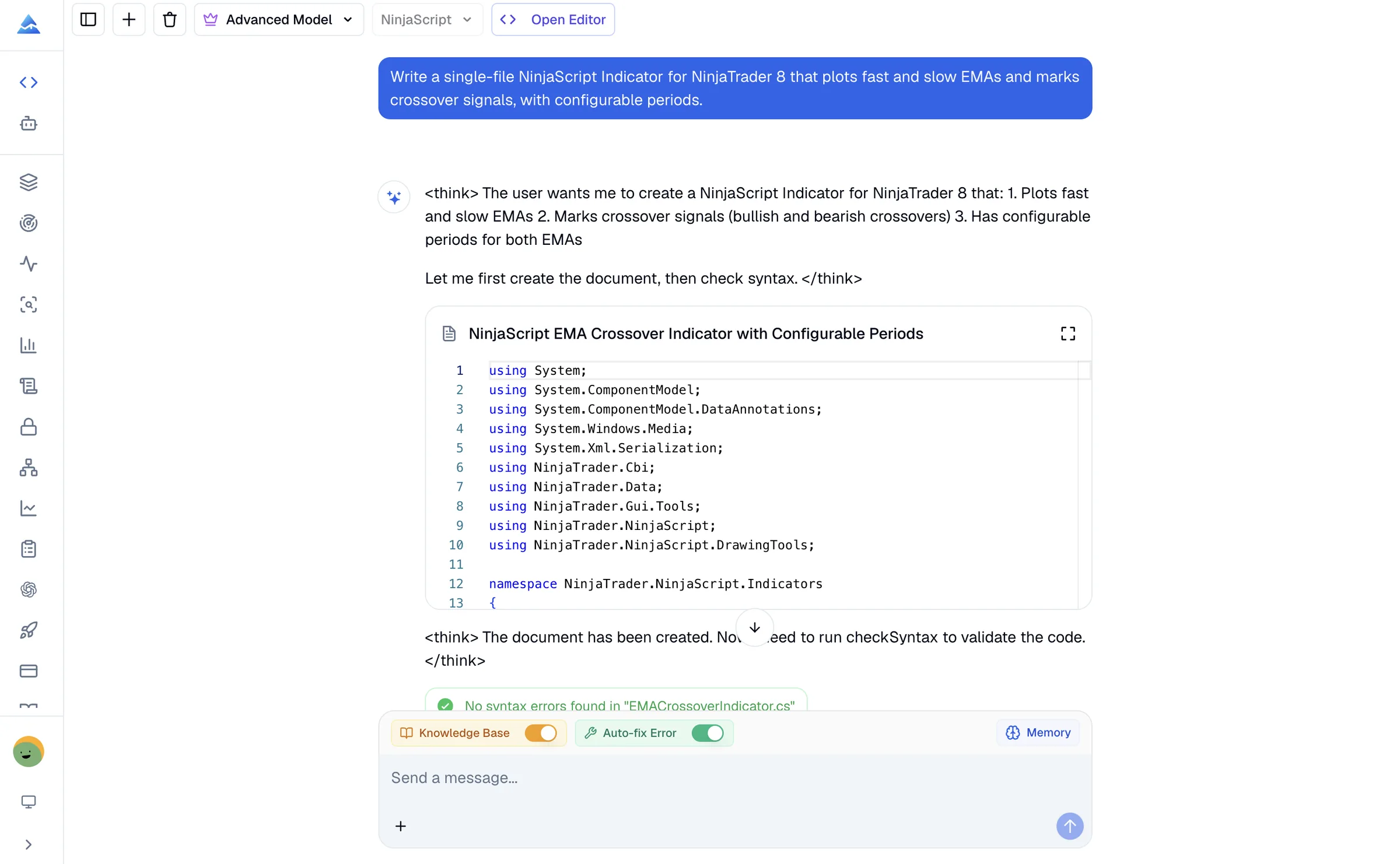
Turn trading rules into editable NinjaScript C# for NinjaTrader 8. Build an Indicator or Strategy, inspect static diagnostics, and refine the same code artifact before platform testing.

Start without NinjaScript expertise. NinjaScript Editor compilation and platform testing are still required.

Pineify NinjaTrader AI Coding Agent generating NinjaScript code for an Indicator or Strategy
NinjaTrader 8
Indicators and Strategies
Built-in NT8 knowledge base
Static diagnostics

Purpose-built coding workflow

More Than a Generic C# Prompt

NinjaScript combines C# with platform-specific lifecycle, series, plots, and order rules. Pineify keeps those contracts near the code and makes the diagnostic boundary explicit.

Generate NinjaScript C#

Describe an Indicator or Strategy in plain English and receive an editable, single-file NinjaTrader 8 source artifact.

  • Indicators with plots and parameters
  • Strategies with managed entries and exits
  • Explicit lifecycle and lookback guards

Use a Built-In NT8 Knowledge Base

The coding context uses a versioned NinjaTrader 8 knowledge base instead of treating NinjaScript as generic C#.

  • OnStateChange and OnBarUpdate lifecycle
  • Series, multi-timeframe, and plot contracts
  • Managed orders and signal association

Inspect Static Diagnostics

Run a single-file syntax and supported API check, then use source-located diagnostics to guide the next revision.

  • C# compiler diagnostics
  • Supported NinjaScript API feedback
  • Clear boundary before platform testing

Keep NinjaScript Context

Continue an existing artifact and save NinjaScript-specific conventions in a dedicated language memory.

  • Targeted edits without starting over
  • Separate NinjaScript preferences
  • Explain code before you change it

From idea to platform test

A Reviewable NinjaScript Workflow

Generation, static checking, NinjaTrader compilation, and strategy testing are separate steps. Keeping them separate makes the result easier to inspect and trust.

  1. STEP 01

    Describe the platform behavior

    Choose Indicator or Strategy, then state the inputs, calculation timing, lookback, signals, order rules, and risk constraints.

    Example: Build an NT8 Strategy that trades an EMA crossover on bar close with one position at a time and configurable stop and target distances.
  2. STEP 02

    Review the NinjaScript artifact

    Inspect namespaces, lifecycle methods, parameters, series guards, signals, and order association in the generated C# source.

    Example: Explain why each State branch exists, then add a session filter without changing the crossover rules.
  3. STEP 03

    Check, compile, and test

    Use the static checker for supported diagnostics, then compile in NinjaScript Editor and test the behavior in Strategy Analyzer or simulation.

    Example: Fix the reported diagnostics and list every assumption that still requires NinjaTrader platform testing.

Code you can inspect

Keep Lifecycle and Trading Rules Visible

The artifact exposes the lifecycle, bar guards, signal names, and position checks that determine behavior. Ask for a focused edit without hiding the rest of the source.

Explain each State branch and calculation mode
Review lookback guards before series access
Keep entry and exit signal association explicit
EmaCrossStrategy.cs
using System;
using NinjaTrader.Cbi;
using NinjaTrader.NinjaScript;
using NinjaTrader.NinjaScript.Strategies;

namespace NinjaTrader.NinjaScript.Strategies
{
    public class EmaCrossStrategy : Strategy
    {
        protected override void OnStateChange()
        {
            if (State == State.SetDefaults)
            {
                Name = "EmaCrossStrategy";
                Calculate = Calculate.OnBarClose;
                BarsRequiredToTrade = 50;
            }
        }

        protected override void OnBarUpdate()
        {
            if (CurrentBar < BarsRequiredToTrade)
                return;

            if (Position.MarketPosition == MarketPosition.Flat
                && CrossAbove(EMA(20), EMA(50), 1))
                EnterLong(1, "LongEntry");
            else if (Position.MarketPosition == MarketPosition.Long
                && CrossBelow(EMA(20), EMA(50), 1))
                ExitLong("LongExit", "LongEntry");
        }
    }
}
Static checking helps locate supported syntax and API issues; NinjaScript Editor remains the platform compilation boundary.

A specialized workflow

Pineify vs a General AI Chat

Both can produce C# text. Pineify adds a bounded NinjaScript workflow so the built-in knowledge, artifact, diagnostics, and platform testing responsibilities remain clear.

TaskPineify NinjaTrader AgentGeneral AI chat
NinjaTrader API contextBuilt-in NinjaTrader 8 knowledge baseDepends on the model and prompt
Code outputEditable single-file artifactUsually a chat response
Static diagnosticsSource-located syntax and API feedbackUsually manual copy and paste
NinjaScript preferencesDedicated language memoryVaries by product and session
Platform validationStill requires NinjaTrader compilation and testingStill requires NinjaTrader compilation and testing

Buy Once. All Tools. Forever.100,000+ Traders Already Upgraded

One-time payment · No subscriptions · Lifetime updates included

⏰ Lifetime pricing is going away

We're moving to annual subscriptions soon. This is your last chance to lock in a one-time payment and keep every future update at no extra cost.

💡 Once we switch, lifetime access will no longer be available

Plus

$129$99One-time payment
Advanced Model + 500 AI credits/month — pay once, use forever!
Save 20%
Get Lifetime Access
  • Visual Pine Script Editor
  • Pine Script, MQL5 & cTrader Coding AI Agent (Knowledge Base, Auto Fix Error & Memory)
  • 500 AI credits monthly
  • Advanced Model (100 msgs / 5h, no credits required)
  • AI Chart Analysis (2 times/day)
  • Exclusive PineifyGPT access
  • 18 premium scripts
  • 🎁 Get 1 month Wundertrading Pro Plan (Reg. $49)
Best Value Plan
2xUsage

Advanced

$219$149One-time payment
2x AI power — 1000 credits/month + all premium tools included!
🔥 Save 30%
Get Lifetime Access
  • Everything in Plus plan
  • AI Finance Agent
  • Pineify® - Signals & Overlays™ (Invite-only indicator)
  • 1000 AI credits monthly
  • Advanced Model (200 msgs / 5h, no credits required)
  • AI Chart Analysis (5 times/day)
  • Trading Journal
  • Strategy Optimizer Extension
  • Backtest Report Deep Report
  • Lifetime feature updates
Maximum AI Power
5xUsage

Expert

$369$259One-time payment
Full access to every tool + 5x AI power — 2500 credits/month
🔥 Save 30%
Get Lifetime Access
  • Everything in Advanced plan
  • Custom ScreenerNew
  • AI Stocks & Options PickerNew
  • MCP Access for AI AgentsNew
  • Market Insights (Options Flow, Dark Pool, Market Tide & More)
  • 2500 AI credits monthly
  • Advanced Model (500 msgs / 5h, no credits required)
  • AI Chart Analysis (20 times/day)
  • Priority access to new features
  • Request custom indicators
  • AI Trading AgentSoon
  • AI Daily Portfolio ReportSoon
  • Agent Skills LibrarySoon
  • more coming soon...
See what's included in each plan
Payment Security

Clear answers

NinjaTrader AI Coding Agent FAQ

What is a NinjaTrader AI Coding Agent?
A NinjaTrader AI Coding Agent turns plain-language requirements into NinjaScript C# for NinjaTrader 8 Indicators and Strategies. Pineify keeps the generated source in an editable code artifact so you can review it and request focused changes.
What NinjaScript can Pineify generate?
The current workflow generates one complete NinjaTrader 8 C# source file for either an Indicator or a Strategy. It can implement parameters, plots, bar-driven logic, managed entries and exits, protective orders, and supported multi-series patterns when those requirements are stated explicitly.
How does NinjaScript syntax checking work?
Pineify sends the current source to an external single-file static syntax and supported API checker. Diagnostics include source locations that the agent can use for a focused revision. A clean result is not proof of full NinjaScript Editor compilation, execution, Strategy Analyzer results, backtesting, or live-trading behavior.
Does the agent use NinjaTrader documentation?
Yes. The coding context uses a built-in, versioned NinjaTrader 8 knowledge base created from official NinjaTrader documentation. It covers lifecycle methods, indicators, managed strategies, parameters, series, drawing, and the API contracts used by the supported static checker.
Can Pineify edit an existing NinjaScript?
Yes. You can continue from a NinjaScript code artifact and ask for a targeted change. The agent also has separate NinjaScript memory for conventions you want to reuse across chats.
Does it support AddOns, DLLs, or multi-file projects?
No. The current workflow is intentionally limited to one NinjaTrader 8 Indicator or Strategy source file. It does not claim to generate AddOns, external DLL integrations, Market Analyzer components, project files, or multi-file solutions.
How is Pineify different from a general AI chatbot?
Pineify combines a built-in NinjaTrader-specific knowledge base, an editable code artifact, dedicated NinjaScript memory, and structured static-check diagnostics in one workflow. A general chatbot can write C#, but its NinjaScript API context and validation loop depend on the model and prompt.
Can AI create a profitable NinjaTrader Strategy?
No. Generated code can contain flawed assumptions, unsuitable risk settings, or behavior that changes under real market conditions. Compile and review the source in NinjaScript Editor, test it in Strategy Analyzer, validate it on unseen data, and use simulation before considering live trading. Pineify is not investment advice.

Build Your NinjaTrader Idea in NinjaScript

Describe an Indicator or Strategy, review the generated source, and carry a clearly bounded artifact into NinjaTrader testing.

Open the NinjaTrader Coding Agent