

AI Finance Agent
Use Pineify's AI finance agent for stock analysis, financial research, market data, company fundamentals, screening, and evidence-aware investing workflows.
Pineify's AI finance agent is a conversational research assistant for investors, traders, analysts, and learners who need market context without switching between data terminals. It turns plain-language questions into tool-backed stock analysis, financial research, screening, and company-fundamental summaries. Use it to explore quotes, filings, estimates, news, and market activity, then verify each answer's timestamp and coverage before acting.
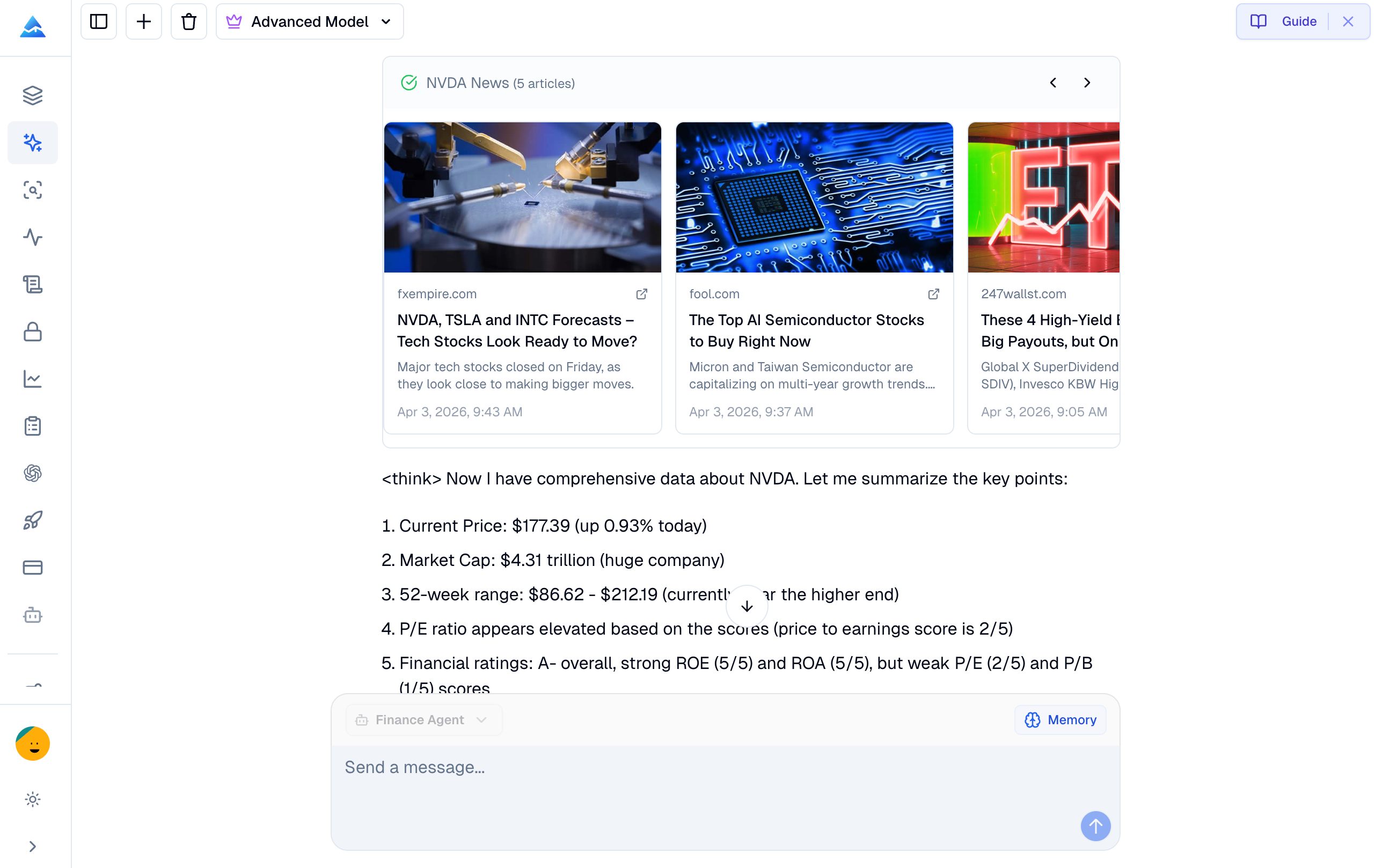
What is an AI finance agent?
An AI finance agent connects a language interface to financial-data tools. Instead of relying only on model memory, Pineify's agent can retrieve market quotes, company fundamentals, analyst estimates, filings, news, and other research data when you ask a question. The result is a structured research response, not a promise that a trade will be profitable.
The current product page lists more than 95 financial data tools, including market data, fundamentals, options, filings, ownership, news, web search, and social discussion. Tool availability, market coverage, and data freshness vary by dataset, so use the returned source context and timestamp as part of your analysis.
How to use the Finance Agent
- Open the Finance Agent chat.
- Ask a focused question in plain English. Include a ticker, market, date range, metric, or comparison when it matters.
- Review the structured response, including units, period, timestamp, and any source context shown by the agent.
- Ask a follow-up question to narrow the universe, compare companies, explain a metric, or check an assumption. Use the result as research context and verify important figures before making a decision.
What can the AI finance agent research?
Real-time market data assistant
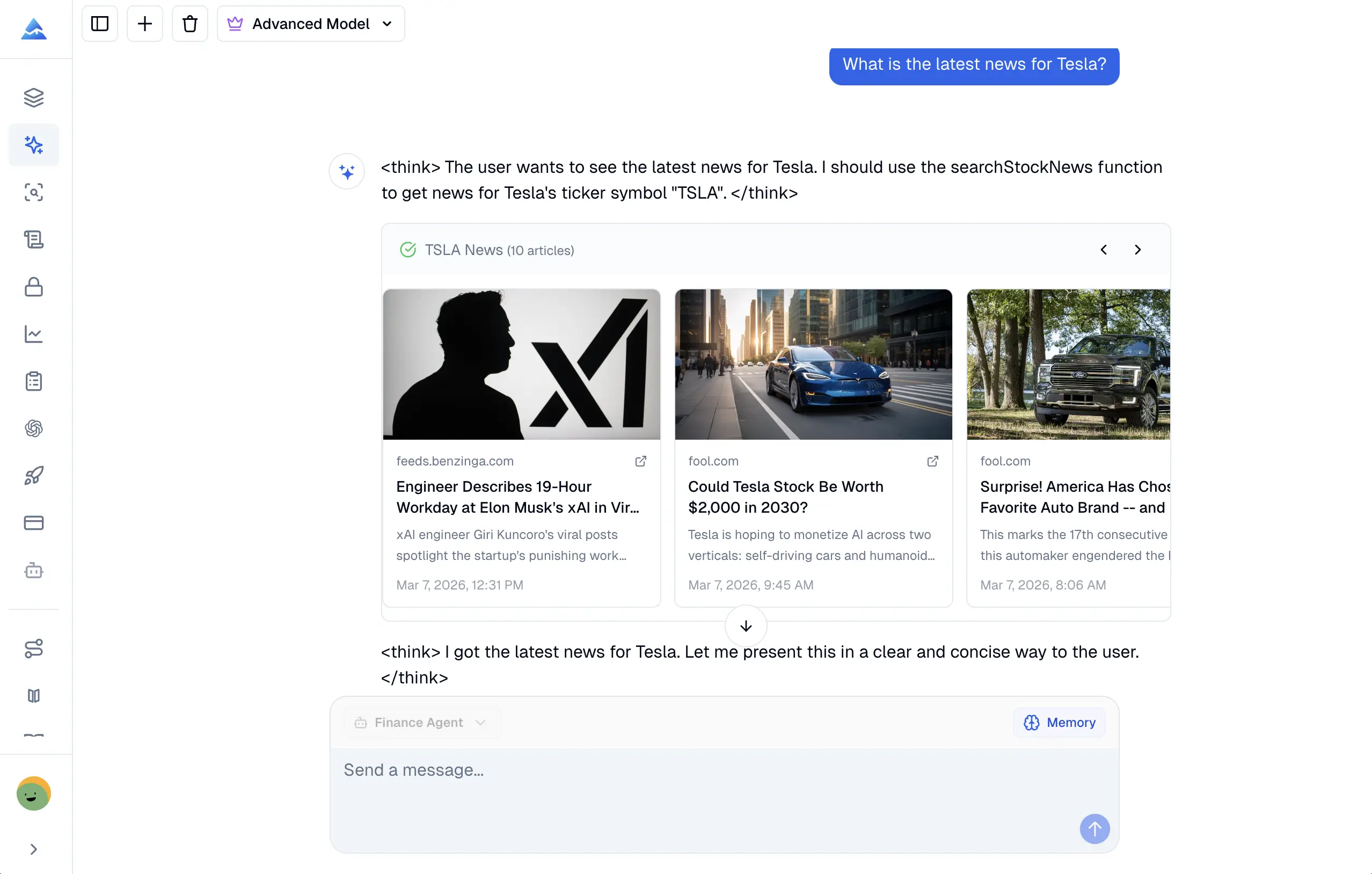
For a real-time market data assistant workflow, ask for a quote, market move, event, or instrument comparison. Quotes and market activity may be current during market hours, while each feed can have its own delay and coverage rules.
- Stock, options, forex, and crypto quotes: Request prices and related activity for supported instruments.
- Market movers: Find gainers, losers, and heavily traded securities for a selected market or session.
- News and press releases: Summarize recent company or market stories and ask follow-up questions about the event.
- Economic calendar: Review events such as CPI, FOMC meetings, and jobs reports, with the available expectations and context.
Company financial analysis
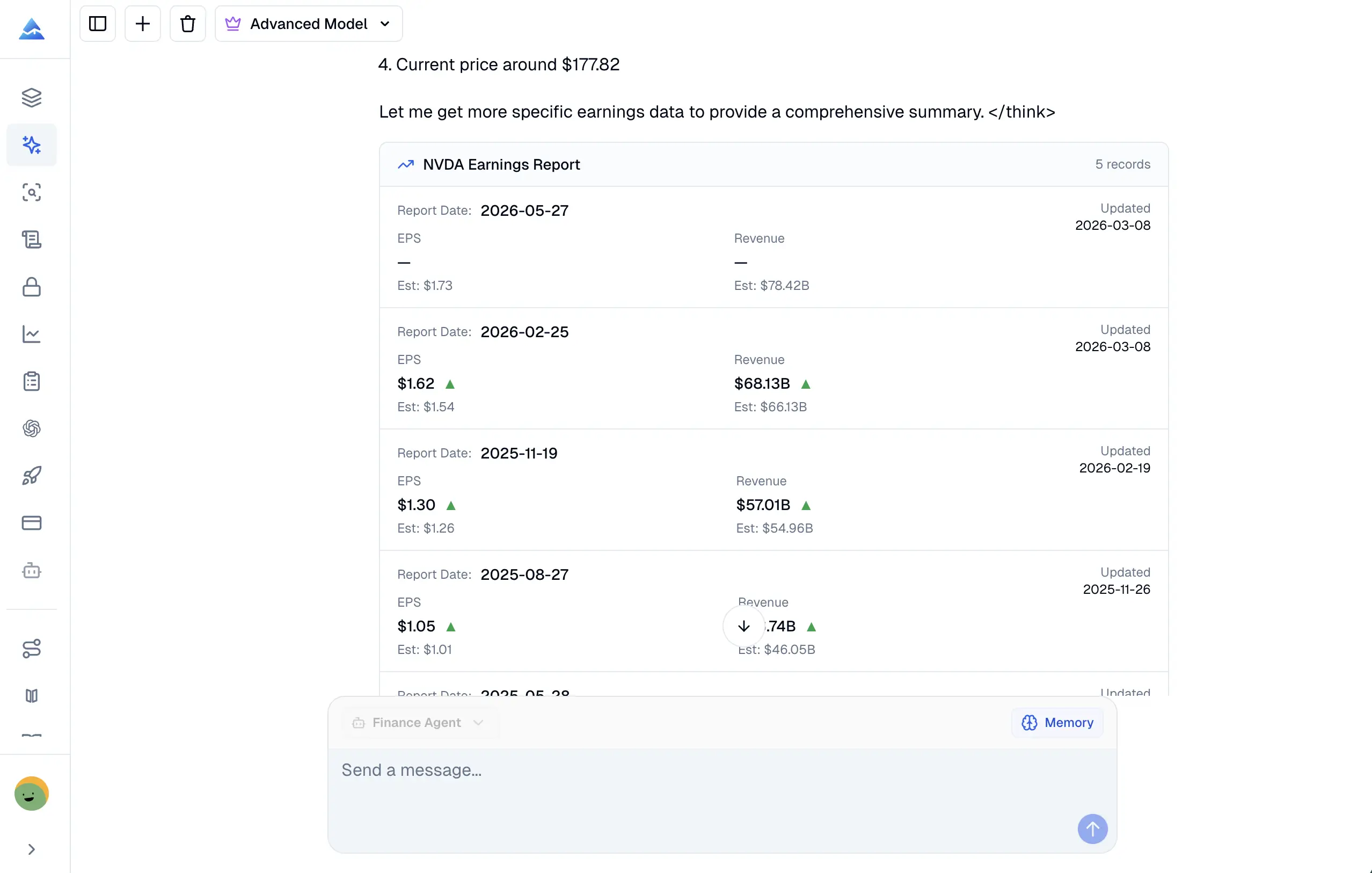
Use the Finance Agent as a financial research AI when you need to understand a public company across several reporting periods. Ask for a specific period and currency where possible, then check whether the response uses annual or quarterly data.
- Financial statements: Review income statements, balance sheets, and cash-flow reports.
- Key ratios: Compare metrics such as P/E, P/B, ROE, debt-to-equity, and current ratio.
- Analyst estimates: Inspect price targets, earnings estimates, and recommendation distributions.
- SEC filings: Locate 10-K, 10-Q, 8-K, and other available regulatory documents.
- Historical trends: Compare revenue, margins, cash flow, or leverage across multiple periods.
Stock analysis AI and natural-language screening
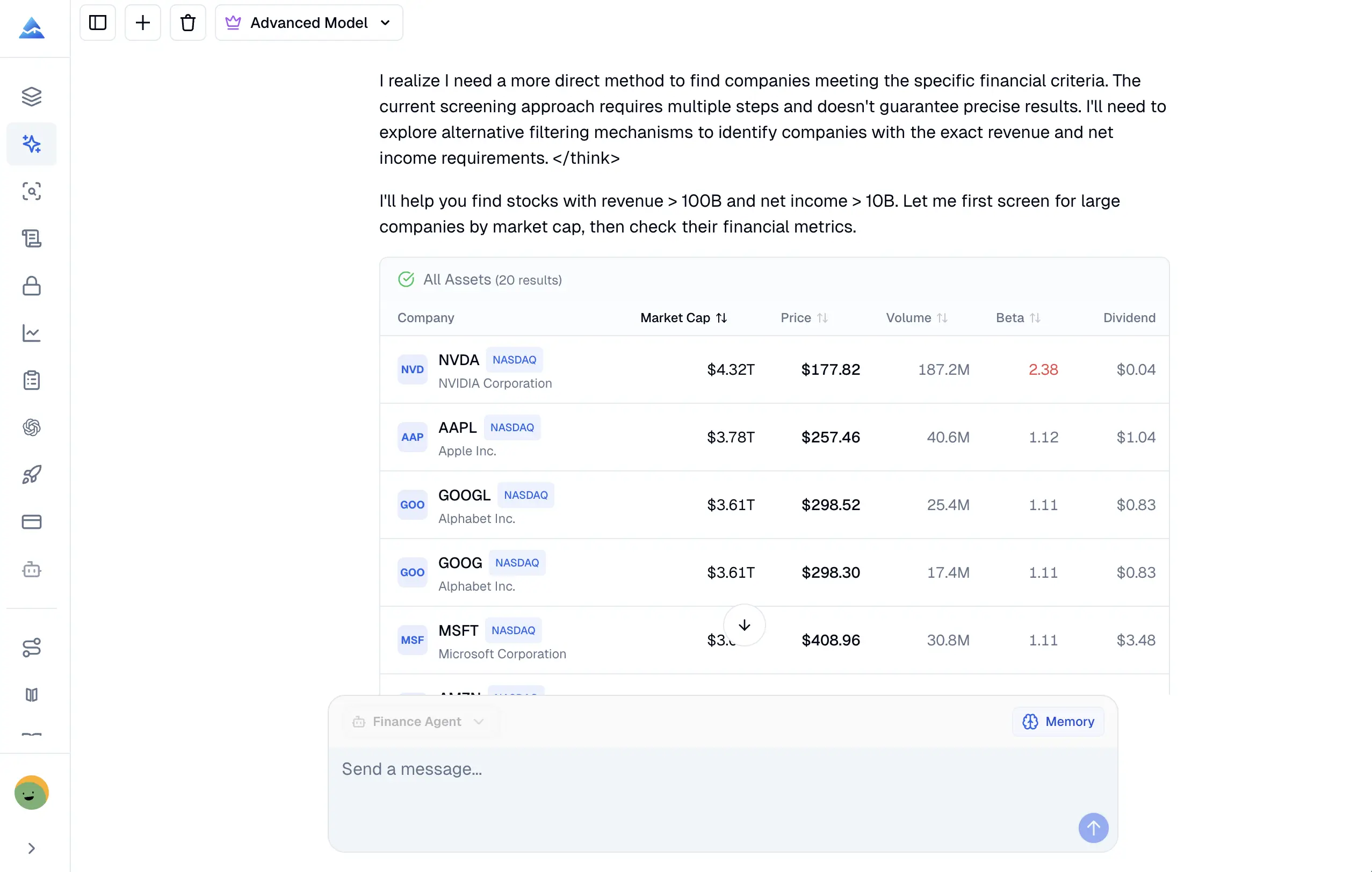
The stock analysis AI can translate a plain-language idea into a set of screening conditions. State the market, factor definitions, and threshold clearly because terms such as "growth" or "undervalued" can be interpreted in more than one way.
- Natural-language queries: For example, ask for healthcare stocks above a selected market-cap threshold with a specified dividend yield.
- Multi-factor screening: Combine fundamental, technical, valuation, sector, or market-cap filters in one request.
- Market comparison: Compare companies such as AAPL and MSFT on P/E, revenue growth, margins, or free cash flow.
- Research context: Use the output to build a watchlist or a follow-up investigation, not as an automatic buy or sell instruction.
Additional research capabilities
| Capability | Example question | Typical output |
|---|---|---|
| Technical indicators | "What are the RSI and moving averages for AAPL?" | Indicator values for the selected ticker and period |
| Earnings tracking | "Which companies report earnings this week?" | Calendar entries, surprise history, and report dates when available |
| ETF and fund data | "Compare the sector weights of two ETFs." | Holdings, weights, expense ratios, and comparison context |
| IPO and M&A activity | "What recent listings or merger news affect this sector?" | Event summaries and available market context |
| Sentiment analysis | "What is the recent sentiment around NVDA?" | News, analyst, or social discussion summarized with caveats |
How is it different from general AI chat?
General-purpose AI models can explain finance concepts, but their built-in knowledge may not contain the latest quote, filing, or market event. Pineify's AI finance agent can call financial-data tools for the question at hand and organize the returned evidence in the conversation.
Tool access reduces the risk of stale or fabricated numbers, but it does not remove it. Check the source context, timestamp, units, exchange, and reporting period, and ask the agent to show the underlying filing or data context when the decision is material.
Example questions for financial research AI
- "Analyze Tesla's revenue trends, margins, cash flow, and debt across the latest reported periods."
- "Compare AAPL and MSFT on P/E, revenue growth, and free cash flow. Use the same reporting period."
- "Show the top market gainers today and include the exchange and timestamp."
- "Find supported small-cap stocks with positive earnings growth, then list the filters used."
- "Summarize the latest SEC filing for this company and separate reported facts from interpretation."
- "Show upcoming earnings reports for this week and identify any missing coverage."
Data coverage, access, and research limits
Quotes, financial statements, estimates, news, social discussion, and alternative datasets do not share one timestamp or one geographic scope. Market-hours quotes can be current, while filings, statements, analyst data, and news may be delayed or updated on different schedules. Review the timestamp, source context, units, and market coverage returned with every answer.
AI credit usage and plan limits are shown in the app and on the pricing page. The Finance Agent is a research tool, not a licensed financial adviser. It can provide data-driven buy, sell, or hold research context, but it cannot predict prices with certainty or replace independent due diligence.
Related Pineify Manual guides
- AI Stock Picker for ranked stock research and screening context.
- Market Insights for options flow, Market Tide, dark-pool, and congressional-trading views.
- AI Chart Analysis for screenshot-based technical analysis.
- Backtest Deep Report for evaluating strategy results after research.
Finance Agent FAQ
What is the best way to start using an AI finance agent?
Start with one ticker, one question, and a defined period. Ask the agent to show the timestamp, units, and source context, then follow up with a comparison or verification question.
Can the Finance Agent provide current stock prices?
It can retrieve supported market quotes through its financial-data tools, often during market hours. "Current" depends on the instrument, exchange, feed, and timestamp, so inspect those details instead of assuming every dataset is tick-level.
Can it analyze SEC filings and financial statements?
Yes. You can ask for available 10-K, 10-Q, 8-K, income-statement, balance-sheet, and cash-flow information. Specify annual or quarterly periods and verify the original filing when the figure affects a decision.
Does the AI finance agent give investment advice?
No. It provides research context and may summarize buy, sell, or hold signals from the available data, but it is not a licensed adviser. Investment decisions remain your responsibility and involve risk.
NinjaTrader AI Coding Agent
Generate, statically check, and revise one NinjaTrader 8 NinjaScript Indicator or Strategy source file with Pineify's AI Coding Agent.
AI Stock Picker
Learn how Pineify's AI stock picker ranks stocks with daily 1-10 scores, fundamentals, charts, news, and options analysis. Review evidence before investing.