

MQL5 AI Coding Agent
Use Pineify's MQL5 AI Coding Agent to generate, validate, and revise MetaTrader 5 Expert Advisors, MT5 indicators, scripts, and libraries with a clear workflow.
The MQL5 AI Coding Agent is Pineify's MQL5 code generator for MetaTrader 5. It converts a plain-language specification into editable MQL5 for custom indicators, Expert Advisors, utility scripts, and libraries, then supports validation and revision. Use it to draft or migrate code, but compile in MetaEditor and backtest in MT5 before any demo or live use.
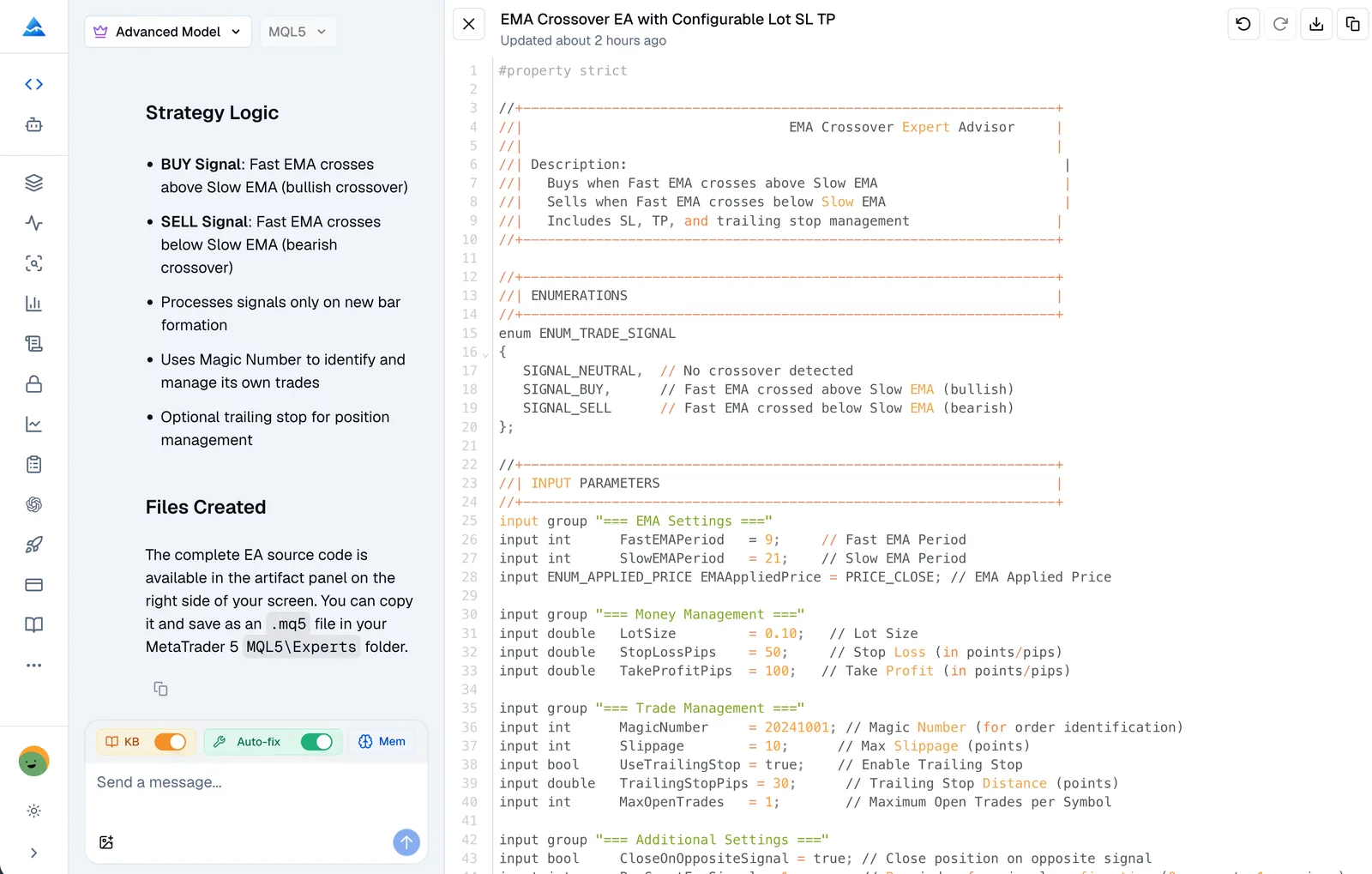
How do you use the MQL5 AI Coding Agent?
Start with a specific trading requirement, then inspect and test the generated artifact in the target MetaTrader 5 environment.
- Open the Coding Agent and select MQL5.
- Describe the instrument, entry and exit rules, timeframe, position sizing, stop loss, take profit, and risk limits.
- Review the generated code and ask the agent to explain or revise assumptions, parameters, or execution details.
- Run the validation flow and resolve every reported compiler diagnostic.
- Copy the result into MetaEditor, compile it, and backtest it in MetaTrader 5 before using a demo or live account.
Example MQL5 prompt
Build an MQL5 Expert Advisor that trades an EMA crossover on bar close. Make both periods, risk per trade, stop loss, and take profit configurable. Allow only one position per symbol.
The more explicitly the prompt defines execution timing and risk controls, the easier it is to review whether the code matches the intended MetaTrader 5 workflow.
What can the MQL5 code generator build?
The agent can create several MQL5 artifact types. Choose the output based on how MetaTrader 5 will load and execute the code, then review the platform-specific assumptions.
| Output | Typical use | Main review focus |
|---|---|---|
| Custom indicator | Overlays, oscillators, multi-buffer indicators, and alerts | Buffers, calculation events, symbols, and timeframes |
| Expert Advisor | Entry, exit, order management, and risk-control logic | Position limits, order calls, sizing, and execution model |
| Utility script | One-off chart, account, or data operations | Account state, permissions, and repeatability |
| Library | Reusable MQL5 functions and shared logic | Interfaces, dependencies, and integration points |
What MQL5 capabilities does it support?
The workflow is MQL5-aware rather than a generic text-only generator. It can work with common MetaTrader 5 structures such as OnInit, OnCalculate, indicator buffers, iCustom, CopyBuffer, and CTrade.
- Validation and revision: Compiler diagnostics can identify errors, after which the agent can revise the current code artifact.
- Persistent context: Continue an earlier result with MQL5 project preferences instead of restating every convention.
- Custom Skills: Reuse naming conventions, EA templates, and risk rules through saved Skills.
- Migration assistance: Use existing MQL4 code as a reference when rebuilding an indicator or Expert Advisor for MQL5.
Can it help migrate MQL4 code?
Yes. Provide the existing MQL4 source and explain the desired MQL5 behavior; the agent can use it as a migration reference. Review event handlers, order and position APIs, indicator buffers, and broker-specific behavior before treating the result as equivalent.
How should you validate generated MQL5 code?
Validation is a coding aid, not a trading result. Use this review sequence after the agent produces or revises an artifact:
- Confirm the symbol, timeframe, and bar-close or tick execution model.
- Check position sizing, spread filters, stop loss, take profit, and maximum open positions.
- Compile in the target MetaTrader 5 environment. Custom DLLs and undocumented platform behavior may require manual changes.
- Backtest on representative and unseen data, and compare behavior across relevant market conditions.
Compilable code is not evidence that a strategy is profitable, robust, or safe. Keep demo testing and independent review in the workflow before considering live execution.
Which Pineify workflow fits your platform?
For TradingView Pine Script, use the Pine Script AI Coding Agent. For cTrader C# cBots and indicators, use the cTrader AI Coding Agent. For NinjaTrader 8 Indicators and Strategies, use the NinjaTrader AI Coding Agent. If you export TradingView strategy results, the Backtest Deep Report helps analyze the exported data, while the Strategy Optimizer is a separate Chrome workflow for TradingView parameter sweeps.
MQL5 AI Coding Agent FAQ
Does it generate an MT5 indicator or an Expert Advisor?
It supports both custom MT5 indicators and MetaTrader 5 Expert Advisors, along with utility scripts and libraries. State the artifact type and the required inputs, events, and risk controls in the prompt.
Does validation guarantee that the EA will work in live trading?
No. Validation and compiler diagnostics help find code issues, but they do not prove that the logic matches your intent or that execution, data, spreads, or broker rules will behave as expected. Compile and backtest in MetaTrader 5, then use a demo environment first.
Can I use custom DLLs or undocumented platform behavior?
These dependencies may require manual changes in the target MetaTrader 5 project. Inspect every external dependency and confirm that your environment permits it before compiling or testing.
Is an MQL5 code generator the same as a strategy tester?
No. The agent generates and revises source code; MetaTrader 5's compiler and tester remain the authoritative checks for build and backtest behavior. A successful backtest also does not establish future profitability.
Pine Script AI Coding Agent
Use Pineify's Pine Script AI coding agent to generate, validate, explain, and revise Pine Script V6 for TradingView, then compile and test every result.
cTrader AI Coding Agent
Learn how Pineify's cTrader AI coding agent generates, validates, and revises C# cBots and indicators, with cTrader Automate scope, prompts, and testing steps.