Built for cTrader C#

cTrader AI Coding AgentGenerate C# cBots and Indicators

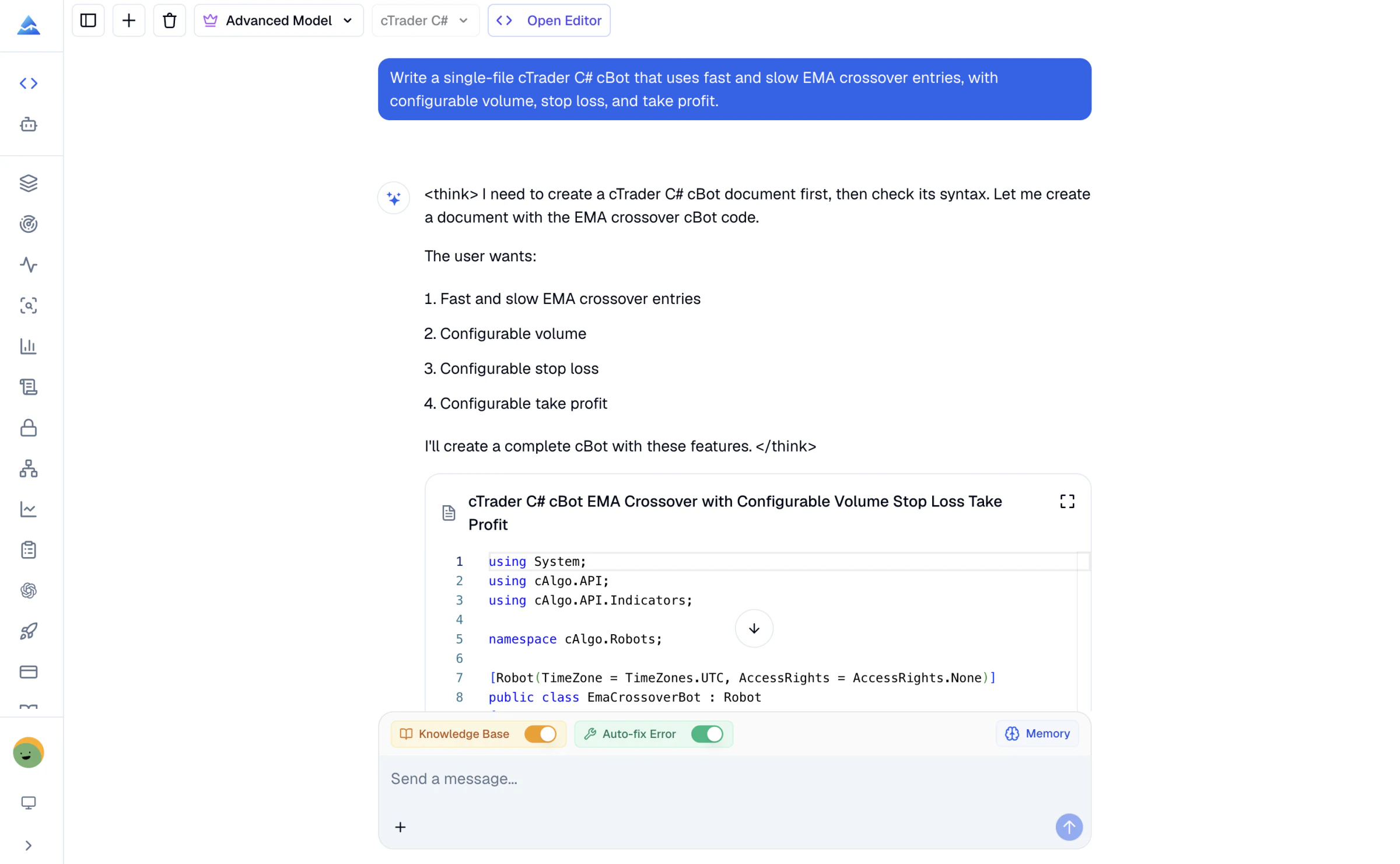
Turn plain-language trading rules into editable cTrader C# code. Build cBots, create custom indicators, inspect compiler diagnostics, and refine the result in one coding workflow.

No cTrader C# expertise required to start. Code review and testing are still required before live use.

Pineify cTrader C# AI Coding Agent generating an EMA crossover cBot with knowledge base, auto-fix, and memory controls
cTrader C# cBots
Custom indicators
Versioned API context
Compiler diagnostics

Purpose-built coding workflow

More Than a Generic C# Prompt

Generic C# knowledge is not enough for reliable cTrader work. A useful result must respect the platform lifecycle, trading operations, symbol volume rules, series indexing, and indicator outputs. We version the cTrader reference and keep compiler feedback inside the editing loop.

Generate cTrader C# Code

Describe the cBot or indicator you need. The agent turns trading rules, parameters, and risk constraints into editable cTrader C# source.

  • cBots with explicit entry and exit logic
  • Custom indicators and chart output
  • Configurable parameters and risk controls

Work From a Versioned Reference

The coding context targets cTrader.Automate 1.0.19 and concentrates on the APIs that cBots and indicators use in practice.

  • Lifecycle and event handling
  • Orders, positions, symbols, and volume
  • Market data, series, and common indicators

Check Compiler Diagnostics

Run a syntax check from the coding workflow. Compiler errors return with source locations so the agent can make a focused revision.

  • C# compiler diagnostics
  • cTrader API compatibility feedback
  • Revision loop inside the same code artifact

Keep Your cTrader Preferences

Save cTrader-specific conventions in global memory, such as naming, risk defaults, and the structure you prefer for future chats.

  • Separate memory for cTrader work
  • Continue an existing code artifact
  • Request precise edits in plain English

From idea to testable code

How the cTrader AI Coding Agent Works

The workflow separates three jobs: defining the strategy, reviewing the implementation, and testing the result. Keeping those jobs distinct makes mistakes easier to find.

  1. STEP 01

    Describe the trading logic

    State the signal, timeframe, volume rule, stop logic, and any position limits. Clear constraints produce code that is easier to review.

    Example: Build a cBot that trades an EMA crossover on bar close, limits spread, and uses configurable stop loss and take profit.
  2. STEP 02

    Review the generated C#

    Read the parameters, lifecycle methods, order calls, and position filters in the code artifact. Ask the agent to explain or revise any section.

    Example: Change volume to risk-based sizing and prevent more than one open position for this symbol.
  3. STEP 03

    Check, build, and test

    Use syntax checking to catch compiler diagnostics, then build and backtest the cBot or indicator in cTrader before using it in a demo environment.

    Example: Fix every compiler diagnostic, then summarize the remaining trading and risk assumptions.

Code you can inspect

Start With a Clear cTrader C# Structure

Generated code stays visible in an editable artifact. You can inspect attributes, parameters, lifecycle methods, and trading calls, then ask for a precise change without losing the rest of the implementation.

Explain what each parameter changes
Add risk controls without rewriting the signal
Use diagnostics to repair the exact failing lines
EmaCrossBot.cs
[Robot(TimeZone = TimeZones.UTC, AccessRights = AccessRights.None)]
public class EmaCrossBot : Robot
{
    [Parameter("Fast Period", DefaultValue = 20)]
    public int FastPeriod { get; set; }

    [Parameter("Slow Period", DefaultValue = 50)]
    public int SlowPeriod { get; set; }

    protected override void OnBarClosed()
    {
        // Entry, position, and risk rules belong here.
    }
}
Compiler check completed with no error diagnostics

Common cTrader tasks

Build, Convert, and Repair cTrader Code

Use the agent for a new implementation or bring existing logic. The goal is always an explicit C# artifact that you can review and test in cTrader.

Create a cBot from a strategy brief

Translate a written strategy into explicit entry, exit, position, and risk logic that you can inspect in C#.

Build a custom indicator

Turn a formula or chart concept into a cTrader indicator with parameters, output series, and chart annotations.

Repair compiler errors

Paste existing cTrader C# code or continue from a generated artifact, run a syntax check, and apply targeted fixes.

Convert trading logic

Use Pine Script or MQL5 logic as a behavioral reference, then rebuild it around cTrader lifecycle and trading APIs.

A specialized workflow

Pineify vs a General AI Chat

Both can produce C# text. Pineify adds the cTrader-specific context and code-checking workflow needed to turn that text into a result you can evaluate.

TaskPineify cTrader AgentGeneral AI chat
cTrader API contextVersioned cTrader.Automate referenceDepends on the model and prompt
Editable code workflowPersistent code artifactUsually isolated chat responses
Compiler feedbackStructured diagnostics in the workflowManual copy and paste
cTrader preferencesDedicated language memoryVaries by product and session
Trading performanceRequires your backtest and validationRequires your backtest and validation

Buy Once. All Tools. Forever.100,000+ Traders Already Upgraded

One-time payment · No subscriptions · Lifetime updates included

⏰ Lifetime pricing is going away

We're moving to annual subscriptions soon. This is your last chance to lock in a one-time payment and keep every future update at no extra cost.

💡 Once we switch, lifetime access will no longer be available

20% OFF

Plus

$129$99One-time payment
🌟 Advanced Model + 500 AI credits/month — pay once, use forever!
Save 20%
Get Lifetime Access
  • Visual Pine Script Editor
  • Pine Script, MQL5 & cTrader Coding AI Agent (Knowledge Base, Auto Fix Error & Memory)
  • 500 AI credits monthly
  • Advanced Model (100 msgs / 5h, no credits required)
  • AI Chart Analysis (2 times/day)
  • Exclusive PineifyGPT access
  • 18 premium scripts
  • 🎁 Get 1 month Wundertrading Pro Plan (Reg. $49)
Most Popular Plan
2xUsage

Advanced

$219$149One-time payment
⚡️ 2x AI power — 1000 credits/month + all premium tools included!
🔥 Save 30%
Get Lifetime Access
  • Everything in Plus plan
  • AI Finance Agent
  • Pineify® - Signals & Overlays™ (Invite-only indicator)
  • 1000 AI credits monthly
  • Advanced Model (200 msgs / 5h, no credits required)
  • AI Chart Analysis (5 times/day)
  • Trading Journal
  • Strategy Optimizer Extension
  • Backtest Report Deep Report
  • Lifetime feature updates
🔥Most Powerful Plan🔥
5xUsage

Expert

$369$259One-time payment
⚡️ Full access to every tool + 5x AI power - 2500 credits/month
🔥 Save 30%
Get Lifetime Access
  • Everything in Advanced plan
  • Custom ScreenerNew
  • AI Stocks & Options PickerNew
  • MCP Access for AI AgentsNew
  • Market Insights (Options Flow, Dark Pool, Market Tide & More)
  • 2500 AI credits monthly
  • Advanced Model (500 msgs / 5h, no credits required)
  • AI Chart Analysis (20 times/day)
  • Priority access to new features
  • Request custom indicators
  • AI Trading AgentSoon
  • AI Daily Portfolio ReportSoon
  • Agent Skills LibrarySoon
  • more coming soon...
See what's included in each plan
Features
Plus
Advanced
Expert
Pine Script Coding Agent
AI Credits (monthly)
500
1,000
2,500
Advanced Model (no credits needed)
100 msgs / 5h
200 msgs / 5h
500 msgs / 5h
Knowledge Base & Auto Fix Error
AI Products
Exclusive PineifyGPT Access
AI Finance AgentNew
AI Chart Analysis
2 times/day
5 times/day
20 times/day
AI Trading AgentSoon
AI Daily Portfolio ReportSoon
Visual Pine Script Builder
Visual Pine Script Editor
Unlimited Lists & Indicators
Full Technical Analysis Indicators
Multi-timeframe & Multi-symbol
18 Premium Scripts
Custom Screener
Full Custom Screener AccessNew
Editable Collections
Up to 15
Symbols per Collection
Up to 100
Technical Indicator Columns
Up to 20
Stocks, Crypto & ETF Coverage
8 Timeframes & Per-Symbol Mode
Automatic Active Collection Refresh
Every 60s
Trading Tools
Strategy Optimizer Extension
Pineify Signals & Overlays (Invite-only)
Trading Journal
Backtest Report Deep Report
Market InsightsNew
AI Stocks & Options PickerNew
Support & Extras
Wundertrading Pro (1 month, $49 value)
Request Custom Indicators
Priority Access to New Features
Lifetime Feature Updates
Payment Security

Clear answers

cTrader AI Coding Agent FAQ

What is a cTrader AI Coding Agent?
A cTrader AI Coding Agent turns plain-language requirements into C# code for cTrader cBots and custom indicators. Pineify also keeps the generated code in an editable workspace, so you can ask for targeted changes instead of starting over.
Can Pineify generate a complete cTrader cBot?
Yes. Pineify can generate cTrader C# cBots with entry and exit rules, parameters, position handling, stop loss, take profit, spread filters, and other risk controls supported by the current workflow. You still need to review, build, and backtest the result in cTrader.
Can it create custom cTrader indicators?
Yes. The agent can create C# indicators for cTrader, including configurable parameters, indicator outputs, chart objects, common technical indicators, and multi-timeframe market data patterns covered by its cTrader reference.
How does cTrader C# syntax checking work?
Pineify sends the current C# source to a cTrader compiler service and returns compiler diagnostics with source locations. The agent can use those diagnostics to revise the code. A successful syntax check does not prove that the trading logic is profitable or safe.
Does the agent use official cTrader documentation?
The agent uses a versioned cTrader.Automate reference built from official cTrader documentation, the cTrader.Automate package contract, and official samples. The reference focuses on the lifecycle, trading, risk, market data, indicators, and correctness patterns used most often in cBots and indicators.
Is Pineify different from a general AI chatbot for cTrader code?
Yes. Pineify combines a cTrader-specific reference, an editable code artifact, persistent cTrader memory, and compiler diagnostics in one workflow. A general chatbot can write C#, but it may not have the same version contract or direct syntax-check loop.
Does it support cTrader Python, plugins, or multi-file projects?
No. The current Pineify cTrader workflow targets C# cBots and indicators. It does not claim support for cTrader Python, plugins, custom NuGet or DLL dependencies, or multi-file project generation.
Can AI create a profitable cBot or predict the market?
No. AI cannot predict markets or guarantee that a cBot will be profitable. Generated code can still contain flawed assumptions, overfit rules, or unsuitable risk settings. Build and backtest it in cTrader, validate it on unseen data, and use a demo account before risking capital. Pineify is not investment advice.

Build Your cTrader Idea in C#

Describe the cBot or indicator, review the generated source, and use compiler diagnostics to guide the next revision.

Open the cTrader Coding Agent