TradingView MCP Server: Live Market Data for AI Without API Keys

The TradingView MCP Server is an open-source framework that connects AI assistants to real-time market data, technical analysis, backtesting, and sentiment feeds through the Model Context Protocol. It doesn't require a single API key, and you get access to 30+ tools covering everything from Bollinger Bands to walk-forward backtesting to Reddit sentiment scoring.
I checked out this project when it crossed 750 stars on GitHub. What stood out was the breadth: 30+ MCP tools for Bollinger Bands, walk-forward backtesting, Reddit sentiment scoring — all accessible through natural language in Claude Desktop or any MCP-compatible client.
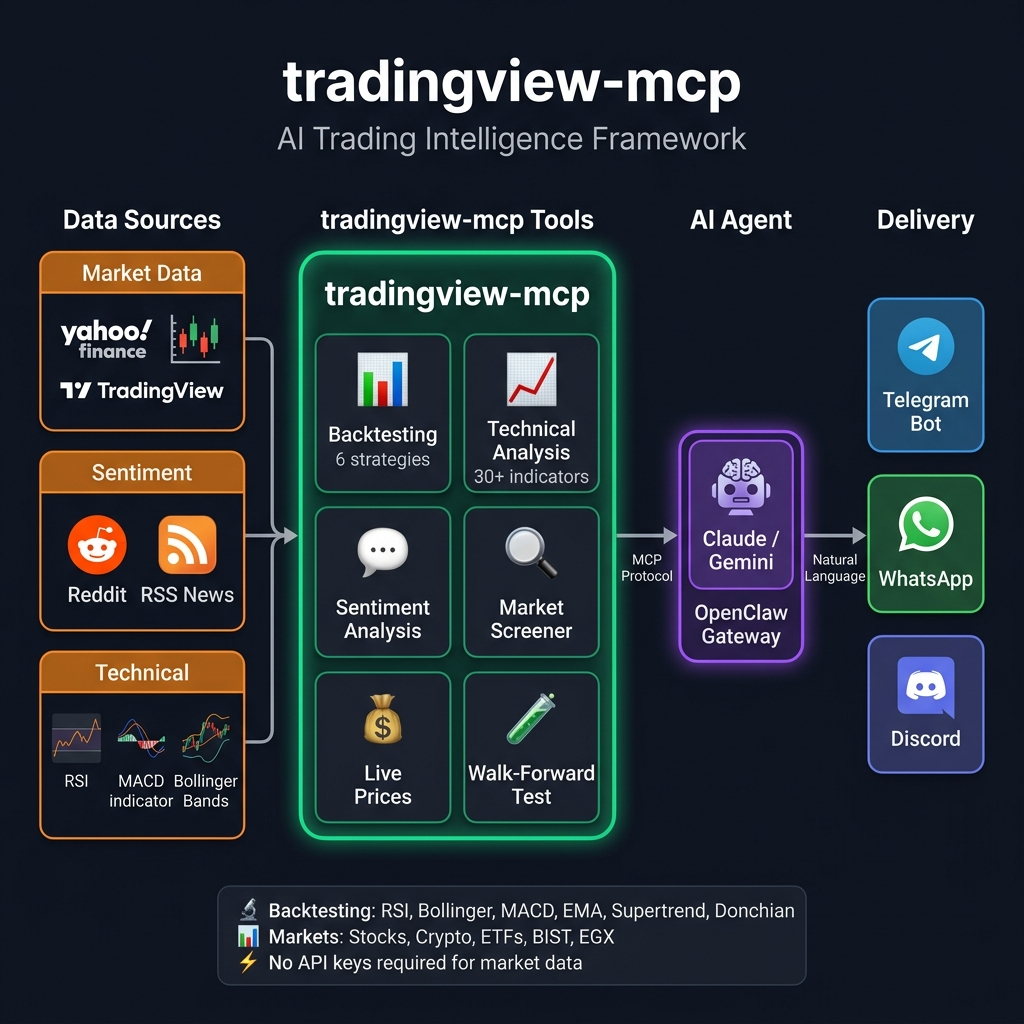
What Is the TradingView MCP Server?
The TradingView MCP Server is a Python project that implements the Model Context Protocol to give AI assistants access to live trading data and analysis tools. Instead of switching between Yahoo Finance, TradingView charts, Reddit threads, and spreadsheet backtests, you ask your AI assistant a question and it calls the right tool behind the scenes.
The architecture is straightforward: your MCP client sends a natural language request, the server maps it to one of its 30+ tools, the tool fetches live data from Yahoo Finance or public feeds, and the server returns structured results the AI can interpret.
What makes this different from asking ChatGPT a generic market question is the retrieval layer. The server fetches real-time prices, runs actual backtests with commission and slippage, and pulls live Reddit sentiment — none of this is hallucinated from training data.
Key numbers at a glance
| Metric | Value |
|---|---|
| MCP Tools | 30+ |
| Backtesting Strategies | 6 |
| Setup Time | ~5 minutes |
| API Keys Required | None |
| Exchanges Supported | Binance, KuCoin, Bybit, NASDAQ, NYSE, EGX, BIST |
| GitHub Stars | 750+ |
| License | MIT |
Why MCP Matters for Trading
The Model Context Protocol is becoming the standard way AI assistants access external tools. For traders, this means your AI assistant can go beyond generic answers and pull live data, run computations, and return verifiable results.
Here is what changes when you add an MCP trading server to your workflow:
- Live prices instead of stale training data. Ask "What is the current price of AAPL?" and get a real-time quote from Yahoo Finance, not a number from months ago.
- Backtesting with real metrics. Say "Backtest the Supertrend strategy on BTC-USD for 2 years" and get Sharpe ratio, Calmar ratio, max drawdown, win rate, and comparison against buy-and-hold — with commission and slippage baked in.
- Sentiment that reflects right now. The server scrapes Reddit finance communities and RSS news feeds to give you a bullish/bearish score grounded in what people are actually discussing today.
- No context switching. Technical analysis, fundamentals, sentiment, and backtesting all happen inside one conversation thread.

The 30+ Tools: What You Can Actually Do
The TradingView MCP Server organizes its tools into four categories.
Backtesting engine
This is where the server gets serious. You can backtest six different strategies on any supported symbol and get institutional-grade metrics back.
The six strategies:
- RSI — Mean reversion based on oversold/overbought RSI levels
- Bollinger Bands — Mean reversion when price touches the bands
- MACD — Golden cross and death cross signals
- EMA Cross — EMA 20/50 golden and death cross
- Supertrend — ATR-based trend following
- Donchian Channel — Breakout strategy in the Turtle Trader style
Each backtest returns win rate, total return, Sharpe ratio, Calmar ratio, max drawdown, profit factor, expectancy, best and worst trade, and a comparison against buy-and-hold. Commission and slippage simulation is included, which is something most free backtesting tools skip.
I've found the compare_strategies tool saves a lot of time — it runs all six strategies on the same symbol and ranks them by performance. No need to run each one manually.
Version 0.7.0 added walk-forward backtesting with configurable train/test splits and a consistency score that flags potential overfitting before you risk real capital. I haven't tested this on crypto pairs yet, but for equities it looks solid.
Yahoo Finance real-time prices
Two tools handle live market data:
yahoo_pricereturns a real-time quote with price, change percentage, 52-week high/low, and market state for any supported symbol.market_snapshotgives you a global overview covering S&P 500, NASDAQ, VIX, BTC, ETH, EUR/USD, SPY, and GLD in one call.
Symbol support is broad: US stocks, crypto pairs (BTC-USD, ETH-USD, SOL-USD), ETFs (SPY, QQQ, GLD), indices, forex, and Turkish market stocks.
AI sentiment and intelligence
Three tools provide sentiment and news context:
market_sentimentscrapes Reddit finance communities and returns a bullish/bearish score with top post summaries.financial_newspulls live RSS headlines from Reuters, CoinDesk, and CoinTelegraph.combined_analysismerges TradingView technicals, Reddit sentiment, and live news into a single confluence decision.
The combined analysis tool is where the framework earns its name. Instead of checking three separate sources and synthesizing manually, one prompt gives you a unified BUY/SELL/HOLD recommendation with the reasoning broken down by signal source.
Technical analysis core
The deepest tool category covers classic technical analysis:
| Tool | What It Does |
|---|---|
get_technical_analysis | Full TA with RSI, MACD, Bollinger, and 23 indicators |
get_multiple_analysis | Bulk TA for multiple symbols at once |
get_bollinger_band_analysis | Proprietary ±3 BB rating system |
get_stock_decision | 3-layer decision engine with ranking and quality score |
screen_stocks | Multi-exchange screener with 20+ filter criteria |
scan_by_signal | Scan by signal type (oversold, trending, breakout) |
get_candlestick_patterns | 15 candlestick pattern detector |
get_multi_timeframe_analysis | Weekly to 15-minute alignment analysis |
The multi-timeframe analysis is worth highlighting — it checks alignment across weekly, daily, 4-hour, 1-hour, and 15-minute charts, which is something most free tools don't automate.
Getting Started in 5 Minutes
Setup is deliberately simple. You need Python 3.10+ and either pip or uv.
Option 1: Install via pip
pip install tradingview-mcp-server
Option 2: Run from source
git clone https://github.com/atilaahmettaner/tradingview-mcp
cd tradingview-mcp
uv run tradingview-mcp
Connect to Claude Desktop
Add this to your claude_desktop_config.json:
{
  "mcpServers": {
    "tradingview": {
      "command": "/Users/YOUR_USERNAME/.local/bin/uvx",
      "args": ["--from", "tradingview-mcp-server", "tradingview-mcp"]
    }
  }
}
On macOS, GUI apps like Claude Desktop may not have ~/.local/bin in their PATH, so using the full path to uvx avoids "command not found" errors.
Once configured, restart Claude Desktop and start asking trading questions. The MCP tools are called automatically when relevant.
Real Conversation Examples
Here is what actual interactions look like once the server is connected:
Market overview:
"Give me a full market snapshot right now" → S&P 500 -3.4%, BTC +0.1%, VIX 31 (+13%), EUR/USD 1.15
Sentiment check:
"What is Reddit saying about NVDA?" → Strongly Bullish (0.41) | 23 posts analyzed | 18 bullish
Single strategy backtest:
"Backtest RSI strategy on BTC-USD for 2 years" → +31.5% return | 100% win rate | 2 trades | Buy-and-hold: -5%
Strategy comparison:
"Which strategy worked best on AAPL in the last 2 years?" → Supertrend #1 (+14.6%, Sharpe 3.09), MACD last (-9.1%)
Combined analysis:
"Analyze TSLA with all signals: technical + sentiment + news" → BUY (Technical STRONG BUY + Bullish Reddit + Positive news confluence)
Each of these would normally require a different tool, tab, or manual process. Inside one Claude conversation, you get the answer in seconds.
Multi-Exchange Support
The server isn't limited to US markets. Here is what is currently supported:
| Exchange | Coverage |
|---|---|
| Binance | Full crypto screener, all pairs |
| KuCoin / Bybit+ | Crypto screener |
| NASDAQ / NYSE | US stocks (AAPL, TSLA, NVDA, etc.) |
| EGX (Egypt) | Market overview, stock screener, trade plans, Fibonacci |
| BIST (Turkey) | Via TradingView screener |
The EGX support is notably deep, with dedicated tools for market overview, screening, trade planning, and Fibonacci retracement — useful for traders focused on emerging markets.
How It Compares to Traditional Setups
| Feature | TradingView MCP | Traditional Tools | Bloomberg Terminal |
|---|---|---|---|
| Setup time | 5 minutes | Hours | Weeks |
| Cost | Free, open source | Variable | $30,000+/year |
| Backtesting | 6 strategies + Sharpe | Manual scripting | Proprietary |
| Live sentiment | Reddit + RSS news | Separate setup | Terminal feed |
| Market data | Real-time | Often delayed | Real-time |
| API keys | None required | Multiple | N/A |
For independent traders and researchers, this covers the workflows that matter most — live data, backtesting, and sentiment — at zero cost. It won't replace a Bloomberg Terminal for institutional use, but it fills the gap where most retail traders actually operate.
Limitations to Keep in Mind
No tool is perfect, and I'd rather use a free tool with honest limitations than pay for something I don't need. Here is what to watch for:
- Data source dependency. Real-time prices come from Yahoo Finance, which can have occasional delays or gaps compared to direct exchange feeds.
- Backtesting simplicity. Six strategies cover common approaches, but advanced traders may want more configurable entry/exit logic or position sizing rules.
- Sentiment is Reddit-heavy. The sentiment tools primarily scrape Reddit, which skews toward retail investor discussion. Institutional sentiment requires different data sources.
- No live trading execution. This is a research and analysis framework. It doesn't place orders or connect to brokerages.
I haven't tested it on BIST equities personally, so I can't vouch for that exchange's coverage.
Even with those limits, the server is free, installs in 5 minutes, and covers the workflows most independent traders need daily. If you already use Claude Desktop or another MCP-compatible client, adding this server is one of the most valuable upgrades you can make to your trading research workflow.
What Is on the Roadmap
The project is actively developed with a clear roadmap:
- Twitter/X market sentiment (expanding beyond Reddit)
- Paper trading simulation
- Managed cloud hosting (no local setup required)
The walk-forward backtesting added in v0.7.0 shows the project is moving toward institutional-quality tooling, not just surface-level features.
Frequently Asked Questions
What is a TradingView MCP Server?
It's an open-source tool that connects AI assistants like Claude Desktop to live market data, technical analysis tools, backtesting engines, and sentiment feeds using the Model Context Protocol. You talk to your AI in natural language and it runs the analysis for you.
How do I set up the TradingView MCP Server with Claude Desktop?
Install it via pip with pip install tradingview-mcp-server, then add the server config to your claude_desktop_config.json. On macOS, use the full path to uvx to avoid PATH issues. Restart Claude Desktop and start asking trading questions.
What backtesting strategies does the MCP Server support?
Six strategies come built in: RSI mean reversion, Bollinger Band mean reversion, MACD crossover, EMA 20/50 crossover, ATR-based Supertrend, and Donchian Channel breakout. Each run returns metrics including Sharpe ratio, Calmar ratio, max drawdown, and win rate.
How does the MCP Server compare to a Bloomberg Terminal?
This server is free, open source, takes 5 minutes to set up, and covers real-time prices, backtesting, and sentiment. A Bloomberg Terminal costs $30,000+ per year with proprietary datasets. For independent traders, the free option handles the workflows you'll actually use daily.
Can I use the MCP Server for real-time stock screening?
Yes. The server includes a multi-exchange stock screener with 20+ filter criteria, signal-based scanning for oversold, trending, and breakout patterns, and 15 candlestick pattern detection methods. It supports US stocks, crypto, and emerging market exchanges.
Does the MCP Server support live trading execution?
No. It's a research and analysis framework only. No orders or brokerages. For implementing strategies on TradingView charts, Pineify or similar tools can help convert analysis into Pine Script indicators.
How Pineify Complements the MCP Workflow
If you use the TradingView MCP Server for analysis and want to act on insights by building custom indicators or strategies directly on TradingView, Pineify fills that gap. Pineify lets you create Pine Script indicators and strategies without writing code — you describe what you want visually or in plain English, and it generates production-ready Pine Script v6.
The workflow fits together naturally: use the MCP Server to identify which strategies and signals perform well through backtesting and analysis, then use Pineify's visual builder or AI Coding Agent to turn those findings into TradingView indicators you can run on live charts.
For traders who want to go deeper into strategy optimization, Pineify's Strategy Optimizer Chrome extension can fine-tune the parameters of strategies you build, testing thousands of combinations to find optimal settings.