TradingView Backtest Report Analyzer: CSV, Metrics, and Limits

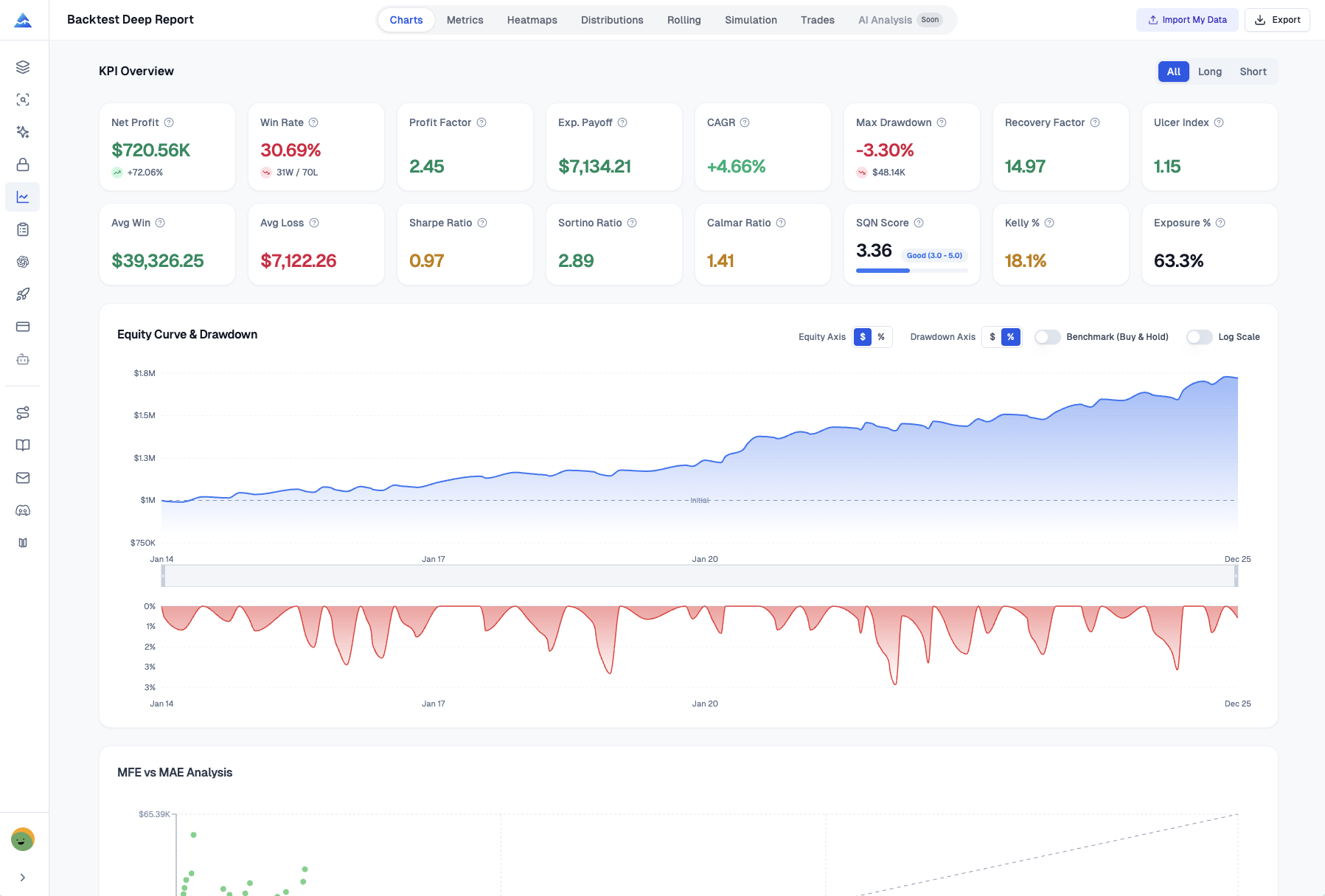
Pineify's Backtest Deep Report analyzes a TradingView trade-list CSV. It calculates trade summaries, equity views, distributions, rolling statistics, calendar results, and bootstrap simulations. It is a reporting layer over an existing backtest; it does not rerun the strategy or verify that its original signals and fills were realistic.
The basic CSV parsing and calculations run in the browser. Optional AI Analysis sends a summary of the report to a server. That distinction matters when deciding which features to use with proprietary results.
Import the right export and reconcile it first
TradingView's strategy-data export instructions distinguish the trade list from other report tabs. Export the Trades or List of Trades data in the supported CSV format, then select it in the Backtest Report tool.
Before interpreting a chart:
- Confirm the strategy, symbol, timeframe, date range, currency, commission, and slippage settings used for the original backtest.
- Set the analyzer's initial capital to the intended basis and choose whether open trades are included.
- Compare parsed trade count, first and last dates, long/short classification, and total net P&L with the source report.
- Inspect several entry/exit pairs and any partial exits or pyramided positions.
- Check that percentage returns and favorable/adverse excursion fields were imported correctly.
The parser recognizes specific headers and entry/exit labels, groups by trade number, and uses the first entry and first exit for a group. Unsupported layouts or multiple records per trade can need separate reconciliation. Missing numeric fields may become zero, so a successful import alone does not prove that every metric has usable inputs. A missing currency label can also fall back to USD.
Read the metrics according to their calculation basis
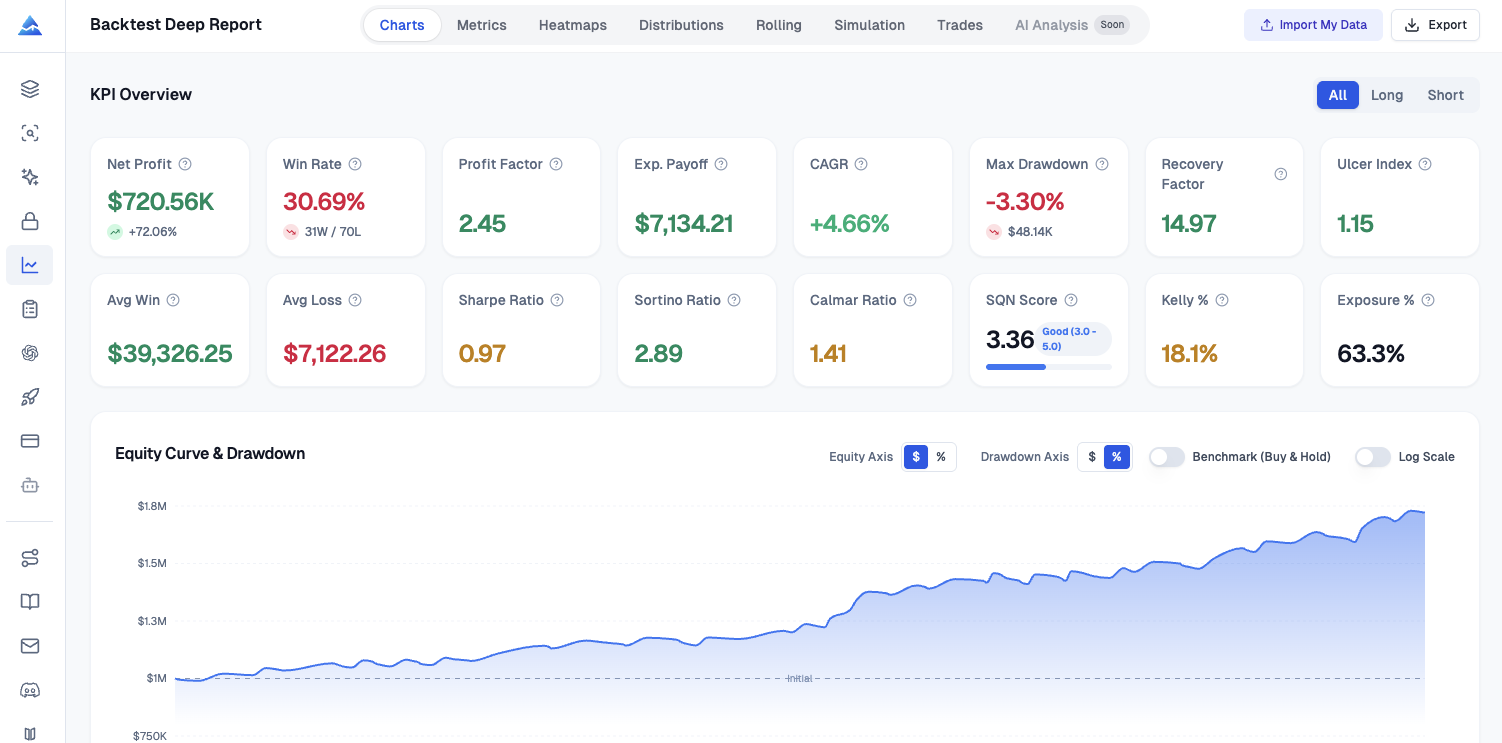
The report includes profitability, risk, distribution, and trade-efficiency metrics, with all-trade, long, and short views. These are diagnostics of the supplied sample, not a certification of an edge.
Sharpe and Sortino: the current implementation works from exported trade-return percentages. The full-sample ratios use an estimated trades-per-year scaling; rolling ratios are not annualized. The configured risk-free value is subtracted directly from the mean trade return without conversion from an annual rate. The default is zero. Do not enter an annual yield and assume standard periodic conversion, or compare the result directly with a daily portfolio Sharpe from another service.
VaR and CVaR: the report uses a lower historical percentile of trade returns and the average of observations at or below it. These describe the sample's lower tail. They are not a maximum possible loss, a future-loss guarantee, or necessarily a daily account-risk measure.
Kelly and other sizing metrics: estimates depend on the observed wins, losses, and payoff distribution. A small or selected sample can make them unstable. The displayed value does not establish a suitable allocation or leverage level.
Drawdown and exposure: trade-list reconstruction differs from a continuous marked-to-market portfolio record. Intratrade losses, overlapping positions, and capital usage require additional scrutiny. Do not assume identical results to TradingView merely because metric names match.
Distribution and rolling views
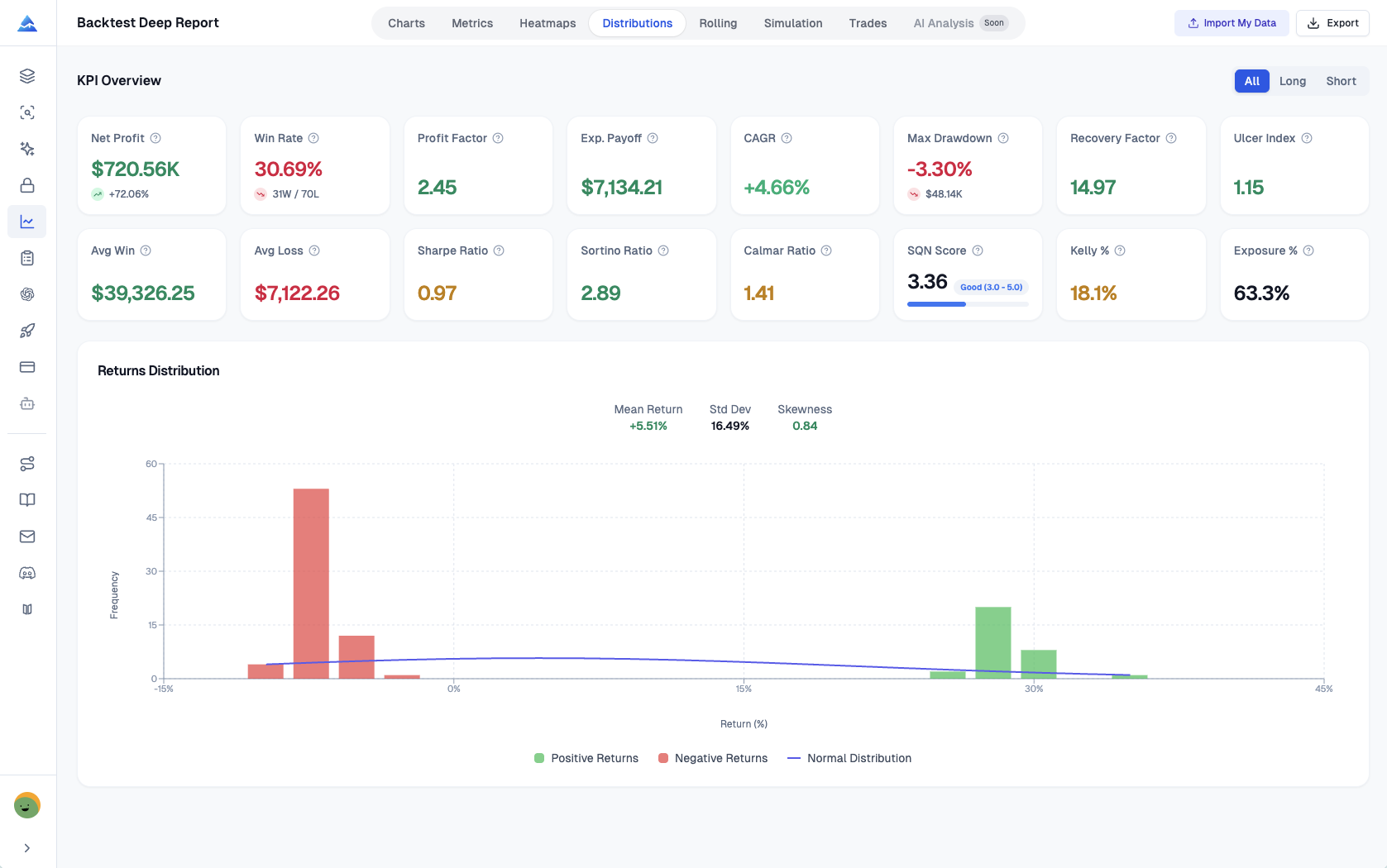
The distribution view helps identify whether a few trades dominate the sample. A normal-curve overlay is a visual reference, not evidence that returns are normally distributed. Review outliers and the source rows before treating them as a stable feature of the strategy.
Rolling analysis uses a 20-trade window. Twenty trades may cover hours in one strategy and months in another. Interpret changes with the dates and sample size in view; a decline does not by itself identify regime change or overfitting. There is no universal 30-trade threshold that proves statistical reliability.
What the Monte Carlo simulation actually does
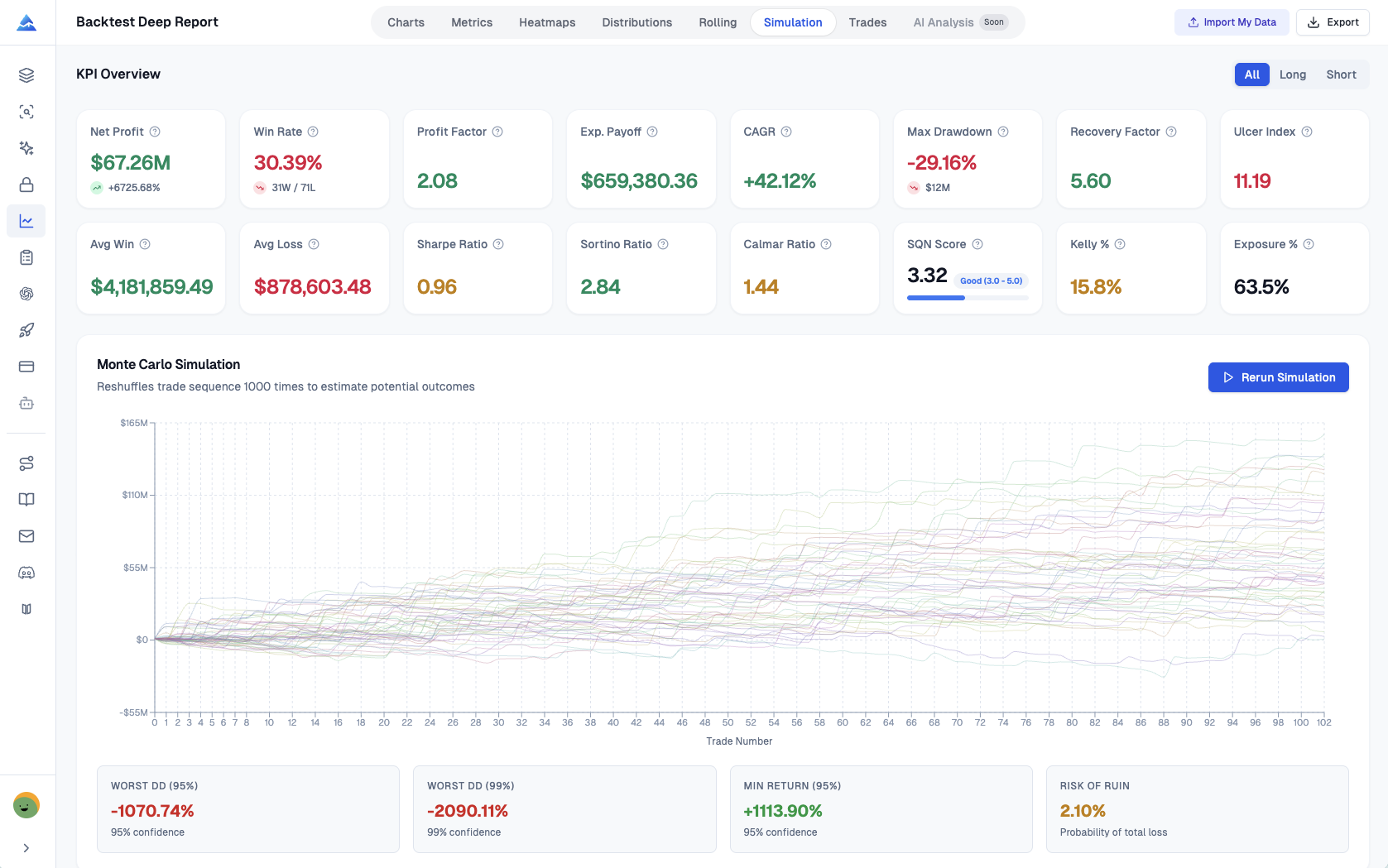
The Simulation action runs 1,000 bootstrap samples of the historical trades' fixed monetary net P&L values. Sampling is with replacement: a trade can appear more than once or be omitted. This changes the sample composition as well as its order and can produce different final totals. It is not just a shuffle of the original trades.
The calculation adds sampled P&L values to the selected initial capital. It does not automatically model compounded position sizing, changing liquidity, regime dependence, or losses absent from the original sample. Only the first 50 simulated paths are retained for charting and path export; percentile summaries use the simulation results.
The current "risk of ruin" summary counts simulations with final equity at or below zero. It does not count every path that temporarily crosses zero and later recovers, so it should not be interpreted as a complete probability of account failure. Simulation percentiles are conditional on the sampling assumptions, not confidence guarantees about future markets. Runs may differ because the sampling is random.
Heatmaps and excursion analysis
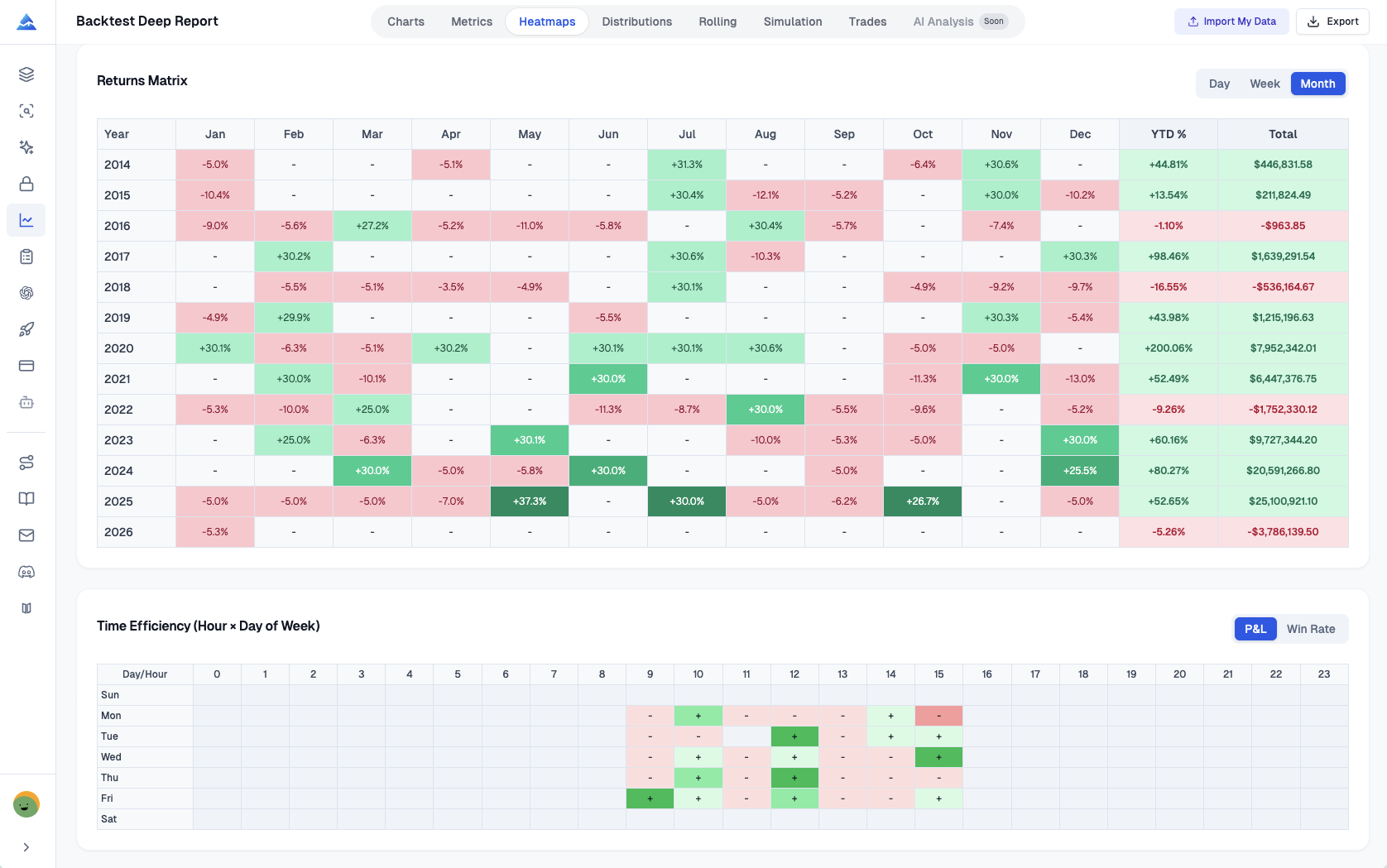
Monthly, weekly, daily, and time-efficiency views can reveal concentration in the imported outcomes. A strong calendar cell is a hypothesis to investigate, not evidence of repeatable seasonality. Testing many calendar filters on the same sample can overfit.
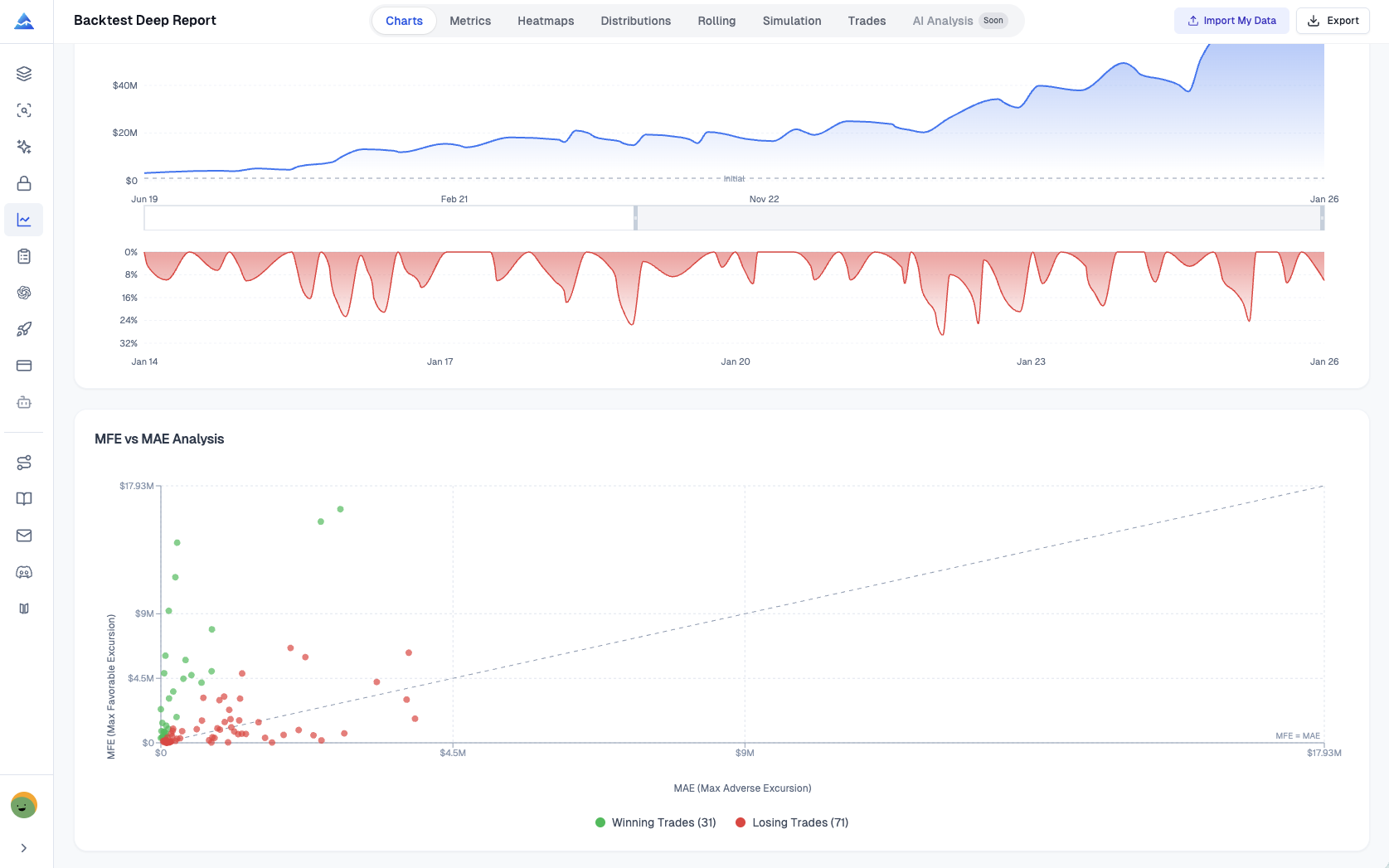
MFE and MAE use the export's favorable and adverse excursion information. Those extrema do not supply the full intratrade price path or establish that the best price was executable. A trade with unused favorable excursion can motivate an exit-rule experiment, but the revised rule needs a new backtest and separate validation data.
Excel export and reproducibility
The workbook contains KPI Overview, List of Trades, Monthly Returns, Weekly Returns, Daily Returns, Rolling Statistics, Distribution Data, and Monte Carlo Data. Simulation sheets depend on whether a simulation was run and on the retained paths. Keep the original CSV, analyzer settings, and exported report together so that another reviewer can reconcile the numbers.
Do not treat an attractive workbook as independent validation of the underlying strategy. It inherits the source backtest's data, signal timing, fills, costs, and selection decisions.
Local calculations and optional AI Analysis
Selecting a CSV uses browser-side file reading, and the basic calculations run locally. When you actively request AI Analysis, the app sends metrics plus monthly, rolling, and Monte Carlo summaries to Pineify's analysis endpoint. That request excludes the raw trade array and full equity-path arrays, but the summaries still reveal strategy information.
Avoid an absolute "nothing leaves the device" interpretation. Decide whether to use the optional AI step based on the information you are willing to transmit, and consult current privacy terms for broader service handling. The AI narrative also needs review against the calculated report.
Does this tool backtest my strategy again?
No. It analyzes an exported trade list. Signal correctness, repainting, fill assumptions, and transaction costs must be checked in the original strategy test.
Why can its ratios differ from TradingView or another analyzer?
The return series, annualization, risk-free handling, trade pairing, and capital basis can differ. Reconcile inputs and formulas before comparing labels.
Does bootstrap simulation prove future drawdown will stay within a range?
No. It resamples the observed fixed P&L values under specific assumptions and cannot generate unobserved market regimes or establish a future loss bound.
Is all analysis local?
Basic CSV parsing and calculations are browser-side. Optional AI Analysis sends selected report summaries to the server; it is a separate data-handling step.