v2.0 - Rolling Analysis, VaR, Kelly Criterion & More

Advanced TradingView Backtest Analyzer & Report Generator

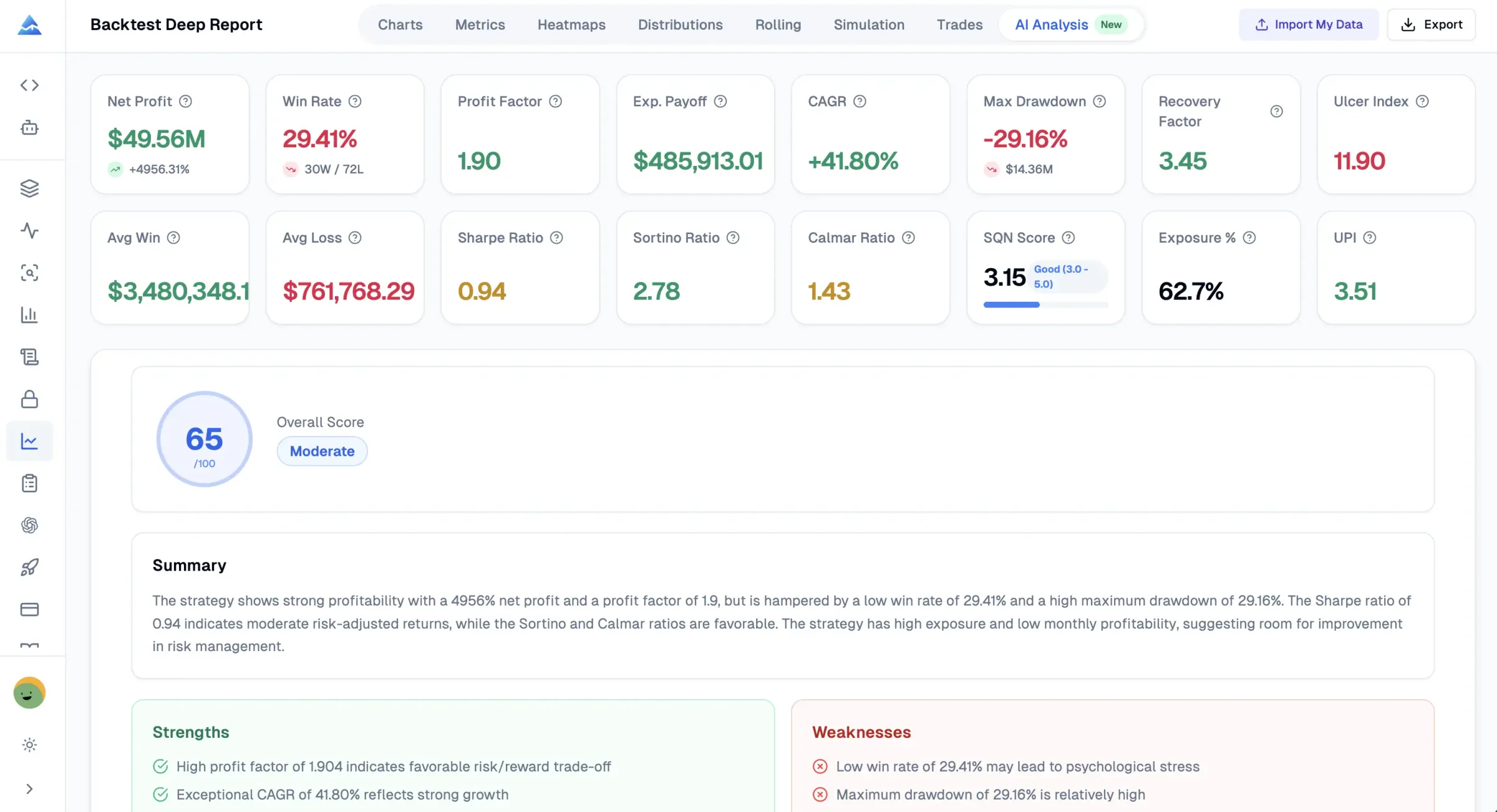
Transform your TradingView strategy test reports into institutional-grade professional analysis. 16+ KPI metrics, Rolling Window Analysis, Returns Distribution, Monte Carlo Simulation, and Trade Efficiency Analysis - all in one powerful tool.

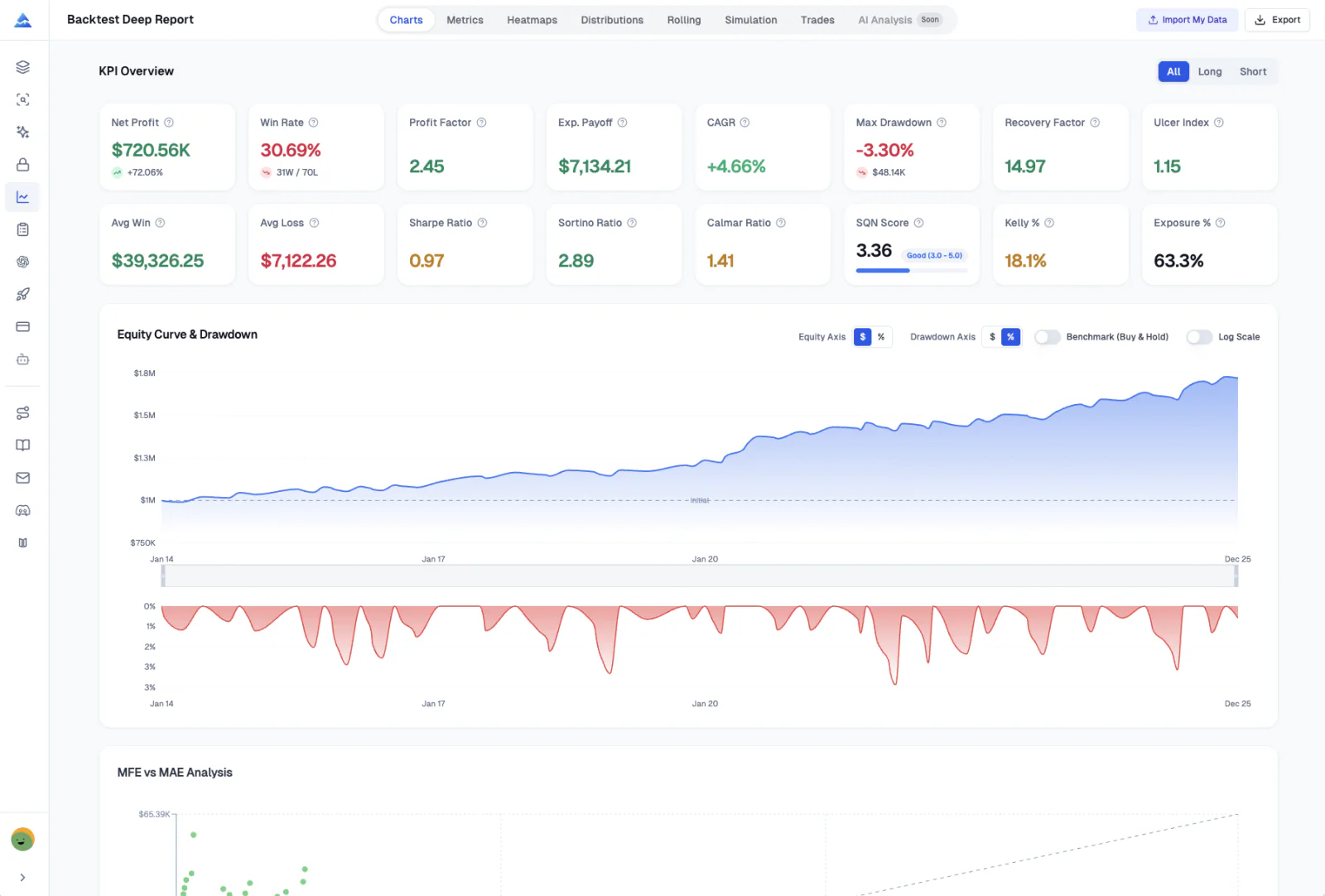
Backtest Deep Report v2.0 Interface with 16+ KPI metrics, Rolling Analysis, and Returns Distribution
16+Professional KPI Metrics
8Analysis Tabs
1000Monte Carlo Simulations
100%Client-Side Privacy

Features

Beyond Basics, Insight into True Strategy Performance

8 analysis tabs, 16+ KPI metrics, and institutional-grade tools to validate your trading edge

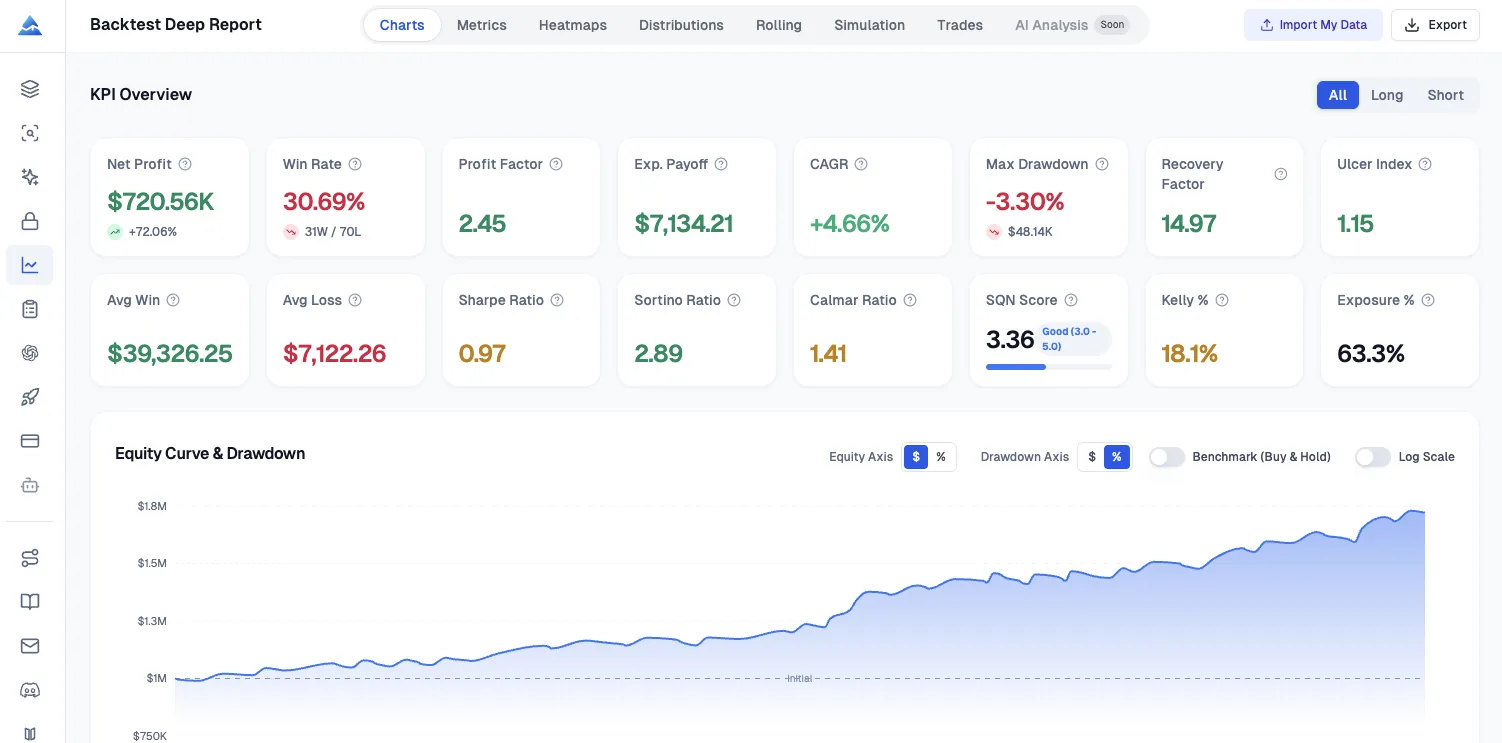
KPI Dashboard showing 16+ metrics including Sharpe, Sortino, SQN, UPI, and more
Advanced Analytics

Calculate 16+ TradingView Backtest Metrics (Sharpe, VaR, SQN & More)

A comprehensive dashboard with all the metrics professional traders need. From basic P&L to advanced risk-adjusted ratios like Sharpe Ratio, Sortino Ratio, and Value at Risk (VaR), everything at a glance with direction filtering (All/Long/Short).

  • Sharpe Ratio, Sortino Ratio, Calmar Ratio, SQN Score
  • Recovery Factor, Ulcer Index, UPI (Martin Ratio), Exposure %
  • VaR (95%), CVaR/Expected Shortfall, Skewness, Kurtosis
  • Filter by All, Long-only, or Short-only trades
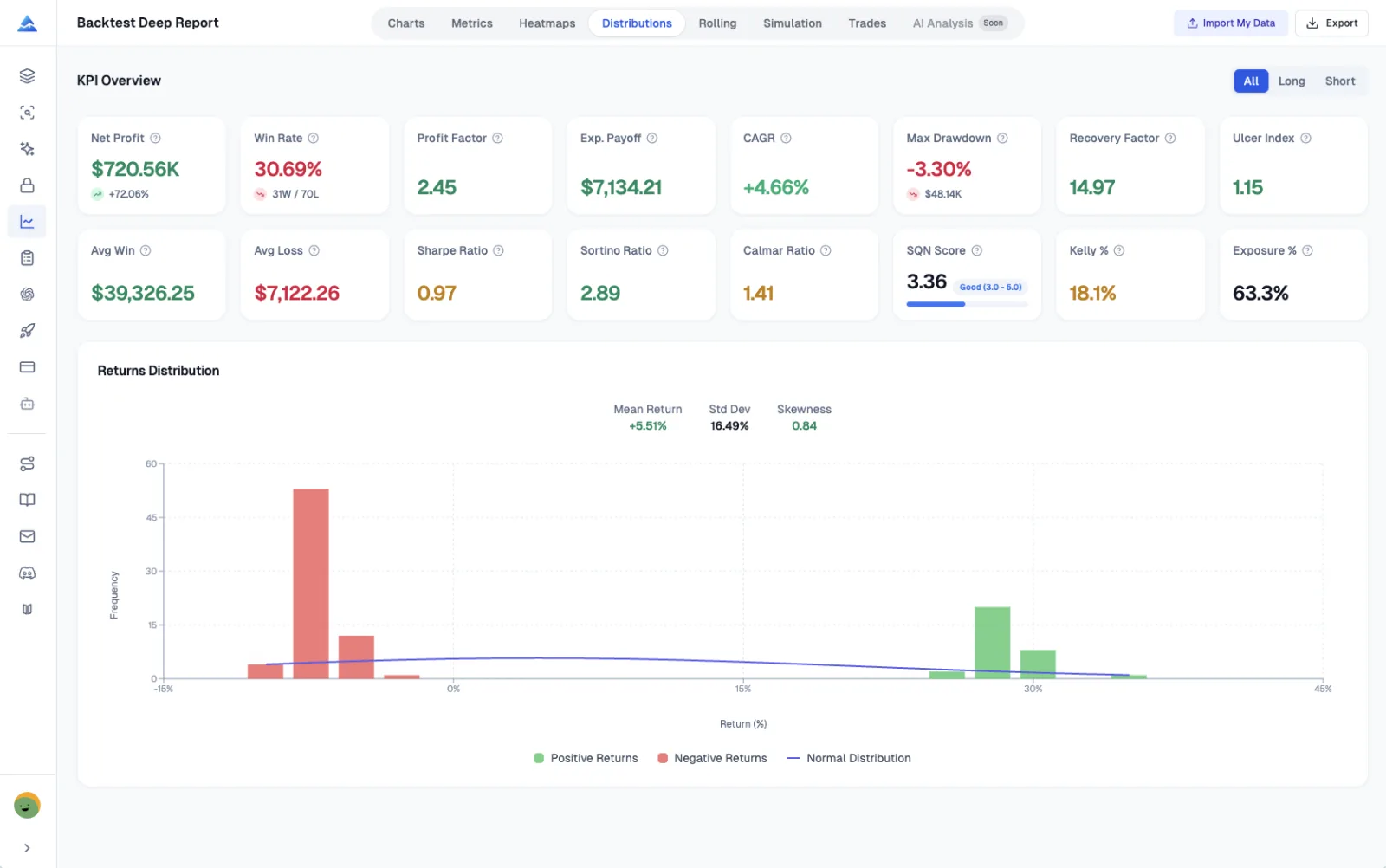
Returns Distribution histogram with normal curve overlay showing mean, standard deviation, and skewness
Distribution AnalysisNew in v2.0

Returns Distribution Analysis

Visualize your trade returns with a professional histogram overlaid with a normal distribution curve. Instantly identify fat tails, skewness, and understand your strategy's return characteristics.

  • Histogram with color-coded positive/negative returns
  • Normal distribution curve overlay for comparison
  • Mean Return, Standard Deviation, and Skewness statistics
  • Identify fat tails and distribution asymmetry
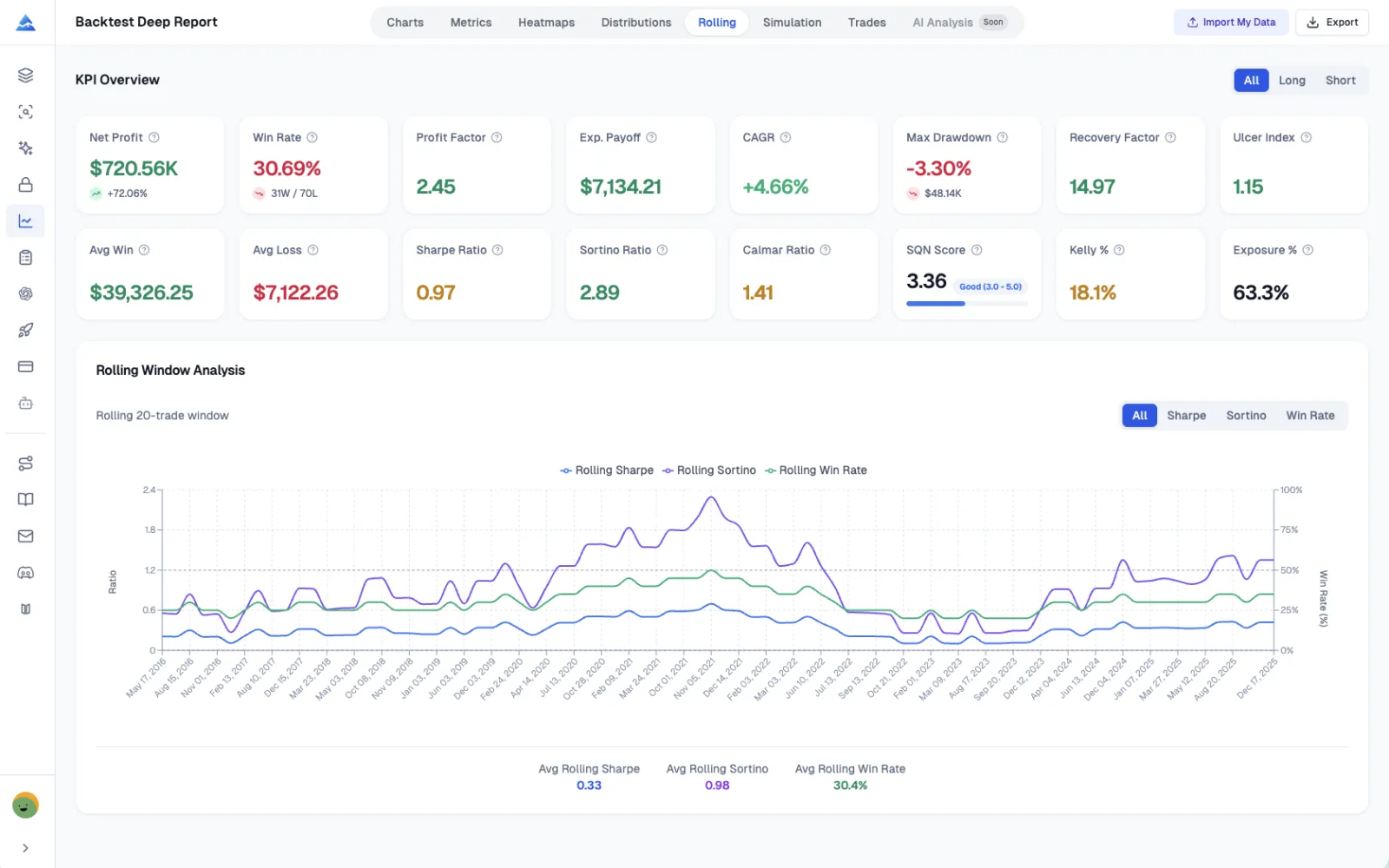
Rolling Window Analysis showing Sharpe Ratio, Sortino Ratio, and Win Rate over time
Rolling StatisticsNew in v2.0

Rolling Window Analysis

Track how your strategy performs over time with rolling 20-trade windows. Spot strategy degradation early, identify regime changes, and validate consistency across different market conditions.

  • Rolling Sharpe Ratio - track risk-adjusted performance stability
  • Rolling Sortino Ratio - monitor downside risk over time
  • Rolling Win Rate - identify winning/losing streaks
  • Early warning system for strategy degradation
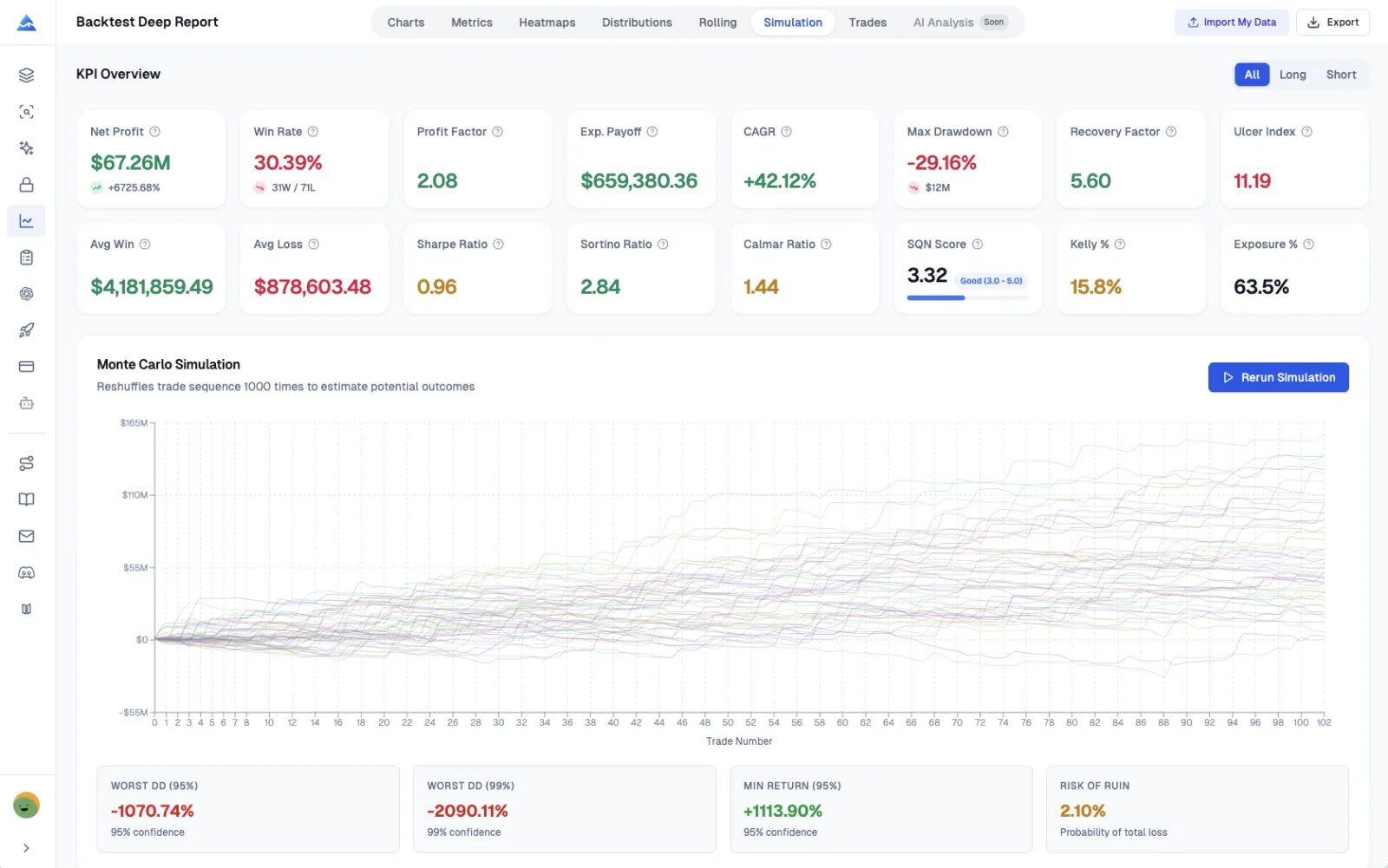
Monte Carlo Simulation showing 1000 equity curves with confidence intervals
Monte Carlo Simulation

Monte Carlo Stress Testing

Run 1000 bootstrap simulations to stress-test your strategy against random market variations. Understand worst-case scenarios and quantify the probability of different outcomes.

  • 1000 bootstrap simulations with replacement
  • Worst Case Drawdown at 95% and 99% confidence
  • Risk of Ruin probability calculation
  • Spaghetti chart visualization of potential outcomes
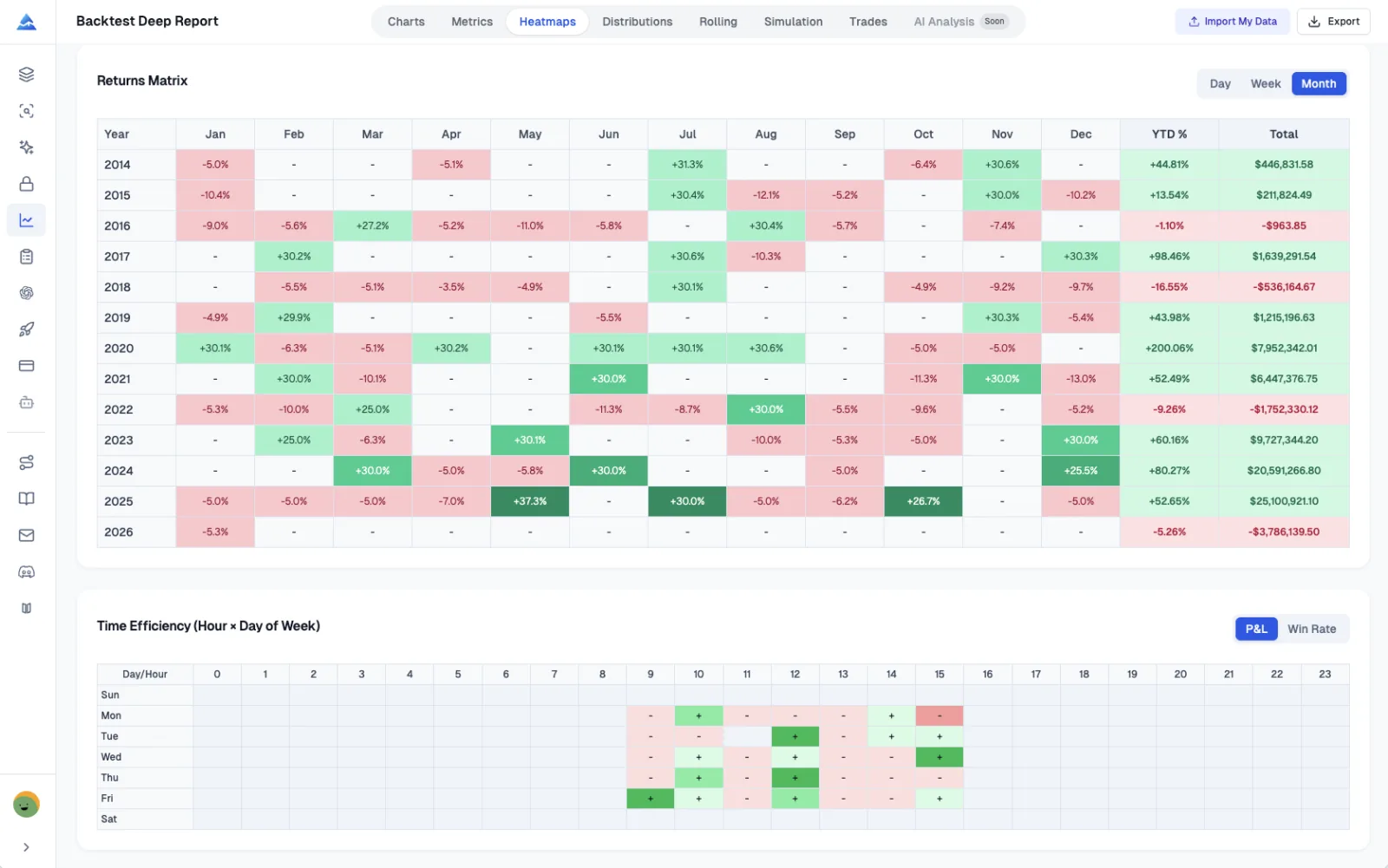
Returns Heatmaps showing Monthly, Weekly, and Daily performance patterns
Visual Heatmaps

Visual Heatmaps for Pattern Discovery

Discover hidden patterns in your trading with multi-dimensional heatmaps. See which months, weeks, or days perform best, and optimize your trading schedule based on historical data.

  • Monthly Returns Matrix with YTD% and yearly totals
  • Weekly Returns (Week 1-53) for seasonal analysis
  • Daily Returns for granular pattern discovery
  • Time Efficiency Heatmap (Hour x Day of Week)
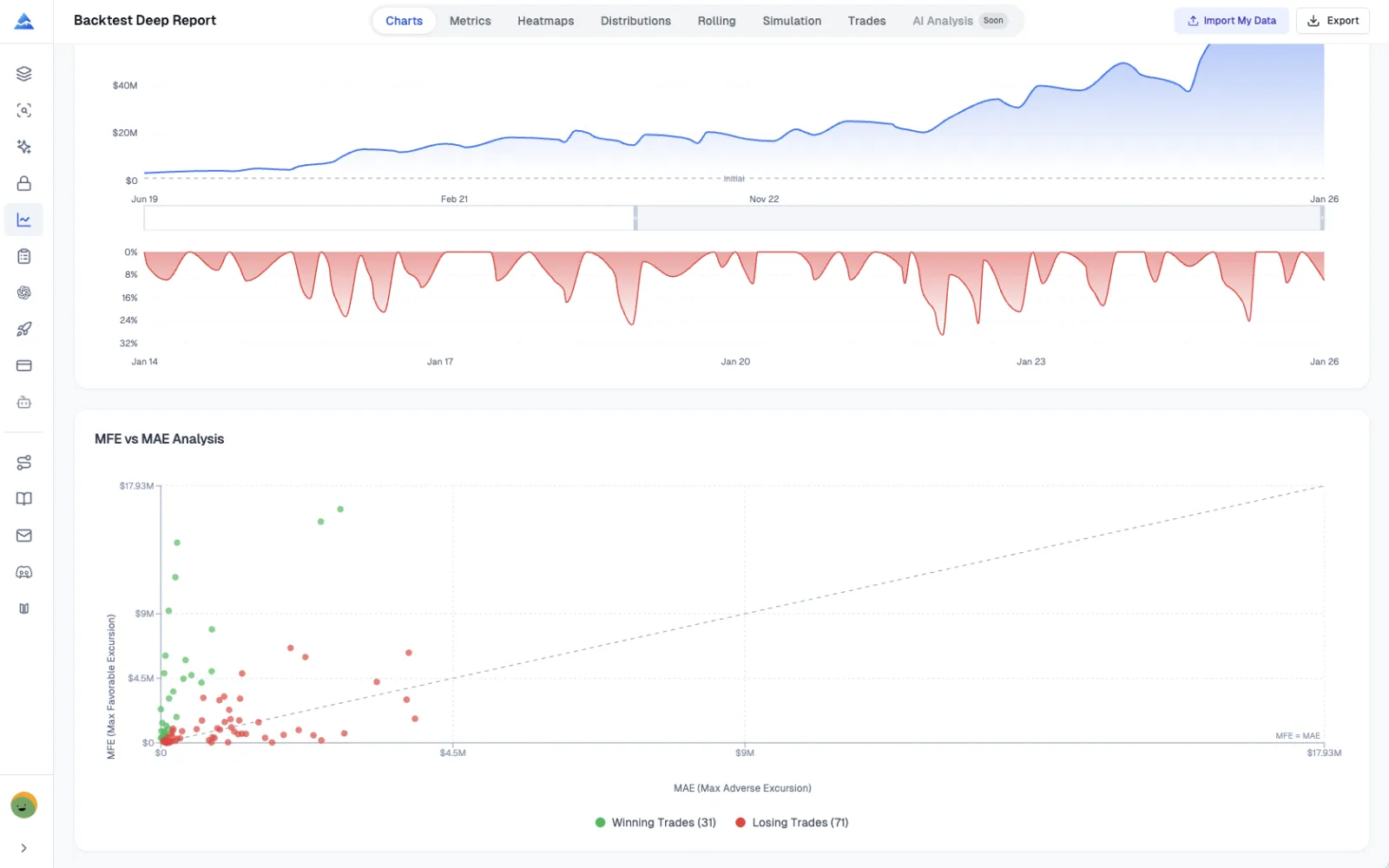
MFE vs MAE Scatter Plot showing trade distribution with profit/loss coloring
MFE/MAE Analysis

MFE/MAE Scatter Analysis

Optimize your take-profit and stop-loss levels with Maximum Favorable Excursion (MFE) and Maximum Adverse Excursion (MAE) analysis. See exactly how much profit you're leaving on the table.

  • Scatter plot with MFE (Y-axis) vs MAE (X-axis)
  • Color-coded by final trade outcome (green/red)
  • Reference line for MFE = MAE comparison
  • Data-driven stop-loss and take-profit optimization
Professional Export

Export TradingView Strategy Results to Excel

Export your complete TradingView backtest analysis to a professionally formatted Excel workbook with 8+ sheets. Share with your team, archive for compliance, or use for further analysis in your favorite tools.

KPI Overview
List of Trades
Monthly Returns
Weekly Returns
Daily Returns
Rolling Statistics
Distribution Data
Monte Carlo Data
One-Click Excel Export

How It Works

From TradingView to Deep Analysis in 3 Steps

01

Export from TradingView Strategy Tester

Open your strategy in TradingView, navigate to the Strategy Tester tab at the bottom of the chart, and click on the "List of Trades" tab. Then click the export icon to download your trade data as a CSV file. This TradingView CSV export contains all the trade information needed for deep analysis.

02

Upload Your TradingView Backtest Data

Drag and drop your TradingView CSV export file into our analyzer tool, or click to browse and select the file. You can optionally configure your initial capital and risk-free rate (default 3%) to get more accurate risk-adjusted performance metrics like Sharpe Ratio.

03

Get Instant Professional Analysis Report

Instantly access your comprehensive TradingView backtest report with 16+ institutional KPI metrics, 8 analysis tabs including Rolling Window Analysis, Returns Distribution, Monte Carlo simulation with 1000 scenarios, trade efficiency metrics, and one-click professional Excel export. All processing happens in your browser for complete data privacy.

All data processing happens in your browser. Your TradingView trading data never leaves your device. We don't store or access your strategy test results.

100% Client-Side Processing - Your Data Stays Private

Who Benefits from TradingView Backtest Analysis?

Professional traders, quants, and strategy developers use our institutional-grade analyzer to validate trading edges, optimize execution, and manage risk across different market conditions

Quantitative Traders

"The Monte Carlo simulation combined with VaR analysis helps me understand worst-case scenarios. I can now size my positions with confidence knowing the true risk profile."

Monte Carlo SimulationVaR/CVaR AnalysisRisk of Ruin

Strategy Developers

"Entry and Exit Efficiency metrics revealed I was leaving 30% of profits on the table. After optimizing my exits based on MFE analysis, my average win increased by 15%."

Entry/Exit EfficiencyMFE/MAE AnalysisTrade Optimization

Risk Managers

"Rolling Sharpe Ratio helped me spot strategy degradation 2 months before it would have caused significant losses. Kelly Criterion keeps my position sizing optimal."

Rolling Window AnalysisKelly CriterionUlcer Index

Buy Once. All Tools. Forever.100,000+ Traders Already Upgraded

One-time payment · No subscriptions · Lifetime updates included

20% OFF

Plus

$129$99One-time payment
🌟 Advanced Model + 500 AI credits/month — pay once, use forever!
Save 20%
Get Lifetime Access
  • Visual Pine Script Editor
  • Pine Script AI Agent (Knowledge Base, Auto Fix Error & Memory)
  • 500 AI credits monthly
  • Advanced Model (100 msgs / 5h, no credits required)
  • Exclusive PineifyGPT access
  • 18 premium scripts
  • 🎁 Get 1 month Wundertrading Pro Plan (Reg. $49)
Most Popular Plan
5xUsage

Expert

$369$259One-time payment
⚡️ Full access to every tool + 5x AI power - 2500 credits/month
🔥 Save 30%
Unlock Expert — Pay Once
  • Everything in Advanced plan
  • 2500 AI credits monthly
  • Advanced Model (500 msgs / 5h, no credits required)
  • Market Insights (Options Flow, Dark Pool, Market Tide & More)New
  • AI Stocks & Options PickerNew
  • AI Finance AgentNew
  • Priority access to new features
  • Request custom indicators
  • Lifetime feature updates
  • AI Trading AgentComing Soon!
  • more coming soon...
30% OFF
2xUsage

Advanced

$219$149One-time payment
⚡️ 2x AI power — 1000 credits/month + all premium tools included!
🔥 Save 30%
Get Lifetime Access
  • Everything in Plus plan
  • 1000 AI credits monthly
  • Advanced Model (200 msgs / 5h, no credits required)
  • Strategy Optimizer Extension
  • Pineify® - Signals & Overlays™ (Invite-only indicator)
  • Trading Journal
  • Backtest Report Deep Report
Features
Plus
Expert
Advanced
Pine Script Coding Agent
AI Credits (monthly)
500
2,500
1,000
Advanced Model (no credits needed)
100 msgs / 5h
500 msgs / 5h
200 msgs / 5h
Knowledge Base & Auto Fix Error
AI Products
Exclusive PineifyGPT Access
AI Finance AgentNew
AI Trading AgentSoon
Visual Pine Script Builder
Visual Pine Script Editor
Unlimited Lists & Indicators
Full Technical Analysis Indicators
Multi-timeframe & Multi-symbol
18 Premium Scripts
Trading Tools
Strategy Optimizer Extension
Pineify Signals & Overlays (Invite-only)
Trading Journal
Backtest Report Deep Report
Market InsightsNew
AI Stocks & Options PickerNew
Support & Extras
Wundertrading Pro (1 month, $49 value)
Request Custom Indicators
Priority Access to New Features
Lifetime Feature Updates
Payment Security

Frequently Asked Questions

Everything you need to know about Backtest Deep Report

v2.0 Now Available

Unlock Institutional-Grade Backtest Analysis

Stop guessing, use data to drive your trading decisions. 16+ KPI metrics, Rolling Analysis, Returns Distribution, Monte Carlo Simulation, and Trade Efficiency - all in one powerful tool.