AI Pine Script Generator: Turn Trading Ideas Into Code Fast

Ever stared at TradingView's Pine Script editor, knowing exactly what you want to build, but feeling lost in the syntax? I've been there more times than I can count. You have a solid trading idea in your head, but the gap between concept and code feels impossible.
An AI Pine Script generator is a tool that converts plain-English trading descriptions into working Pine Script code. You describe your indicator or strategy, and the AI writes it for you — ready to paste straight into TradingView.
Here's what changed my approach to Pine Script: AI tools that actually write the code. Describe your idea in plain English and get back working Pine Script in seconds.
What Makes an AI Pine Script Generator Different
Picture this: you're chatting with a coding buddy who's fluent in human language and Pine Script. That's what these generators do. They bridge the gap between your trading knowledge and the code.

Instead of memorizing syntax, you focus on what you do best — understanding market patterns and building strategies. Want an indicator that combines RSI divergence with volume analysis? Just ask for it in normal language.
The appeal is the simplicity. No more bookmark folders of Pine Script docs. No more copying snippets from forums and hoping they work together. You describe, the AI codes, you test.
Why Traditional Pine Script Learning Frustrates Traders
Let's be honest: most of us didn't get into trading to become programmers. We're here because we love analyzing markets and making smart decisions.
But then we hit that wall where our best ideas stay stuck in our heads. I spent an entire Saturday last March trying to code an RSI divergence indicator for AAPL, tangling myself in syntax errors and version issues.

The worst part? By the time you've debugged your code, the market setup you wanted to test has already passed. AI generators flip that around. Instead of 80% of your time coding and 20% testing, you spend 80% refining actual trading ideas.
The AI Pine Script Tools I've Actually Used
After testing every AI Pine Script generator I could find and writing over 200 Pine Script indicators, here's what's worth your time:
PineifyAI: Built for Pine Script
This is where I spend most of my time. I prefer it over general-purpose AI for Pine Script because it's trained on TradingView's ecosystem specifically.
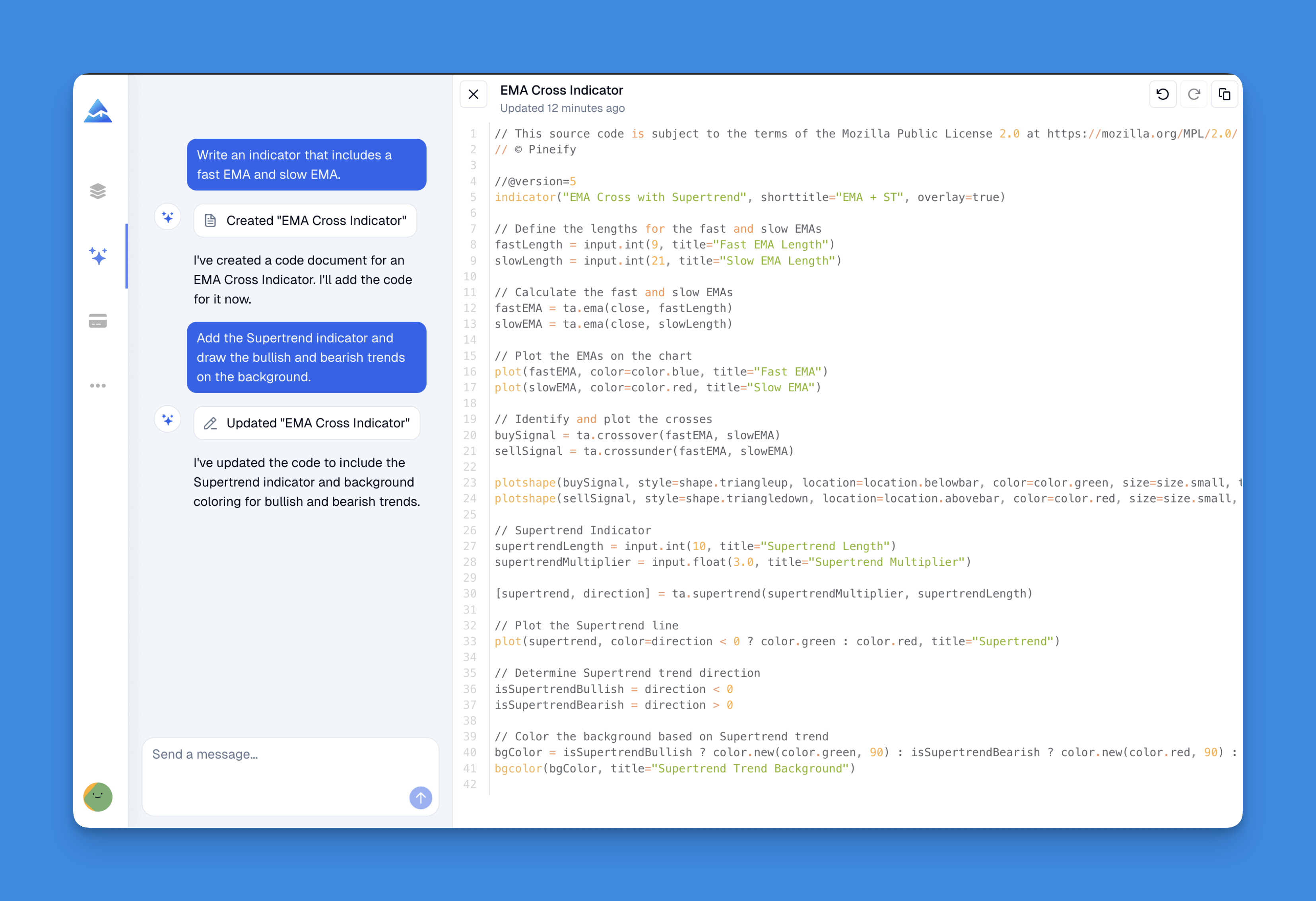
What sets it apart: the code compiles on the first try. Last month I fed it a multi-timeframe strategy for SPY and it compiled without a single error. I can't stress how rare that is.
The visual editor is another feature I rely on. If you learn visually (like me), you drag and drop components and watch the code generate in real time. It's like training wheels while you learn how indicators connect.
One trick I've used: TradingView's free plan limits you to 3 custom scripts. Ask PineifyAI to merge multiple indicators into one, and that limit gets a lot less restrictive.
For a detailed comparison, check out Pine Script Wizard vs Pineify: Which Tool Actually Works Best for TradingView Traders?
Other Tools I've Tested
Pine Script Wizard: Uses ChatGPT's API. Decent for basic indicators, about $9 a month. I found myself debugging code more often than I'd like.
Direct ChatGPT or Claude: Unpredictable. Sometimes you get brilliant code. Other times, code that compiles but misses what you wanted. I haven't tested Claude 4 for Pine Script enough to form a strong opinion, but ChatGPT's hit-and-miss results pushed me toward dedicated tools.
GetPineScript: Template-based. Works if your needs match their presets. I found it too limiting for custom work.
I've written a full breakdown of the best AI tools for Pine Script if you want the complete picture.
Why PineifyAI Keeps Me Coming Back
Reliability is the main reason. When I describe an indicator, I get code that works — not code that "almost" works. I've tested TSLA option flow indicators, multi-timeframe momentum strategies, and custom alert systems. Zero debugging needed on the Pine Script side.
The AI understands Pine Script's quirks: version differences, plotting limits, performance constraints. It's not general programming knowledge duct-taped onto Pine Script — it's targeted.
Iteration feels natural. Need a tweak? Describe the change. Want alerts added? Ask. It's like a coding partner who doesn't get frustrated by revision requests.
Getting Started: Your First AI-Generated Indicator
Here's the process I've refined after helping a dozen trader friends get started:
Start with what you know. Don't jump into complex multi-timeframe strategies. Begin with an indicator you already understand — RSI with custom overbought levels at 75 and oversold at 25.
Be specific in your request. Instead of "I want RSI," try "I want RSI with 21-period length, overbought at 75, oversold at 25, color changes on cross of levels, and alert conditions."
Test immediately. Paste the code into TradingView the second you get it. See how it behaves on live data. This shows you what the AI interpreted from your description.
Iterate one feature at a time. Use the AI to modify existing code. Start simple, then add features. If something breaks, you know exactly what caused it.
For a full walkthrough, check out How to Write Pine Script in TradingView: A Complete Beginner's Guide.
Complex Features I've Built With AI
Once you're comfortable, these tools handle impressively complex requests:
Multi-indicator combos. Ask for indicators that stack multiple tools into one script. I've combined MACD, RSI, and volume profile into a single SPY indicator that runs smoothly.
Custom alerts. Generate alerts based on conditions across multiple timeframes. Price above 200 SMA on the 4H and RSI oversold on the 1H? The AI handles that logic.
Full strategies. Move beyond indicators to complete strategies with entry rules, exit rules, and position sizing. I've tested a few on TSLA and AAPL data.
Performance optimization. Get help cleaning up code so your charts don't lag with multiple indicators running.
For strategy-specific examples, Pine Script v6 Strategy Examples - Real Trading Code That Works has practical templates you can build from.
The Reality Check: What AI Can and Can't Do
I need to be direct about limitations. AI Pine Script generators are powerful, but they're not magic.
What they're great at:
- Turning trading ideas into working code
- Handling Pine Script syntax and TradingView rules
- Rapid prototyping and iteration
- Combining technical indicators
- Custom alert conditions
What they won't do:
- Make your strategy profitable (that's on you)
- Replace market knowledge and trading experience
- Guarantee backtest results
- Handle every edge case
The tools amplify your trading knowledge — they don't replace it. You still need to understand what makes a good strategy and how to validate your ideas.
Practical Habits for Better Results
Here's what I've learned from months of daily use:
Keep a request journal. Note which descriptions produce the best code. Over time you'll develop a vocabulary that works well with the AI.
Read the output. Don't paste blindly. Skim the code to understand the structure. It makes your future requests more precise.
Backtest everything. AI writes syntactically correct code. That doesn't mean the strategy performs. Run it through historical data.
Build in layers. Start minimal, add complexity step by step. Debugging a 10-line indicator is easier than a 200-line one.
For avoiding a common gotcha, read How to Avoid Repainting in Pine Script. It covers a concept that matters for any reliable indicator.
What This Changes About Trading
AI Pine Script generators are shifting how traders build strategies. Instead of months of syntax study before building anything useful, you can test trading ideas on day one. I've seen this firsthand — a friend who couldn't code started testing custom indicators within an hour of trying PineifyAI.
The barrier between having a good trading idea and implementing it is basically gone.
Start Here
If you're ready to turn your trading ideas into code:
- Try PineifyAI — it's what I use daily and it consistently delivers working code
- Start with simple indicators to build confidence
- Test everything — AI code still needs validation
- Talk to other traders using these tools
The goal isn't to become a Pine Script expert tomorrow. It's to remove the coding barrier so you can focus on developing and testing strategies that win.
The tools work. They're available now. Your next trading idea could be running on TradingView in minutes.
What is an AI Pine Script generator?
It's a tool that turns plain-English descriptions of trading ideas into Pine Script code. You describe what you want — like an RSI with custom levels and alerts — and the AI writes the code. No syntax memorization needed.
How accurate is AI-generated Pine Script code?
Depends on the tool. PineifyAI is trained specifically for TradingView and usually compiles on the first try. General models like ChatGPT can output valid-looking code that behaves oddly — they're not tuned for Pine Script's quirks.
Can I use an AI Pine Script generator without any coding experience?
Yes, that's the whole point. You describe what you want in plain language and the generator handles the syntax. No programming background required.
How does PineifyAI differ from using ChatGPT for Pine Script?
PineifyAI is purpose-built for TradingView. It knows about version differences, plotting limits, and performance constraints. ChatGPT treats Pine Script like any other language — its code often needs manual fixes before it runs correctly.
Can an AI generator combine multiple indicators into one script?
Yes, and this is one of the most practical use cases. On TradingView's free plan you get 3 custom scripts. Ask PineifyAI to merge them into one and you work around that limit entirely.
Does AI-generated Pine Script guarantee profitable trading strategies?
No. The AI generates technically correct code based on your description. Profitability depends on your trading logic and risk management. The AI removes the coding barrier — it doesn't replace market judgment.
What types of Pine Script can an AI generator create?
Custom indicators, full strategies with entry and exit rules, multi-timeframe scripts, alert conditions, and optimized code. PineifyAI also has a drag-and-drop editor if you prefer visual building over prompts.