TradeZella vs Pineify Trading Journal: Which Offers Better Insights?

A trading journal is your personal audit trail — it tracks what you bought, why you bought it, and whether you were right. I've logged over 200 trades with both TradeZella and Pineify Trading Journal, trading TSLA, SPY, and NVDA options across multiple timeframes. My verdict: TradeZella wins on automation and community, but Pineify delivers deeper psychological insight at a fraction of the cost with its one-time $149 lifetime price. Neither is perfect, and I'll tell you where each falls short.
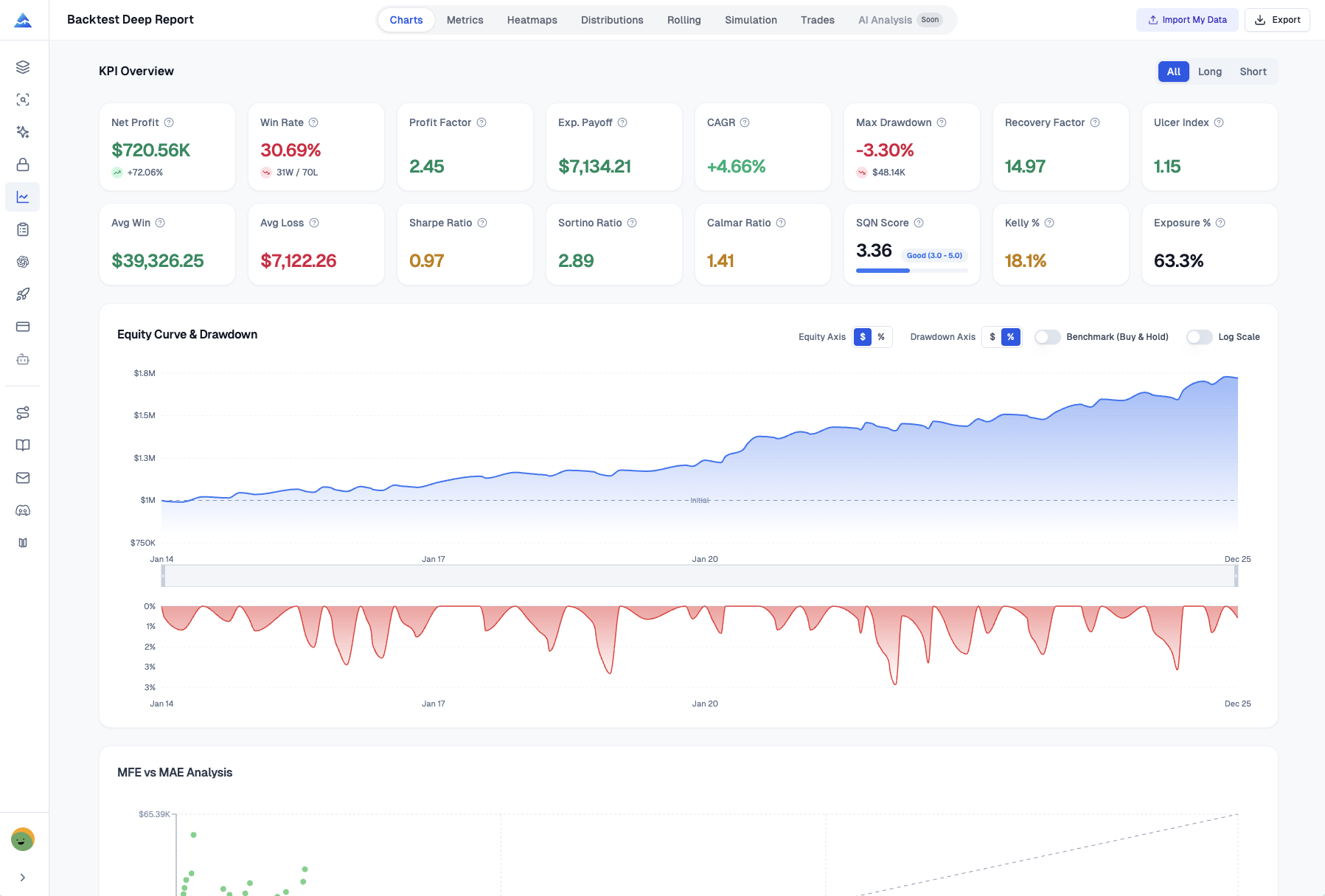
TradeZella connects directly to over 38 brokers — stocks, options, futures, forex. Your trades sync automatically, saving hours of manual entry. It also includes a "Zella Score" (0-100 grade for consistency), backtesting with second-level data, and TradeZella University with full courses. I found the automated sync worked well with my TastyTrade account but had intermittent lag with Webull during high-volume mornings. If you're building automated strategies, my guide on building high-performing AI trading strategies covers the setup I used.
Pineify Trading Journal takes the opposite approach. You log trades manually — entry, exit, and most importantly, the reason you entered. I was skeptical at first, but after 50 manual entries I started spotting patterns in my own decision-making that I'd completely missed with automated logs. The Auto-Calculations handle Position Size, P&L, and R-Multiple, and the partial close tracker saved me when I scaled out of an SPY iron condor in three chunks. Getting your entry prices right is trickier than it sounds — I wrote about that in Getting Your Pine Script Entry Prices Right.
The core difference comes down to how you want to learn. TradeZella hands you data on a silver platter. Pineify forces you to sit with each trade and reflect. I've found value in both approaches for different parts of my trading journey.
Pineify's journal is organized into four focused modules:
| Module | What It's For |
|---|---|
| Strategies | Track and refine specific trading plans. |
| Diary | Log individual trades and your thought process. |
| Sessions | Review performance during a trading day or week. |
| Reports | Get visual analytics from your data. |
| Feature | TradeZella | Pineify Trading Journal |
|---|---|---|
| Pricing Model | $29–$49/month subscription | One-time lifetime payment from $149 |
| Free Plan | None | None (part of Advanced plan and above) |
| Trade Import | Auto-sync + CSV upload + manual | Manual entry (primary method) |
| Broker Integrations | 38+ brokers | No direct broker sync |
| Analytics Depth | 50+ specialized reports | Win Rate, Profit Factor, Sharpe/Sortino Ratio, Max Drawdown |
| Trade Replay | Yes (Premium plan only) | Not available |
| Backtesting | Yes, Backtesting 2.0 with second-level data | Not available |
| Strategies Module | Playbooks with community sharing | Dedicated Strategies module with per-strategy metrics |
| Mindset/Diary Tools | Basic journal prompts | Full Diary module with mood tracking, plan adherence |
| Session Analysis | Limited | Dedicated Sessions module by time window |
| Automated Reports | Yes | Weekly/monthly auto-generated reports |
| Community/Mentorship | Discord, Mentor Mode, shared playbooks | Not a core feature |
| Pine Script Integration | None | Deep integration with TradingView ecosystem |
| Mobile App | No dedicated mobile app | Web-responsive |
Where Each Platform Excels — and Where They Don't
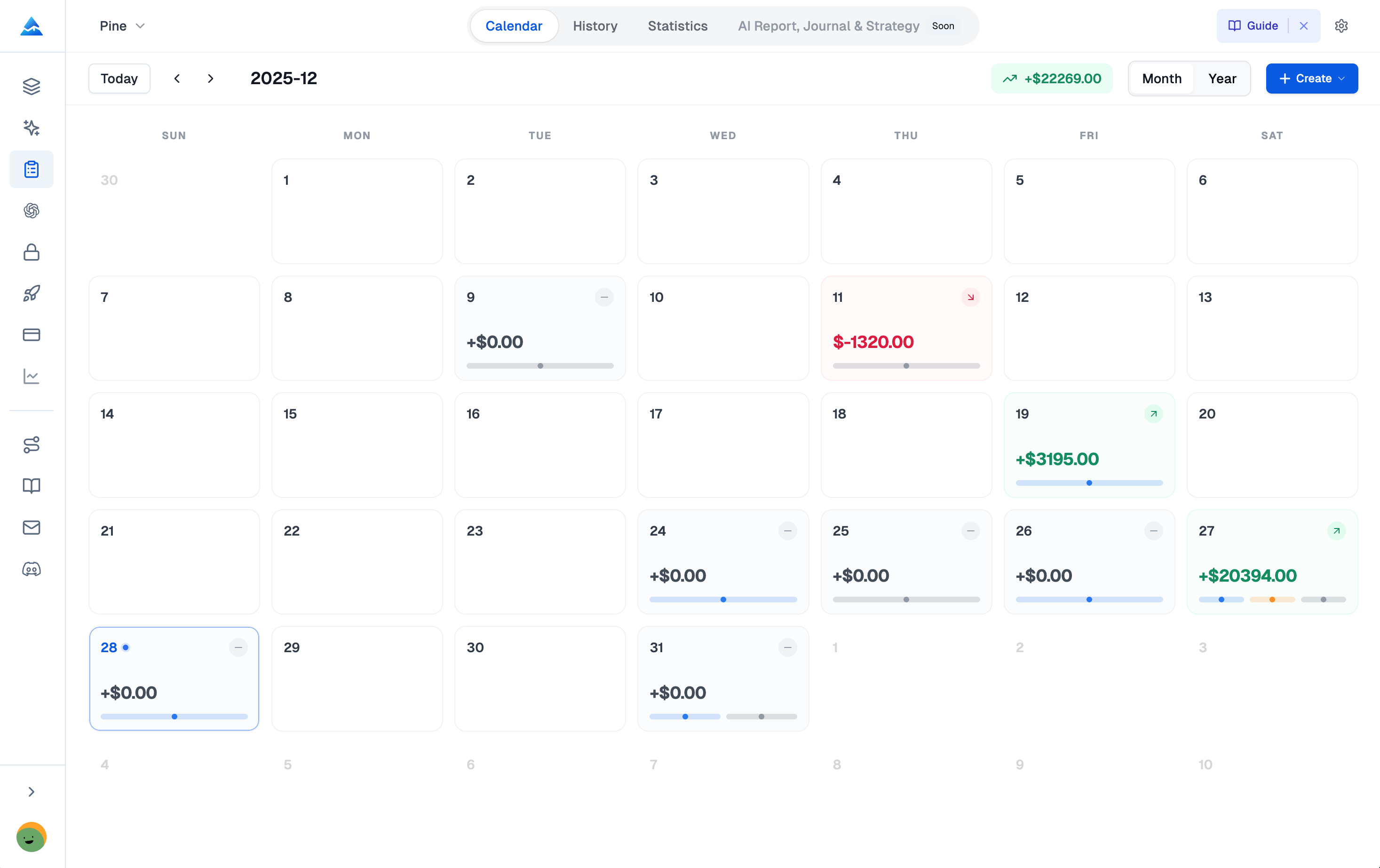
TradeZella generates over 50 reports — ROI, MAE/MFE, a color-coded calendar view of P&L by day. The Zella Score gamifies your progress, which I'll admit kept me coming back during a rough losing week in March. But I haven't tested their Premium trade replay feature, and the $49/month price tag stings if you're not using the community and mentorship tools. If you're a prop firm trader grinding evaluations, the playbooks and Discord community provide real value I haven't seen elsewhere.
Pineify leans hard into statistics. Sharpe Ratio, Sortino Ratio, and its Tag Performance feature let me tag trades by strategy — "bull flag," "earnings breakout," "mean reversion" — and see exactly which setups work. I was genuinely surprised that my "mean reversion" tags on SPY showed a 68% win rate but a negative profit factor because my losers were twice the size of my winners. That kind of insight would have stayed buried in a less structured journal. The Detrended Price Oscillator Indicator is one setup I've been tracking in my journal tags, and the pattern recognition there has improved my entries.
Manual vs Automated Logging: The Real Trade-Off
TradeZella's automated sync turns hours of data entry into a few clicks. Link your brokerage — Robinhood, TastyTrade, Schwab — and trades appear. Their Premium plan supports up to 20 accounts. For high-volume scalpers, this is the only realistic option.
Pineify makes you type every entry yourself. I won't pretend it's faster. It's not. During a five-minute ES futures scalp, the last thing I want to do is open a journal. But here's what I didn't expect: forcing myself to log the reason before the result made me more deliberate about entries. I started noticing I'd enter "FOMO" as a reason way too often, and that alone changed how I sized positions.
The Auto-Calculations handle the math, and partial close tracking is genuinely useful — I split a 10-contract NQ position into three exits and the weighted average was calculated automatically.
Beyond raw logging, Pineify's Diary module helps you track your daily mood, confidence level, and plan adherence. The Sessions module lets you define custom windows — London Open, New York session — and review your performance within those specific timeframes. Over weeks, you start seeing patterns: maybe your Tuesday entries are worse than Thursday entries, or you trade more impulsively during the first hour after lunch.
Pricing: Subscription vs Lifetime
| Platform | Plan | Pricing Model | Cost for 6 Months | Cost for 2 Years |
|---|---|---|---|---|
| TradeZella | Basic | $29/month | ~$174 | ~$696 |
| Pineify | Advanced (Journal Included) | $149 one-time | $149 | $149 |
TradeZella's Basic plan costs ~$174 over six months. Pineify's one-time $149 covers you indefinitely. I've been burned by subscription creep — between TradingView, my data feed, and broker fees, another $29/month adds up. To keep costs down, understanding what you get for free matters — check out TradingView free plan features. The lifetime model is why I personally switched to Pineify for long-term journaling. That said, if you value TradeZella's community, backtesting, and mentorship, the subscription may be worth it. I haven't found an alternative that matches their Mentor Mode feature.
Which One Should You Pick?
- Pick TradeZella if you want automated trade import, backtesting, trade replay, and a community to learn from. You don't mind a monthly fee for a complete ecosystem.
- Pick Pineify Trading Journal if you're willing to journal manually for deeper self-awareness, already use TradingView and Pine Script, and prefer a one-time payment.
TradeZella is a full-service training platform. Pineify is a craftsman's notebook. I use Pineify for my personal journaling and I still recommend TradeZella to friends who want a hands-off experience.
Frequently Asked Questions
What is the main difference between TradeZella and Pineify Trading Journal?
TradeZella automates everything — broker sync, backtesting, community mentorship — and charges monthly. Pineify focuses on manual logging with psychology tools, session analysis, and lifetime pricing. One handles the data for you; the other makes you engage with it.
Does Pineify Trading Journal offer automated trade logging like TradeZella?
No. Pineify uses manual entry. It does include Auto-Calculations for position sizing, P&L, and R-Multiple, so you're not doing math by hand. TradeZella syncs with over 38 brokers automatically. I'd say manual logging builds discipline but automated logging saves time — depends on your priority.
Which trading journal costs less over time?
Pineify costs a one-time $149 on the Advanced plan. TradeZella runs $29 to $49 per month. Over two years, Pineify stays at $149 while TradeZella hits $696 or more. For long-term use, Pineify wins on price by a wide margin.
Which platform is better for prop firm traders?
TradeZella is very popular with prop firm traders — the playbooks, Zella Score, and mentor tools are built for challenge evaluations. Pineify's session analysis and psychology tracking also appeal to prop traders focused on consistency. I've seen both used successfully.
Is Pineify Trading Journal compatible with TradingView?
Yes. Pineify integrates directly with TradingView — it includes a Pine Script AI assistant, a library of indicators, and the Trading Journal. If you build your workflow around TradingView, Pineify fits naturally.
What to Do Next
The best trading journal is the one you actually use. Here's a practical starting point:
- Try Pineify. If you're on TradingView or tired of monthly bills, check out the Pineify Trading Journal. Test the strategies, diary, sessions, and reports modules.
- Look at TradeZella. Visit their site and evaluate whether trade replay and backtesting justify a subscription for your volume and style.
- Start this week. Open a spreadsheet, a notebook, or any journal and log five trades. The habit matters more than the tool. After a month, you'll have data you can actually learn from.
- Share with another trader. Talk through what you're seeing. Accountability makes the habit stick.
What's your biggest hurdle — logging consistently, understanding your psychology, or identifying which setups actually work for you? Drop a comment below.