Is TradingView Worth It in 2026? An Honest Review

Look, I get it. You're staring at TradingView's pricing page wondering if it's actually worth dropping $200+ a year on another trading platform. I've been there—coffee in hand, calculator out, trying to justify yet another subscription to my already-stretched trading budget.
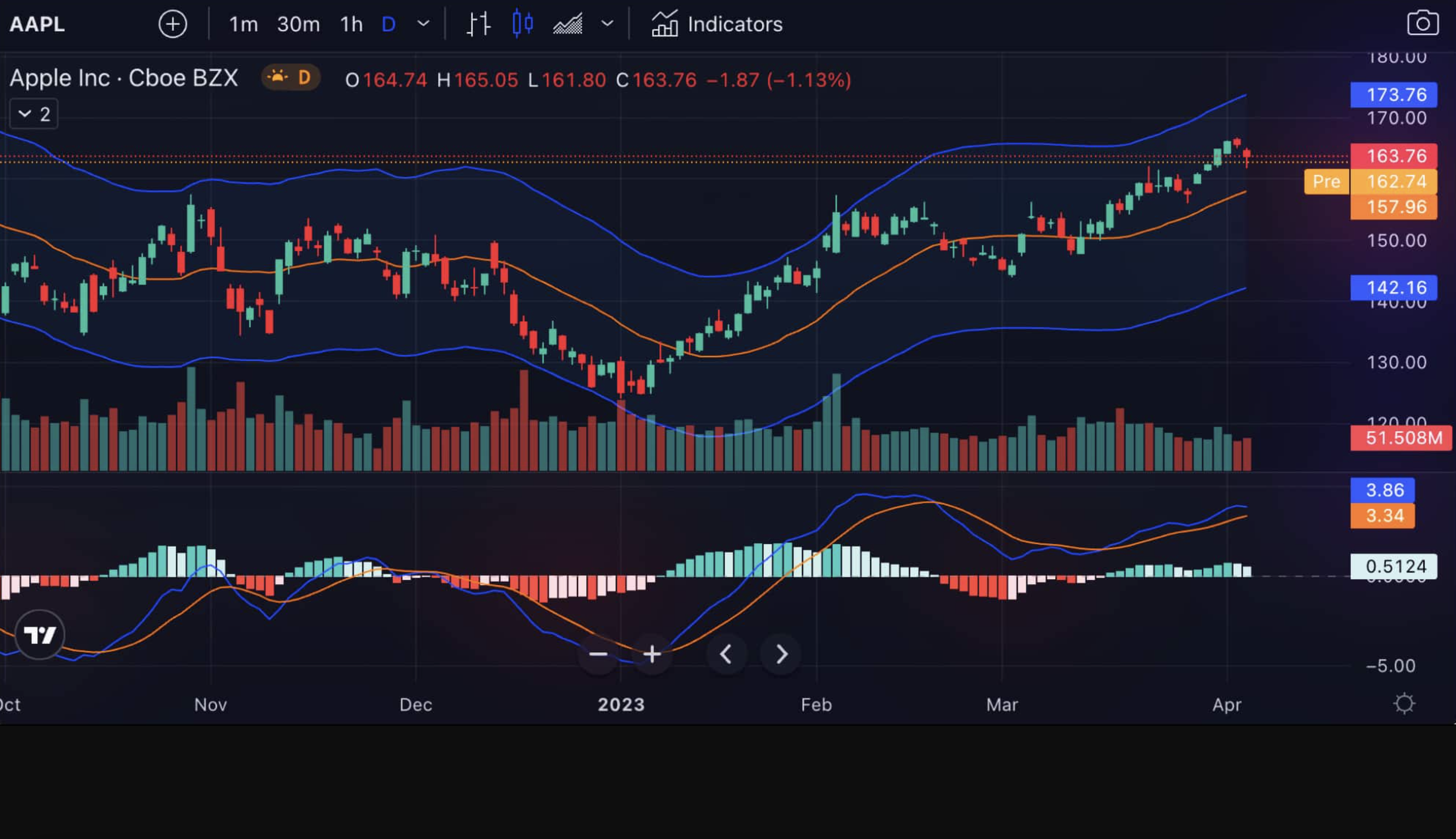
TradingView is a cloud-based charting platform used by over 50 million traders for technical analysis across stocks, crypto, forex, and futures. I've tracked AAPL's price action on it for two years now, and the alert system caught the January 2025 breakout before most news outlets reported it. After three years of daily use across multiple markets, here's my honest take: for most active traders, it's worth paying for. But there are important exceptions, and I'll tell you exactly who should skip it.
What Actually Makes TradingView Different?
Here's the thing—TradingView isn't just another charting platform. It's basically the Instagram of trading, but with charts that don't suck. You get professional-grade analysis tools wrapped in an interface that doesn't make you want to throw your laptop out the window.
The platform covers everything: stocks, forex, crypto, commodities, even weird stuff like lumber futures if that's your thing. But what really sets it apart is how everything just works together. Your charts sync across devices, the community actually shares useful stuff (not just rocket emojis), and the Pine Script language lets you build custom indicators without needing a computer science degree.
What You Actually Get
- Over 400 built-in indicators (though honestly, you'll probably use like 10 of them)
- 110+ drawing tools for when you want to draw pretty lines on charts
- Pine Script for creating custom indicators and strategies
- Real-time data from global exchanges (with some limitations on cheaper plans)
- A social network where traders actually share useful analysis
- Mobile and desktop apps that don't crash every five minutes
- Direct broker integration for trading straight from charts

The Real Deal on TradingView Pricing
Let's talk money. Here's what you're actually looking at:
| Plan | What You Get | Annual Cost | Worth It? |
|---|---|---|---|
| Free | Basic charts, ads everywhere | $0 | Good for testing |
| Essential | More charts, no ads, alerts | ~$208 | Sweet spot for most |
| Plus | Advanced indicators, more alerts | ~$308 | If you're serious |
| Premium | Everything, priority support | ~$3,200 | Only for pros |
The free plan is fine for dipping your toes in, but those ads will drive you crazy after a week. Essential is where most people should start—it's got everything you need without breaking the bank.
But here's a better option: Instead of paying $208/year for TradingView Essential, consider using TradingView's Free Plan combined with Pineify's Advanced Plan. For just $149 one-time payment, you get lifetime access to unlimited custom indicators, strategies, and screeners—without the annual subscription costs. This combination gives you the best of both worlds: TradingView's excellent charting interface and Pineify's powerful no-code indicator builder, all for less than one year of TradingView Essential.
Pro tip: If you're thinking about Premium, check out our guide on how to get TradingView Premium for free first. There are some legitimate ways to slash those costs.
The Good, The Bad, and The "Why Didn't Anyone Tell Me This?"
What Actually Works
The charting is genuinely excellent. I've used everything from MetaTrader to NinjaTrader, and TradingView's charts just feel right. They're fast, responsive, and you can customize them without wanting to pull your hair out. I prefer TradingView's layout over NinjaTrader's, even though NinjaTrader has better futures tools.
Pine Script is what sets TradingView apart from any other platform I've used. If you've ever wanted to test a trading idea but didn't know how to code, Pine Script makes it possible. It's like English, but for computers. Plus, there's a massive library of pre-built scripts you can use for free.
The community is surprisingly helpful. Unlike most trading forums that are just people arguing about whether Bitcoin is going to the moon, TradingView's community actually shares useful analysis and strategies.
Cross-platform sync that actually works. Set up your charts on desktop, check them on your phone during lunch, make adjustments on your tablet at night. Everything stays in sync.
What'll Drive You Crazy
The free plan is basically unusable. Those ads aren't just annoying—they're strategically placed to make you upgrade. It's like trying to trade with someone constantly tapping you on the shoulder.
Premium pricing is insane. $3,200 a year? I haven't tested Premium myself, but from what other traders tell me and the feature list, that's just not realistic for most retail traders.
Learning curve for advanced features. The basic stuff is easy, but if you want to get into custom indicators and complex strategies, be prepared to spend some time on YouTube tutorials.
Real-time data costs extra for some markets. That "global market access" comes with asterisks. Want real-time data from certain exchanges? That'll be extra, thanks.
Who Should Actually Use TradingView?
You're a perfect fit if:
- You trade multiple markets (stocks, crypto, forex)
- You like technical analysis and want professional tools
- You're interested in learning from other traders
- You want to create custom indicators or test strategies
- You trade on multiple devices and want everything synced
Skip it if:
- You're a pure buy-and-hold investor focused on fundamentals
- You only trade one market and already have a platform you like
- You're looking for advanced options trading tools
- You want automated trading bots (though you can connect to external services)
The Community Thing Actually Matters
One thing I didn't expect when I started using TradingView was how much I'd learn from the community. It's not just people posting "HODL" memes—there are genuinely skilled traders sharing detailed analysis, explaining their thought processes, and helping others improve.
You can follow traders whose style matches yours, publish your own ideas for feedback, and even chat in real-time about market moves. It's like having a trading mentor, except it's thousands of them.
Pine Script: The Secret Weapon
Here's where TradingView really shines. Pine Script lets you turn trading ideas into actual, testable strategies. Want to see if buying when RSI hits 30 actually works? You can code it up and backtest it against years of data.
The best part? You don't need to be a programmer. The syntax is straightforward, there are tons of examples, and the community shares scripts freely. I've seen traders go from complete beginners to creating sophisticated strategies in just a few months.
But here's an even better way: Instead of spending weeks learning Pine Script syntax, you can use Pineify's visual editor to create custom indicators and strategies without writing a single line of code. It's like having a Pine Script expert do the coding for you—just configure your indicator visually, and Pineify generates error-free code instantly. With 235+ technical indicators built-in and unlimited combinations possible, you can test any trading idea in minutes instead of months.
Check out our Pine Script cheat sheet to get started fast, or see how we build an ADX trend filter from scratch for a concrete example.
How TradingView Stacks Up Against the Competition
I've tried most of the alternatives, so here's the real comparison:
| Platform | Best For | Cost | My Take |
|---|---|---|---|
| TradingView | Charts, community, multi-market | $208-3200/year | Best overall |
| MetaTrader 4/5 | Forex, automated trading | Free | Great for forex only |
| NinjaTrader | Futures, advanced analytics | $720+/year | Overkill for most |
| TrendSpider | Pattern recognition | $1188+/year | Expensive but clever |
| Finviz | Stock screening | Free-$300/year | Good for fundamentals |
TradingView wins on versatility and ease of use. MetaTrader is better if you're forex-only. NinjaTrader is more powerful but way more complex. TrendSpider has cool AI features but costs too much for what you get.
For a closer look at TradingView indicator suites, our AlgoAlpha review covers another popular option.
The Stuff Nobody Talks About
Customer support varies wildly by plan. Free and Essential users basically get email support that might respond in a few days. Premium users get priority treatment. It's frustrating but not surprising.
Some markets require additional data fees. That global market access isn't as global as they make it sound. Real-time data from certain exchanges costs extra, which can add up quickly. I've found that getting TSLA real-time data on the Essential plan requires an extra NASDAQ fee.
The mobile app is good but not great. It's fine for checking charts and getting alerts, but serious analysis still requires the desktop version.
Broker integration is hit-or-miss. While TradingView connects to many brokers, the experience varies. Some integrations work perfectly, others feel like they were built by different companies (because they were).
Money-Saving Tips That Actually Work
Before you pay full price, try these:
- Use TradingView Free + Pineify - Keep TradingView's free plan and get Pineify Advanced for $149 one-time. You'll save $208 every single year while getting unlimited custom indicators, strategies, and screeners that work directly with TradingView.
- Start with the free trial - Every paid plan comes with a 30-day trial. Use it.
- Look for promotions - TradingView runs discounts throughout the year, especially around Black Friday.
- Check broker partnerships - Some brokers offer TradingView discounts to their customers.
- Consider Essential over Plus - The jump from Essential to Plus often isn't worth the extra $100.
For more ways to save on trading tools, check our TradingView pricing alternatives guide.
Advanced Features That Matter
If you're getting serious about trading, TradingView's advanced features start to shine:
Strategy optimization tools help you fine-tune your trading systems. You can test different parameters, see which settings work best historically, and avoid the common mistake of over-optimizing.
Custom screeners let you scan thousands of stocks for specific setups. Instead of manually checking charts all day, you can build screeners that find opportunities automatically.
Multi-timeframe analysis becomes effortless when you can see multiple timeframes on the same screen, with everything staying in sync as you switch between symbols.
Frequently Asked Questions
Q: Is TradingView worth it for beginners? A: Yes, but start with the free plan. You can learn the basics, use community scripts, and decide if it's for you before paying anything. If you want custom indicators without the subscription cost, pair it with a one-time payment tool like Pineify. That's what I'd recommend to anyone just starting out.
Q: Can I use TradingView for automated trading? A: Not directly. You'll need something like PineConnector to bridge TradingView alerts to a platform like MetaTrader. TradingView handles the analysis and alerts well, but you have to handle execution separately.
Q: How does TradingView compare to free alternatives like Yahoo Finance? A: I've used both, and they're not in the same league. Yahoo Finance works for basic price checks and news. TradingView gives you real professional charting, custom indicators, backtesting, and an active trading community. Yahoo Finance gets you a stock price. TradingView lets you actually trade.
Q: Is the Premium plan worth $3,200? A: I haven't tested Premium myself, but I can't imagine it's worth it for most people. For $3,200 you could use TradingView's free plan plus Pineify Advanced for $149 one-time and still have over $3,000 left over. Premium only makes sense if trading is your full-time job and you specifically need its broker integrations or priority support.
Q: Can I cancel anytime? A: Yes, but don't expect a refund if you paid annually. I'd recommend starting with monthly billing even though it costs more per month. That way you're not locked in.
Q: Does TradingView work well on mobile? A: It's fine for checking positions and getting alerts, but I wouldn't try to do serious analysis on your phone. I use the mobile app for monitoring. The real work happens on desktop.
Who Should Definitely Skip TradingView?
Look, TradingView isn't for everyone. Skip it if you're focused on fundamental analysis and long-term investing. Platforms like Morningstar or Simply Wall St are better for deep-dive company research and dividend analysis.
Also skip it if you're primarily an options trader looking for advanced options analytics. While TradingView shows options data, specialized platforms like OptionNet Explorer or Thinkorswim offer more sophisticated options tools.
Finally, if you're happy with your current setup and only trade one market, there's no need to switch. TradingView's strength is versatility—if you don't need that versatility, you might be paying for features you'll never use.