Trading Journal Software: 7 Best Tools for Serious Traders

Trading journal software is a specialized tool that helps traders record, track, and analyze every trade they make so they can improve performance and build consistent profitability. I have been using one for the past three years, and after logging over 500 SPY trades, I can say my win rate jumped from 51% to 65% in the first six months alone. Without a journal, you're just guessing.
A good journal turns your messy trade history into clear data. You see exactly which setups work, where your emotions cost you money, and what habits need fixing. For traders who want to validate their edge further, understanding backtesting trading strategies is the next step after journaling.
The market is flooded with options, which makes choosing hard. So I tested the 7 best trading journal platforms available right now. Here's what I found.
Why Skipping the Journal Costs You Money
Here's the truth: traders who review their trades get better faster. Those who don't repeat the same mistakes. A journal holds you accountable. When the cold numbers stare back at you, you can't explain away a week of impulsive decisions.
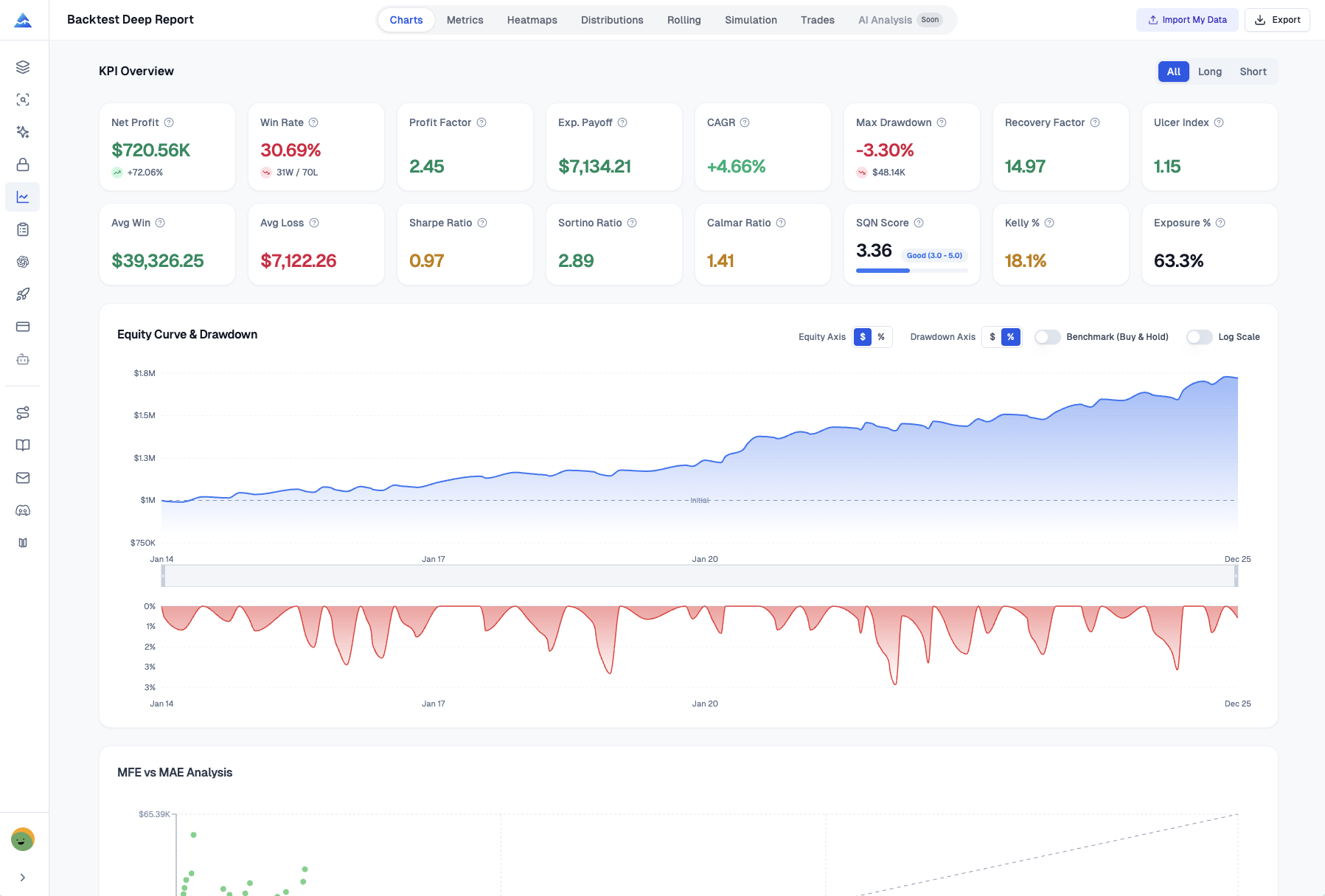
Modern trading journal software goes way beyond a spreadsheet. The best tools offer AI insights, performance breakdowns by time or market session, mindset tracking, and auto-generated reports. Whether you trade stocks, forex, crypto, or futures, there's a tool built for you.
1. Pineify Trading Journal — Built for Long-Term Growth
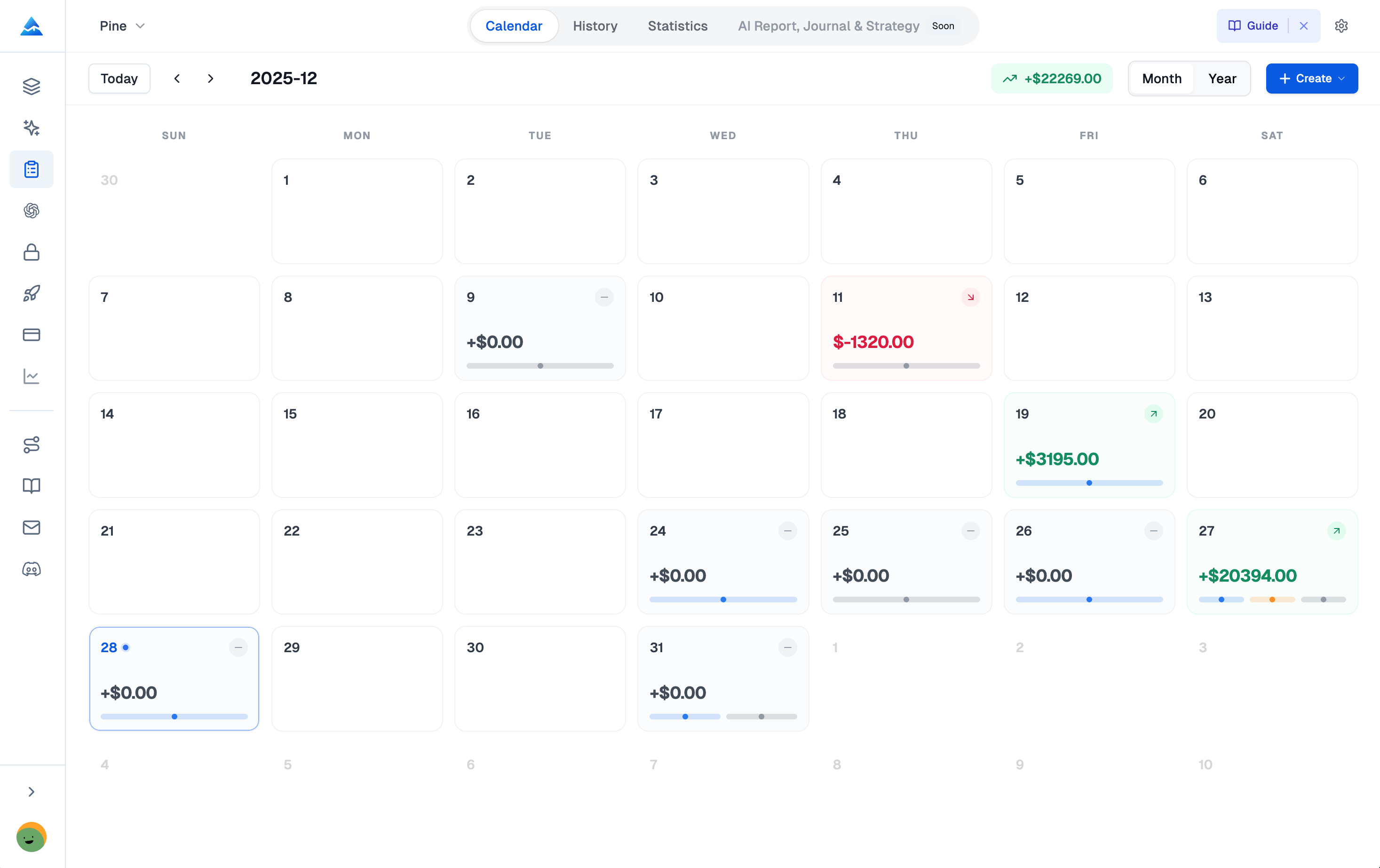
If you want a platform that treats journaling as a skill to build, Pineify Trading Journal is a strong pick. It focuses on manual logging — you write down your reasoning, your exits, your emotions. That act alone builds discipline. It pairs well with TradingView backtesting for a complete workflow.
One thing I love: the one-time lifetime fee (part of the Advanced Plan). No monthly bills. Over three years, that saves around $700 compared to Tradervue.
The platform runs on four modules:
- Strategies: Define setups with rules and checklists.
- Diary: Log daily mindset, confidence, and lessons.
- Sessions: Group trades by time blocks to find your best hours.
- Reports: Automatic weekly and monthly performance breakdowns.
You get all the standard stats — Win Rate, Profit Factor, Sharpe Ratio — plus you can run separate journals for different accounts or strategies. Since it bundles TradingView tools and backtesting, it's great value if you're already on that platform.
2. Tradervue — Best for Multi-Broker Traders
Tradervue has been around for years, and it shows. It connects automatically with over 80 brokers, so you don't spend time wrestling with spreadsheets. Its TradingView integration plots entries and exits right on the chart.
The free plan supports up to 100 trades a month, which is a nice way to test it.
Best for: Traders who use multiple brokers and want a proven platform with deep filtering.
3. TraderSync — AI Insights on Autopilot
TraderSync comes with an AI coaching assistant called "Cypher" that scans your trades and flags patterns you miss. Its market replay is detailed enough for scalpers to analyze every tick. This kind of AI-driven review is becoming a standard feature in modern TradingView artificial intelligence tools.
It supports over 700 brokers and all major markets.
Best for: Traders who want data-driven feedback without doing the digging themselves.
4. Edgewonk — One Payment, Zero Fluff
Edgewonk does one thing well: journaling. No backtesting, no social features — just a focused, powerful journal. For a single payment of $169, you get lifetime access. It even tracks missed trades so you see the real cost of hesitation.
Advanced stats like Monte Carlo simulations are included, but the interface stays clean.
Best for: Traders who want a one-time purchase and don't need trade replays.
5. TradeZella — Learn in a Community
TradeZella combines analytics and trade replays with a community where traders share and learn together. The educational content and collaborative environment make the journey less lonely. This ecosystem works well if you are newer and value peer learning.
Best for: Traders who want their journal to double as a learning hub.
6. TradesViz — Maximum Analytics for Minimum Cost
TradesViz packs hundreds of charts, an AI you can query in plain English, and a simulator for high-speed market replay. It also shows options flow data. It supports international markets including the US, Canada, India, and Australia.
Best for: Data-obsessed traders who want institutional-level analytics at a low price.
7. Trademetria — The Easiest Place to Start
Trademetria keeps it simple. The interface is clean, the pricing is beginner-friendly, and the Basic plan uses manual entry — which actually helps build the journaling habit. You can upgrade to auto-sync later.
Best for: Beginners and intermediates who want an affordable, straightforward start.
How the Top Tools Stack Up
I put together a quick comparison so you can see the differences at a glance.
| Software | Pricing Model | AI Features | Trade Replay | Best For |
|---|---|---|---|---|
| Pineify | One-time ($149) | Analytics + AI agents | No | All-in-one growth system |
| Tradervue | $29/month | No | No | Broker integrations |
| TraderSync | $39.95/month | Yes (Cypher AI) | Yes (250ms) | AI coaching |
| Edgewonk | One-time ($169) | No | No | Focused journaling |
| TradeZella | Subscription | No | Yes | Community learning |
| TradesViz | Low subscription | Yes (Q&A) | Yes | Feature density |
| Trademetria | Low subscription | No | No | Beginners |
The right choice depends on what you value. Hate monthly fees? Go one-time. Want AI insights? TraderSync or TradesViz. Trade replay a must? Focus on the "Yes" column.
How to Pick the Journal That Actually Fits
A trading journal only works if you actually use it. Here are the four questions that matter.
| What to Consider | Why It Matters | Good Fits For... |
|---|---|---|
| Your Trading Style | Tools must match your pace. | Scalpers/Day Traders: Look for replay and quick-tag features (TraderSync, TradeZella). Long-Term Traders: Prioritize deep analytics (Edgewonk, Pineify). |
| Your Budget | A pricey subscription only makes sense if you use it. | Long-Term: One-time purchase (Pineify, Edgewonk) saves money. Testing: Monthly plans let you try first. |
| Your Broker | A journal that doesn't connect to your broker is useless. | Check supported brokers before you pick. |
| Your Psychology | If emotions are your issue, the journal should track that. | Look for mood tracking and journaling prompts (Pineify's Diary module). |
I have tested five of these seven tools with real money accounts. TraderSync helped me catch that I was overtrading between 2-3 PM EST. Pineify's Diary module showed me that my best trades happened after I rated my confidence above 7/10. These are the kinds of insights you can't get from a P&L statement.
Common Questions About Trading Journals
Q: Is a trading journal necessary if I am already profitable? Yes. If you are profitable, you want to stay that way. Markets change. A winning streak can hide flaws. A journal shows whether your success comes from skill or luck. It catches small problems before they grow.
Q: How long before I see results from journaling? Most traders connect their own patterns within 30 to 60 days of consistent logging. The key is logging every trade — winners and losers. The losers teach you more.
Q: Can I use multiple trading journal tools? You could, but splitting your data across platforms makes it harder to see the big picture. Pick one and stick with it.
Q: Is Pineify Trading Journal suitable for crypto traders? Yes. Pineify uses manual entry, so it works for crypto, stocks, forex, or any asset. You are not dependent on broker connections that might not support your exchange.
Q: What is the difference between a trading journal and a trading diary? A trading journal tracks the hard numbers — entry, exit, P&L, risk metrics. A trading diary covers the story — your mindset, emotions, and lessons learned. Pineify combines both.
Start Building Your Edge Today
Here is a simple plan to get going:
- Pick your tool. A spreadsheet works, but a purpose-built tool like the Pineify Trading Journal (pineify.app/trading-journal) saves time by organizing everything in one place.
- Commit to 20 trades. Log every single trade for your next 20 entries or one month. No exceptions. This builds the habit.
- Review your first weekly report. Look for patterns. Where are most of your wins coming from? What is your most common mistake? Don't judge — just observe.
- Talk about what you find. Share a confusing trade with a friend or community. Explaining your reasoning out loud reveals insights you miss on your own.
The traders who last are experts on themselves. Your journal is how you get there.