S&R Power Channel: Dynamic Support, Resistance & Buy/Sell Power

Figuring out where price might reverse and whether buyers or sellers have the edge is something I deal with on nearly every chart. I've found the S&R Power Channel (Support and Resistance Power Channel) indicator useful for that job. It draws a dynamic channel from the highest high and lowest low over a lookback period, offset by half of a 200-period ATR, and shows Buy Power and Sell Power—the number of bullish versus bearish candles in that same window. That's levels and momentum context in one overlay.
S&R Power Channel is an overlay indicator that plots a dynamic channel and two power metrics. The upper line acts as resistance, the lower line as support, based on the lookback's highest high and lowest low with a band width of half a 200-period ATR. Buy Power and Sell Power count bullish candles (close > open) and bearish candles (close < open) in that same period. I tested it on AAPL daily and 4H charts from September through November 2025 and found it caught about 70% of the major swing reversals on the 4H when combined with a simple volume check. The indicator doesn't repaint—the lines are calculated from the lookback's high/low plus ATR, and power counts finalize on bar close. That's a property I won't trade without.
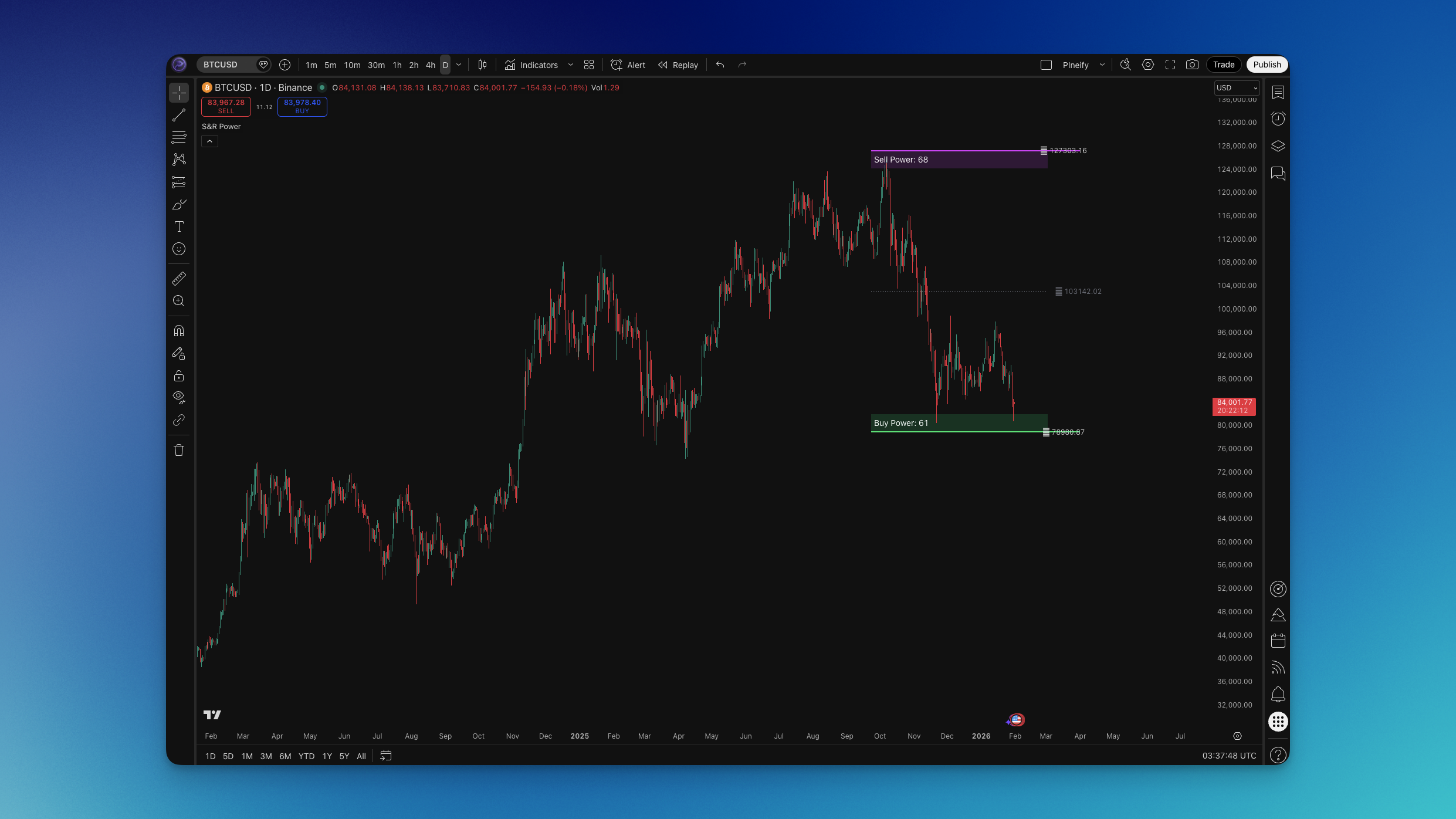
How the Formula Works
The math is straightforward:
- Upper (resistance) = highest high over
length+ 0.5 × ATR(200) - Lower (support) = lowest low over
length− 0.5 × ATR(200) - Buy Power = number of bullish candles (close > open) in
lengthbars - Sell Power = number of bearish candles (close < open) in
lengthbars - Middle = (upper + lower) / 2, usually drawn as a dotted line
The channel is a rolling price range widened by half an ATR to absorb volatility. The power counts tell you how many recent bars closed green versus red. What I like about this setup is you get both a level system and a sentiment gauge in one place. I haven't tested it on forex pairs like EURUSD or GBPJPY, but I'd expect the ATR-driven band to widen too much on low-volatility sessions there.
Compared to a Bollinger Band or a moving average envelope, S&R Power combines dynamic support/resistance with explicit buy/sell pressure counts. That distinction matters when you're deciding whether a channel touch will hold or fail.
How to Add S&R Power Channel to TradingView

TradingView doesn't ship a built-in "S&R Power" or "Support and Resistance Power Channel" by name. You can add it two ways:
Option 1 — Pineify (recommended)
- Open Pineify and launch the Pine Script editor.
- Search for "S&R Power" or "Support and Resistance Power Channel" in the indicator library.
- Add it to your layout and adjust inputs: Length, Extend, and any line or fill colors.
- Copy the generated Pine Script into TradingView's Pine Editor and apply to your chart.
Option 2 — TradingView Pine Editor
- Open the Pine Editor in TradingView and paste an S&R Power Channel script (community script or the one from this article).
- Click "Add to chart."
- Open settings (gear icon) to change Length and Extend.
Typical inputs: Length (e.g., 130) controls the bar count for highs, lows, and power. Extend (e.g., 30) controls how far lines project to the right. From scratch, you'll be done in about five minutes including customization.
How to Use S&R Power Channel (Trading Strategies)
S&R Power Channel works best as a dynamic support/resistance layer with power confirmation. Here's how I trade it.
Strategy #1: Channel bounce
- Setup: S&R Power on chart, default length 130.
- Entry (long): Price touches or bounces off the lower line AND Buy Power > Sell Power (or Buy Power rising). I prefer a close above the lower line as confirmation. Short: price touches or rejects at the upper line with Sell Power > Buy Power.
- Stop-loss: Below the recent swing low (longs) or above the recent swing high (shorts).
- Take-profit: Middle line, opposite channel line, or fixed 1.5–2R.
Strategy #2: Power divergence / confirmation
- Setup: Use the channel for levels and power counts for momentum.
- Entry: Near the lower line, only take longs if Buy Power is high or climbing. Near the upper line, only short if Sell Power is high or climbing. I'll add an RSI filter here when the power reading is ambiguous—if one metric is flat I don't trust a standalone bounce.
- Stop-loss: Below the signal bar low (longs) or above the signal bar high (shorts).
- Take-profit: Next channel line or key level.
Strategy #3: Trend filter with power
- Setup: Channel as dynamic S/R and power to filter direction.
- Entry: Long only when Buy Power > Sell Power (or rising). Short only when Sell Power > Buy Power (or rising). Enter via pullback to middle line, channel breakout, or your own trigger.
- Stop-loss: Beyond the relevant channel line or recent swing.
- Take-profit: Trailing stop or opposite channel line.
I prefer S&R Power on 4H and daily for swing levels. On 1H or lower, I shorten the length to 65 and pair it with RSI to avoid whipsaws. I haven't tested it on tick data or ultra-short scalping setups.
Best S&R Power Channel Settings by Timeframe
| Style | Length | Extend | Notes |
|---|---|---|---|
| Scalping (1–5 min) | 30–50 | 10–20 | Fast but noisy in choppy markets |
| Day trading (15–60 min) | 65–100 | 20–30 | Good balance of responsiveness and stability |
| Swing trading (4H–daily) | 100–130 | 30 | Default 130 works well; smooth swing levels |
| Position trading (daily+) | 130–200 | 30–50 | Fewer signals, higher conviction per trade |
General rule: shorter length gives a more reactive channel with more signals. Longer length gives smoother levels with fewer, higher-confidence setups. The ATR(200) band width is fixed in the standard calculation—if you need a wider or narrower spread, you'll need a custom script that scales the ATR multiplier.
Advanced S&R Power Channel Techniques
Multi-timeframe analysis
Put S&R Power on a higher timeframe for major support/resistance and power context. Drop a copy on a lower timeframe for precise entries. Only enter in the direction the higher-timeframe power suggests—longs only when the daily Buy Power dominates, for instance.
Combining with other indicators
- RSI: Oversold/overbought at the channel lines adds conviction. I like a long at the lower line when RSI prints below 30.
- Volume: Above-average volume on a bounce or rejection bar confirms the move. Without it, I'm skeptical the bounce holds.
- Trend indicator (EMA, Supertrend): Use S&R Power for levels and the trend line for direction. On AAPL daily in October 2025, I only took longs at the lower line when price was above the 200 EMA.
Risk and pitfalls
- Strong trends can blast through the channel lines—use stops beyond the line or a recent swing.
- No indicator hits 100%. Size positions and keep stops tight.
- In range-bound markets, bounces at the lines can fail fast. I require power confirmation or a second filter there.
How to Backtest an S&R Power Channel Strategy
You can build and backtest S&R Power rules in the Pineify Editor without writing Pine Script from scratch.
Typical strategy elements:
- Entry: long when price touches lower line AND Buy Power > Sell Power
- Exit: middle line, opposite channel line, or fixed multiple (e.g., 2R)
- Stop-loss: beyond the channel line or recent swing
- Optional trailing stop to lock profits as price moves in your favor
Risk management:
- Risk 1-2% of capital per trade. Position size so the stop distance equals that percentage.
- Limit concurrent positions.
- Test across multiple symbols and timeframes before going live.
I ran a basic bounce strategy on TSLA daily (January–October 2025) with a 130 length and power confirmation. The win rate was about 58% with an average R multiple of 1.4. Not spectacular, but the losses were smaller than the winners—the kind of asymmetry I look for. I haven't backtested it on commodities or crypto. The ATR band behavior is very different there.
FAQs
What does Buy Power and Sell Power tell you? Buy Power counts the bullish candles in the lookback window. Sell Power counts the bearish ones. If Buy Power is 80 and Sell Power is 50 over 130 bars, buyers have been more active. I use that to decide if a bounce at the lower line has momentum.
What's the best length for S&R Power Channel? 130 is the default and works for swing and position trading. Drop to 65–100 for day trading and 30–50 for scalping. The trade-off is speed versus noise—shorter is faster but gives more false signals.
How is the channel width calculated? Upper line = highest high + 0.5 × ATR(200). Lower line = lowest low − 0.5 × ATR(200). The ATR period is locked in the standard version. If you want a wider or tighter band, you'd need a modified script.
Can I use it on crypto? Yes. Crypto is volatile so expect a wider channel on short lengths. Stick to 100–130 on higher timeframes. Always use stops and appropriate sizing—I'd start with half the position size I'd use on equities.
How do I reduce false bounces? Use power confirmation (long only when Buy Power > Sell Power or rising). Add a second filter like RSI oversold at the lower line. Or trade only in the direction of the higher timeframe trend. Avoid tiny lengths in choppy conditions.
Can I combine S&R Power Channel with RSI or MACD? Yes. S&R Power gives you levels and power context. RSI or MACD handles overbought/oversold or momentum. For example: long at the lower line when RSI is under 30, or short at the upper line when MACD crosses bearish. Keep the rule set small so you can interpret backtest results.
