Pineify Strategy Optimizer: Tune TradingView Parameters Without Python

Parameter optimization in trading is the process of automatically testing thousands of parameter combinations against historical market data to find the best-performing settings. I've spent entire weekends doing this manually — changing a moving average length, running a backtest, writing down the result, changing it again. The Pineify Strategy Optimizer solves that. It's a Chrome extension that brings automated parameter tuning directly into TradingView, no Python setup required.
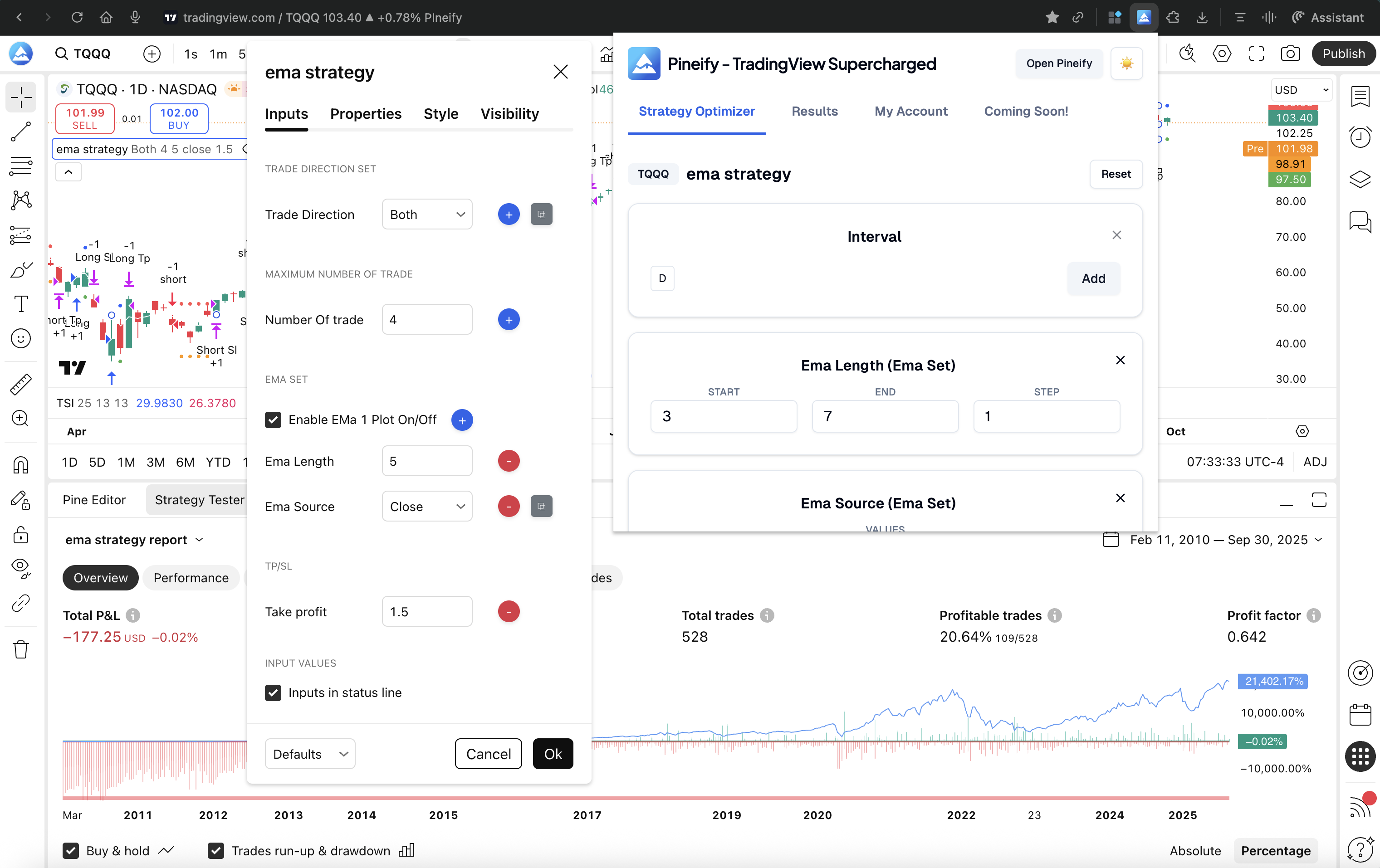
Every strategy you use is controlled by settings — moving average length, RSI threshold, stop-loss percentage. Pick them at random, and you're gambling that your guess happens to be right. Optimization changes that: it tests hundreds or thousands of combinations systematically, then tells you which set performed best by the metrics you care about. A good strategy idea can fail simply because the numbers are slightly off, and optimization reveals the best version.
Why Optuna Gets Mentioned
If you've searched for better strategy settings, you've probably come across Optuna. It's a Python library built for hyperparameter tuning in machine learning, and traders adopted it for optimizing strategy parameters. Instead of brute-force grid search, it uses algorithms like TPE to focus on the most promising combinations.
For people who code in Python, Optuna works well. You define a goal like "maximize Sharpe ratio," set parameter ranges, let it run hundreds of trials, and it learns from each result.
But here's the problem for most TradingView users.
The majority of people building strategies on TradingView aren't Python developers. Setting up Optuna means installing Python and libraries, writing custom functions to interface with your strategy logic, managing data pipelines, and interpreting the output — all in code. I've tried this route myself. It can take days to get right.
This is the gap Pineify fills. You get optimization within TradingView — define ranges, run the analysis, see results sorted and highlighted — without leaving your browser. One limitation worth noting: Pineify uses grid search rather than adaptive algorithms. For most TradingView strategies, grid search covers the parameter space well enough. But if you're working with dozens of parameters, Optuna's smarter sampling might converge faster. To track your optimized strategies' live performance, every trader needs a log — Pineify's built-in trading journal makes that straightforward.
Optimization isn't the only feature in the extension. You can also build strategies visually with the Visual Editor, generate Pine Script with the AI Coding Agent, or get deeper analysis with the Backtest Deep Report.

How the Optimizer Works
Tweaking settings one by one is tedious. Here's what using the optimizer actually looks like:
- Open Your Strategy: Pull up any TradingView chart with a Pine Script strategy.
- Set Your Ranges: In the Pineify sidebar, tell it which parameters to test and what range to cover.
- Run It: One click. The tool cycles through every combination automatically.
- Review Results: A sorted table shows all outcomes. Filter by net profit, win rate, or any metric.
- Export: Download everything as a CSV for deeper analysis.
What used to take a weekend now finishes during a coffee break. I've run a 50-combination grid in under 10 minutes — something I'd never attempt manually.
What Makes It Useful
Grid Search Across Multiple Parameters
Manually testing one setting at a time is slow. Pineify tests a whole range in one go.
You can optimize:
- Integers and floats: set a start, end, and step size.
- Boolean switches: turn rules on or off to see their impact.
- Dropdown choices: switch between calculation methods.
- Chart timeframes: test on 1-hour, 4-hour, and daily charts simultaneously.
This systematic approach shares principles with the Adaptive Laguerre Filter, which smooths price data to reveal clearer trends for your parameters.
Smart Results View
After a run, you get a large table. Pineify helps you make sense of it:
- Sort by Net Profit, Max Drawdown, Win Rate, or Profit Factor.
- Best combinations are highlighted instantly.
- Filter by your risk or profit targets.
- Compare parameter sets side by side.
One-Click CSV Export
Every result can be exported to CSV. Use Excel, Google Sheets, or Python for deeper analysis.
Your Code Stays Local
Privacy matters when your strategy code is your edge. Pineify runs completely in your browser tab — your Pine Script never leaves your machine.
Pineify vs Optuna: A Direct Comparison
| Feature | Optuna (Python) | Pineify Strategy Optimizer |
|---|---|---|
| Setup Required | Python environment, libraries, custom code | Chrome extension install only |
| Technical Skill Needed | Intermediate–Advanced Python | None |
| Platform | Any backtesting framework | TradingView (Pine Script) |
| Search Algorithm | TPE, NSGA-II, CMA-ES | Grid search |
| Best For | Quant devs, ML-integrated strategies | TradingView retail traders |
| Execution Speed | Depends on custom implementation | Automated via browser |
| Code Safety | Local Python environment | Runs locally in browser |
| Result Export | Custom (CSV, database, etc.) | One-click CSV export |
Verdict: if your workflow lives in Python and you're building multi-factor strategies, Optuna gives you more algorithmic flexibility. But if TradingView is where you build and test, Pineify cuts out the entire setup — no installation, no coding, no platform switching.
Who This Is Actually For
I've found the optimizer most useful for:
- TradingView users who don't write code. You know what a good strategy looks like, but tweaking Pine Script slows you down.
- Pine Script developers who want speed. Testing 30 parameter combos across a dozen stocks manually takes forever. The optimizer does it in one run.
- Traders moving from discretionary to systematic. Data-backed confidence matters, and this gives you a starting point without coding overhead.
- Swing or day traders testing across markets. Running the same strategy on multiple timeframes is automated in one pass.
The Strategy Optimizer is part of Pineify's Advanced plan, currently $149 as a one-time payment, and includes member-only indicators, a trading journal, and the Backtest Deep Report.
Avoiding Overfitting
Parameters tuned perfectly on past data can fail in real trading. It's like memorizing answers to a specific practice test — doesn't mean you'll ace the real exam. A setup showing 90% win rate in backtest might flop live because it was too finely tailored to historical moves.
Here's what I do to avoid that:
| What to Do | Why It Helps |
|---|---|
| Validate on out-of-sample data | Tests the strategy on a period it hasn't seen during optimization. |
| Look for consistent performance across a range | Settings that work well across neighboring values are more reliable than a single spike. |
| Review the full distribution of results | Use CSV export to see if your "best" result is a lone standout or part of a strong cluster. |
| Test across different markets and timeframes | Confirms the strategy isn't fitted to one asset's behavior. |
A good habit: use Pineify's sorting to scan the whole list, not just the top performer. Look for clusters. For example, a strategy optimized during volatile squeezes — like the Bollinger Band Squeeze Indicator identifies — should also be tested in trending and ranging markets to make sure settings hold up.
Frequently Asked Questions
What is the Pineify Strategy Optimizer?
It's a Chrome extension that automates parameter optimization for TradingView strategies. You define the ranges, it runs the grid search, and you get a sortable table of results — no coding required.
How do I set up a parameter sweep in Pineify?
Open a TradingView chart with your strategy applied, then open the Pineify sidebar. Pick the parameters you want to test, set a min, max, and step for each one, and hit Run. The extension cycles through every combination automatically and logs the results.
What types of parameters can the optimizer test?
Integers, floats, boolean toggles, dropdown options, and chart timeframes. Basically anything you'd see as a standard TradingView input field.
How is Pineify different from running a manual backtest sweep?
Doing it manually means changing one setting, running the backtest, writing down the result, and repeating — that can take hours for even a few combinations. Pineify automates the whole loop, runs unattended, and delivers a sortable table you can export to CSV in one click.
Does using Pineify require a TradingView paid plan?
No. It works with any TradingView tier, including the free plan. Higher subscription tiers may process backtests faster, but that's a TradingView limit, not a Pineify limitation.
How do I avoid overfitting when using the optimizer?
After you find top parameter sets, test them on a time period the optimizer didn't see. Also look for parameter neighborhoods where performance is good across multiple neighboring values — broad stability indicates genuine reliability rather than curve-fitting.
Is the Pineify Strategy Optimizer included in the free plan?
It's part of the Advanced plan, currently $149 one-time. That also includes member-only indicators, a trading journal, and the Backtest Deep Report.
What to Do Next
- Visit pineify.app/strategy-optimizer to see the full feature list.
- Install the Pineify extension from the Chrome Web Store.
- Open any strategy on TradingView and define which settings to test.
- Run your first optimization and export the results to CSV.
- Join the Pineify Discord to share findings and see what others are doing.
For building more complex logic into your optimized strategies, Pine Script Multiple Conditions is a useful next step.