Best Trading Journal Apps: Automated Performance Analysis Beyond Excel

I've spent the last year testing five different trading journal apps, and here's my honest take: most traders are better off with a one-time purchase like Pineify over any recurring subscription. A trading journal app is a dedicated tool that records and analyzes your trades automatically, tracks metrics like win rate and profit factor, and replaces manual spreadsheets with behavioral insights. If you're still using Excel, you're burning 30+ hours a month on data entry alone.
Why Excel Holds Traders Back
Excel is where most traders start. It's free, flexible, and familiar. But once your trade count goes up, the cracks show fast.
You lose more time than you realize. If you're a scalper doing 30+ trades a day, typing each one in takes 1.25 to 1.8 hours daily. That's nearly 40 hours a month just maintaining your journal. Time you could've spent reviewing plays, watching price action, or stepping away to reset.
Errors slip in silently. Manual data entry studies show about a 1% error rate per field. If you track 40 details per trade, that's a 40% chance each trade has at least one mistake. Automated tools hit 99.96-99.99% accuracy, roughly 100 times more reliable than typing everything by hand.
Psychology gets buried in cells. How you felt during a trade matters, maybe more than anything else for long-term results. In Excel, notes sit in a column with no easy way to connect your mindset to your outcomes. As trading psychologist Brett Steenbarger puts it: "A trading journal isn't just a trade log; it's a database for becoming your own trading psychologist." You need tools built for that job.
It doesn't scale with you. Excel technically handles over a million rows per sheet, but performance tanks much sooner, often around 100,000 entries. Filters, charts, and pivot tables get sluggish. One broken formula or bad cell reference can mess up your whole sheet. The "free" spreadsheet ends up costing you in hidden ways.
What Makes a Great Trading Journal App?
Picking a journal is about more than digital record-keeping. The right tool handles the tedious parts so you can focus on what the numbers tell you. Here's what I look for:
1. Saves You Time: Broker Integration (Auto-Import)
Direct broker connections pull in trades automatically. No more typing entries, exits, and commissions. This alone makes consistent journaling sustainable because it removes the friction. If you're curious about automating other parts of trading, check out whether you Can You Automate Trading on TradingView? for the real possibilities and limits.
2. Gives You Deep Insight: Analytics & Statistics
Raw PnL only tells part of the story. Good journals calculate metrics that reveal your trading health:
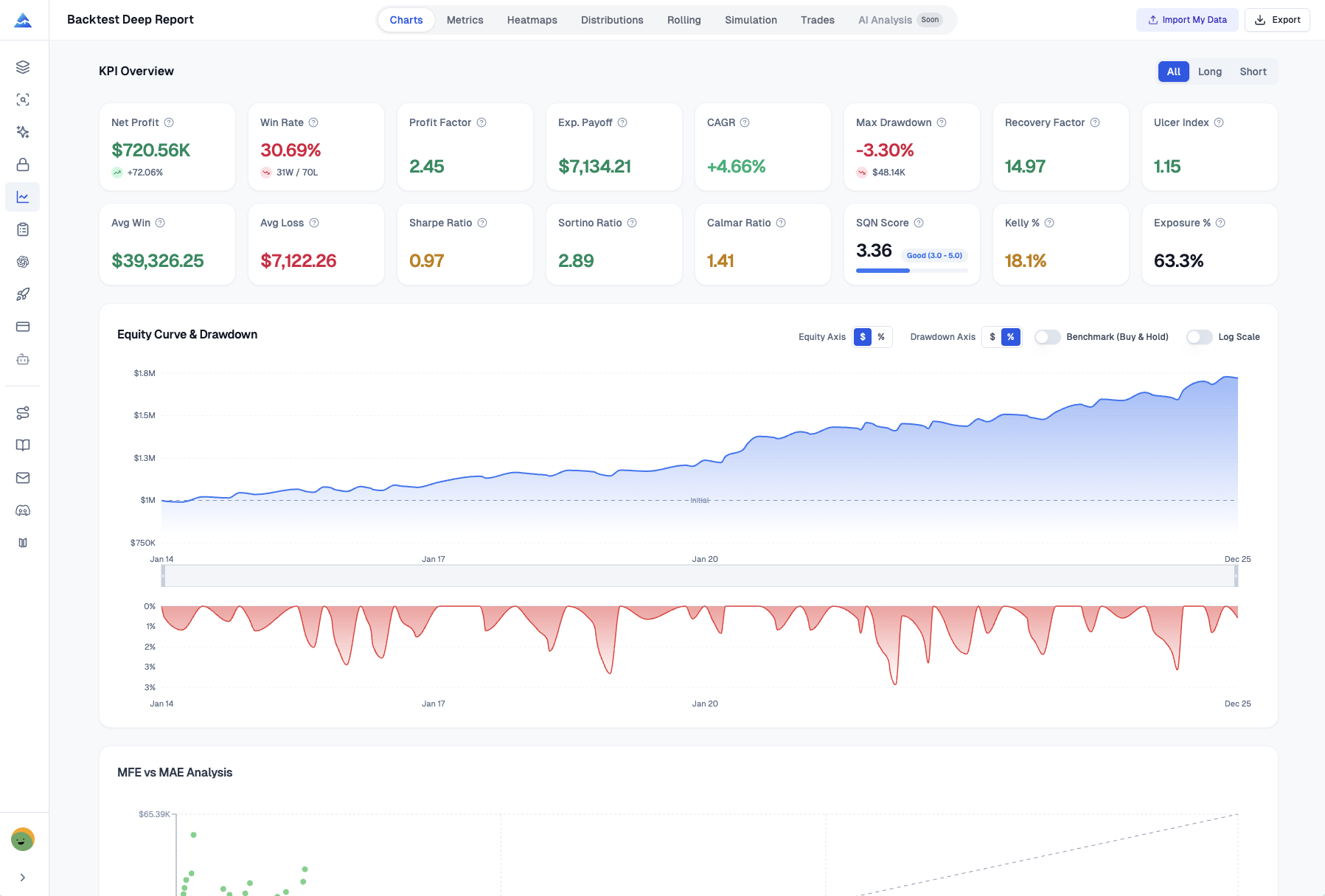
- Core Performance: Win Rate and Profit Factor show the balance between how often you win and how much you win versus lose.
- Risk-Adjusted Returns: The Sharpe Ratio tells you if returns come from smart decisions or just taking on too much risk.
- Trade Analysis: MAE (Maximum Adverse Excursion) and MFE (Maximum Favorable Excursion) show how much each trade moved for and against you before closing. This is gold for refining exits, similar to how the Best Exit Indicator TradingView: Complete Guide to Maximizing Your Trading Profits helps optimize exits directly on the chart.
- Strategy Breakdown: It should answer: "Which specific setups are actually working for me?" Filter by strategy, symbol, or time of day to see what's profitable and what's noise.
- Visual Analytics: Humans process visuals fast. Look for PnL charts, equity curves, and a trading calendar. Seeing performance graphically reveals patterns like drawdown periods or consistently strong days that tables hide.
3. Builds Your Discipline: Psychological & Automated Tracking
The best journals work on the mindset behind the trades.
- Psychological Tracking: Simple logs for your mood, plan adherence, and mistakes help you spot emotional patterns. Do you overtrade when bored? Do you cut winners short after a loss? The Pineify Trading Journal handles this well with its diary feature.
- Automated Reports: The app should generate weekly or monthly summaries so you get a regular snapshot of progress without manual compilation.
I haven't found a single app that nails all three categories perfectly. Pineify is strongest on psychology and pricing, TraderSync wins on automation, and TradesViz is the data nerd's playground. You'll probably end up picking two out of three.
Top Trading Journal Apps for 2026
Pineify Trading Journal
If monthly subscriptions annoy you as much as they annoy me, Pineify Trading Journal stands out. Pay once, use it forever. It blends professional-grade analytics with tools that help you understand your habits.
Four sections work together:
- Strategies — Outline your trading plans. Set entry and exit rules, create pre-trade checklists, and see each strategy's Win Rate and Profit Factor.
- Diary — Log your mood and confidence, rate how well you stuck to your plan, jot down lessons learned, and attach chart screenshots.
- Sessions — Group trades by time of day (London Open, your custom sessions). Straightforward way to check if you're more profitable at certain hours.
- Reports — Automatic weekly and monthly performance summaries broken down by symbol, long/short, and strategy, plus your best and worst trades.
Pineify covers Net PnL, Win Rate, Sharpe and Sortino Ratios. You can view daily PnL on a chart, track performance by tags, and see a Trading Calendar. A nice touch: separate journals for different accounts or strategies. It also tracks partial closes with weighted average math, which I haven't seen done as cleanly anywhere else.
The catch: it's manual-first. You type your trade reasons, which builds memory and understanding. Then the app crunches the numbers to show you patterns. I prefer this approach for my swing trading on SPY and AAPL because the act of typing helps me remember. But if you make 50+ trades a day, manual logging gets old fast. Pricing starts at $99 for Plus and $259 for Expert, one-time, no recurring fees.
Tradervue
Tradervue has been around for years. I tested it back in 2023. Its biggest strength is importing from over 80 brokers. Once trades are in, you get deep stats, entry/exit overlays on TradingView charts, and MFE/MAE metrics. It covers stocks, options, futures, and forex, and has features for coaches mentoring other traders. I found its psychology tracking limited, just tags and basic notes. For a pure data person it works, but I missed the structured reflection.
TraderSync
TraderSync is the most automated option here. It pairs a full-featured journal with an AI coach called Cypher and includes market replay with 250-millisecond precision, which day traders love. It imports from 700+ brokers. The reporting is detailed enough to tell you if you trade better before lunch. My issue: the top tier costs $79.95/month. That's nearly $960 a year. I'd only recommend it if you're consistently profitable and the AI feedback directly pays for itself.
Edgewonk
Edgewonk focuses on discipline and advanced stats. Its "Tilt Meter" helps you spot when emotions affect your trades. It calculates R-multiples and Maximum Adverse Excursion automatically. The interface feels dated and I haven't used it long enough to form a deep opinion, but the tilt tracking is genuinely clever. Good for traders who want a no-frills numbers-heavy approach to consistency.
TradesViz
TradesViz offers incredible depth. It supports stocks, forex, options, futures, and crypto. The filtering is granular, it handles multiple accounts, and the built-in charting is the most powerful I've seen in any journal. Expect a learning curve. I spent two weekends setting it up properly. For total control over your data analysis, TradesViz is unmatched. Just know you'll invest time before seeing returns.
Here's how these tools compare side by side:
| Feature | Pineify | Tradervue | TraderSync | Edgewonk |
|---|---|---|---|---|
| Pricing Model | One-time lifetime | Subscription | Subscription | One-time |
| Broker Auto-Import | Manual-first | 80+ brokers | 700+ brokers | Manual |
| AI Analysis | Coming soon | No | Yes (Cypher) | No |
| Psychology Tracking | Diary + mood | Limited | Limited | Tilt Meter |
| Strategy Tracking | Yes (checklists) | Tag-based | Tag-based | Yes |
| Auto Reports | Weekly & monthly | Manual | Yes | Yes |
| Partial Close Support | Yes | Yes | Yes | Yes |
| Multi-Journal | Yes | No | No | No |
The right pick depends on what matters most: one-time fee, broker integration, AI insights, or psychology focus.
Why Switching to a Trading Journal App Makes Sense Today
Trading feels more competitive now than it did two years ago. Prop firm challenges, algorithms, tighter spreads. The real edge is knowing yourself, your habits, your best setups. That comes from self-awareness and consistency, not market analysis alone. I've read the Trading Journal Guide: The Essential Tool for Trading Success and it makes the same point: traders who pull ahead spot their own patterns.
Which setups actually work for you? When are you sharpest? Improving means building on these personal insights, and that's nearly impossible with scattered spreadsheets.
Dedicated apps remove the friction. Your weekly review isn't another chore. It's just there, ready when you are. That's the difference between a habit that sticks and one that fades.
Frequently Asked Questions
What is a trading journal app?
A trading journal app records and analyzes your trades automatically. It tracks win rate, profit factor, and behavioral patterns, replacing manual spreadsheets with insights you'd miss otherwise.
Should I use manual trade logging or auto-import?
Depends on your goals. Auto-import saves time and cuts data entry errors, ideal for high-volume traders. Manual logging, like Pineify's approach, forces you to reflect on each trade's reasoning, which builds discipline. In my experience, combining both works best.
Which trading journal app is best for day traders?
For day traders and scalpers, TraderSync offers market replay with 250-millisecond precision and AI coaching. Tradervue provides deep statistical reports with MFE/MAE analysis. I prefer Pineify's structured diary for building discipline through daily reflection.
Can trading journal apps track options, futures, and crypto?
Yes. TraderSync, TradesViz, and Tradervue all support stocks, options, futures, forex, and major cryptocurrencies. You can keep one unified journal across all your markets, which I've found simplifies the review process significantly.
Does Pineify's trading journal require a subscription?
No. It's included in the Advanced and Expert plans as a one-time lifetime payment starting at $99. No recurring fees. I honestly haven't found another tool at this price that offers the same depth.
What metrics should I focus on in my trading journal?
Beyond win rate, pay attention to Profit Factor, whether your wins cover your losses, and R-Multiple, your risk-adjusted return per trade. These tell you if your strategy is sound. A good journal calculates them automatically, so you don't have to.
How do trading journal apps improve trading psychology?
They track mood, plan adherence, and summarize performance automatically. You spot patterns like overtrading when bored or cutting winners short after a loss. I caught my own tendency to revenge trade after two red days just by reviewing my weekly journal reports.