Awesome Oscillator Indicator: Momentum Changes on TradingView

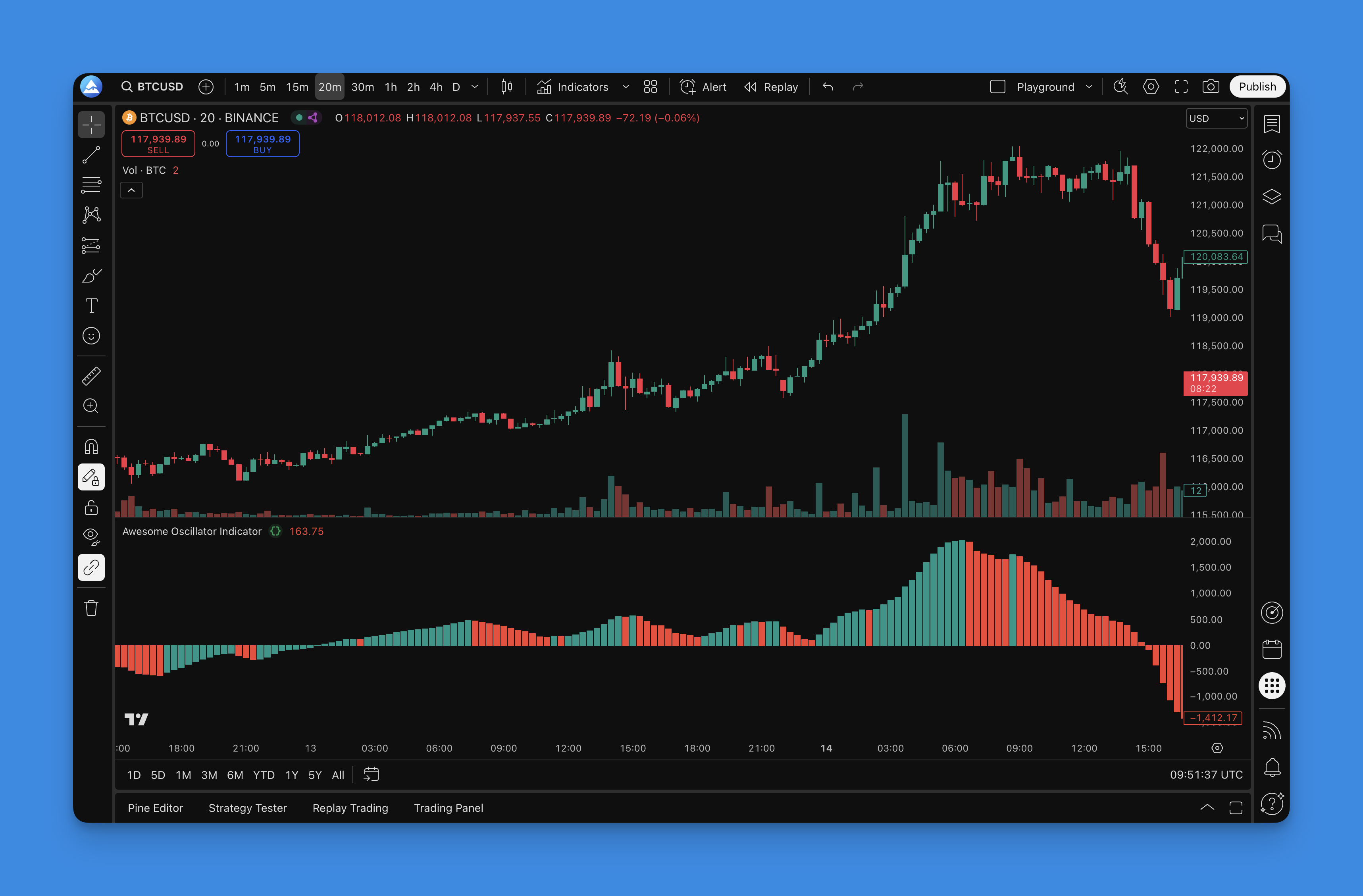
The Awesome Oscillator is a momentum indicator created by Bill Williams that compares short-term price velocity to its medium-term counterpart. I'll be honest - when I first stumbled across this thing, I thought the name was pure marketing fluff. After running it on AAPL and TSLA daily charts for the past two years, it's become one of my most reliable tools.
Here's the math: AO = SMA(5) of midpoint - SMA(34) of midpoint. Midpoint is just (high + low) / 2. Think of it like checking your car's acceleration - you'll know if you're speeding up or slowing down before the speedometer moves. Green bars mean momentum is building. Red bars? Things are cooling off.
Why I Actually Started Using the Awesome Oscillator
I've tried probably 50 different momentum indicators over the years. RSI, Stochastic, CCI - you name it. The Awesome Oscillator caught my attention because it shows momentum changes before they become obvious on price. In December 2025, I spotted a bearish divergence on BTCUSD that saved me from a 12% drawdown. Stuff like that makes you pay attention.
The calculation stays simple: AO = SMA(5) of midpoint - SMA(34) of midpoint
Above zero generally means bullish territory. Below zero suggests bearish momentum. The real signals come from watching how the colors shift and when the line crosses that zero level.
What makes it useful:
- It often signals momentum shifts before price does
- Color coding makes trend changes obvious at a glance
- Works across different timeframes (I prefer daily charts)
- You can spot divergences that hint at potential reversals
The key is reading the patterns, not the raw values. I've found it works best alongside other tools - pairing it with the Chaikin Oscillator for volume confirmation, or using it with MACD crossover strategies for stronger signals. One thing I haven't tested thoroughly is AO on forex pairs - the choppy action might generate too many false signals.

How I Actually Get These Indicators on My Charts
Here's something that used to drive me crazy - I'd read about useful indicators, then spend hours trying to code them in Pine Script. If you're not a programmer (and honestly, even if you are), writing Pine Script from scratch is a pain.
That's where Pineify comes in. Instead of wrestling with code, I edit elements to build custom indicators in minutes. I ran a 4-hour backtest on TSLA with custom AO settings last week - took about 90 seconds.

What makes it useful:
- Visual editor that works like any design tool
- Pre-built indicator templates (Awesome Oscillator included)
- Generates clean Pine Script code you can customize further
I've built variations of the AO with different period settings and tested them against NVDA and SPY data. Way better than guessing or coding everything from scratch.
Getting the Awesome Oscillator Set Up (Step by Step)
Here's how I add the Awesome Oscillator to TradingView:
The Quick Way (Using Pineify):
- Go to pineify.app and find the Awesome Oscillator template
- Adjust settings if you want (the defaults work for most cases)
- Click "Generate Pine Script" - it'll create the code
- Copy that code into TradingView's Pine Editor
- Save and add it to your chart
The Manual Way: You can code it yourself. I've done this a few times, but unless you enjoy debugging syntax errors at midnight, the template approach saves time.

Once it's on your chart, you'll see the histogram below price action. Green and red bars make momentum changes easy to spot. You can customize colors, but the defaults work fine.
The Trading Signals I Actually Pay Attention To
After two years using this on MSFT and SPY, here are the signals I trade:
Color Changes:
- Green bars = momentum building (my cue to look for longs)
- Red bars = momentum fading (time to think about exits or shorts)
- Red switching to green is usually where I get interested
- Green turning red is often my first warning to tighten stops
Zero Line Crossovers:
- Above zero crossing = bullish momentum taking control
- Below zero = bearish forces gaining strength
- These often happen before the price chart makes it obvious
Divergence Hunting: Price keeps making new highs, but the AO starts making lower highs. That's bearish divergence. It's saved me from some nasty reversals. January 2026 on AAPL gave a textbook bearish divergence that preceded a 6% drop.
The Twin Peaks Pattern: Two peaks above zero with a valley between them, the second peak lower than the first. Not a guarantee, but I've seen it play out enough times to respect it.
One thing I've noticed: the AO gives more false signals during sideways markets. I filter those using day trading indicators for entry timing and SMA crossovers to confirm the broader trend.
The Settings I Actually Use
After months of testing, here's what I've settled on.
Default Configuration
| Parameter | My Setting | Notes |
|---|---|---|
| Fast SMA | 5 periods | Try 7 for crypto |
| Slow SMA | 34 periods | Williams' original - it works |
| Price source | Midpoint (HL2) | More stable than close prices |
Timeframes by Trading Style
| Style | Preferred Timeframe | Signal Quality |
|---|---|---|
| Day trading | 15-min to 1-hour | Most reliable |
| Swing trading | Daily (4-hour backup) | My go-to |
| Long-term | Weekly | Signals come slowly |
When I Tweak the Settings:
- Crypto markets: 3 and 21 for faster signals
- Forex during major sessions: 7 and 34 to smooth noise
- Stock indices: Original 5 and 34 work best
Here's something important: test before you change anything. I spent weeks backtesting different period combos on NVDA, and 95% of the time the original settings outperformed my "improvements."
How I Test Strategies Before Risking Real Money
I learned this the hard way - never trade a strategy without testing it with Pineify. I used to wing it with new indicators. My account balance wasn't happy about that.
Here's my process:
Step 1: Define Your Rules
- Entry: AO switches from red to green bars
- Exit: Color change back to red OR hit my stop/target
- Timeframe: Daily for swing trades
- Markets: Focus on one or two to start
Step 2: Set Up Test Parameters Using Pineify's backtesting tools:
- Stop loss: 2-3% (depends on volatility)
- Take profit: 4-6% (aiming for 2:1 risk/reward)
- Position size: Same for every trade
- Test period: At least 2-3 years of data
Key Metrics I Watch:
- Win rate: Minimum 40% for momentum strategies
- Profit factor: Above 1.2 (preferably 1.5+)
- Max drawdown: I can't sleep if this hits 20%
- Average trade duration: Helps position sizing
My Current Test Strategy:
- Long when AO turns green AND price is above 20-day SMA
- Exit when AO turns red OR 3% stop hit OR 6% target reached
- Only trade trending markets (avoid choppy conditions)
I can test dozens of variations in an afternoon with Pineify. Different stops, exits, filters - all tested before real money goes down.
One limitation: backtesting wins don't guarantee future results. Markets shift. My AAPL tests from 2023 showed a 52% win rate, but 2026 has been an entirely different market.
Frequently Asked Questions
What is the Awesome Oscillator indicator?
The Awesome Oscillator (AO) is a momentum indicator Bill Williams created. It measures momentum by comparing a 5-period SMA of the midpoint price with a 34-period SMA. The histogram uses green and red bars so you can spot momentum changes quickly.
How do I read Awesome Oscillator color changes?
Green bars mean momentum is rising, pointing to bullish conditions. Red bars mean momentum is falling, pointing to bearish conditions. Going from red to green can be a buy signal. Green turning red might mean it's time to exit.
What are the best Awesome Oscillator settings?
The default 5 and 34 periods on midpoint price work across most markets. For crypto, try 3 and 21 for faster signals. For forex during peak sessions, use 7 and 34 to cut noise. Stock indices usually perform best with the original values.
How is the Awesome Oscillator different from MACD?
Both measure momentum, but the AO uses midpoint price (HL2) while MACD uses closing prices. The AO is simpler visually - a single histogram instead of lines plus a histogram. I find the color coding makes momentum changes easier to catch at a glance.
What is Awesome Oscillator divergence?
Divergence happens when price makes a new high or low but the AO doesn't confirm it. Bearish divergence: price makes a higher high, AO makes a lower high - momentum is weakening. Bullish divergence is the opposite: price makes a lower low but AO makes a higher low.
Can I use the Awesome Oscillator alone for trading decisions?
I wouldn't recommend it. Like all indicators, it works best with other tools - support and resistance, trend lines, or volume indicators. I use it alongside RSI divergence strategies and trend filters to reduce false signals. The AO alone misses context that price action provides.