Anchored VWAP in Pine Script: Custom Indicator With Deviation Bands

Ever been in a trade where you're just sitting there wondering, "What's a fair price for this thing?" Yeah, me too. Anchored VWAP (Volume Weighted Average Price) is a Pine Script indicator that measures fair value from any user-selected starting point instead of resetting at each session open. I started using anchored VWAP on SPY in early 2022 and still reference it on every daily chart I pull up. Unlike regular VWAP, you control where the calculation begins - earnings releases, breakouts, market opens, whatever makes sense for your strategy.
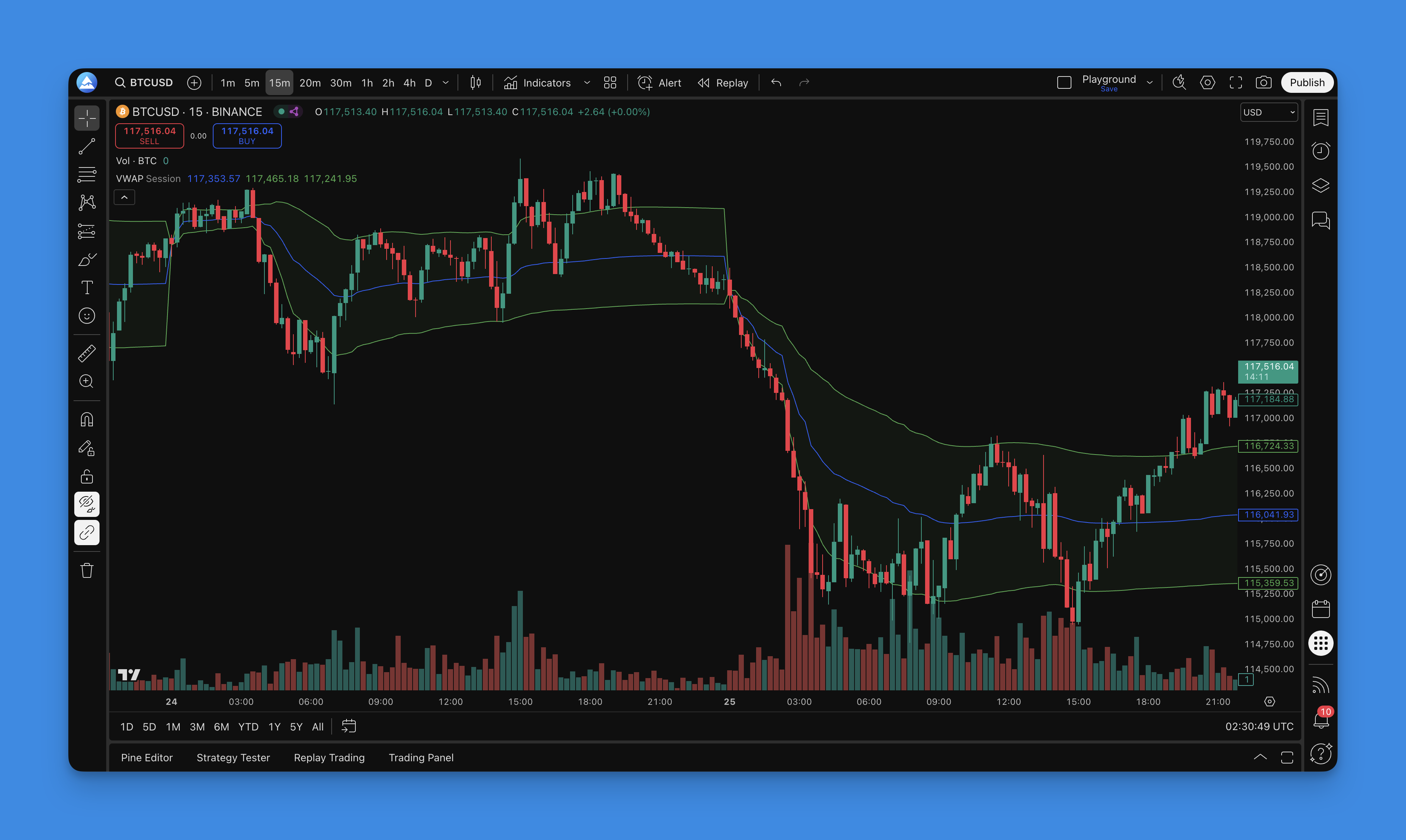
What Is Anchored VWAP?
Regular VWAP calculates the average price weighted by volume from market open to close, then resets the next day. Simple, predictable, but sometimes not what you need.
Anchored VWAP works differently. You choose the starting point. Want to see the volume-weighted average price since that earnings announcement that moved the stock 20%? Anchor it there. Curious about fair value since that major support level broke? You can do that too.
The math stays the same as regular VWAP - cumulative volume-weighted price - but you control when the calculation starts. That gives you a more relevant reference point for the events that matter most to your strategy.
If you're new to Pine Script, check out our Pine Script tutorial guide to get familiar with the basics before diving deeper.
The Real-World Benefits of Anchored VWAP
Here's why I actually use this indicator in my daily trading:
Dynamic Support and Resistance
Static horizontal lines show you where price has been. Anchored VWAP shows you where fair value is since a specific event. I anchored this to AAPL's September 2023 iPhone launch event, and the line held support three times over the following two weeks. The line that forms often acts as a magnet for price action.
Context-Specific Analysis
Regular VWAP treats every session equally. Markets don't work that way. By anchoring to specific events, you focus on the volume and price action that actually matters for your current analysis.
Better Entry and Exit Timing
I've found that price tends to respect Anchored VWAP levels more than arbitrary support and resistance lines. On TSLA's Q4 2024 delivery miss, I set my anchor at the gap-open level and watched price respect it for five sessions. When price trades above the anchored line, the bias from that anchor point is bullish. Below it? Bears have been in control since that event.
Institutional Footprint Tracking
Big players have reference prices from significant events. They might be using similar anchor points for their position management. Anchored VWAP potentially shows you the same levels larger traders watch. Volume analysis can reveal a lot about market structure - our Pine Script volume guide shows how to layer volume tools into your analysis.

Building Your Anchored VWAP Indicator in Pine Script
The VWAP formula is straightforward: VWAP = Sum(Typical Price x Volume) / Sum(Volume), where Typical Price = (High + Low + Close) / 3. The anchor point controls when accumulation starts.
Basic Anchored VWAP Script
Here's a clean, straightforward implementation:
//@version=5
indicator("Anchored VWAP", overlay=true)

// Input for anchor date and time
anchorTime = input.time(timestamp("01 Jan 2024 09:15 +0530"), title="Anchor Date/Time")

// Variables to track anchor point and cumulative values
var int anchorBarIndex = na
var float cumulativeTPV = 0.0  // Total Price * Volume
var float cumulativeVolume = 0.0

// Detect anchor point
if na(anchorBarIndex) and time >= anchorTime
    anchorBarIndex := bar_index

// Calculate anchored VWAP
if not na(anchorBarIndex) and bar_index >= anchorBarIndex
    typicalPrice = (high + low + close) / 3.0
    cumulativeTPV += typicalPrice * volume
    cumulativeVolume += volume
    anchoredVWAP = cumulativeTPV / cumulativeVolume
else
    anchoredVWAP = na

// Plot the line
plot(anchoredVWAP, color=color.blue, linewidth=2, title="Anchored VWAP")
Enhanced Version with Standard Deviation Bands
Once you're comfortable with the basic version, here's an enhanced script with deviation bands:
//@version=5
indicator("Enhanced Anchored VWAP", overlay=true)

// Inputs
anchorTime = input.time(timestamp("01 Jan 2024 09:15 +0530"), title="Anchor Date/Time")
stdDev1 = input.float(1.0, title="Standard Deviation 1", minval=0.1, maxval=5.0)
stdDev2 = input.float(2.0, title="Standard Deviation 2", minval=0.1, maxval=5.0)

// Variables
var int anchorBarIndex = na
var float sumTPV = 0.0
var float sumVolume = 0.0
var float sumTPVSquared = 0.0
var int barCount = 0

// Detect anchor point
if na(anchorBarIndex) and time >= anchorTime
    anchorBarIndex := bar_index

// Calculate values from anchor point
if not na(anchorBarIndex) and bar_index >= anchorBarIndex
    tp = (high + low + close) / 3.0
    sumTPV += tp * volume
    sumVolume += volume
    sumTPVSquared += tp * tp * volume
    barCount += 1

    // Calculate VWAP
    vwap = sumTPV / sumVolume

    // Calculate standard deviation
    variance = (sumTPVSquared / sumVolume) - (vwap * vwap)
    stdDeviation = math.sqrt(variance > 0 ? variance : 0)

    // Calculate bands
    upperBand1 = vwap + (stdDeviation * stdDev1)
    lowerBand1 = vwap - (stdDeviation * stdDev1)
    upperBand2 = vwap + (stdDeviation * stdDev2)
    lowerBand2 = vwap - (stdDeviation * stdDev2)
else
    vwap = na
    upperBand1 = na
    lowerBand1 = na
    upperBand2 = na
    lowerBand2 = na

// Plot everything
plot(vwap, color=color.blue, linewidth=2, title="Anchored VWAP")
plot(upperBand1, color=color.gray, title="Upper Band 1σ")
plot(lowerBand1, color=color.gray, title="Lower Band 1σ")
plot(upperBand2, color=color.red, title="Upper Band 2σ")
plot(lowerBand2, color=color.red, title="Lower Band 2σ")

// Fill between bands for better visualization
fill(plot(upperBand1), plot(lowerBand1), color=color.new(color.blue, 95))
Strategic Applications: How to Actually Trade with Anchored VWAP
Trend Direction and Strength
The simplest use is as a trend filter. Price consistently above the anchored line means buyers have been in control since your anchor point. Below it, sellers have had the upper hand.
Pay attention to how price interacts with the line. Does it bounce off like concrete? Or slice through like butter? The reaction tells you a lot about the level's strength.
Entry and Exit Signals
I like Anchored VWAP alongside other indicators for entries. Some setups I watch for:
- Pullback entries: Price pulls back to the VWAP in an uptrend - good spot to add positions or enter new ones.
- Breakout confirmation: Price chops around the VWAP then breaks with volume - could signal a new move starting.
- Mean reversion: Price stretches beyond the 2σ bands - it often snaps back.
For more entry strategies, see our guide on MACD crossover strategies in Pine Script, which pairs well with VWAP analysis.
Risk Management
One of my favorite uses is position sizing. If I'm long and price sits well above the anchored VWAP, I size up. If it's struggling around the VWAP or below it, I keep positions smaller and take profits quicker.
The standard deviation bands are especially useful here. Price beyond the 2σ bands is relatively rare, so these work as natural profit-taking levels. I prefer using the 1σ band as a re-entry trigger on pullbacks rather than the 2σ level, since 2σ touches are less frequent on intraday charts.
Timeframe Considerations
The anchor you choose needs to match the timeframe you're trading. Here's what I've found works:
| Timeframe | Best Use Case | Recommended Anchor |
|---|---|---|
| 1-min to 5-min | Intraday scalping | Session open, news event |
| 15-min to 1-hour | Swing trading | Major breakout, earnings release |
| Daily | Position trading | Earnings, structural break |
| Weekly | Long-term trend | Major support/resistance breach |
A 5-minute chart anchored to a session open gives very different signals than the same stock on a daily chart anchored to quarterly earnings. I haven't tested anchored VWAP on crypto markets extensively, so I can't speak to how it performs on 24/7 assets.
Combining Anchored VWAP with Other Indicators
With Moving Averages
Combining Anchored VWAP with traditional moving averages gives multiple perspectives on the same price action. Anchor VWAP to a significant event while watching key MAs like the 20 or 50-period EMA. When these align, they often create stronger support or resistance zones.
For more on combining MAs with other indicators, our MACD crossover strategy guide covers similar territory.
With Volume Analysis
Since VWAP is inherently volume-weighted, it pairs naturally with other volume-based indicators. Consider adding volume profile, On-Balance Volume, or other volume oscillators for a more complete picture of volume dynamics around your anchor point.
With Momentum Oscillators
Momentum indicators like RSI or Stochastic can help you time entries and exits around your Anchored VWAP levels. Price approaching the VWAP from below while RSI shows oversold conditions? That's a higher-probability long setup.
Common Mistakes and How to Avoid Them
Too Many Anchor Points
I see traders who anchor VWAP to every minor swing high and low. That's like having ten speedometers in your car - just confusing. Stick to truly significant events: earnings, major news, clear breakout points, or session opens.
Ignoring the Context
Anchored VWAP isn't magic. A random anchor point with no significance produces a line with little predictive value. Always ask yourself: "Would other traders care about this anchor?"
Over-Reliance
No single indicator replaces good judgment. Don't trade based solely on VWAP interactions. Consider market structure, volume, momentum, and overall conditions.
Ignoring Timeframe Differences
What works on a 5-minute chart may not work on a daily chart. The anchor's significance changes with your timeframe. Always match the anchor horizon to your trading horizon.
Advanced Tips
Dynamic Anchoring
Instead of manually setting anchor points, you can create scripts that automatically anchor to gap opens, volume spikes, or volatility expansions. Removes the subjectivity but requires more complex logic.
Multiple Timeframe Analysis
Use Anchored VWAP across timeframes simultaneously. A longer-term anchor from quarterly earnings on your daily chart, plus a shorter-term anchor from the morning gap on your intraday charts.
Alert Integration
Set up alerts when price crosses your Anchored VWAP or reaches the standard deviation bands. You stay aware of key levels without watching charts all day.
If you're looking to build a stronger Pine Script foundation, our Pine Script course guide covers creating more sophisticated trading tools.
Anchored VWAP provides context that regular technical analysis misses. It answers one question: "What's been fair value since this important thing happened?" The key is selecting meaningful anchor points. Start simple with the basic implementation, get comfortable with how price interacts with the line, then add complexity with standard deviation bands and indicator combinations.
Frequently Asked Questions
What is Anchored VWAP in Pine Script?
Anchored VWAP (Volume Weighted Average Price) is a Pine Script indicator that calculates the volume-weighted average price starting from a user-defined anchor point rather than from market open. Unlike standard VWAP which resets daily, Anchored VWAP lets traders choose any starting point - such as an earnings report, breakout level, or significant market event - to measure fair value from that moment forward.
How do I set an anchor point in Pine Script?
To set an anchor point in Pine Script, use the input.time() function to create a date/time input, then compare each bar's timestamp against this anchor time. When the current bar's time is greater than or equal to the anchor time, the calculation begins. The basic syntax is: anchorTime = input.time(timestamp("01 Jan 2024 09:15 +0530"), title="Anchor Date/Time"), followed by a conditional check to detect the anchor bar.
How is Anchored VWAP different from regular VWAP?
Regular VWAP automatically resets at the beginning of each trading session, calculating the volume-weighted average price from market open to close. Anchored VWAP, on the other hand, starts from a custom point chosen by the trader and continues accumulating until reset. This makes Anchored VWAP more flexible for event-driven analysis, as it can measure fair value from significant market events rather than arbitrary session boundaries.
What are the best anchor points for trading?
The most effective anchor points include: earnings announcements, major support or resistance breakouts, gap opens at market start, significant news events, and swing highs or lows on higher timeframes. The key is choosing points that other traders are likely to also recognize, as Anchored VWAP levels gain significance when they represent widely watched reference prices.
Can I add standard deviation bands to Anchored VWAP?
Yes, you can enhance Anchored VWAP with standard deviation bands by tracking the sum of squared typical prices and cumulative volume. Once you have the VWAP value, calculate variance as (sumTPVSquared / sumVolume) - (vwap * vwap), then take the square root to get standard deviation. Common band levels include 1 sigma and 2 sigma, which can serve as overextension indicators for potential mean reversion trades.
What are the limitations of Anchored VWAP?
The main limitations include: (1) the indicator is only as good as the anchor point chosen - a meaningless anchor produces a meaningless line; (2) Anchored VWAP is a lagging indicator based on historical data; (3) it works differently across timeframes - what is significant on a 5-minute chart may be irrelevant on a daily chart; and (4) it should not be used in isolation but rather as part of a broader analysis framework with other technical tools.