

Release Notes
Discover Pineify's latest release notes, featuring new indicators, enhanced functionalities, and updated pricing plans to elevate your trading experience.
Apr, 4, 2026
-
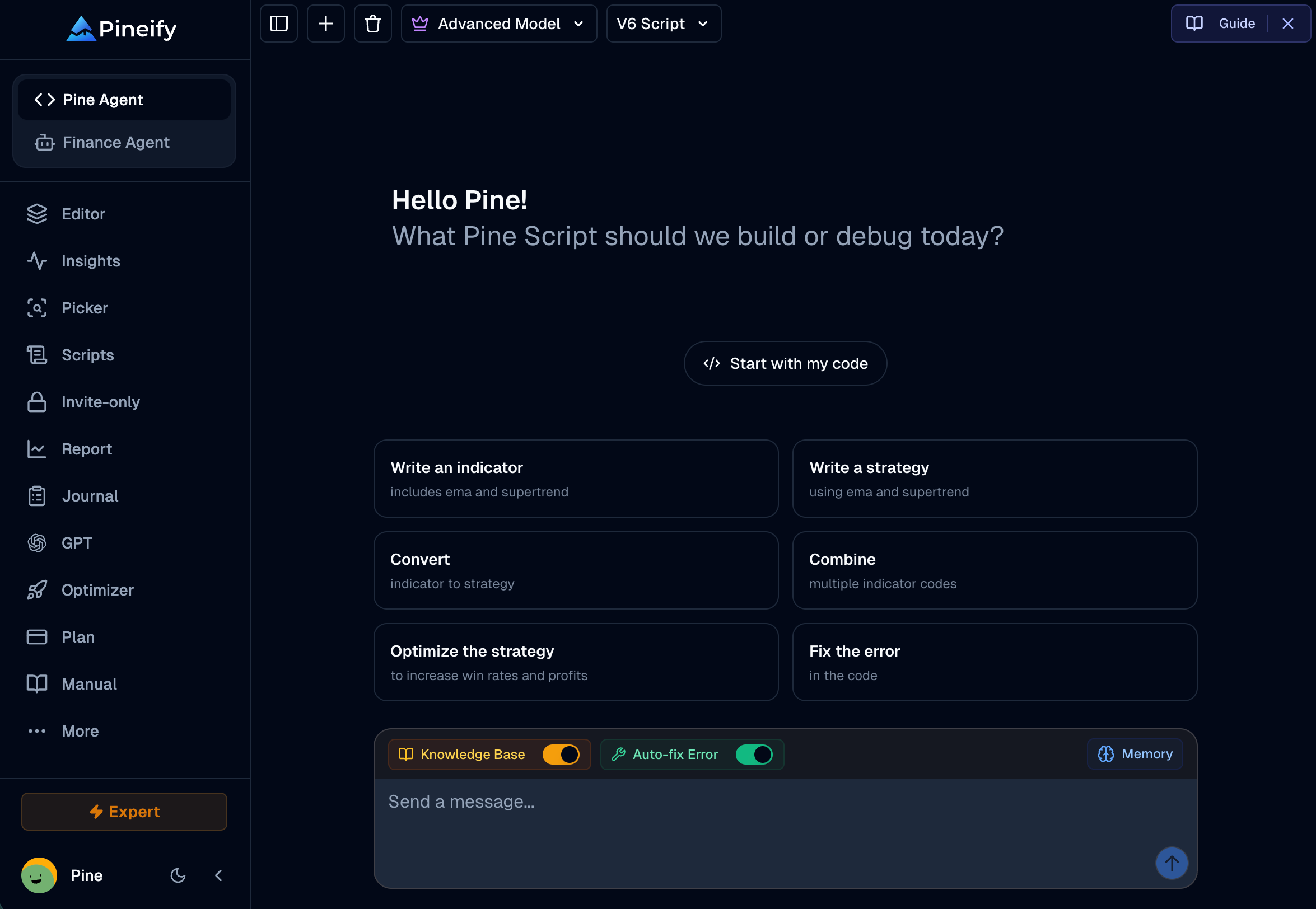
Sidebar UI Refresh & Agent Branding Update
-
We've polished the sidebar to make navigation more comfortable and intuitive:
- "Coding Agent" is now "Pine Script Agent": The name better reflects what it does — generating and fixing TradingView Pine Script.
- Clearer sidebar labels: The "Invited" section has been renamed to "Invite-only" for better clarity.
- Improved popover alignment: The "More" menu now aligns more naturally, reducing visual clutter.
- Smarter lock indicators: Both Pine Script Agent and Finance Agent now show a lock icon when your current plan doesn't include access, so you always know what's available at a glance.
- Smoother chat loading: The AI chat panel now shows a loading indicator while content is being prepared, instead of a blank screen.
Apr, 3, 2026
-
Market Insights — Institutional-Grade Market Intelligence Suite
-
A new all-in-one market intelligence dashboard combining four powerful modules:
- Options Flow: Real-time tracking of unusual options activity with smart money sentiment classification (Above Ask / Below Bid), advanced multi-dimensional filters, and expandable trade details with full Greeks.
- Market Tide: Net call vs. put premium time-series chart, sector heatmap with bullish/bearish coloring, Top Net Impact stock rankings, and KPI summary cards for instant sentiment reading.
- Dark Pool: Institutional block trade feed with size tiers (Block / Mega Block), NBBO-based buy/sell direction inference, and volume-at-price profile with Point of Control (POC) markers.
- Congress Trading: Full U.S. congressional stock trade disclosures with party, chamber, and ticker filters, late filing violation alerts (>45 days), and politician drill-down profiles.
Mar, 29, 2026
-
Dark Mode Support
-
Pineify now fully supports Dark Mode across the entire application. The interface automatically adapts to your system preferences, providing a comfortable viewing experience in low-light environments. All components, charts, and visualizations have been optimized for dark theme consistency.
Mar, 25, 2026
-
Syntax Check — Stability & Performance Fix
-
Resolved timeout issues and intermittent failures in the Pine Script syntax check tool, delivering faster and more reliable code validation.
Mar, 22, 2026
-
Supercharged Extension — Manual Recording & Optimizer Improvements
-
Manual Record: A new tab in the extension popup that lets you record backtest results as you manually adjust strategy parameters. Supports auto-record (captures every result change) and manual-record (click to capture) modes. Results are saved and viewable on the same results page as automated optimizations.
-
In-Page Controls: A clickable REC badge in the Strategy Tester report tabs shows live snapshot count and lets you stop recording without opening the popup. In manual mode, a Capture button appears in the strategy dialog footer.
-
CSV Export Fix: Resolved the "Unknown" timeframe in exported CSV filenames — now correctly shows the active chart interval (e.g.
1h,4h,D).
Mar, 21, 2026
-
Finance AI Agent — New: Web Search, Social Sentiment & People Lookup
-
Four new tools added to the Finance AI Agent, expanding its research capabilities beyond traditional financial data:
- AI Web Search (Perplexity): Ask any question and get real-time, AI-synthesized answers with cited sources from the live web.
- X / Twitter Search: Tap into live trader discussions — get AI-summarized sentiment, tweet cards with engagement metrics, and optional user-scoped search.
- Reddit Search: Surface the most relevant threads from investing communities (r/wallstreetbets, r/stocks, r/investing, etc.) with AI-summarized takeaways.
- People Profile Search: Look up CEOs, fund managers, analysts, or any public figure — get their bio, LinkedIn, GitHub, X, and website in one place.
Mar, 8, 2026
-
Finance AI Agent — Real-Time Market Data & AI-Powered Research
-
A new AI-powered financial research assistant built into the Pineify AI platform. Ask questions in natural language and get real-time, data-backed answers — live stock/forex/crypto quotes, financial statements, analyst estimates, SEC filings, earnings transcripts, and AI-powered stock screening. Covers stocks, forex, crypto, commodities, ETFs, and global indices.

Mar, 4, 2026
-
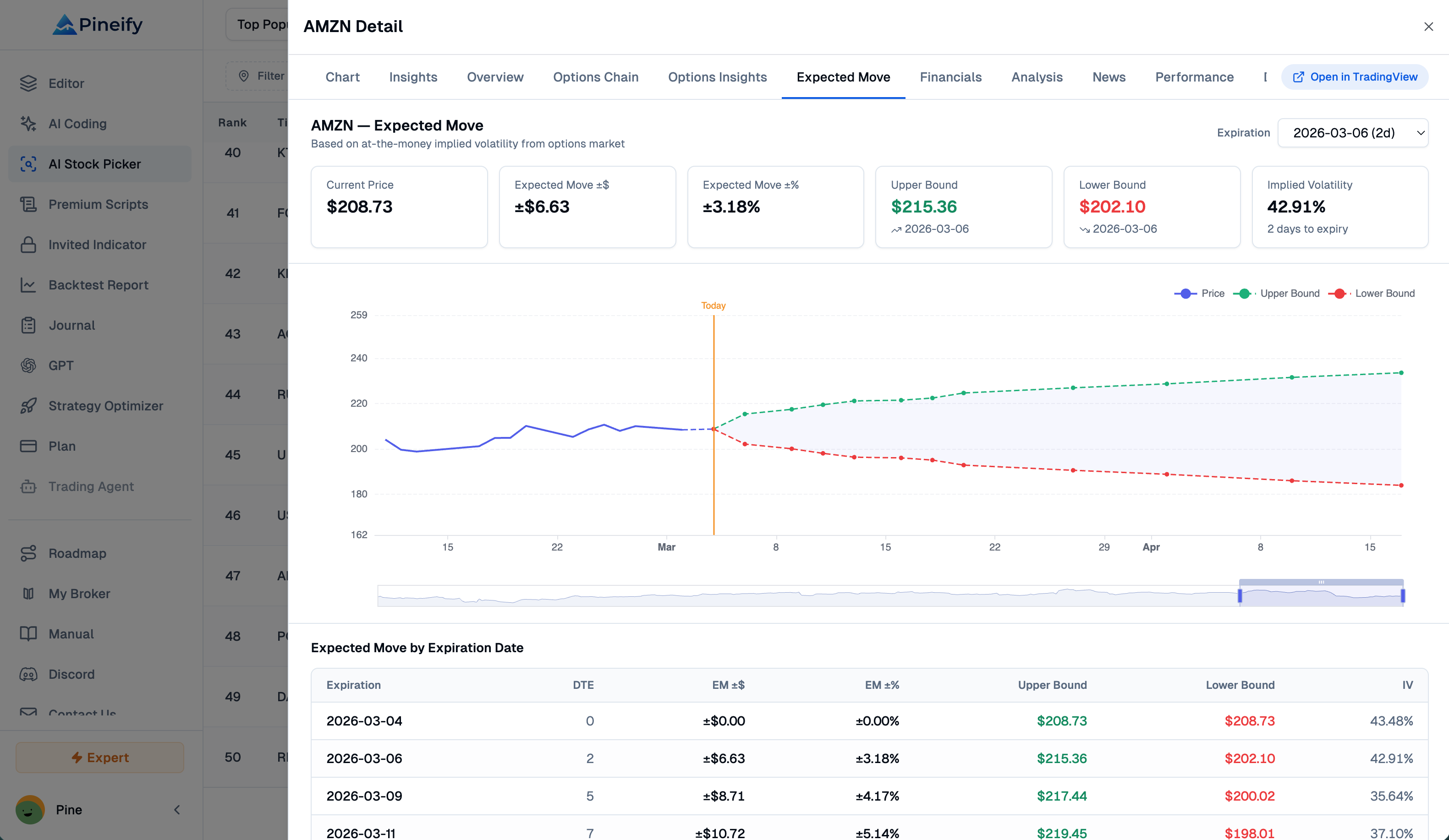
AI Stock Picker — Expected Move
-
Visualize IV-based expected price ranges for any stock by options expiration date. The Expected Move tab shows upper and lower price bounds derived from at-the-money implied volatility, with an interactive chart overlaying historical prices and projected ranges, plus a sortable data table for all expirations.
Feb, 29, 2026
-
Advanced Model Performance — Doubled Speed
-
The Advanced Model now delivers up to 2x faster output, so you can generate, test, and refine your trading strategies in record time.
Feb, 16, 2026
-
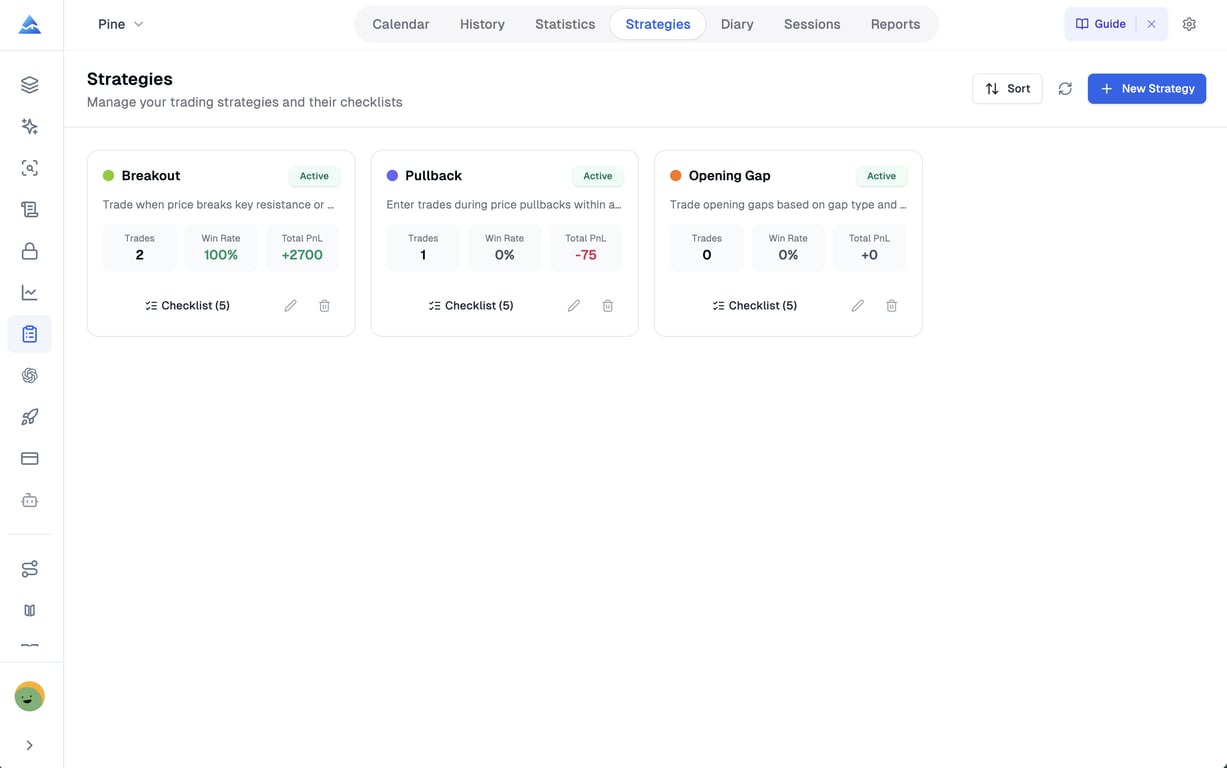
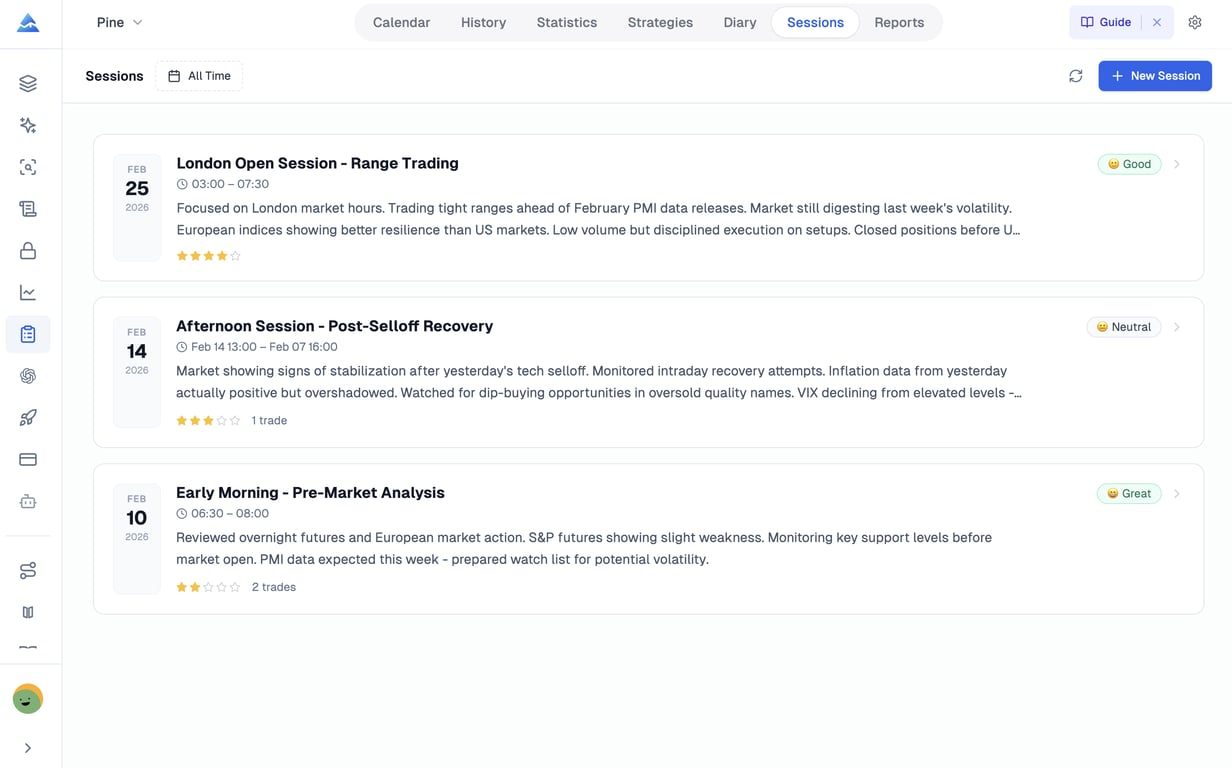
Trading Journal 2.0
-
Strategies — Define, Track, Optimize: Create structured trading strategies with pre-trade checklists. Every trade links to a strategy, so you can see exactly which setups are profitable and which ones to cut. Per-strategy Win Rate, Profit Factor, and PnL are calculated automatically.
-
Diary — Reflect, Learn, Grow: Write daily reflections with mood tracking, plan adherence ratings, and lessons learned. Attach screenshots for chart analysis. Over time, the diary builds a personal knowledge base that helps you spot emotional patterns affecting your trading.
-
Sessions — Structure Your Trading Day: Organize trades into time-based sessions — London Open, NY Session, or your own custom windows. Each session tracks aggregated PnL, trade count, mood, and performance rating, so you know when you trade best and when to sit out.
-
Reports — Data-Driven Performance Reviews: Auto-generated weekly and monthly reports break down your results by symbol, side, and strategy. Track progress over time with best/worst trade analysis, profit factor trends, and fee summaries — all without manual effort.

Feb, 7, 2026
-
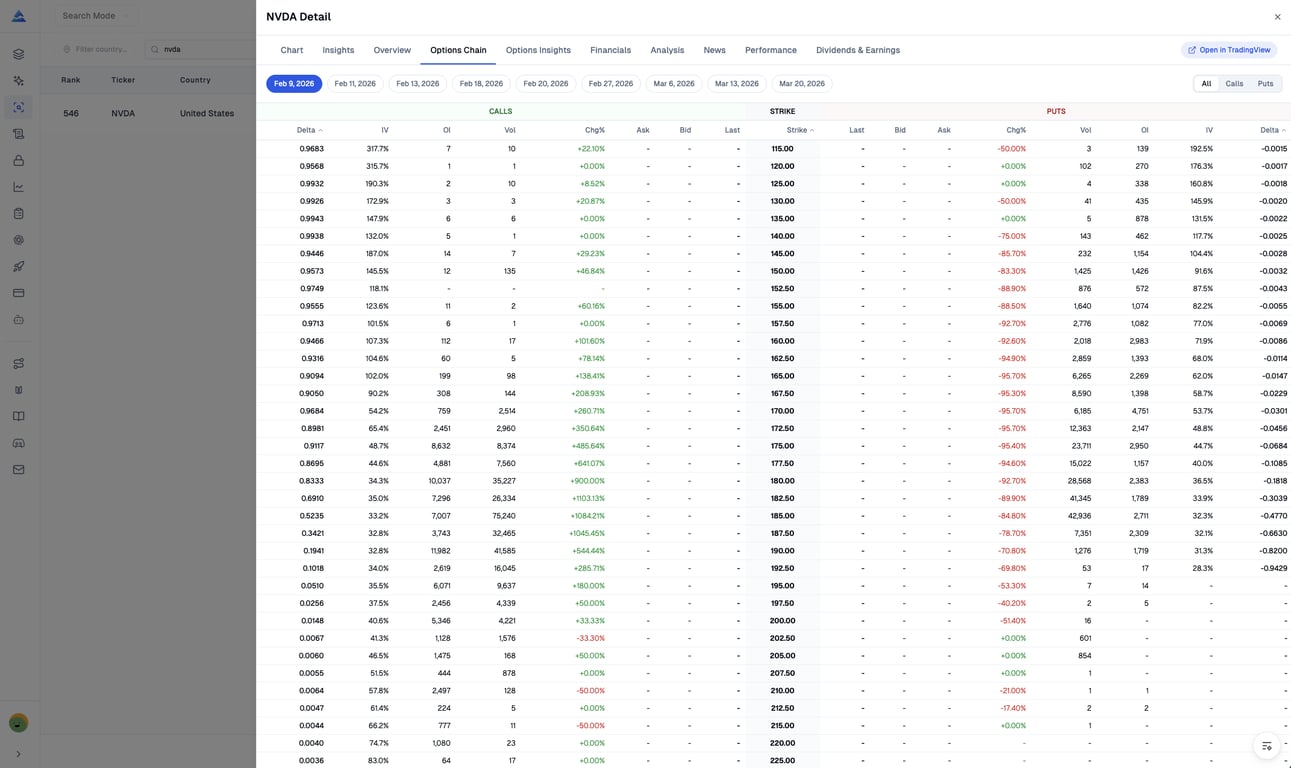
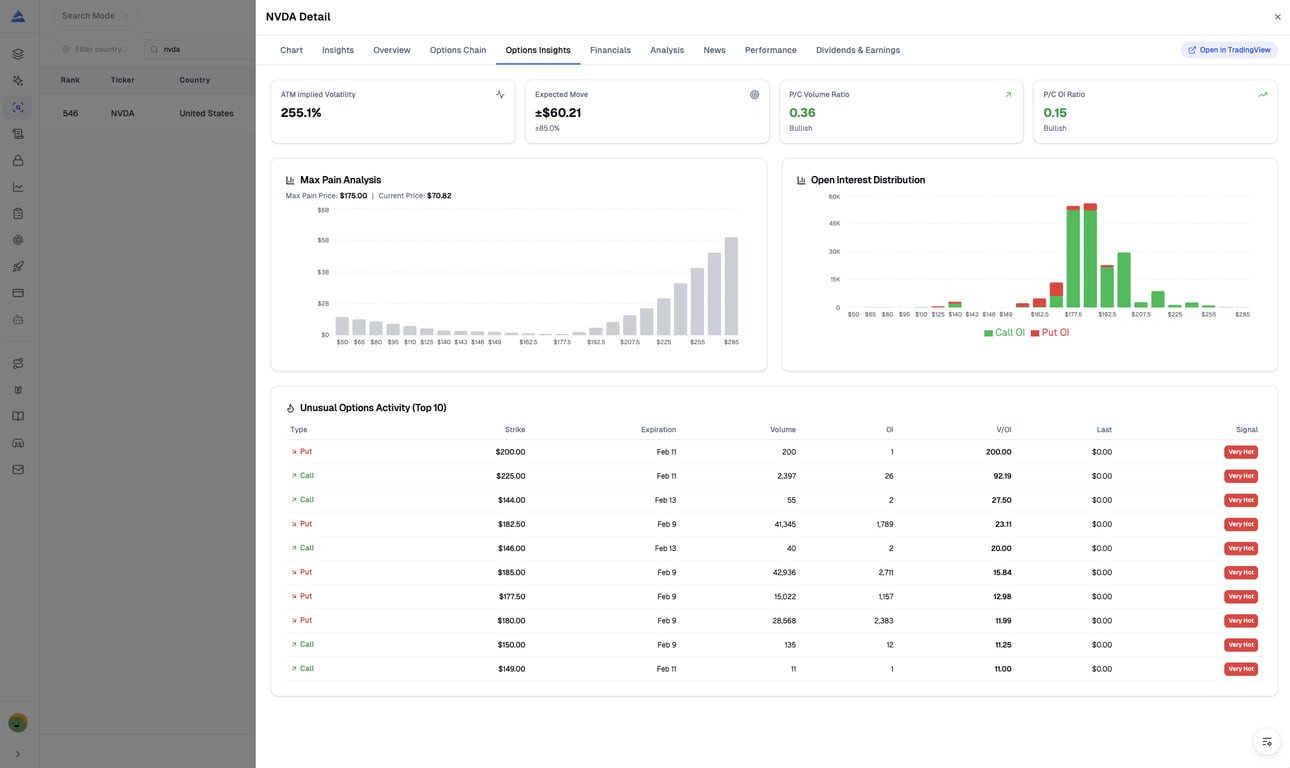
AI Stock Picker supports viewing options data and insights
-
Full options chain with data. View calls and puts side-by-side with precision.
-
AI-powered options analytics to spot smart money flow and gauge market sentiment.
-
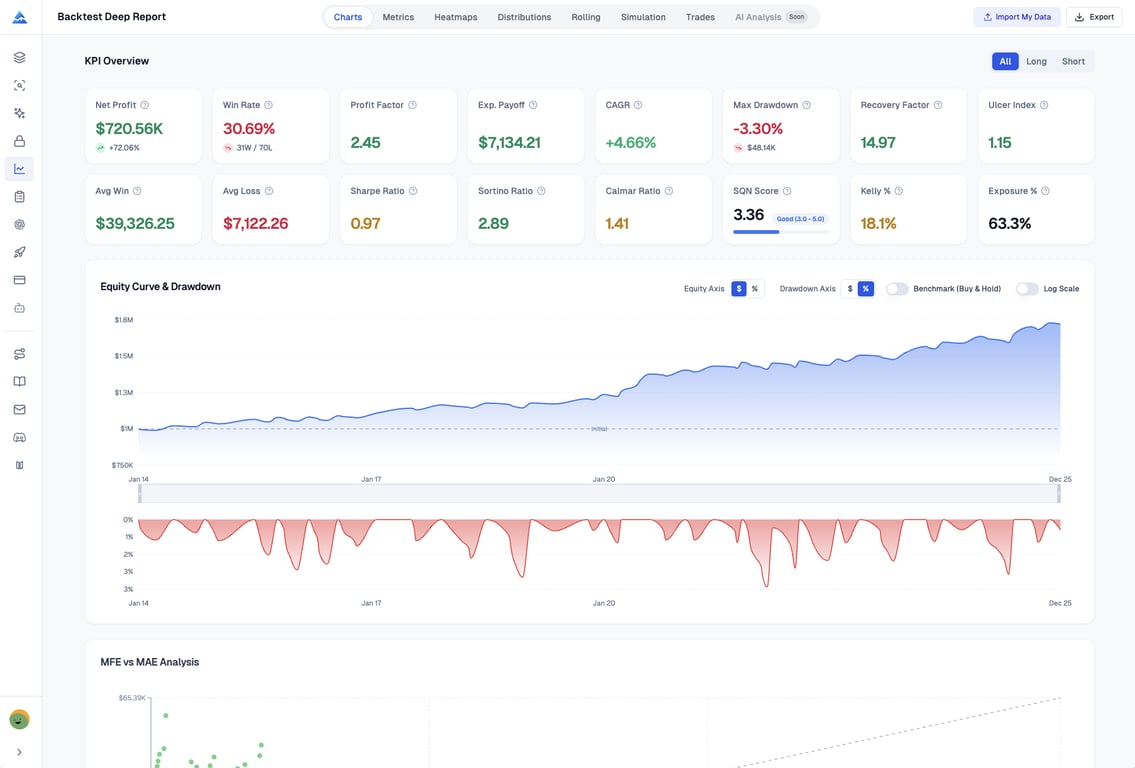
Backtest Deep Report 2.0
-
Rolling & Distribution Analytics: New rolling window KPIs plus return distribution charts to reveal regime shifts, tail risk, and hidden performance patterns in your strategy.
-
Advanced Risk & Sizing: Added professional risk metrics (VaR, CVaR, skew, kurtosis) and Kelly Criterion sizing to better align position size with your risk appetite.
-
Deeper Trade & Time Insights: Enhanced trade efficiency, directional KPIs, and time-based heatmaps, delivered with a revamped multi-sheet Excel export for institutional-grade reporting.
Jan, 21, 2026
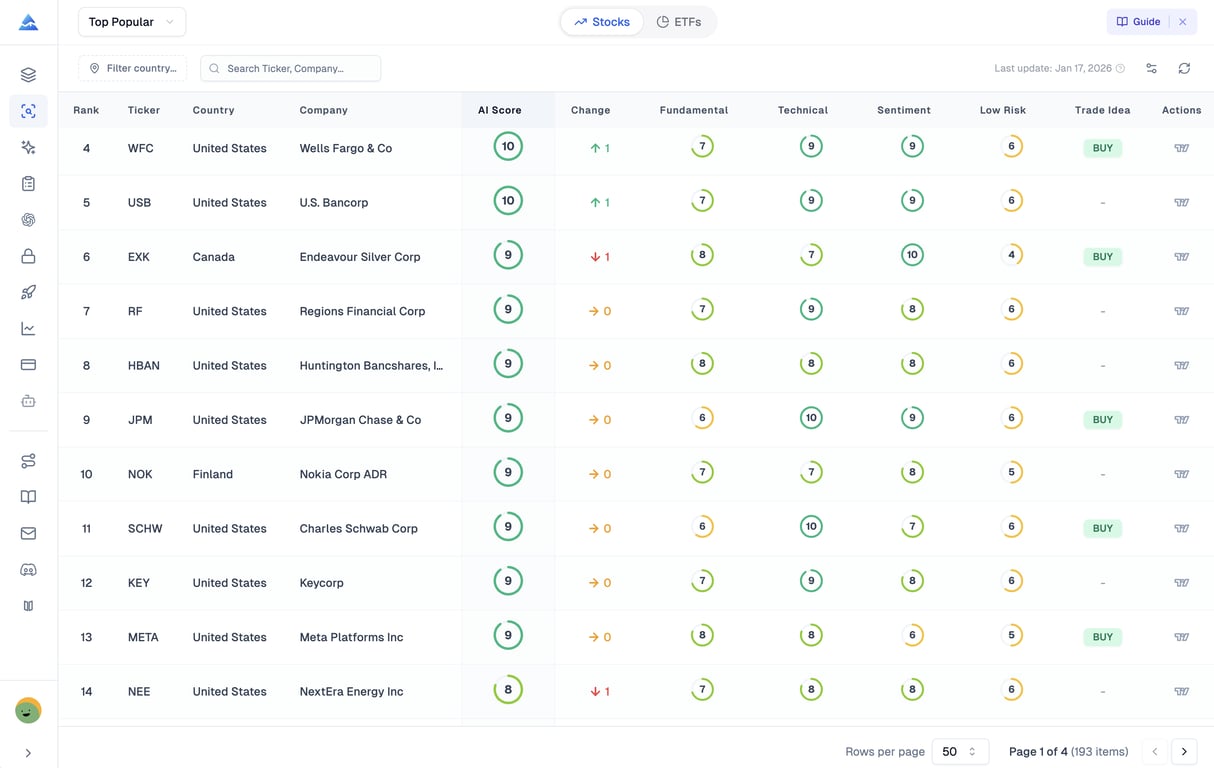
- AI Stock Picker: a new intelligent stock selection tool that scans thousands of symbols daily, assigns 1–10 predictive scores, and surfaces high‑potential, low‑risk opportunities with clear buy signals and risk insights.
- Update Backtest Report: Fixed the missing new metrics in the exported XLSX file of Pineify Backtest Deep Report, and added the Log Equity Curve display option, Y-axis ($/%)toggle for both Equity Curve and Drawdown Curve, as well as benchmark comparison/overlay capability for the Equity Curve.
Jan, 11, 2026
-
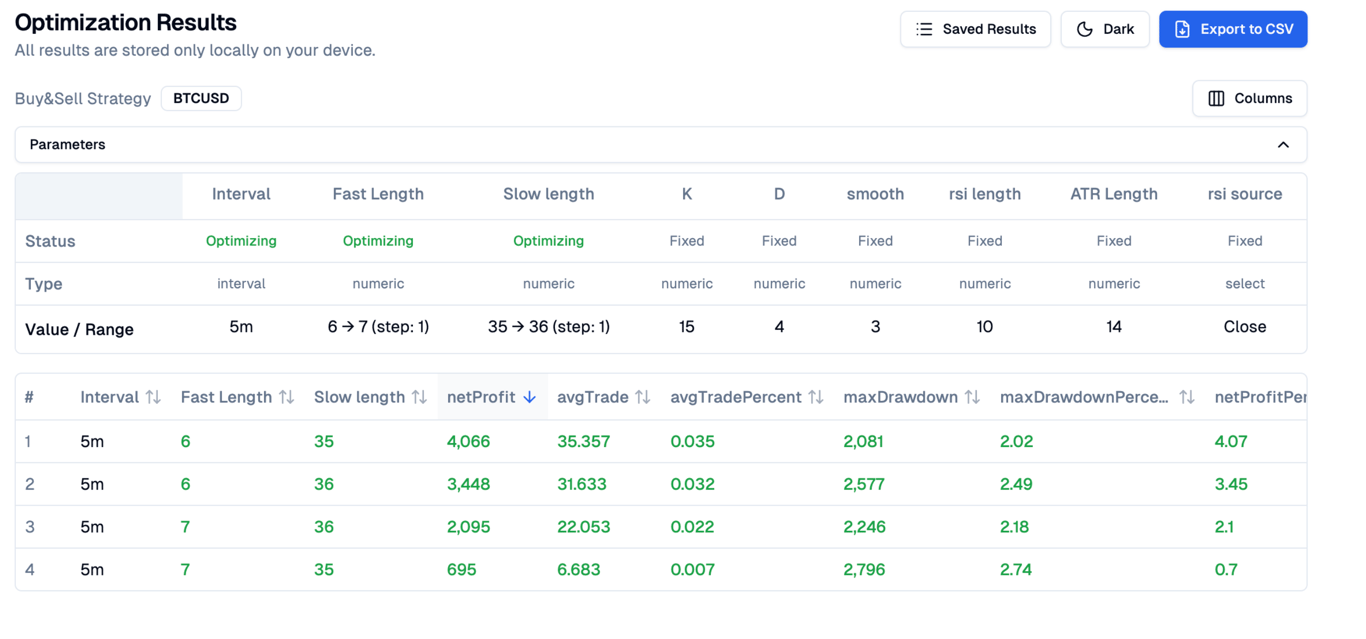
Supercharged Extension: In the backtest results, Params will display all parameter data of the current Inputs
-
Supercharged Extension: Fix the issue where deep backtesting does not take effect
-
Coding AI Agent: Fix the issue where the model cannot remember historical errors. We have optimized the model's workflow to ensure that the model will not forget historical errors when fixing new issues.
Dec, 30, 2025
-
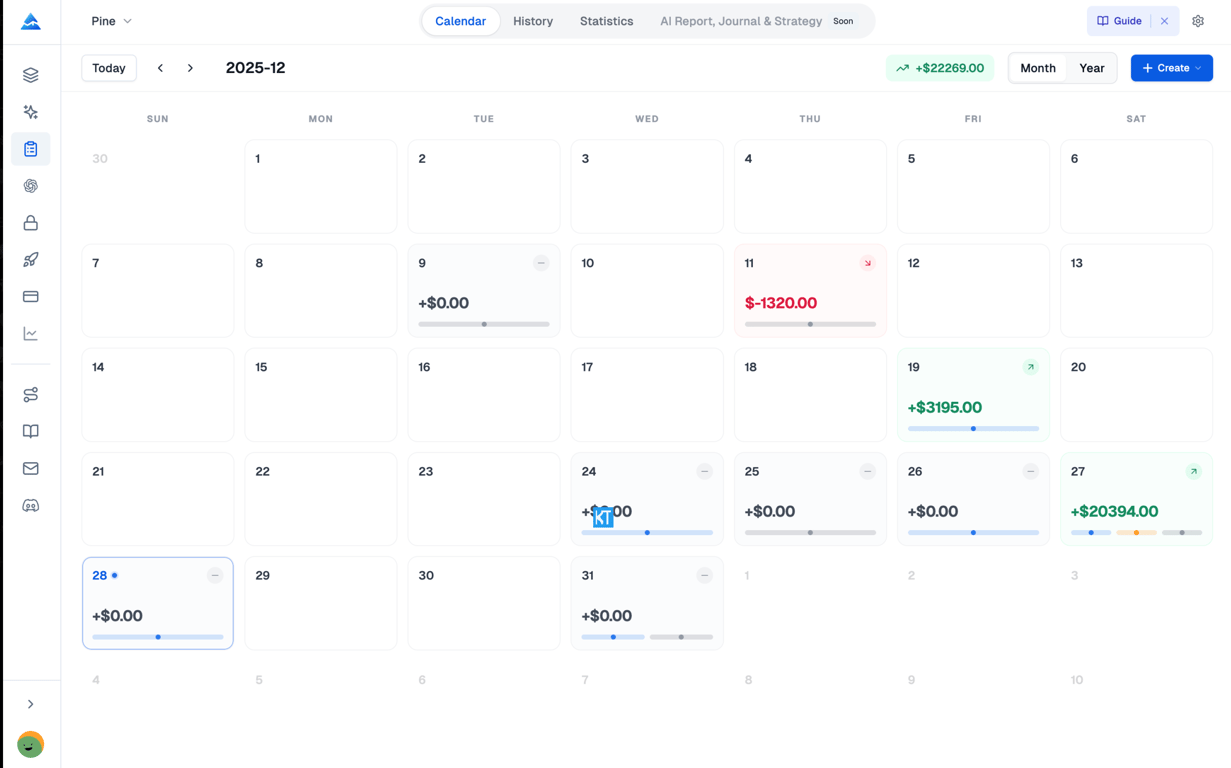
Pineify Trading Journal: A professional trading journal designed for manual-first tracking. Review your trades with calendar views, detailed statistics, and performance analytics.
-
Calendar view for intuitive trade history browsing
-
Partial close support with automatic PnL calculation
-
Multi-journal architecture for different accounts or strategies
-
Comprehensive statistics: Win Rate, Profit Factor, R-Multiple
-
Tag-based filtering and performance analysis
Dec, 7, 2025
-
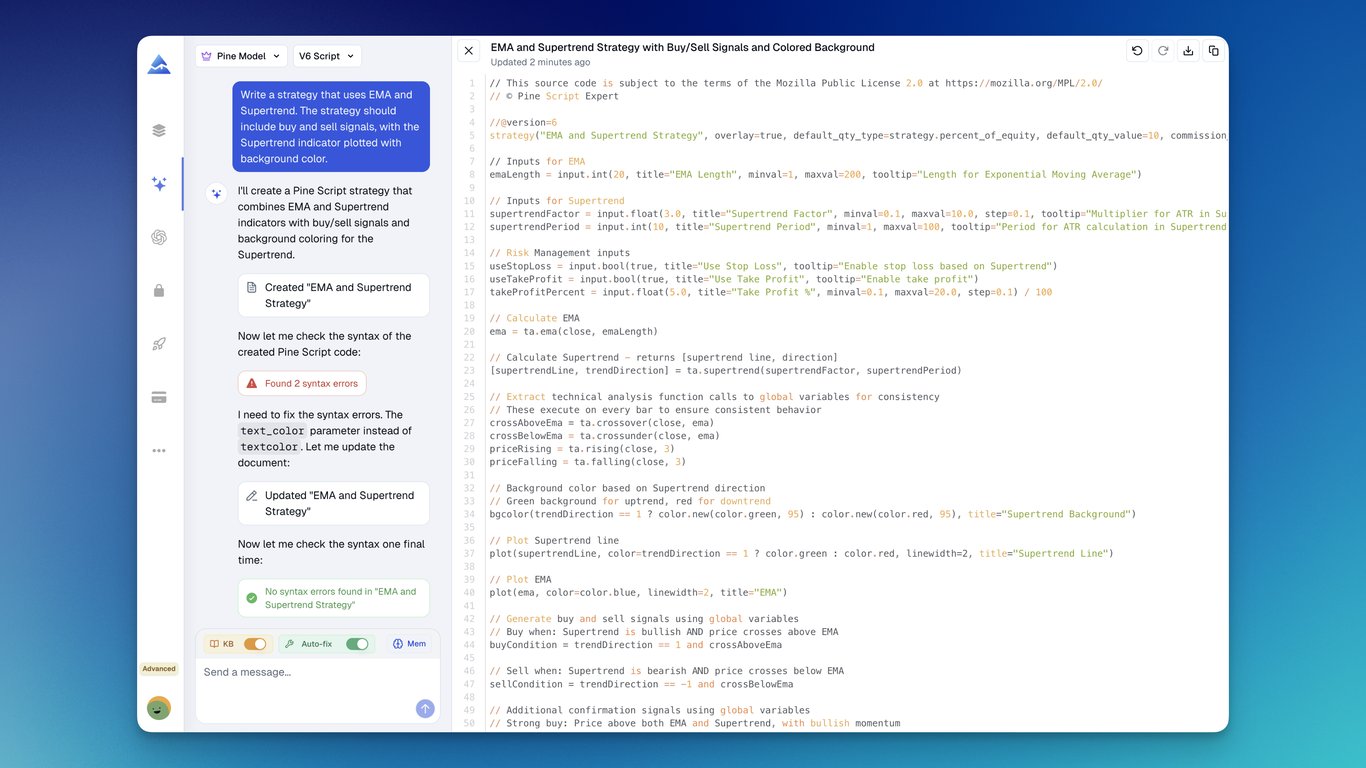
Pineify 3.0 Official Release - AI Coding Agent: We are thrilled to announce Pineify 3.0, featuring the revolutionary Pineify AI Coding Agent — the world's first AI specifically engineered for TradingView Pine Script V6.
-
Zero-Error Code Generation: The AI agent automatically detects syntax errors and fixes them instantly, ensuring code compiles successfully on the first try.
-
Advanced Pine Model: Trained on the latest official Pine Script documentation, outperforming general AI models like ChatGPT, Gemini, and Claude Opus in this domain.
-
Deep Knowledge Base Integration: Fully masters the differences between V5 and V6 versions, providing accurate and reliable code suggestions.
-
Context-Aware Memory: Users can control what the AI remembers, pinning key rules, preferences, and code snippets.
Oct, 26, 2025
-
Indicator and scanner indicator updates: Several popular indicators have been added. You can select "Newest to Oldest" in the sorting of the indicator list to view the latest indicators.
-
Premium Scripts adds "Ezalgo v.5": The Ezalgo v.5 script is newly added to the Premium Scripts collection.
Oct, 01, 2025
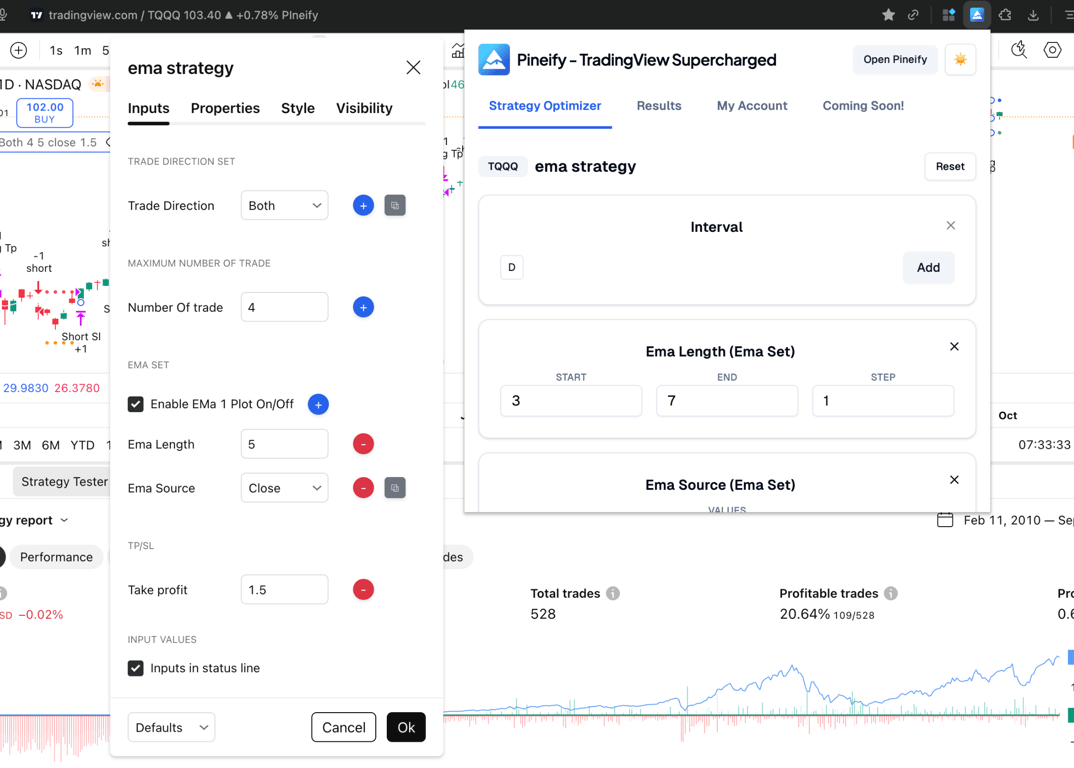
TradingView Supercharged Extension: Analyze backtests to surface optimal parameters for your TradingView strategies.
-
Multi‑parameter grid search with ranges and steps
-
Support timeframe, number, checkbox and dropdown inputs
-
Sortable results with best‑combo highlight and quick filters
-
Export results to csv
Sep, 21, 2025
-
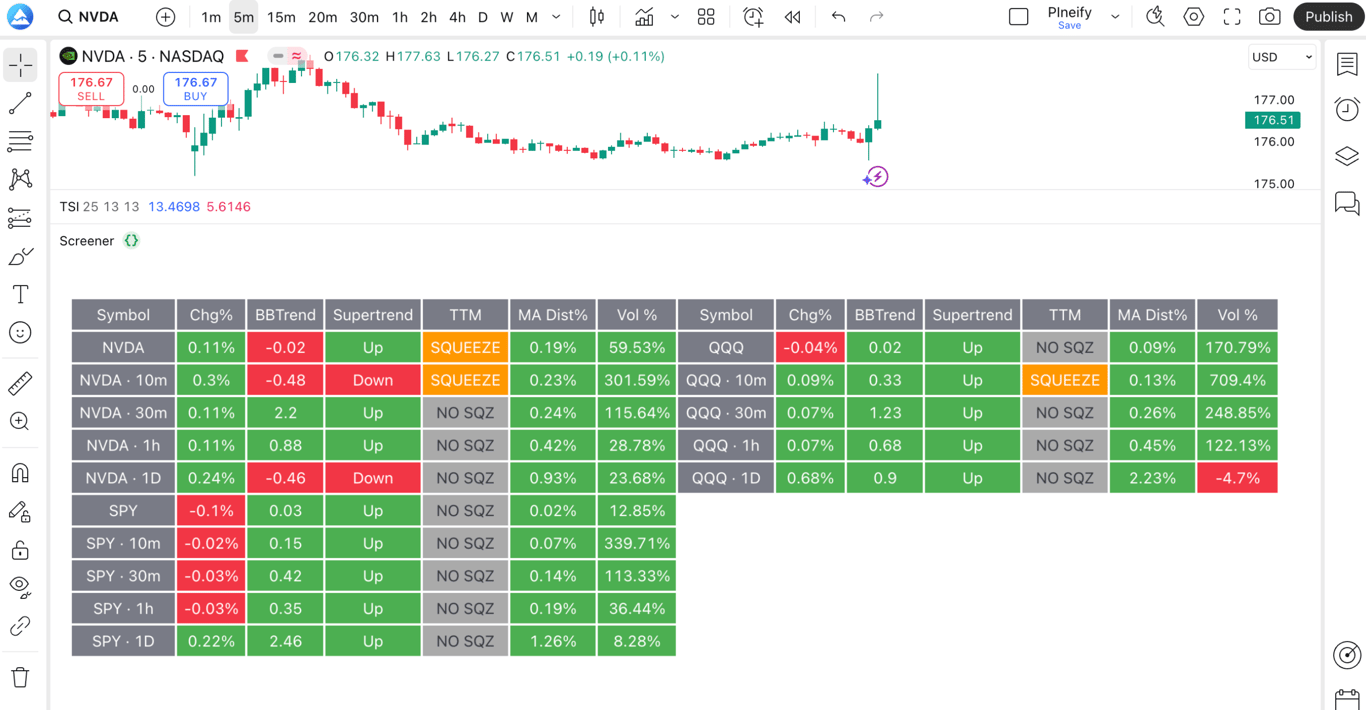
TradingView Custom Screener: We’re excited to announce the launch of TradingView Custom Screener in Pineify! 🎉
-
Multi-Symbol & Multi-Timeframe Scans – Analyze several markets and timeframes at once.
-
149+ Technical Indicators – Fully customizable columns for precise screening.
-
Instant Color-Coded Signals – Quickly spot Long, Short, or Neutral opportunities.
-
Blazing-Fast Updates – Catch market moves as they happen.
-
Advanced Customization – Fine-tune rules, thresholds, and layout to fit your strategy.
Start creating your own screener today and never miss a trade setup. 🚀
Sep, 7, 2025
-
Added five indicators to the core library: Daily Cam Pivots (daily Camarilla-style pivot levels for precise intraday support/resistance), Three Simple Moving Averages (triple-SMA stack for trend filtering and crossover signals), Trend Intensity Index (quantifies trend persistence/strength to avoid chop), Normalized Smoothed MACD (noise-reduced and normalized MACD for consistent thresholds across symbols/timeframes), and Impulse MACD (momentum/trend impulse visualization with faster, clearer signal response). These enhancements improve pivot-based trading, crossover strategy design, and momentum/trend confirmation, enabling clearer entries/exits and more robust cross-market comparability.
-
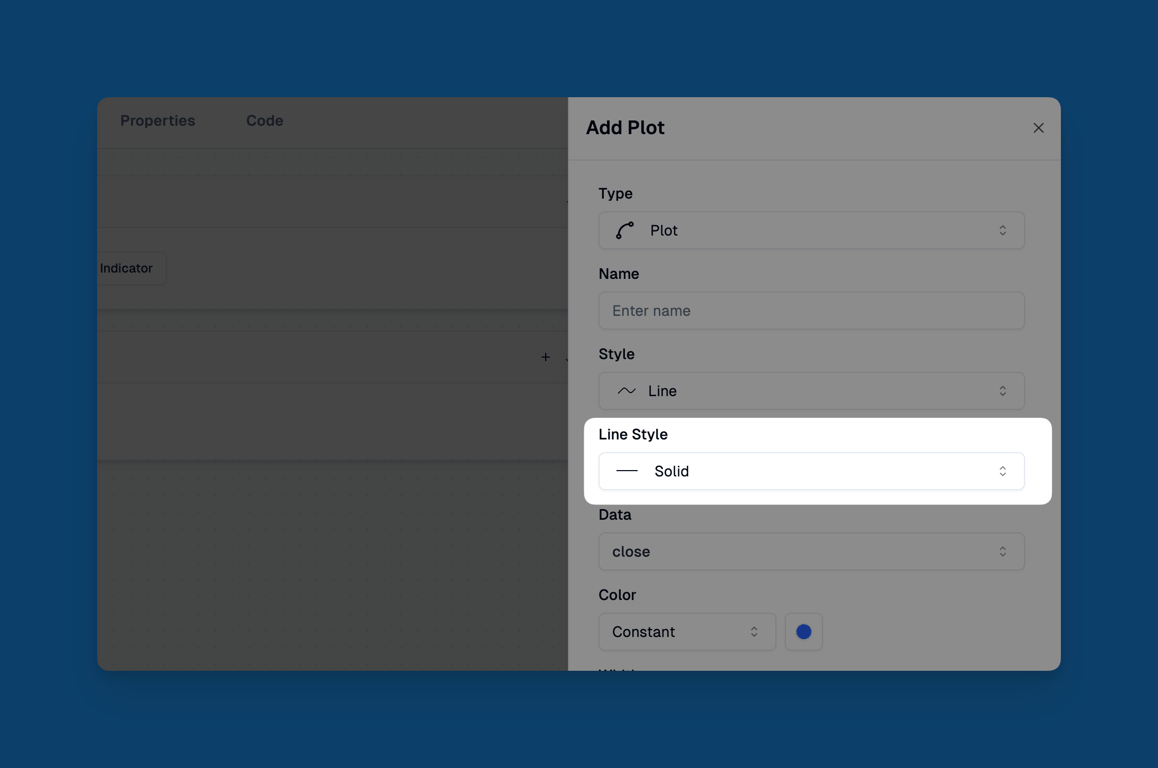
Support Line Style: We’ve added a modifier to control the style of lines in applicable plots. This modifier lets you set plotted lines to solid, dashed, or dotted.
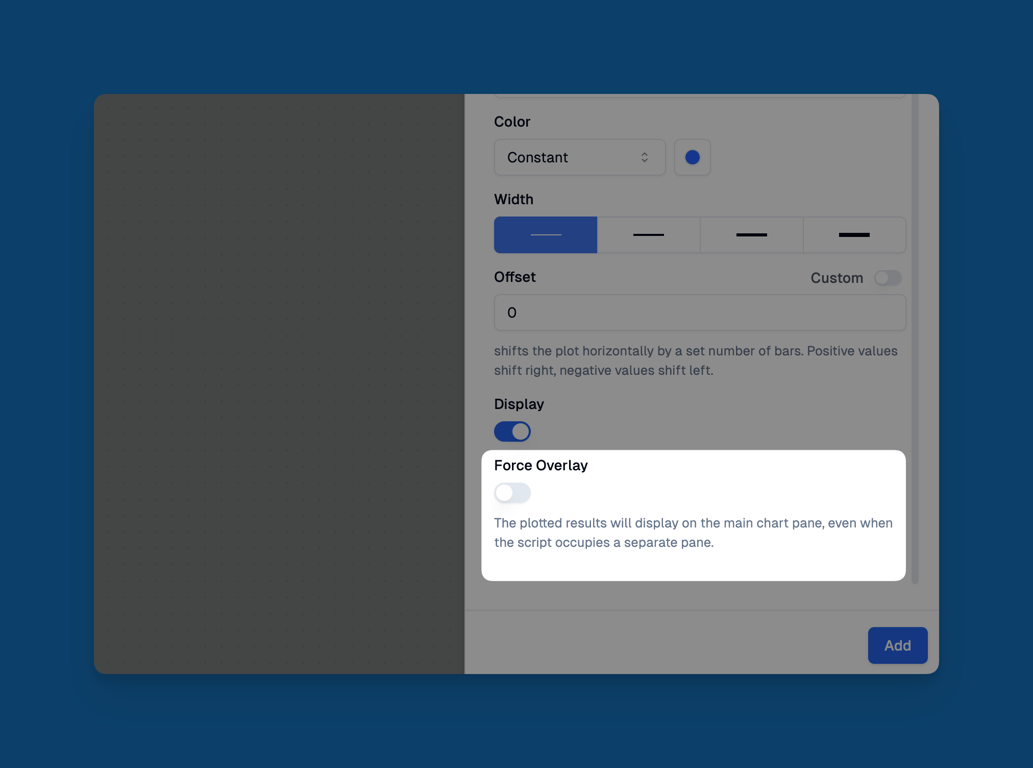
- Support Force Overlay: Plot, Character, Background, Candle, and Shape now support the Force Overlay property. When enabled, even if Overlay was not turned on during creation, the chart can be forced to display on the main chart.
- Support Sorting And Filtering For Indicators: Added sorting and filtering operations to the indicator list section.

July, 13, 2025
-
Added Dozens of Indicators: We've significantly expanded our indicator library with dozens of new technical analysis tools. Visit https://pineify.app/resources/blog to learn more about these new indicators and how they can enhance your trading strategy development.
-
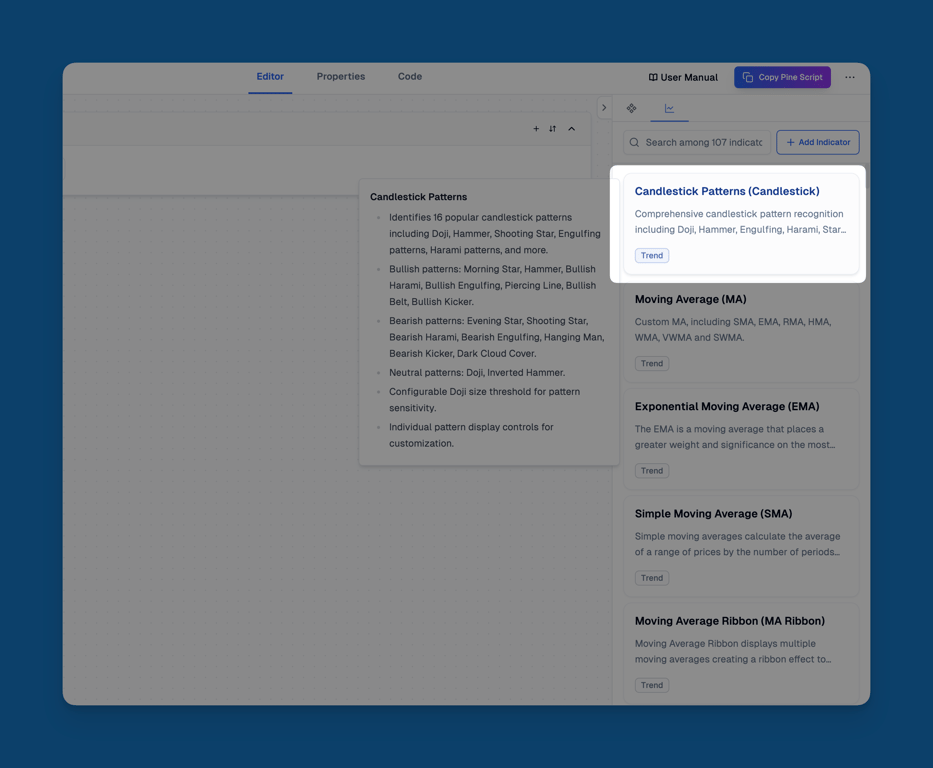
Add Candlestick Patterns: We've integrated comprehensive candlestick pattern recognition into our platform. Include like Doji, Engulfing, Hammer, and more on your charts, providing valuable insights for technical traders. You can search for candlestick patterns in the indicator list and then add them.
July, 06, 2025
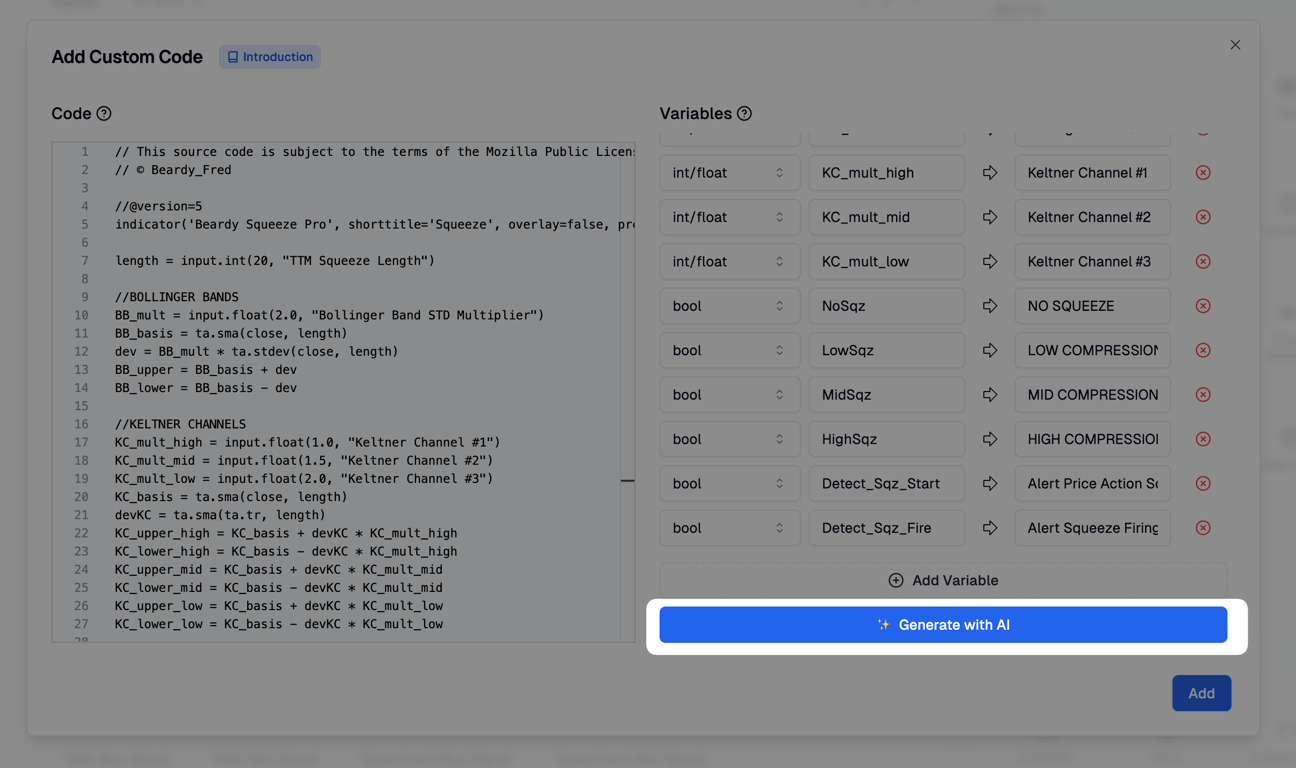
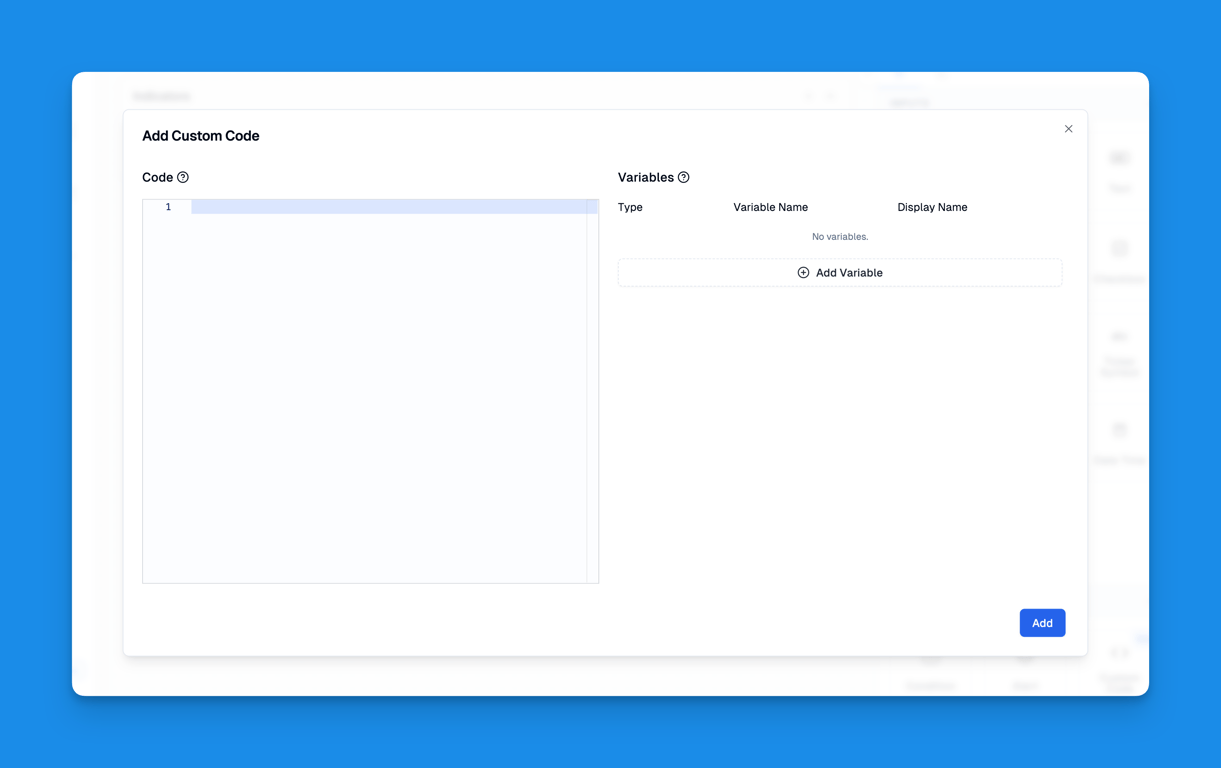
- Use AI to Generate Custom Code Variables: Now you just need to paste your Pine Script code into the Custom Code editor, then click the Generate with AI button on the right, and our AI will automatically generate the corresponding variable definitions.
June, 16, 2025
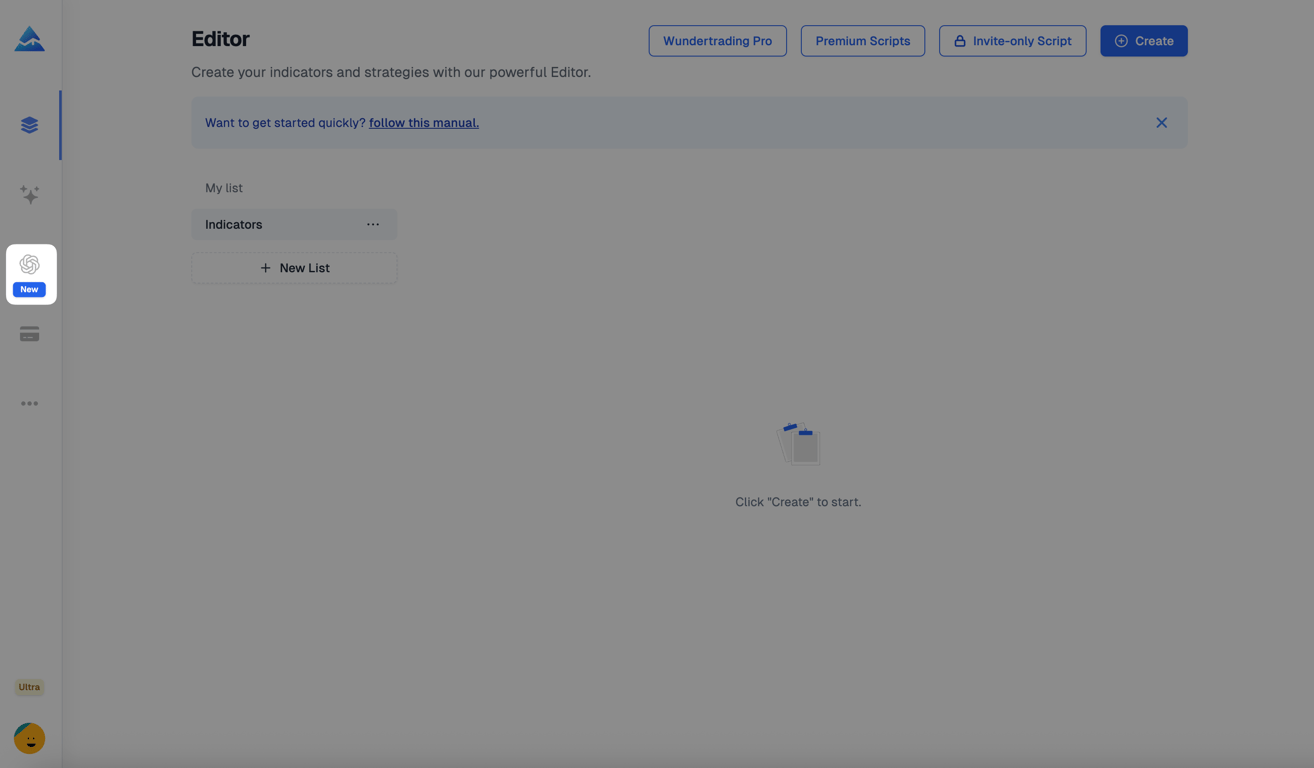
- Pineify GPT: Pineify GPT is a private GPT tool designed for Pine Script users, enabling effortless generation of Pine Script code and providing answers to related questions. Requiring only a free ChatGPT account, it integrates Pine Script Manual and Reference knowledge bases and supports Canvas and Web Search features for enhanced functionality.
This GPT can only be accessed with the Advanced Plan.
June, 09, 2025
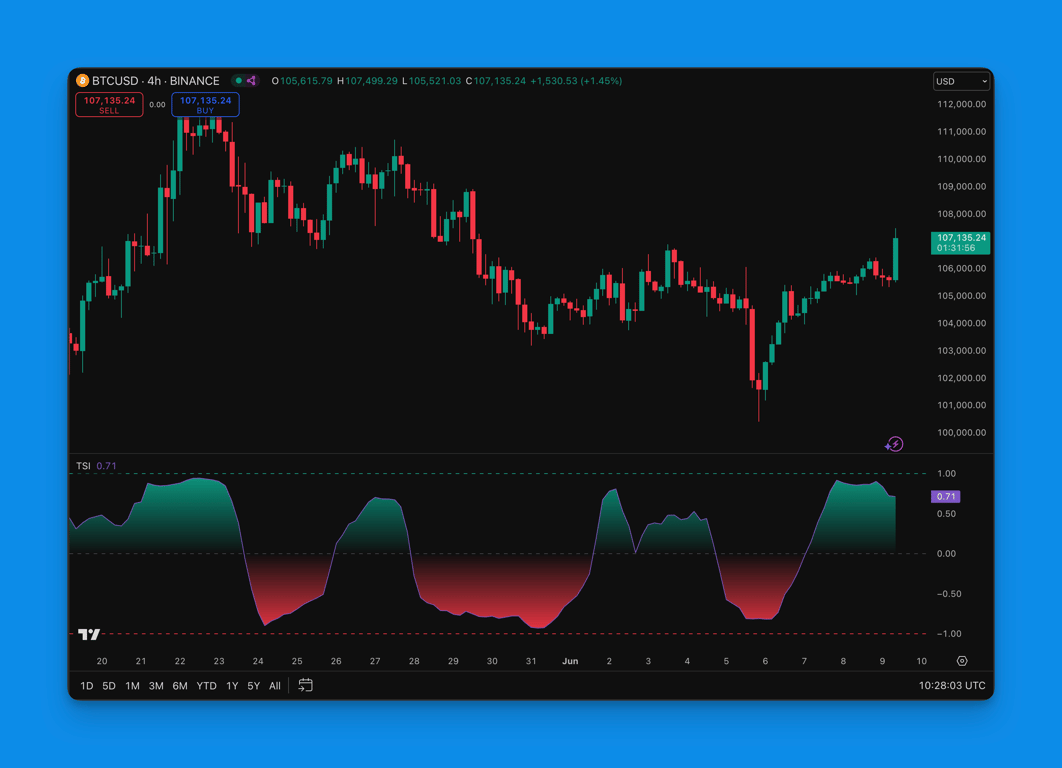
- Add Trend Strength Index Indicator: Trend Strength Index (TSI) measures a symbol's tendency to either trend steadily or revert to its mean. The indicator calculates the correlation between closing prices and bar index values over a specified period to analyze price momentum.
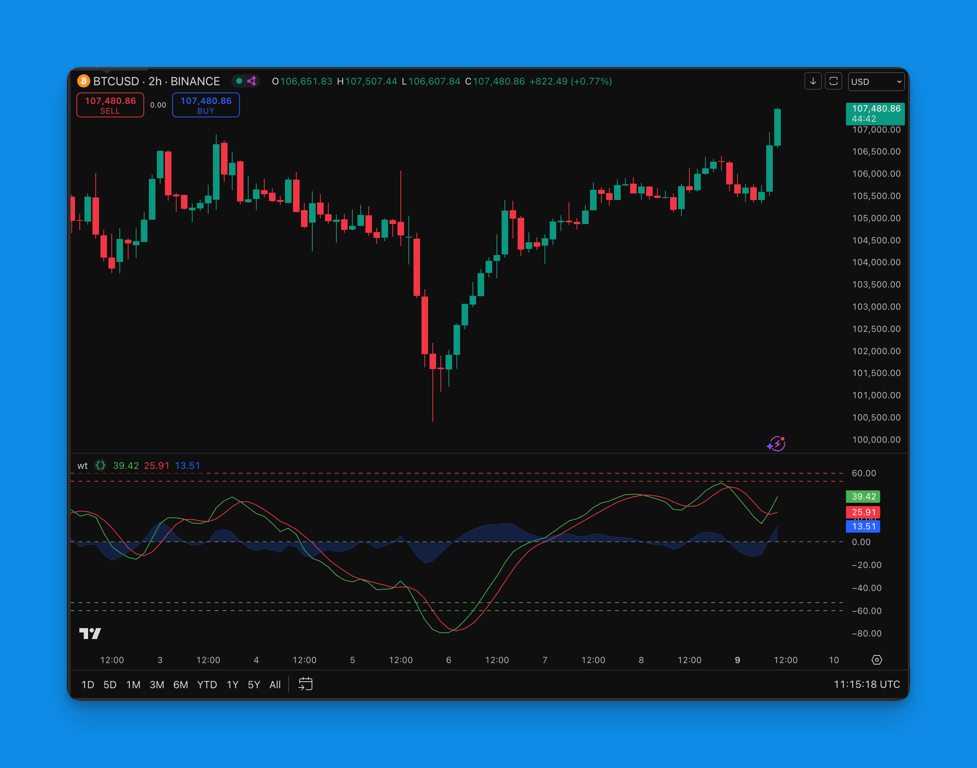
- Add WaveTrend Oscillator: The WaveTrend oscillator by LazyBear shows market momentum and overbought/oversold conditions through the main trend line WT1, the smoothed trend line WT2, and an area plot representing the difference between WT1 and WT2.
May, 31, 2025
- Wundertrading Pro (1 month): The Pineify team is excited to announce our partnership with Wundertrading! All paid Pineify users will receive a complimentary one-month Pro subscription to Wundertrading. This collaboration allows our users to enhance their trading experience with Wundertrading's powerful automated trading platform.
You can open the Wundertrading link at the top of the Pineify App's home page, register, and automatically get a 1 - month Pro Plan.
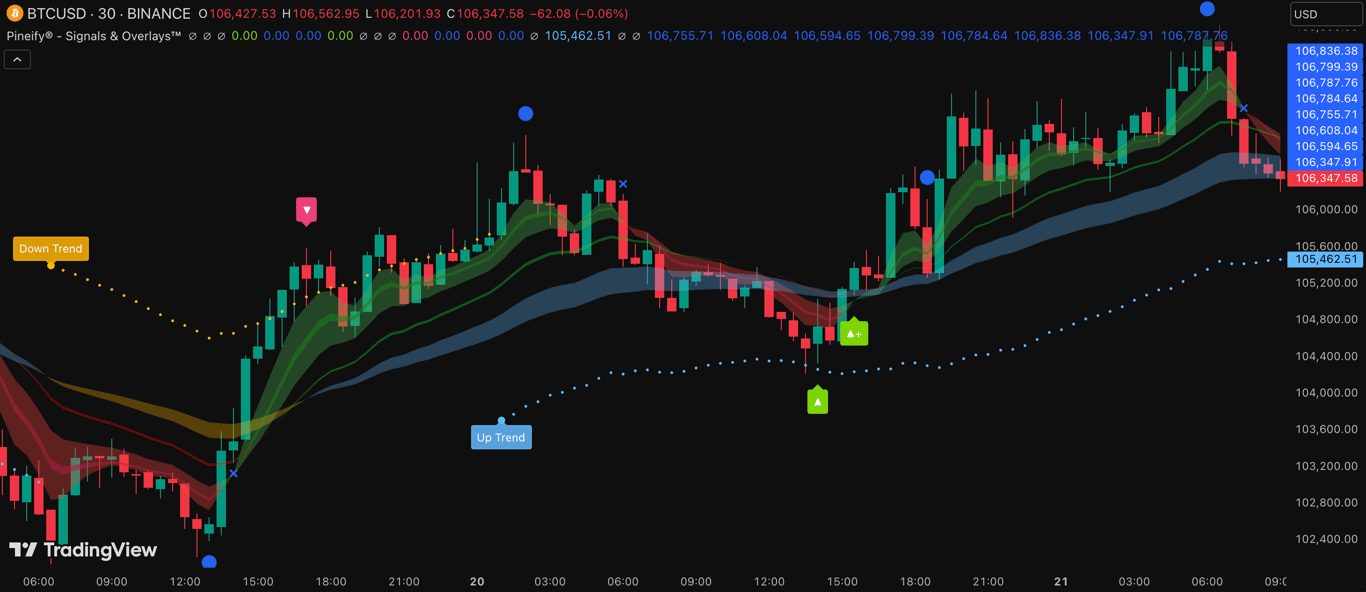
- Pineify® - Signals & Overlays™ Indicator: The Pineify® Signals & Overlays™ indicator is built upon Dow Theory principles, which identify primary and secondary market trends through systematic price analysis. This comprehensive system combines multiple proven technical methodologies to create a unified trend-following and reversal-detection framework. The indicator synthesizes quantitative momentum analysis with qualitative trend assessment, providing traders with a complete market perspective across multiple timeframes. This versatile indicator is suitable for various trading styles and timeframes, also has Beginner-Friendly presets to enable multiple features at once within one-click.
This indicator can only be accessed with the Advanced Plan. On the homepage of the Pineify App, click on "Invite-only Script" and submit your TradingView username, and you will get access to the indicators within 12 hours.
Pineify® - Signals & Overlays™ — Indicator by Pineify
May, 5, 2025
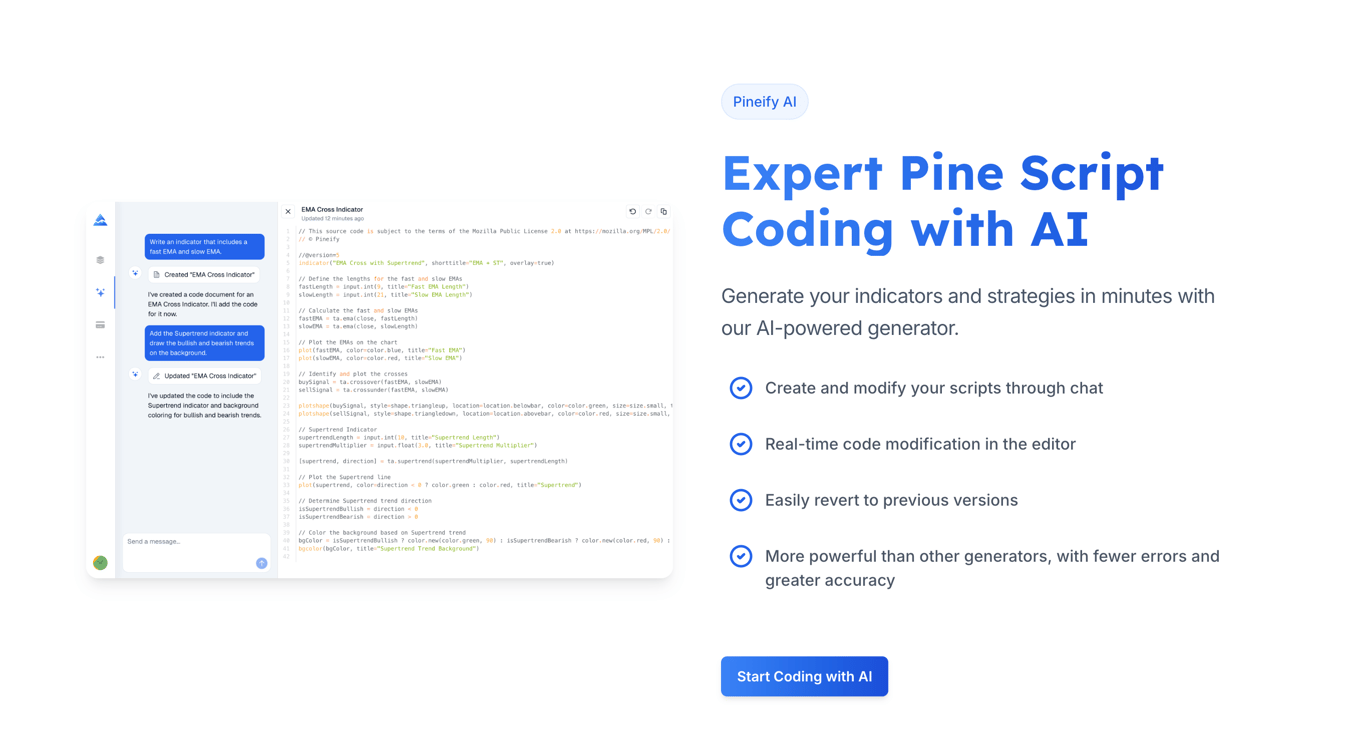
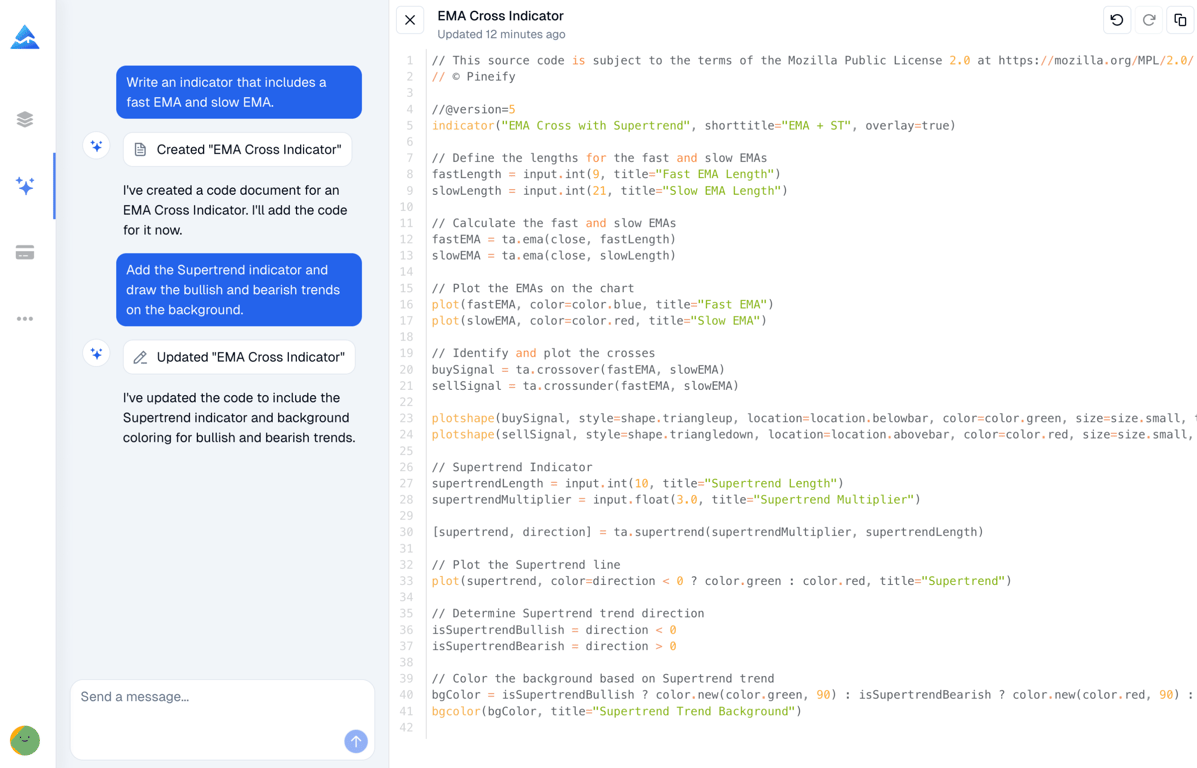
- Pineify AI: Pineify AI: Pineify 2.0 has launched with a new AI Coding feature that uses advanced models to generate Pine Script code. 🎉
April 13, 2025
- Add LWMA (Linear Weighted Moving Average) Indicator: The Linear Weighted Moving Average (LWMA) indicator assigns more weight to recent prices compared to older ones, making it more responsive to price changes than traditional moving averages. This indicator helps traders identify trends and potential reversal points with greater accuracy by reducing lag in the signals. The LWMA can be particularly useful for short-term trading strategies where quick reaction to price movements is crucial.
February 23, 2025
- Add Volume Trend Tracker Indicator: The Volume Trend Tracker Indicator (VTT) is a trend-following tool that uses two lines (uptrend and downtrend) to identify trend strength, reversals, and potential entry/exit signals.
February 12, 2025
- Increasing the Character Limit for Importing Custom Codes: We've increased the character limit for importing custom code from 20,000 to 250,000 characters. This expansion allows users to import larger, more complex custom indicators and strategies.
February 04, 2025
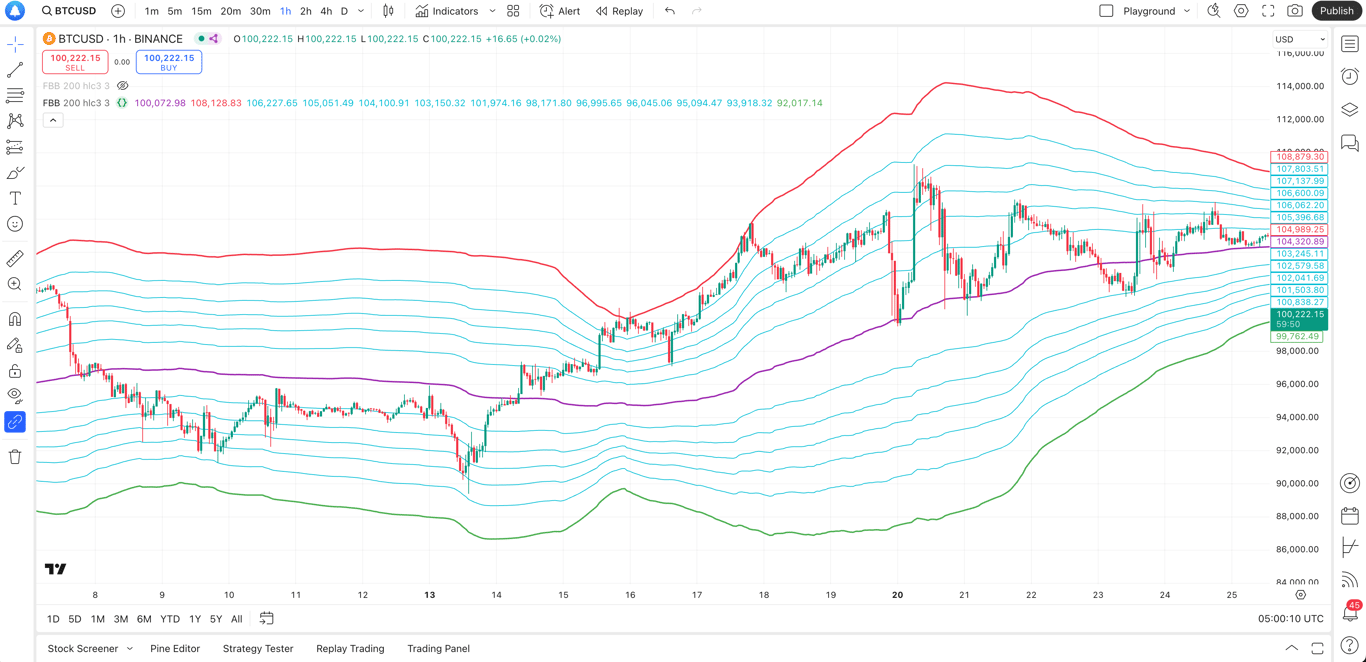
- Add Fibonacci Bollinger Bands Indicator: These Bollinger Bands incorporate Fibonacci retracements to highlight areas of support and resistance. The basis is calculated using the Volume Weighted Moving Average, with bands set at 3 standard deviations from the mean. This range encompasses 99.73% of all price observations.
January 29, 2025
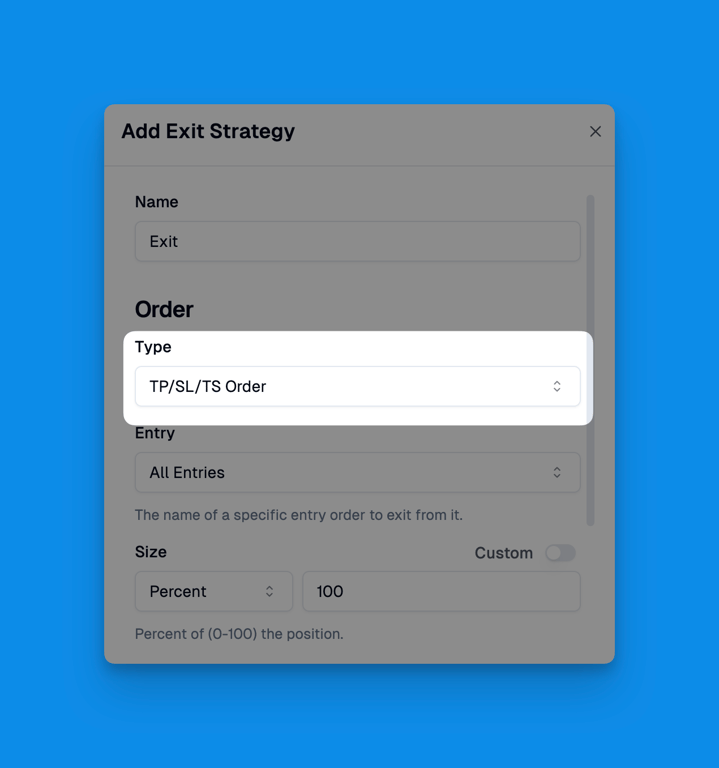
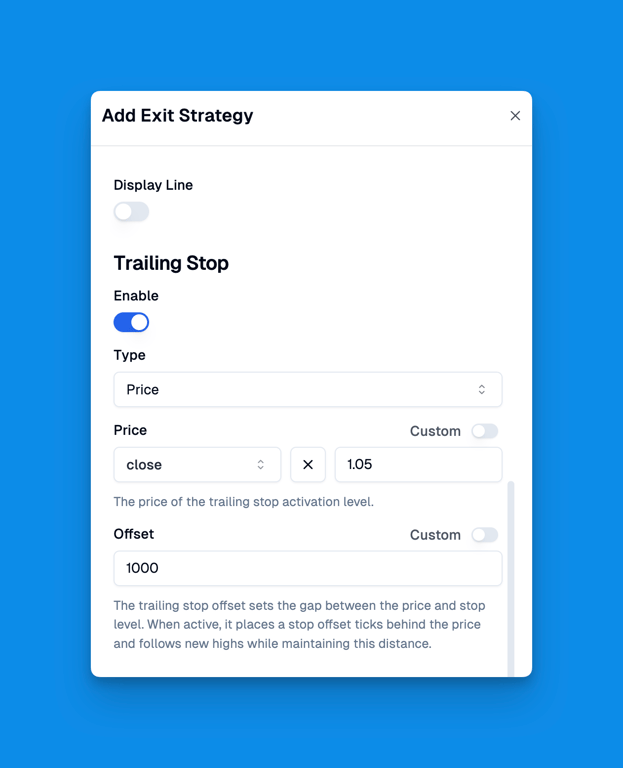
- Support Trailing Stop Strategy: We've introduced trailing stop functionality for strategy backtesting. This feature allows traders to automatically adjust their stop-loss levels as the price moves in their favor, helping to lock in profits while maintaining protection against reversals. The trailing stop can be configured with customizable parameters to suit different trading styles and risk management preferences.
January 18, 2025
-
Add MAVW Indicator: A support and resistance indicator based on fibonacci injected weighted moving averages.
-
Add HAS Indicator: A trend trading forex system composed of the Smoothed Heiken Ashi candlestick indicator and moving averages. It works best on the 1 hour charts and higher time frames.
January 11, 2025
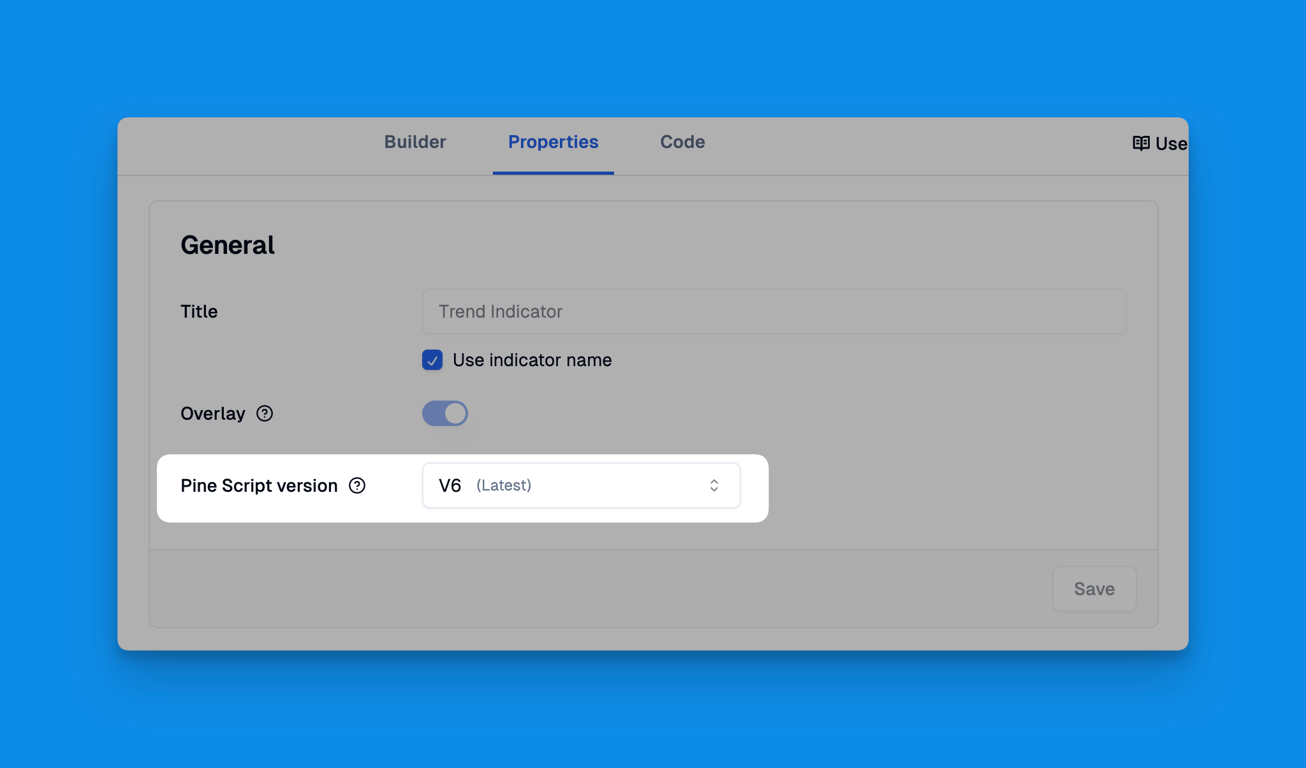
- Modify Pine Script Version: You can now modify the Pine Script version of generated code in the indicator's Properties. We added this feature because some users need to incorporate V5 code in their custom scripts. This allows you to change the generated indicator or strategy code to V5 version (recommended only when V5 code is strictly required).
January 05, 2025
- Submit a Request to Add Indicators: Ultra users can now request new indicators directly through our platform. If you can't find an indicator you're looking for, simply submit a request with one click. So we can keep expanding our indicator library to match your trading needs.

January 01, 2025
- Add BBTrend Indicator: The BBTrend indicator uses dual Bollinger Bands to measure trend direction and strength, showing bullish trends above zero and bearish trends below zero on a histogram.
December 31, 2024
- Brand Logo Redesign: We have partnered with Linx designer (whom I consider Asia's best designer) to redesign our brand logo, making it more concise, modern, and creative. The new design not only retains the core characteristics of the original brand but also infuses it with more vitality and professionalism. This new visual identity will help us establish a stronger brand recognition in this field.


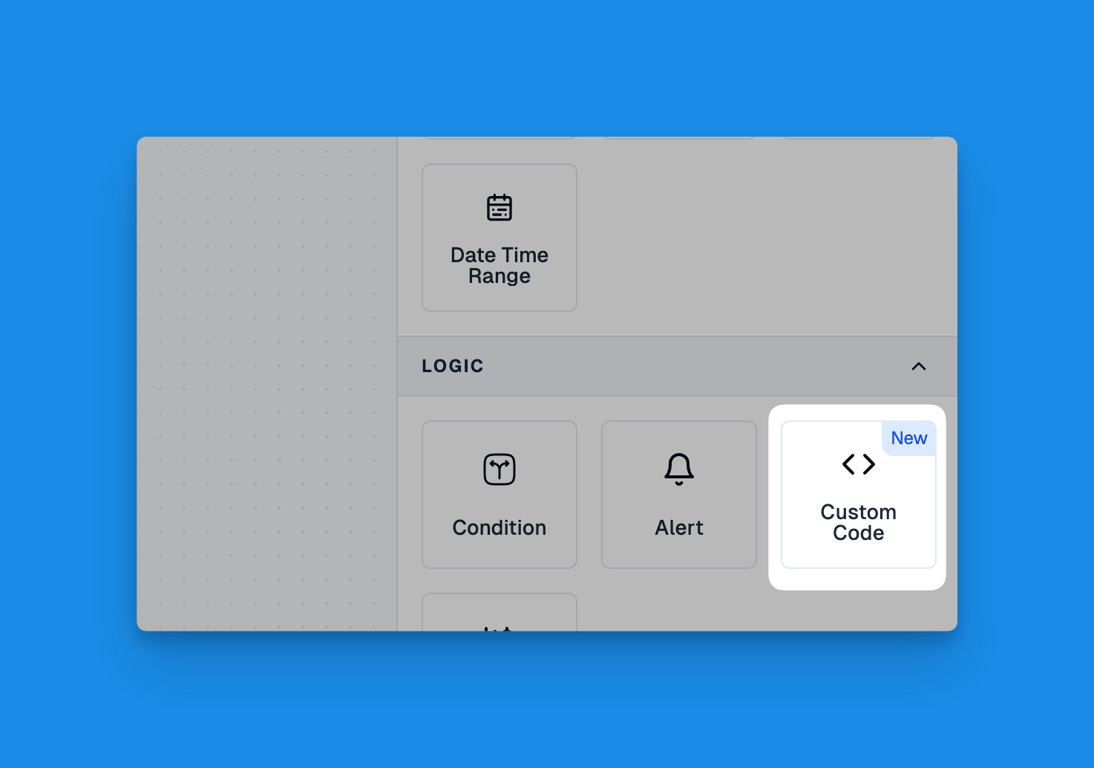
- Import Custom Code: This time, we're bringing a highly anticipated feature for Ultra Plan users - the ability to import custom code. Now you can import your own code into Pineify and use variables from your code within Pineify. With this functionality, you can use Pineify to add backtesting to your indicators, incorporate your own indicators, and much more. We look forward to seeing what new use cases you'll discover, and feel free to discuss any questions in our Discord.
December 22, 2024
-
Add QQE / RSI Indicator: This indicator combines the QQE (Qualitative Quantitative Estimation) and RSI indicators, with QQE providing a smoother, volatility-adjusted trend signal and RSI offering momentum analysis, all on a single display. (
 QQE / RSI — Indicator by NodeX4 — TradingView
)
December 11, 2024
- Condition Override: A powerful new feature that gives you more control over your condition evaluations.
Key Features:
- Temporarily override conditions to True or False without modifying the underlying logic
- Simple toggle interface for quick condition state changes
- Visual indicators to clearly show muted state
This feature is perfect for testing scenarios and temporary workflow adjustments. Try it out and let us know what you think!
December 1, 2024
-
Added TTM Squeeze Indicator: We're excited to introduce the TTM Squeeze indicator to our platform. This powerful tool helps traders identify potential breakout opportunities by measuring price volatility and momentum. The indicator combines Bollinger Bands and Keltner Channels to detect periods of market consolidation and potential explosive moves.
-
Added More MA Indicators: We've expanded our Moving Average collection with advanced indicators including Coefficient of Variation Weighted Moving Average (CVWMA), Ehlers Dynamic Smoothed Moving Average (EDSMA), Ehlers EMA Smoother (EEMAS), Fractal Adaptive Moving Average (FRAMA), Jurik Moving Average (JMA), Kaufman's Adaptive Moving Average (KAMA), Modular Filter (MF), Volatility Adjusted Moving Average (VAMA), and Zero-Lag Exponential Moving Average (ZLEMA). These additions provide traders with more sophisticated tools for technical analysis.
November 24, 2024
-
Alert Messages Now Support "Use Input": We've enhanced our alert messaging system to now support "Use Input" feature. This update allows users to create more dynamic and customizable alert messages by incorporating input parameters directly into alert messages.
-
Manual updated with Input Types and Price Data content: We've updated our manual with comprehensive sections on Input Types and Price Data, providing detailed explanations and examples to help users better understand these key features.
Comprehensive Guide to Pine Script Input Types | Pineify Manual
Mastering Price Data in Pine Script for Trading | Pineify Manual
November 17, 2024
-
Add Manual: We've added a new manual to our platform. It gives clear guidance on how to use Pineify's features and tools. You can access the manual right from your dashboard for quick reference. Keep in mind, we're still working on the manual. We're always adding new information to keep it up-to-date.
-
Support Bar Color Plot: We've added a new feature that allows users to customize the color of bar plots in their charts. This enhancement provides greater visual clarity and helps differentiate between various data points. Users can now easily highlight specific trends or patterns in their trading analysis by adjusting the bar colors to their preference.
We've made two key updates to Pineify. We added a new manual that explains how to use our features and tools. You can find it on your dashboard. We'll keep updating it with new info. We also added a feature to change bar plot colors in charts. This helps you see trends and patterns more clearly. These updates make Pineify easier to use and give you better tools for looking at your data.
November 10, 2024
-
ADX Indicator Added: We’re excited to introduce the Average Directional Index (ADX) to Pineify. This technical indicator helps traders assess the strength of price trends for financial securities, enhancing your decision-making toolkit.
-
Expanded Timeframe Options: Pineify now offers greater flexibility with additional supported intervals, including 20 seconds, 2 minutes, 4 minutes, 10 minutes, 20 minutes, 6 hours, and 8 hours. These new intervals provide more tailored data analysis to meet your specific trading needs.
-
Improved Symbol Input Functionality: Users can now set default Chart Symbols, making it easier to customize and streamline your trading workflow.
These updates bring more powerful tools and customization options to your trading experience, enhancing analysis and workflow efficiency. Explore these new features to elevate your Pineify journey!
November 3, 2024
-
Enhanced MA Indicator: Pineify now includes a comprehensive range of Moving Average (MA) indicators, including SMA, EMA, RMA, HMA, WMA, VWMA, and SWMA. You can seamlessly switch between these types using adjustable parameters, making it easier to customize your analysis.
-
Improved MA Crossover Indicator: Creating MA crossover indicators is now more efficient. With this update, setting up conditions for crossover scenarios is simplified, offering a more streamlined user experience.
-
New Highest and Lowest Indicators: Pineify introduces the Highest and Lowest Indicators, allowing you to track the highs and lows within a specified time period effortlessly. This feature is designed to enhance trend identification and analysis.
-
Added KST Indicator: The Know Sure Thing (KST) indicator is now part of Pineify Indicators. KST is a momentum-based oscillator derived from the Rate of Change (ROC) and is ideal for identifying potential trend reversals.
These updates aim to elevate your analytical capabilities and provide a more flexible, efficient, and comprehensive trading experience with Pineify.
October 22, 2024
New Pricing and Plans – Introducing the Pro Plan!
We’re excited to announce a major update to our pricing and plans, offering more flexibility and value for our users. Whether you’re just getting started or a power user, we have the right plan for you.
Here’s What’s New:
- Introducing the Pro Plan – $69/year (Save 30% Today!)
Get access to all features for one year at an incredibly affordable price. The Pro Plan includes:
• Unlimited lists • Unlimited indicators and strategies • Unlimited technical analysis indicators • Unlimited inputs, conditions, alerts, and plots • Support for different timeframes and symbols • First-party support • Free updates throughout the year
- Lower Pricing Across All Plans
We’ve reduced the price of our lifetime plan, making it easier than ever to get full access. Here’s the updated pricing:
• Free Plan: $0 – Ideal for users starting with basic features, including 1 list, 1 indicator, and limited analysis tools. • Pro Plan: $69/year (Save 30%) – Access to all features for one year. • Ultra Plan: $96 (Lifetime Access, Save 35%) – Get lifetime access to all features, including priority access to new features and 15 exclusive indicator source codes (valued at $399).
We believe in simple, no-tricks pricing with no monthly fees or hidden costs, and these updates reflect our commitment to delivering high-quality tools at an unbeatable value.
Start exploring today with our updated plans!
FAQs
Frequently asked questions about Pineify, including pricing, features, TradingView compatibility, and how to use our visual trading indicator builder.
Pine Script AI Coding Agent
Learn how to use Pineify's Pine Script AI Coding Agent to generate, debug, and optimize TradingView Pine Script V6 code through natural language conversation.