

Invite-Only Indicator
Access Pineify's institutional-grade invite-only TradingView indicator — Signals & Overlays™ — with backtested buy/sell signals, Dow Theory trend detection, and ATR-based risk management.
The Pineify® - Signals & Overlays™ is an invite-only TradingView indicator that delivers institutional-grade buy and sell signals powered by Dow Theory trend detection, machine-learning-optimized entries, and ATR-based risk management. It works across stocks, crypto, forex, and futures on any timeframe from 1-minute to daily.
You can access the indicator from the Pineify App.

Performance
| Metric | Value |
|---|---|
| Active Traders | 100,000+ |
| Backtested Win Rate | 87% |
| Max Return per Trade | 412% |
Key Features
Backtested High Win Rate Strategy
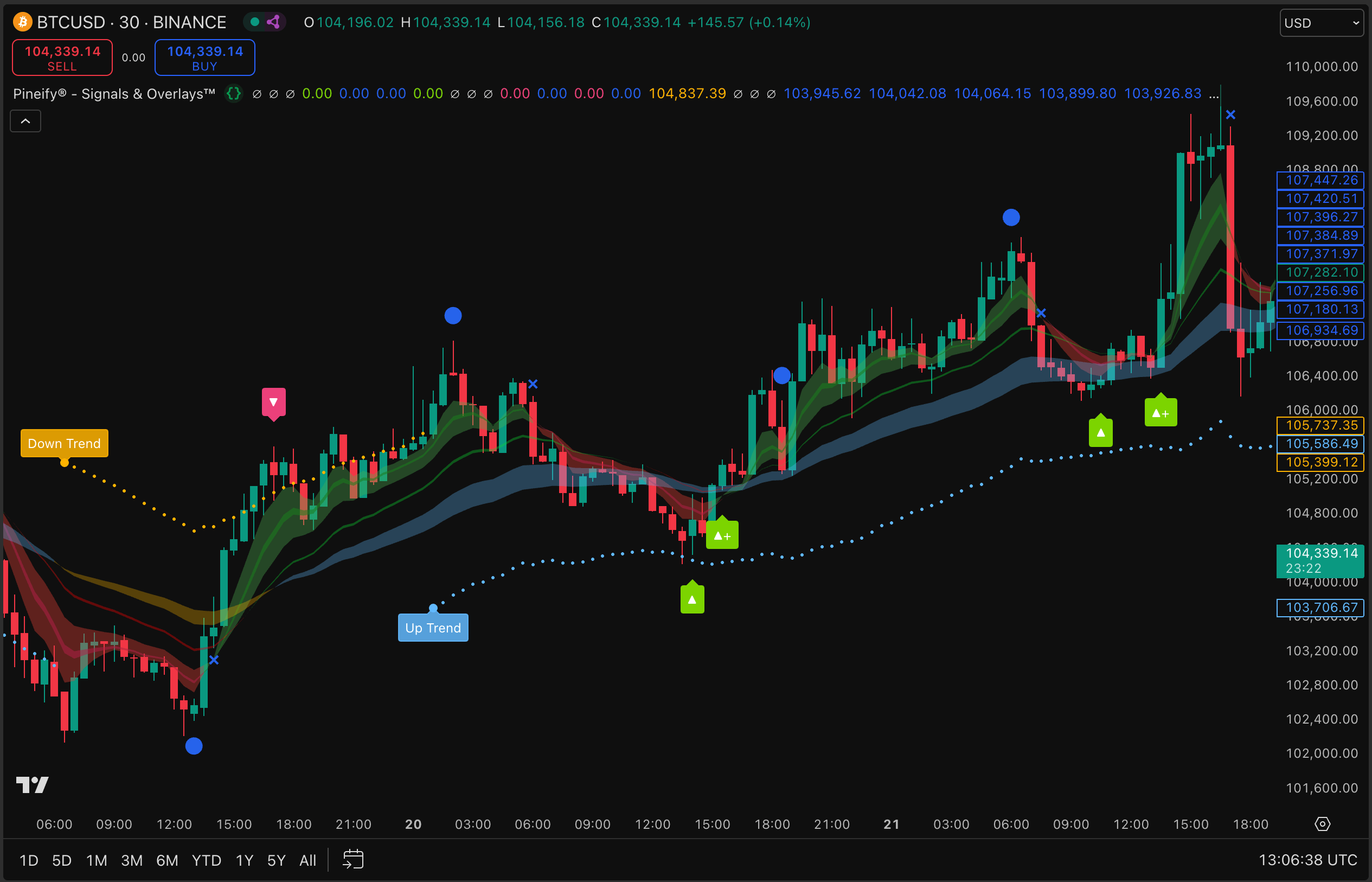
The indicator has been backtested across multiple markets and timeframes with an 87% win rate. It combines algorithmic pattern recognition with Dow Theory principles to generate high-confidence signals validated through thousands of historical trades.
Trend Detection & Reversal Identification
The indicator uses Dow Theory to identify trend direction and potential reversal points. A color-coded trend cloud shows bullish (green) and bearish (red) market conditions at a glance, helping you stay on the right side of the market.
Real-Time Buy and Sell Signal Alerts
When the indicator identifies a high-probability entry point, it generates a clear buy or sell signal directly on your TradingView chart. You can set up TradingView alerts to receive notifications via email, push notification, or webhook — so you never miss a signal.
ATR-Based Risk Management
Every signal comes with an ATR-based stop loss level. After a trade moves into profit, the indicator suggests moving your stop to breakeven to protect gains — a systematic approach to risk management that removes emotional decision-making.
How to Use
- Add to Chart: In TradingView, search for "Invite-only scripts" and select Pineify® - Signals & Overlays™. Add it to your chart.
- Identify the Trend: The trend cloud shows the current market direction. Green = bullish, Red = bearish. Trade in the direction of the trend for higher probability setups.
- Execute on Signals: When a buy or sell signal icon appears on the chart, wait for the candle to close to confirm the signal, then enter the trade.
- Manage Risk: Use the ATR stop loss level shown by the indicator. Once in profit, move your stop to breakeven to protect the position.
Suitable for Your Trading Style
- Day Traders: Use 1-minute to 15-minute timeframes for intraday signals with quick entries and exits.
- Swing Traders: Apply the indicator on 4-hour and daily charts to capture multi-day moves aligned with the primary trend.
- Investors: Use higher timeframes to time entries and reduce portfolio risk through systematic signal-based allocation.
Availability
The Signals & Overlays™ invite-only indicator is included with Pineify Pro and Lifetime plans. Once subscribed, access is granted automatically — the indicator appears in your TradingView "Invite-Only Scripts" section, ready to add to any chart.
Visual Pine Script Editor
Build TradingView indicators, strategies, and screeners visually with Pineify's no-code Pine Script editor. Supports 235+ indicators — no programming required.
Strategy Optimizer
Optimize your TradingView strategy parameters automatically with Pineify's Strategy Optimizer extension. Find the best settings through automated backtesting and parameter sweeps.