Source-backed review

Infinity Algo review: documented tools and test limits

Infinity Algo documents a TradingView suite with a signal indicator, a Backtest version and an Infinity Dashboard. Its guides describe entry markers, configurable exits and a separate dashboard for market structure. These are vendor-described capabilities, not results we verified in a paid account. Evaluate the exact version, settings, access terms and test assumptions before relying on a signal or a displayed performance statistic.

This review uses the vendor’s public documentation. We have not inspected its private calculation code, bought access or independently reproduced its results. The existence of a website and setup guide does not establish a general legitimacy verdict.

Compare the features

Pineify product evidence

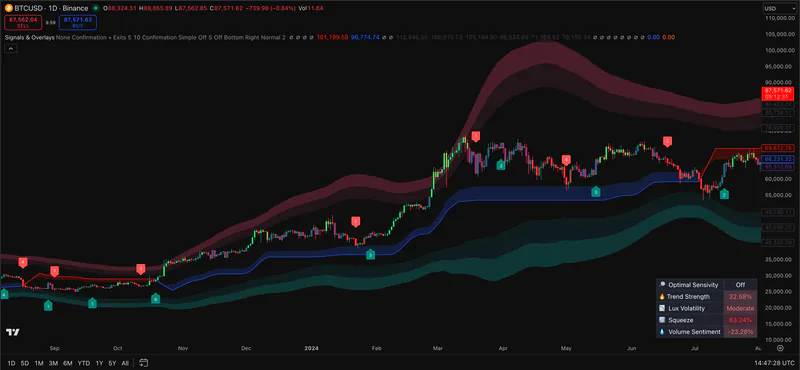
Signals & Overlays

Pineify Signals & Overlays on a TradingView price chart with trend bands and signal markers
Pineify screenshot. It does not show Infinity Algo software.

What to check before choosing

The details below determine whether the named tool fits the job behind the search.

Separate signals, exits and dashboard features

The V3 documentation separates the signal indicator, Backtest version and Dashboard. The exit guide says take-profit price levels use Percentage exit mode, with separately configured long and short stops. A plotted target is a calculation, not proof that a broker filled an order.

Read the backtest assumptions

The Backtest guide itself distinguishes historical results from live trading and lists omitted execution costs. Inspect the actual strategy properties, entry timing, fees, spread and slippage for your test. Do not convert a win-rate display into expected profit or apply an arbitrary haircut as a substitute for modeling costs.

Verify access and preserve the test setup

The vendor lists monthly, yearly and lifetime purchase options. Its setup guide uses a linked TradingView username. Record the installed version, symbol, session, interval and inputs, then compare confirmed-bar signals after reload and on later data. This review does not certify non-repainting behavior.

Feature comparison

Descriptions are drawn from the linked public sources. Similar categories do not imply matching formulas or performance.

Infinity Algo and Pineify Premium Scripts feature comparison
QuestionInfinity AlgoPineify Premium Scripts
Documented workflowSignals, separate Backtest version and DashboardA separate collection of chart indicators with source and tutorials
InspectabilityPublic documentation describes behavior; private calculations were not inspectedEligible users can open the source library; each script still needs review
Performance evidenceNo independently reproduced account-level result in this reviewNo comparative accuracy or profitability benchmark in this review

Scroll sideways to read the full table.

Related Pineify workflow

Where Premium Scripts fits

Pineify Premium Scripts is an adjacent option for users who need editable source. It does not reproduce Infinity Algo’s private rules or establish a performance advantage.

Check the current script list and access terms on the product page before choosing a plan.

View Premium Scripts

Common questions

Is Infinity Algo legit or a scam?

This documentation review cannot establish either label. Verify the seller, current purchase and refund terms, account access and the exact product delivered. Public feature descriptions and customer comments do not independently authenticate trading results.

How do you use Infinity Algo?

Follow the vendor’s account-connection and installation guide, then identify whether you are using the signal indicator, Backtest version or Dashboard. Record inputs and check output on a test chart. Alerts and plotted exits are not evidence of broker execution.

Can you view or edit Infinity Algo Pine Script source code?

Its setup documentation describes account-authorized indicator access rather than delivery of editable Pine source. Confirm source licensing with the vendor if that is a requirement; this review has not inspected the private code.

Sources and review scope

Consult the provider documentation, author-published scripts, and review profiles linked below. Features and access can change; confirm current terms with each provider.

This page is for information and education. Indicator output is not investment advice or a guarantee of trading results. Test scripts with your own rules, data, and risk limits.