

01
Find your next idea
Give your shortlist a starting point.
Look for upgrades or newly covered stocks. Pick the opinions worth investigating before opening another earnings report.
Start with rating changes
Stock Analyst Ratings & Price Targets
Stock analyst ratings are professional consensus price targets and Wall Street research recommendations aggregated into actionable buy, hold, and sell signals.
Preview with symbols hidden. Full access with Expert and above.
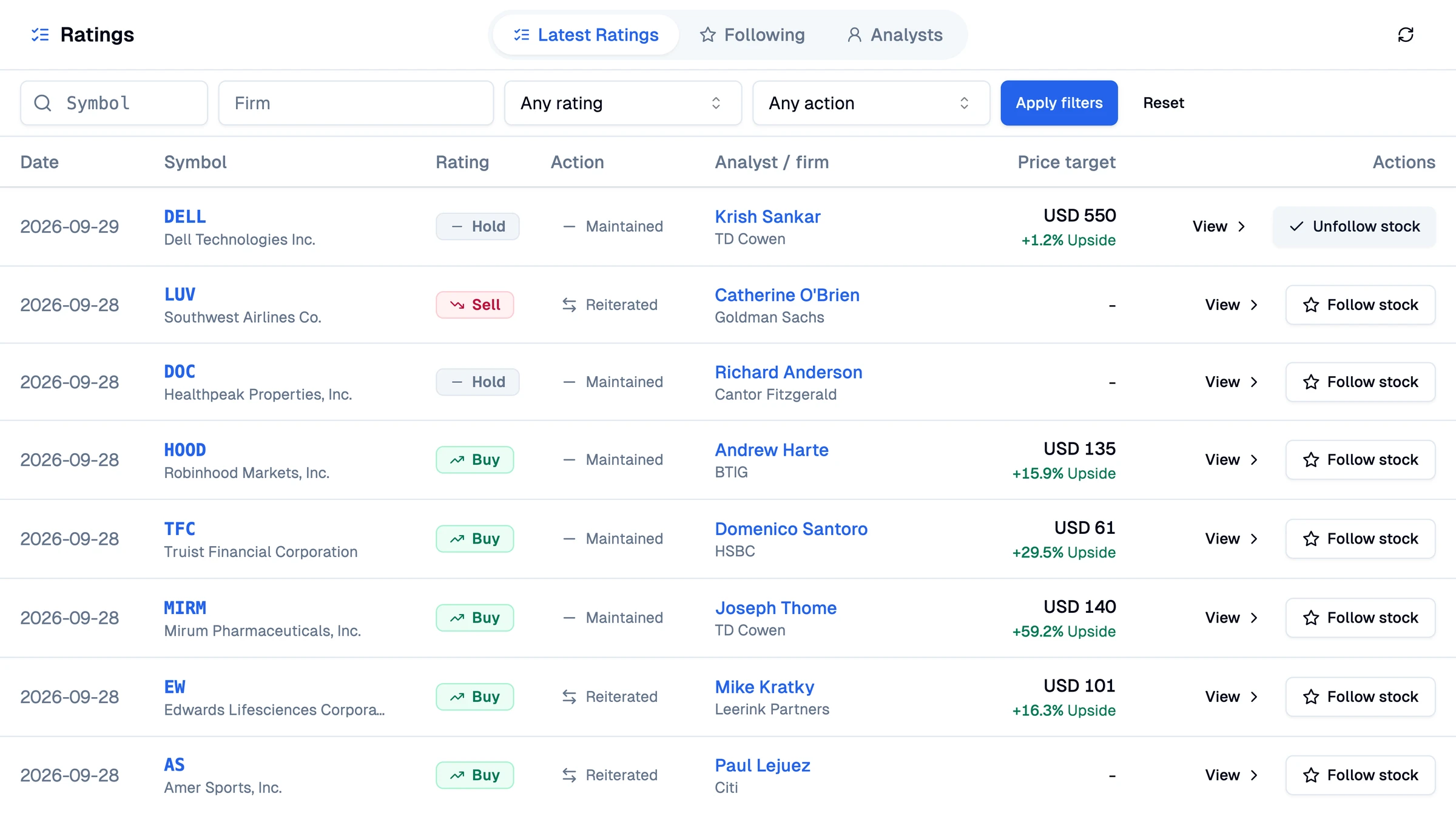
Spot a change in conviction
See the target behind the rating
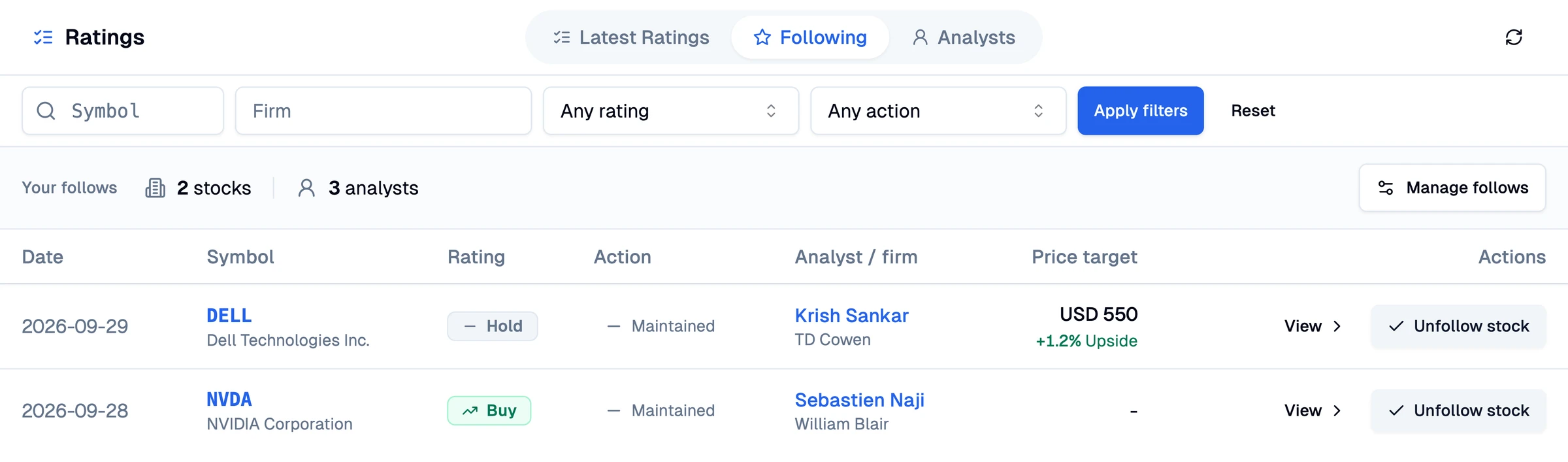
Keep your stocks and analysts in view
Practitioner Observations
Wall Street price targets are valuable signals when tracked systematically, but blind faith in headline recommendations leads to poor execution. Here is what real testing shows.
Equities Research Practice
“In my testing, tracking consensus price targets across tech stocks showed that sudden target revisions often signal quarterly earnings inflection points before price moves.”
Risk Management Review
“Honestly, relying solely on single analyst targets without checking historical accuracy is dangerous, which is why comparing conflicting opinions on one stock saved me from chasing overcrowded trades.”
Technical & Fundamental Workflow
“I found that filtering for newly upgraded stocks and immediately testing their momentum in Chart Analysis gave me much clearer entry signals than reading 40-page research notes.”
Daily Research Routine
“I've tested dozens of rating tools over the years, and the biggest friction was always drowning in ads or outdated price targets; keeping a lean following feed solved that.”
From opinion to a better question
You bring the investment thesis. Use analyst opinions to find what deserves a closer look, whether you are starting fresh or reviewing a holding.
Find your next idea
Look for upgrades or newly covered stocks. Pick the opinions worth investigating before opening another earnings report.
Start with rating changes
Before you buy
Compare the views behind a stock you like. A cautious analyst can raise a question that a bullish headline leaves out.
Compare opinions on one stock
Keep an idea in view
Follow a stock you own or an analyst whose views you want to revisit. Return to their available ratings when you review your next move.
Build your Following feed
Platform Comparison
Most platforms bury analyst data beneath banner advertisements, push order execution, or hide target price history behind paywalls. Here is how Pineify provides a focused research experience.
| Capability | Pineify | Yahoo Finance | TipRanks | Legacy Brokerages |
|---|---|---|---|---|
| Custom Analyst & Ticker Following Feed | Personalized feed tracking specific analysts and tickers together | Static ticker pages only; no individual analyst tracking | Paywalled analyst tracking with promotional tiers | Basic watchlist alerts only; no analyst-specific feeds |
| Historical Snapshot Price Difference | Exact price delta recorded at publication date | Generic mean target with delayed market price update | Target upside based on rolling calculations behind paywall | Static broker target without clear snapshot history |
| Dissent & Consensus Breakdown | Visible Buy, Hold, and Sell distributions highlighting contrarian views | Basic aggregate rating score without analyst rationale | Consensus score with full details gated behind subscription | Often hidden inside multi-page PDF research reports |
| Ad-Free, Focused Interface | Clean, distraction-free interface built for focused research | Heavy display advertisements and sensational financial headlines | Frequent upsell banners, popups, and sponsored stock placements | Prompts to execute orders and trade options on margin |
| Direct Integration with Pineify Ecosystem | Cross-reference with AI Stock Picker, Chart Analysis, and Finance Agent | No integration with algorithmic tools or Pine Script indicators | Siloed scoring system without technical charting tools | Complex legacy platforms with steep learning curves |
A feed for your research
A promising stock today may deserve another look next week. Save the stocks and analysts you want to follow, then come back to a feed focused on those interests.
Bring available ratings for your holdings or watchlist into one place. Review the opinions and targets when you revisit your thesis.
Follow the person behind an opinion. Their newly collected ratings can introduce a stock you have not followed yet.
Put a number behind the opinion
An analyst can like a stock without expecting a big move. See the distance to their target before deciding whether the idea deserves more research.
In Latest Ratings, the percentage uses the stock price captured when the rating was collected. It stays tied to that snapshot, even if the market price moves.
Try a different target
Example · USD+20%
Potential upside to target
Illustrative prices, not a stock recommendation. A target is an estimate, not a promised return.
One stock. Different views.
Illustrative example8 Buy ratings. What do the other 4 see?
Most analysts in this example lean Buy. The Hold and Sell opinions are still worth investigating before you make up your mind.
Look beyond the loudest headline
One confident opinion can make an idea sound settled. Open a stock's summary to compare available Buy, Hold, and Sell views and see how widely price targets differ.
Connected Workflow
Wall Street analyst ratings offer sentiment and valuation targets. Connect them with our specialized financial intelligence tools to validate momentum and verify entry setups.
Rank top momentum and value opportunities using multi-factor algorithmic scoring that complements Wall Street consensus.
Validate analyst price targets against real technical price action, multi-timeframe trends, and key support levels.
Track macroeconomic trends, earnings calendar surprises, and institutional liquidity flows before opening positions.
Examine SEC filings, quarterly balance sheets, and insider transactions with interactive AI financial research.
Start with one stock
Search for a stock you own or are considering.
Read the ratings, targets, and differing views.
Save the stock or analyst. Return to Following to review available updates.
Frequently Asked Questions
Understand how Wall Street consensus numbers work, how price targets are determined, and how to integrate them into your workflow.
Stock analyst ratings are formal equity recommendations—such as Buy, Hold, or Sell—paired with 12-month price targets issued by Wall Street research analysts because institutional investors require structured models to estimate fair valuation based on earnings forecasts and sector multiples.
A consensus price target is the calculated average of all active Wall Street price projections, whereas an individual target is a single brokerage firm’s price estimate because distinct research desks apply different valuation models, discount rates, and earnings multiples.
The price target percentage is the calculated distance between an analyst target and the stock price captured when Pineify collected the rating, because calculating against a fixed baseline prevents intraday market volatility from distorting the analyst’s original upside thesis.
No, a consensus Buy rating does not guarantee profit because analyst ratings are subjective projections subject to market volatility, macroeconomic disruptions, and unforeseen corporate earnings misses.
Pineify is a focused research radar rather than an exhaustive institutional terminal, meaning we do not archive every historical rating ever published or cover every micro-cap OTC ticker, because our data pipeline focuses on high-liquidity stocks with active Wall Street coverage.
You can cross-reference any ticker’s Wall Street consensus with our AI Stock Picker and Chart Analysis because pairing fundamental price targets with algorithmic ratings and technical trend levels delivers stronger multi-factor confirmation before opening trades.
No, the following feed is an on-demand research workspace inside Pineify rather than a push notification service, because deliberate, scheduled research routines produce better long-term trading decisions than reactive alerts.
Start with a stock you have been thinking about. Compare the views, follow what matters, and return when you are ready to review your next move.
Analyst opinions and targets are research inputs, not investment advice or a guarantee of returns. Coverage varies.