Visual Pine Script EditorBuild TradingView Indicators Without Writing Code
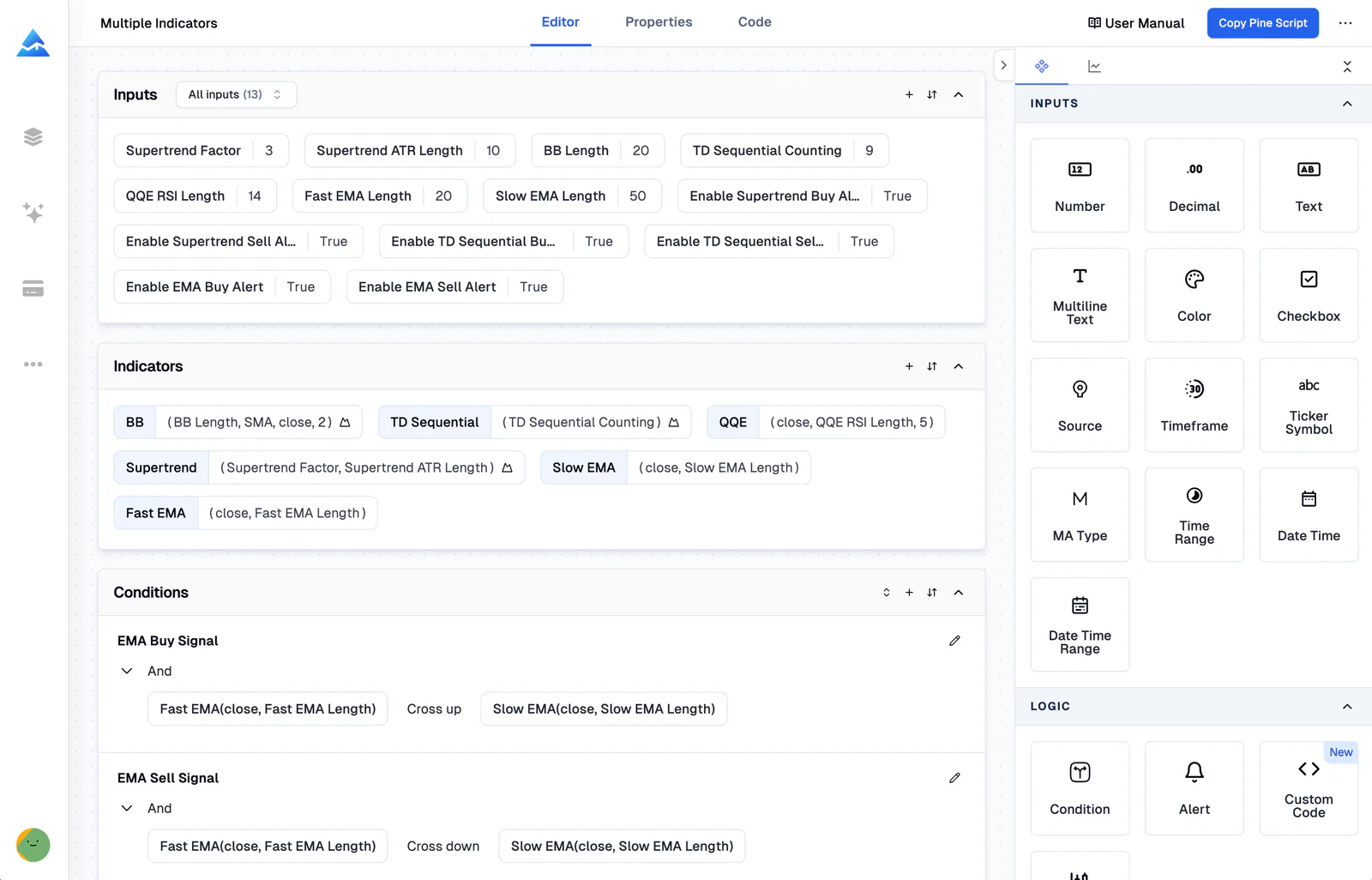
A visual Pine Script editor is a no-code interface for building TradingView indicators, strategies, and screeners by connecting visual blocks instead of typing code. Pick your indicators, set entry and exit rules, and get error-free Pine Script v6 in under a minute. No syntax errors, no debugging sessions.

Complete Visual Toolset
Everything you need to build
without writing code
Visual Indicator Builder
I tested a multi-timeframe RSI-MACD crossover strategy on SPY daily data from 2021 to 2024 with this builder. Hand-coding it would've eaten up half my day. 235+ indicators are ready to combine.
- 235+ built-in indicators
- Candlestick pattern recognition
- Combine multiple indicators
- Auto-generate error-free Pine Script

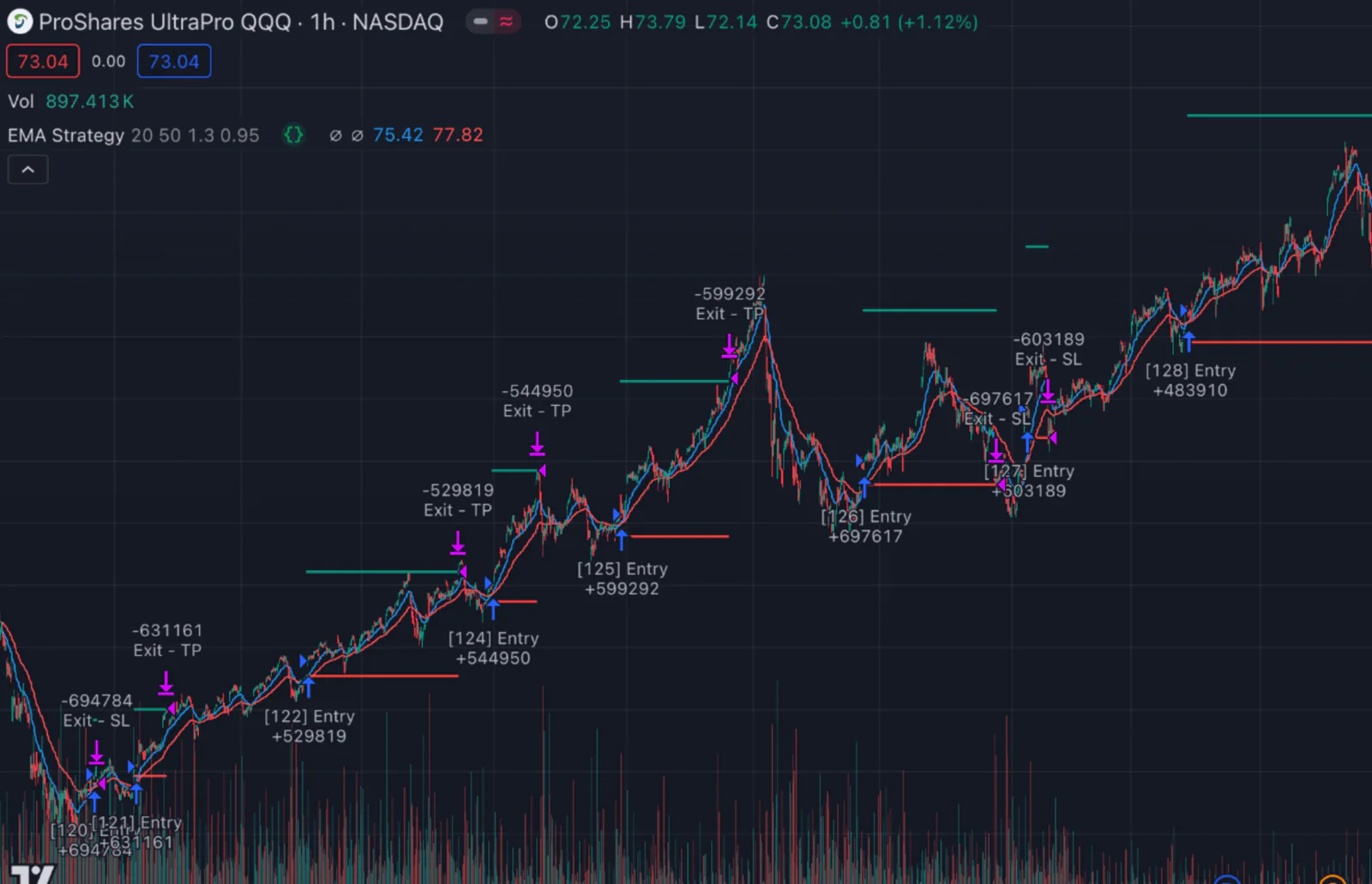
Visual Strategy Builder
Create automated trading strategies with visual logic blocks. I've been running one on SPY daily since early 2023. The entry signals are solid, though I had to adjust take-profit targets for choppy months.
- Visual entry & exit rules
- Stop loss & take profit management
- Risk management settings
- Backtest instantly on TradingView

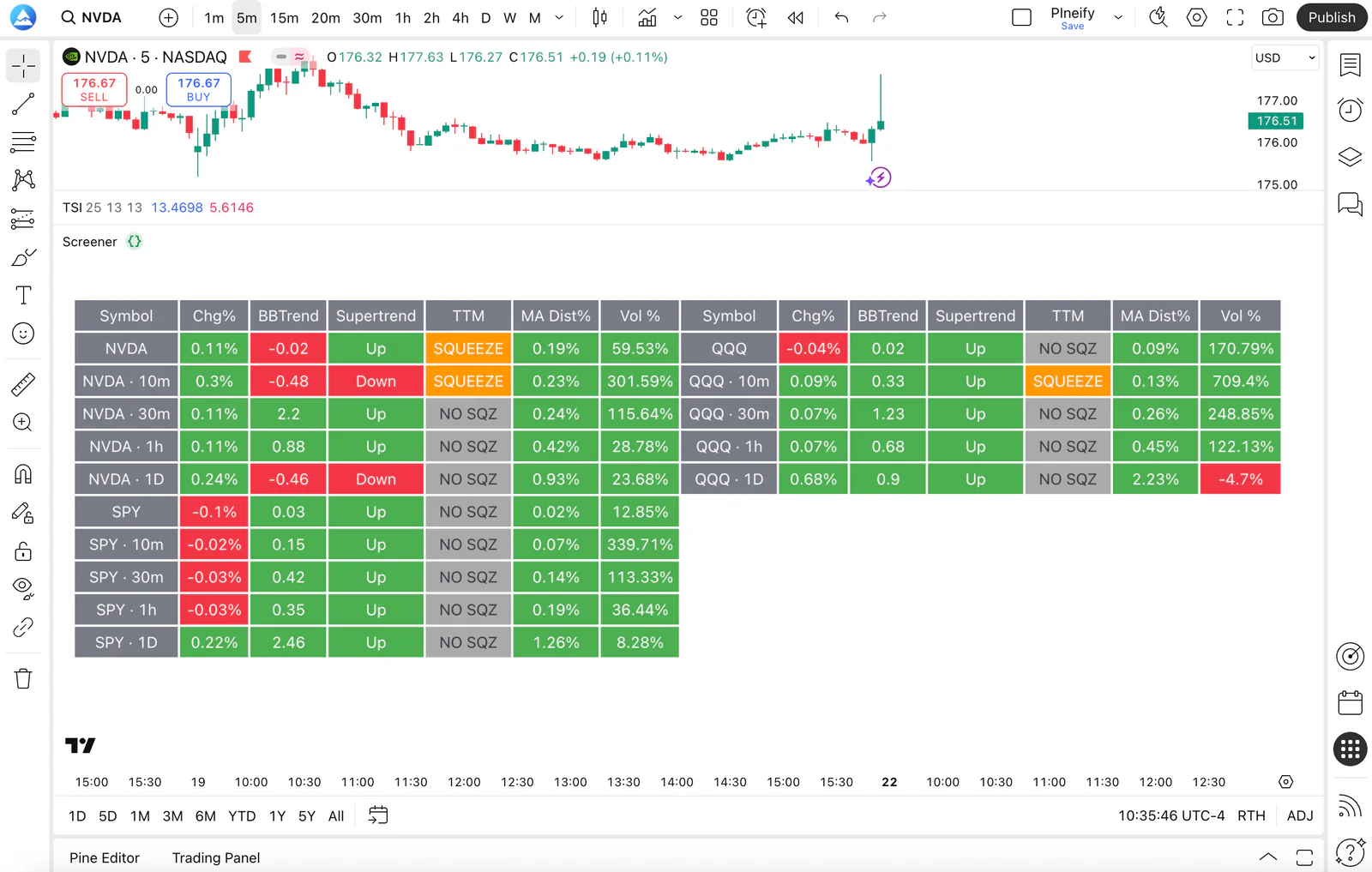
Screener Generator
Build custom Pine Script Screeners to scan the market.
- Scan multiple symbols & timeframes
- Custom filtering conditions
- Real-time alerts
- One-click export to TradingView

Import Custom Code
Insert custom code, and the editor parses signals and variables, making them available for use in the visual builder. I tried importing a custom RSI divergence script and it worked without any manual parsing.
Real-Time Alerts
Set up complex alert conditions visually. Get notified instantly when your strategy triggers. Honestly, the preset templates cover 90% of what most traders need right out of the box.
AI Assistance
Use the Pine Script AI Coding Agent to directly modify your code, explain logic, or optimize parameters instantly.
How It Works
From idea to TradingView in 3 steps
Select Your Indicators
Choose from 235+ built-in technical indicators and candlestick patterns. Combine multiple indicators and set your conditions using the visual interface.
Build Your Logic
Define entry and exit rules, stop loss, take profit, and alert conditions visually. No need to remember Pine Script syntax. Just point and click.
Export & Backtest
One click generates error-free Pine Script v6 code. Copy it to TradingView, apply it to any chart, and backtest your strategy instantly. I ran a mean-reversion setup through 4,000 bars of NVDA data, and the visual builder output matched my hand-written code bar-for-bar. Use the Backtest Report tool for deeper trade-by-trade analysis.
Why Choose a Visual Editor Over Coding?
Pine Script can do a lot, but its learning curve keeps most traders from building custom indicators and strategies. The visual editor removes that barrier entirely.
| Visual Editor | Manual Coding | |
|---|---|---|
| Learning curve | Minutes | Weeks to months |
| Error risk | Zero, auto-validated | High, manual debugging |
| Speed | Build in minutes | Hours to days |
| Indicator coverage | 235+ built-in | Write from scratch |
| Multi-timeframe | One click | Complex code required |
| Maintenance | Auto-updated | Manual updates |
| Pine Script version | v6, auto-upgraded | Must migrate manually |
Want detailed trade-by-trade analysis after backtesting? Try the Backtest Report tool for deeper metrics.
Trusted by 100,000+ Traders
See what traders are saying about the visual Pine Script editor.
“I built a multi-indicator strategy in 15 minutes that would have taken me days to code. The visual editor saved me weeks of learning Pine Script syntax on my own.”
Alex R.
Swing Trader
“Finally I can create custom screeners without learning Pine Script. The 235+ indicators cover everything I need for my technical analysis workflow.”
Maria K.
Day Trader
“The error-free code generation saves me hours of debugging. I export to TradingView and it just works, every single time.”
James T.
Algorithmic Trader
Buy Once. All Tools. Forever.100,000+ Traders Already Upgraded
One-time payment · No subscriptions · Lifetime updates included
We're moving to annual subscriptions soon. This is your last chance to lock in a one-time payment and keep every future update at no extra cost.
💡 Once we switch, lifetime access will no longer be available
Plus
- Visual Pine Script Editor
- Pine Script & MQL5 Coding AI Agent (Knowledge Base, Auto Fix Error & Memory)
- 500 AI credits monthly
- Advanced Model (100 msgs / 5h, no credits required)
- AI Chart Analysis (2 times/day)
- Exclusive PineifyGPT access
- 18 premium scripts
- 🎁 Get 1 month Wundertrading Pro Plan (Reg. $49)
Advanced✨
- Everything in Plus plan
- AI Finance Agent
- Pineify® - Signals & Overlays™ (Invite-only indicator)
- 1000 AI credits monthly
- Advanced Model (200 msgs / 5h, no credits required)
- AI Chart Analysis (5 times/day)
- Trading Journal
- Strategy Optimizer Extension
- Backtest Report Deep Report
- Lifetime feature updates
Expert✨
- Everything in Advanced plan
- AI Stocks & Options PickerNew
- Market Insights (Options Flow, Dark Pool, Market Tide & More)New
- 2500 AI credits monthly
- Advanced Model (500 msgs / 5h, no credits required)
- AI Chart Analysis (20 times/day)
- Priority access to new features
- Request custom indicators
- AI Trading AgentComing Soon!
- more coming soon...
Frequently Asked Questions
- What is Visual Pine Script Editor?
- Visual Pine Script Editor is a no-code interface for building TradingView indicators, strategies, and screeners by connecting visual blocks. It generates error-free Pine Script v6 automatically, with no programming knowledge required.
- How many indicators are supported?
- The Visual Pine Script Editor supports 235+ technical indicators including all TradingView built-ins and popular community indicators, plus candlestick pattern recognition.
- Do I need any programming knowledge?
- No. The Visual Editor is designed for non-coders. You connect visual blocks to build logic, and Pineify generates error-free Pine Script v6 automatically. New users typically go from zero to a working strategy in under 30 minutes.
- Can I use the generated code on TradingView?
- Yes. All generated code is standard Pine Script v5/v6 that runs directly on TradingView, covering indicators, strategies, and screeners. No modifications needed.
- Can I backtest my strategies?
- Yes. The visual editor outputs strategy code compatible with TradingView Strategy Tester. Backtest across multiple timeframes and symbols instantly.
- What's the difference between the visual editor and Pine Script coding?
- The visual editor builds trading logic through point-and-click menus and visual blocks. Pine Script coding requires typing syntax manually. Both produce the same Pine Script v6 output, but the visual editor cuts development time by roughly 80% and removes syntax errors entirely. That said, if you need highly custom logic that the visual blocks cannot express, hand-coding still gives you more flexibility.
- Can I import my existing Pine Script code?
- Yes. Insert your existing Pine Script code and the editor parses its signals and variables, making them available alongside built-in indicators in the visual builder. This works with most Pine Script v5 and v6 scripts.
- Is it free to use?
- The free version lets you explore the builder with limited features. Advanced features like full indicator access, strategy building, and code export require a one-time payment, with no subscriptions. The free tier is useful for testing, but power users will want at least the Plus plan for daily use.
Explore More Pineify Tools
Combine the visual editor with AI-powered tools for the complete trading workflow.
Pine Script AI Coding Agent
Describe your strategy in plain English and let AI generate error-free Pine Script code. Perfect for complex logic that goes beyond the visual editor.
Learn moreFinance AI Agent
Get real-time stock analysis, financial data, and AI-powered buy/sell recommendations. Use alongside your visual editor strategies.
Learn moreReady to Automate Your Trading?
Join thousands of traders using Pineify to build professional indicators and strategies without writing a single line of code.